Cura: [4.4->4.4.1] Layflat modify model.
Application version
(The version of the application this issue occurs with.)
Tested with 4.4.0 and 4.4.1
Platform
(Information about the operating system the issue occurs on. Include at least the operating system and maybe GPU.)
Windows 10 pro / 970gtx(maindisplay)/1080ti/1070x2
Printer
(Which printer was selected in Cura?)
Tested with cr10,ender3,anet A6 and customFFF
Reproduction steps
- (Something you did.)
- (Something you did next.)
Load the model, Rotate, click Lay flat.
Screenshot(s)
(Image showing the problem, perhaps before/after images.)
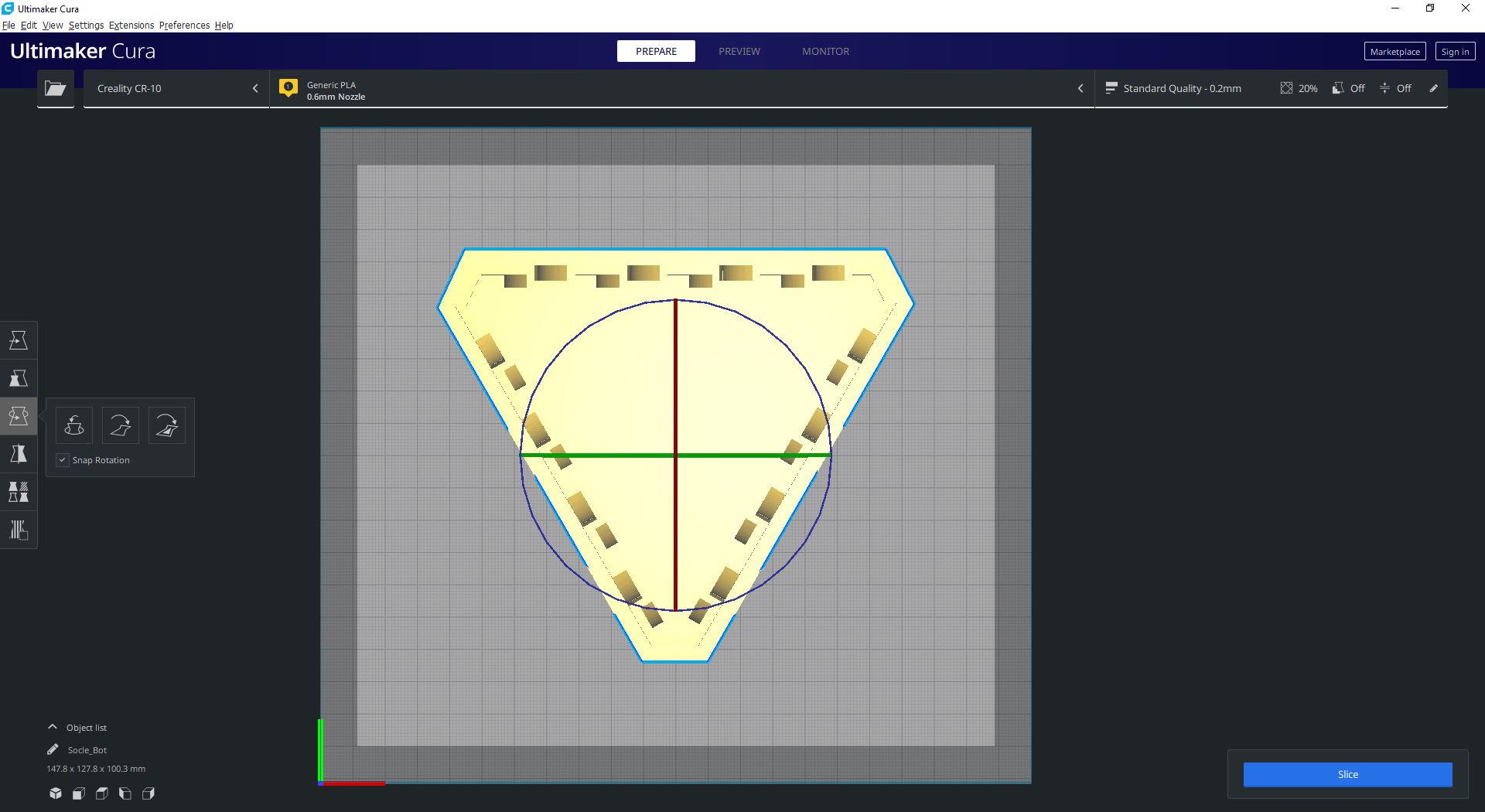
BEFORE :
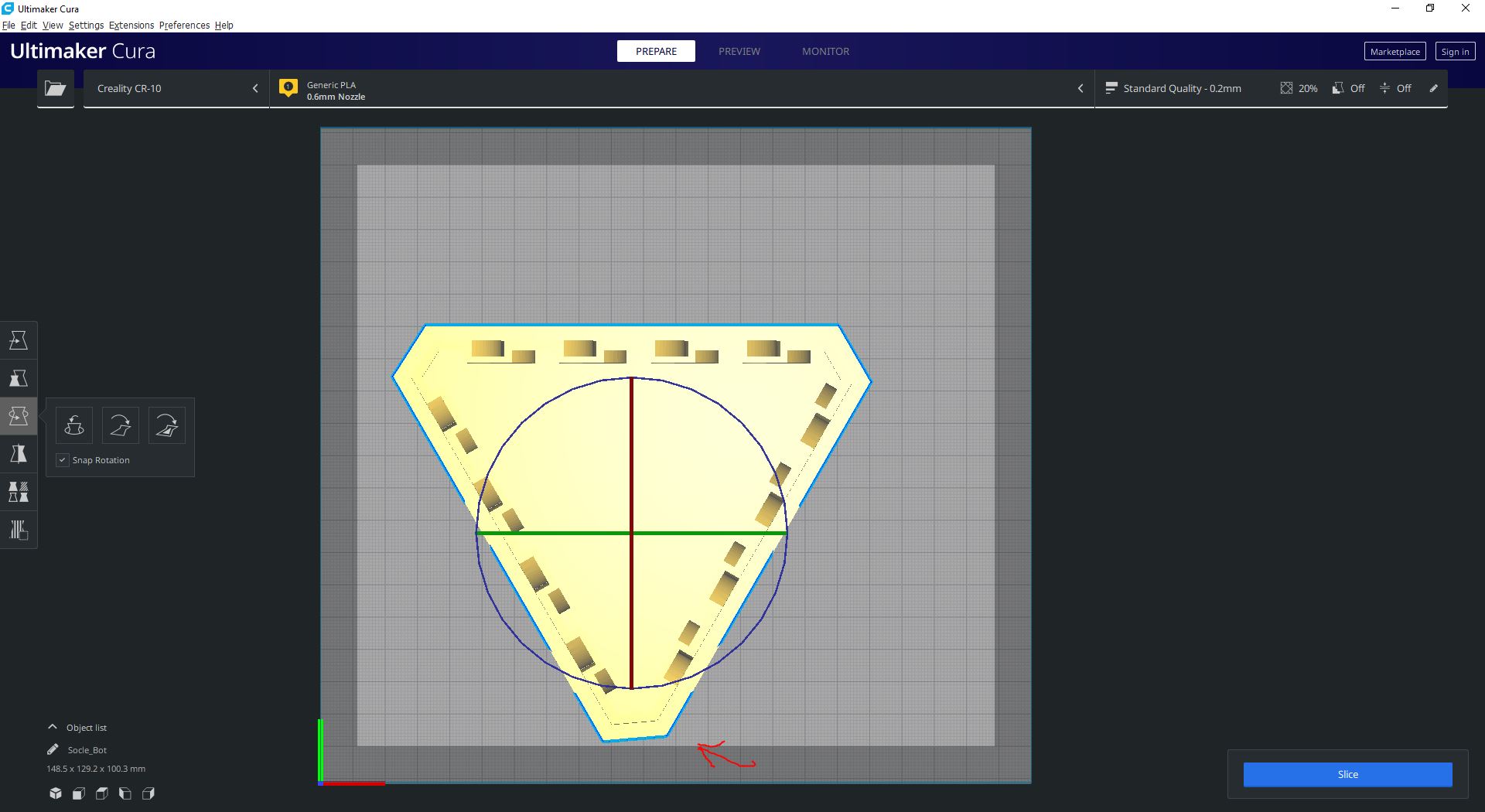
AFTER layflat : (Look bottom angle)
Actual results
(What happens after the above steps have been followed.)
Expected results
(What should happen after the above steps have been followed.)
Project file
(For slicing bugs, provide a project which clearly shows the bug, by going to File->Save. For big files you may need to use WeTransfer or similar file sharing sites.)
Log file
(See https://github.com/Ultimaker/Cura#logging-issues to find the log file to upload, or copy a relevant snippet from it.)
Additional information
(Extra information relevant to the issue.)
 Twigho
All 18 comments
Without a link to the model, it is going to be hard to see what is going on from this orthographic view.
 fieldOfView
on 28 Dec 2019
fieldOfView
on 28 Dec 2019
the angle on the bottom of the second screen, There is a red arrow.
EDIT: it is a stl generated by Fusion360 (I printed this and the deformation is real )
Twigho
on 28 Dec 2019
Without access to the model and seeing the geometry, we can not try to replicate the problem. I saw the arrow, but it does not help solve the problem.
fieldOfView
on 28 Dec 2019
Ok ok.
Socle_Bot.zip
EDIT : I perform a clean install and reset all profiles, etc...
EDIT2: Tested with low,med,high STL param. Tested with and without y-up option. Tested with thinkercad or artCAm optimization too. But no change.
Autodesk patched STL export since a few weeks..
EDIT3: I havent plugins for Cura
Twigho
on 28 Dec 2019
I also see the deformation after lay flat, but I have no idea why it happens.
The model does not need laying flat though; it is already flat on the surface when you load it.
fieldOfView
on 28 Dec 2019
An other situation with other models :
At Load both have a good placement.

But after the layflat, one is not flat on the bed :
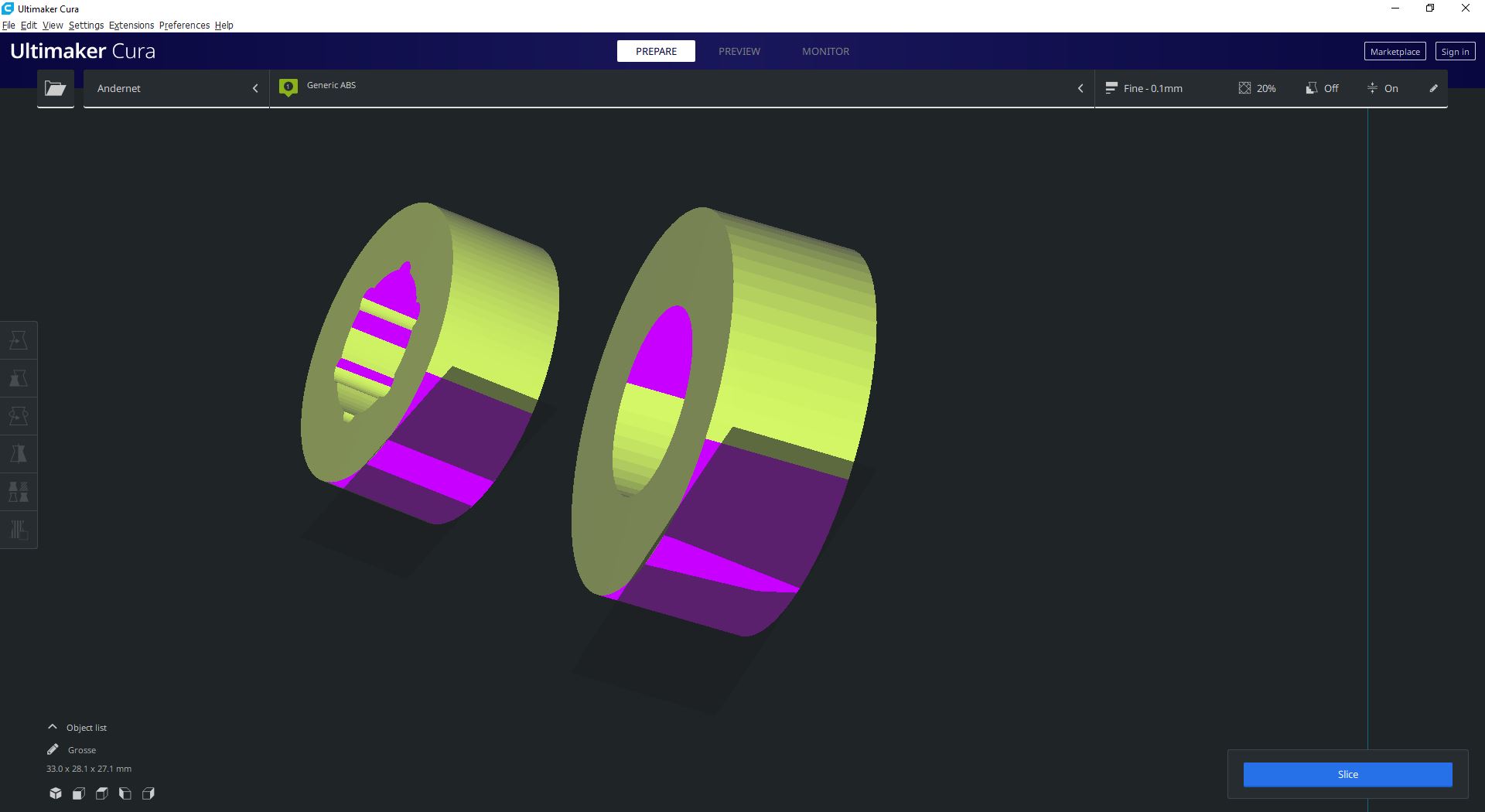
What difference between the models for the lay flat option?
Poulies.zip
Both are created with the same method, with Fusion 360. An simple circle's extrusion...
Twigho
on 28 Dec 2019
The model isn't deformed, it just also got a rotation around the Z axis. If you rotate the model by -120 degrees using the blue rotation circle you can see it did not change.
 nallath
on 30 Dec 2019
nallath
on 30 Dec 2019
I can't believe I did not spot that... Well done, @nallath!
fieldOfView
on 30 Dec 2019
Indeed, the second case is not distorted but the option prefers to do shit instead of doing nothing. (when there is nothing to do). We can clearly see that the option puts the object askance ... Without any reason !! We can clearly see that the object enters the bed. I was wondering why the option acts on certain objects and not all ...
EDIT: You see, originally I used this option as a precaution and then I realized that it was more destructive than doing well.
Twigho
on 9 Jan 2020
The lay flat option only makes sure that the selected face is laid flat on the build plate. It doesn't ensure that the most logical rotation to get there is chosen.
This would require more sensory input to read the user's mind what he thinks is the most logical rotation. Mind reading devices can theoretically be made, but it would need some experimentation on my colleagues. To ship the mind reading devices we could load in some g-code for the user to print.
 Ghostkeeper
on 14 Jan 2020
Ghostkeeper
on 14 Jan 2020
The lay flat option only makes sure that the selected face is laid flat on the build plate.
Perfect ! This is exactly what I expected from this function.
I do not question the logic of rotation but the sometimes destructive result :
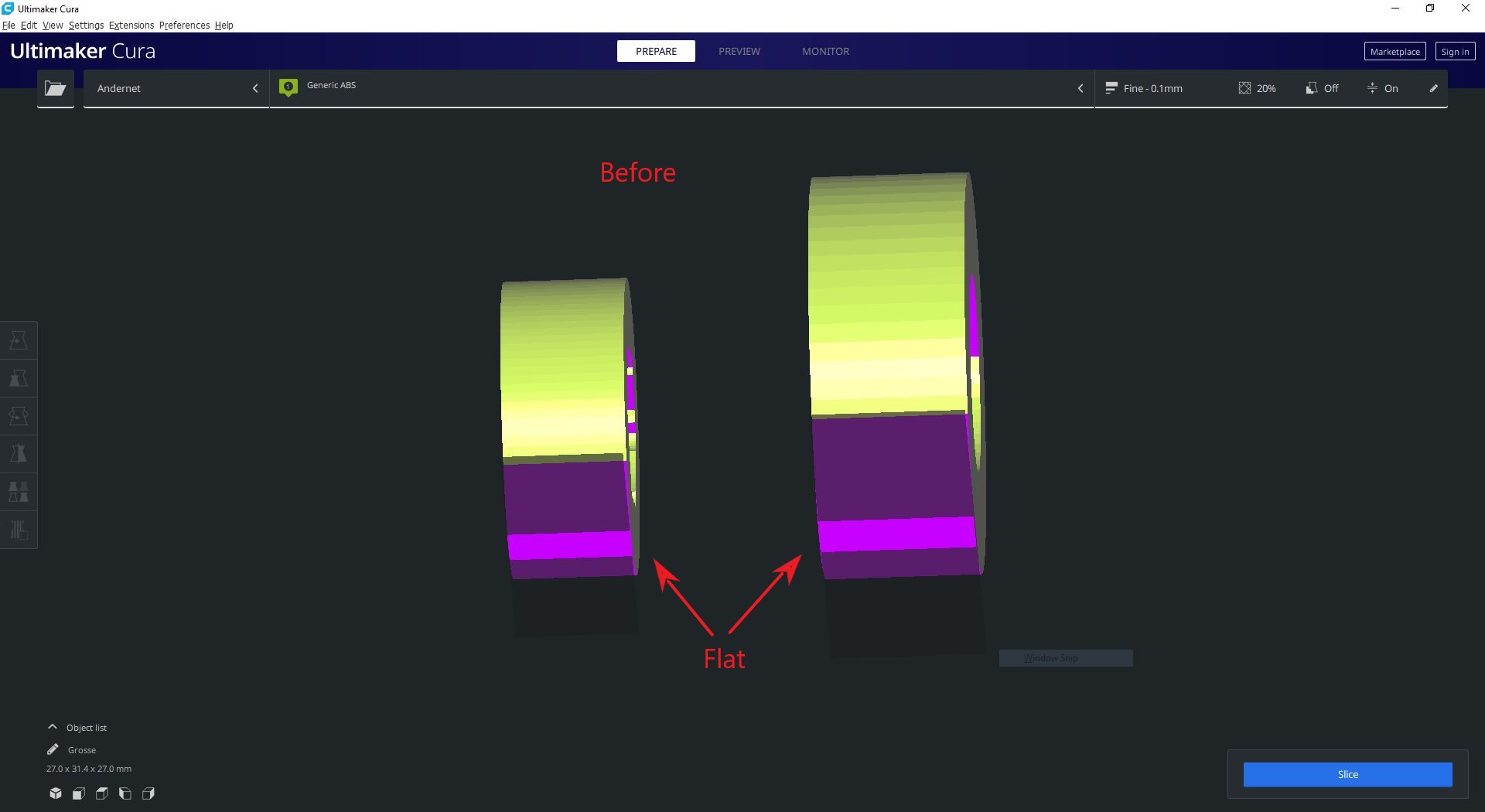
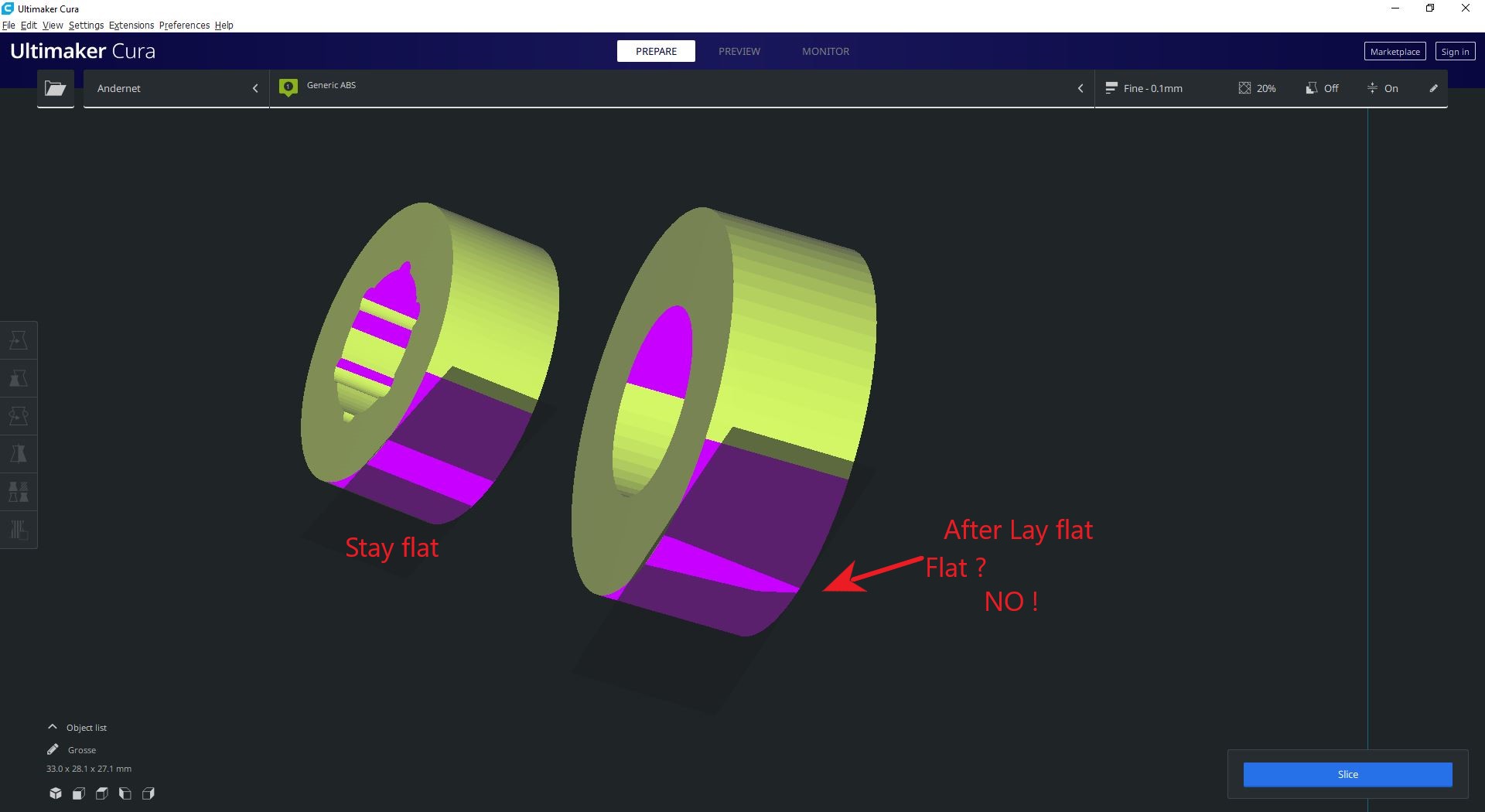
Or even the deformation of the angle, in the initial message.
Sorry, my English must be too bad to communicate with this team. And it's not my software, you are free to apply an ostrich policy. ;-)
Cordially
Twigho
on 14 Jan 2020
you are free to apply an ostrich policy. ;-)
That's a funny way to put it!
This issue was closed because of the original model. But yes what you're seeing is reproducible with that Grosse.stl model. It seems to be something of a rounding error that places the model at a slight tilt. It's not being deformed, only rotated. As a result, part of the surface there ends up above the disallowed area shadow, making it appear deformed when looking from below.
Ghostkeeper
on 15 Jan 2020
Yes indeed, but it is not an illusion. From a software point of view, the object is not distorted but if it is printed it will ultimately be distorted. Admittedly, this example is a bit stupid, but I chose it for the simplicity of the objects and the scene. (Almost primitive geometry.)
This could have been caused by an error exporting the model. I have more complex objects that have the same problem.
Now I am very careful before using this option. :-)
Excuse me for being somewhat caustic but felt like I was taken for an..."asshole"
And I did not want to tag the message in "bug" but I had not found how changed.
Thanks for your time.
Twigho
on 15 Jan 2020
Sorry about that comment about mind reading. It was meant to be funny, not sarcastic, but in plaintext on the internet it's hard to convey that.
I suspect that this is a rounding error. I put it up for debate again with the team. We'll see if they consider it important enough, because it is a bit of a minor case.
Ghostkeeper
on 15 Jan 2020
@Ghostkeeper Ah ah no, I was not referring to your humor. I understood that it was second degree. (I hope)
I was referring to the answer: "it just also got a rotation around the Z axis." and directly close
The object also rotates on the other 2 axes. Why ignore this. Yet it looks like the nose in the middle of the face on the screenshot.
Is that the strategy? Make people look like idiots when you don't want to be repaired? This is what crossed my mind
Without the fact that the enormous distortion of the initial message is very real!
And believe me this is not an isolated case.
I can understand that this is a minor case for you and it doesn't matter to me, I already have a lot of my time because of this function.
That the best solution is not to use the function, as I have often read in other posts.
;-)
Twigho
on 15 Jan 2020
I was referring to the answer: "it just also got a rotation around the Z axis." and directly close
The object also rotates on the other 2 axes. Why ignore this. Yet it looks like the nose in the middle of the face on the screenshot.
It was closed because the initial case in the report is not deformity but only rotation around the Z axis. The model is not symmetrical. One of the other corners of the triangle now is pointing downwards and that corner already has the deformity you pointed to in the original model before rotating. You can see this by loading your Socle bot and rotating it manually around the Z axis by 120 degrees.
Your second example, with Grosse.stl, does indeed not lay it completely flat. It's also not a deformity, but the model gets slightly tilted. We've seen these things before with very small prints and we do consider that a bug. It seems to be some rounding error in the way we sample the face it's laying flat on.
Ghostkeeper
on 16 Jan 2020
We have discussed this and because we intend to replace this feature with something else, this has no priority for us.
 mahtDFR
on 16 Jan 2020
mahtDFR
on 16 Jan 2020
awww, I understood that we were talking about grosse.stl !
About soclebot, I also see that with the file sent. I don't understand, the 2D drawings are good and the tower has been printed several times. Despite all the checks made before coming to you, there must have been an error on my side. So I'm going to question my methods.
I send you my sincere apologies. A big thank you for your extreme patience.
Twigho
on 16 Jan 2020
Related issues
 rudowinger
·
3Comments
rudowinger
·
3Comments
 jornada812
·
3Comments
jornada812
·
3Comments
 konvoj
·
3Comments
konvoj
·
3Comments
 DmitryBychkov
·
3Comments
DmitryBychkov
·
3Comments
 DamianSepczuk
·
3Comments
DamianSepczuk
·
3Comments