Cura: Error displaying settings after starting printing (4.3)
Hello.
I noticed one unpleasant mistake.
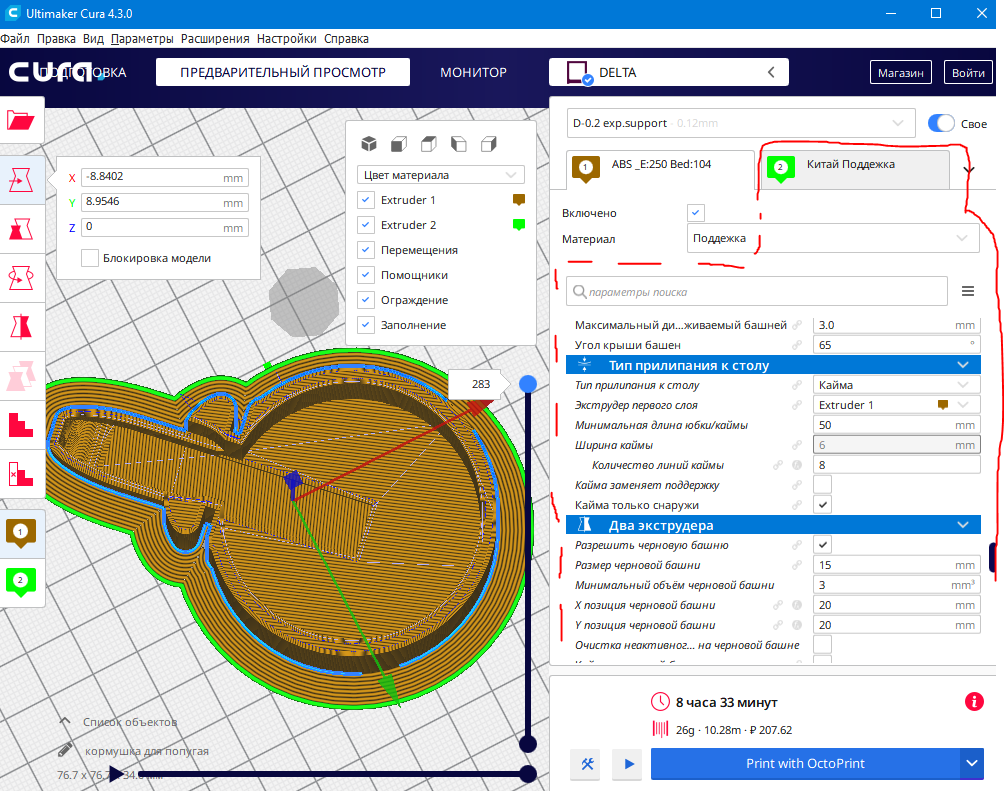
When I start printing with two extruders, I return to the main menu and prepare a new print.
At this point, the program confuses the settings of the first and second extruder.
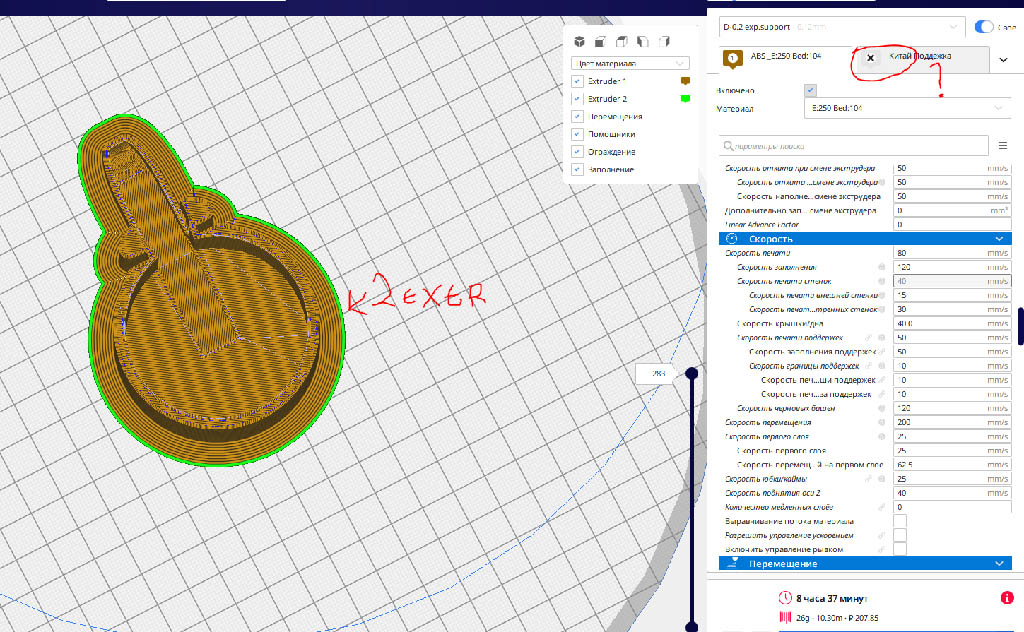
It shows that the settings for the first extruder are turned on, but in fact they refer to the second extruder.
The same is about profiles. If you change the profile with two extruders installed to the one where only one extruder is used, the printing will still use two extruders although the program displays only one extruder.
Only forced switching of settings from the first extruder to the second and vice versa helps.
This becomes inconvenient, because the program is very slow while switching.
Windows 10
Cura 4.3
Delta printer
nozzle 0.4
dual extruder (extr 1 + extr.support)
P.S Pictures do not load, loading error
 Goodfeat
All 10 comments
 Goodfeat
on 25 Oct 2019
Goodfeat
on 25 Oct 2019
We have seen the issue with the second extruder's skirt line as well and supposedly fixed it for version 4.4.
Just to be sure that it's the same issue, could you provide a project file with your bug? That would be in the menu at the top of the screen under File, then "Save...". This saves a Cura-specialised 3MF file that also contains all of your settings.
Keep in mind that if you have set settings like the Infill Extruder to a specific extruder, Cura will only display the settings for that extruder for all infill settings, regardless of which tab is active.
 Ghostkeeper
on 25 Oct 2019
Ghostkeeper
on 25 Oct 2019
I can provide a project file, but that makes no sense. this problem occurs with any files
it is more related to the display settings in the program
Try
1) enable the settings of the second extruder,
2) go to the "monitor" tab
3) back to extruder settings
you will see that the extruder number is turned on alone, and the settings remained for the second extruder
It is easy to test .
it’s enough to at least set another nozzle diameter for one of the extruders
you will understand everything right away
Goodfeat
on 25 Oct 2019
I think we're talking past each other here. I'm asking for a project file that reproduces the green line around your print. This is about the slice that gets generated, so it is only affected by the settings and the model (which are both in a project file). When switching to the monitor and back it doesn't even reslice.
But you're asking about settings displaying differently (with the value from the wrong extruder) and suddenly one extruder being disabled. I'm also not able to reproduce that.
Maybe we have a bug here that's being caused by the Sidebar GUI plug-in? But I'm also not able to reproduce the bug with that plug-in installed.
Ghostkeeper
on 28 Oct 2019
I created a video showing a display error.
I also attached a file in 3FM format
Goodfeat
on 29 Oct 2019
Could you please 'save' rather than 'export' the file? For the current file, only the model is saved, not the settings.
 rburema
on 29 Oct 2019
rburema
on 29 Oct 2019
You gave me a hint
I disabled the plugin SidebarGUI (fieldOfView), problem solved
However, now it is not so convenient(
кормушка для попугаяSAVE.zip
Goodfeat
on 29 Oct 2019
@fieldOfView You might want to take a look at this issue.
rburema
on 29 Oct 2019
I have created an issue here:
https://github.com/fieldOfView/Cura-SidebarGUIPlugin/issues/9
I'll see if I can fix it for the next release of the Sidebar GUI plugin
 fieldOfView
on 29 Oct 2019
fieldOfView
on 29 Oct 2019
All right, please continue the conversation there then :smiley:
Ghostkeeper
on 30 Oct 2019
Related issues
 mnswamp1
·
3Comments
mnswamp1
·
3Comments
 wi1k1n
·
3Comments
wi1k1n
·
3Comments
 DmitryBychkov
·
3Comments
DmitryBychkov
·
3Comments
 StanislavJochman
·
3Comments
StanislavJochman
·
3Comments
 tomoinn
·
3Comments
tomoinn
·
3Comments
Most helpful comment
I have created an issue here:
https://github.com/fieldOfView/Cura-SidebarGUIPlugin/issues/9
I'll see if I can fix it for the next release of the Sidebar GUI plugin