Cura 4.2.1 will now bring in my old profiles, but most of the profile settings are over-written but the creawsomemod compatibility. Is this by design?
Application version
4.2.1
Platform
Windows
Printer
Creality CR-10s
Reproduction steps
Compare 4.0 or 4.1 profile with what 4.2.1 brings in
Actual results
My profiles have had most of the settings changed
Expected results
My profile should remain as they were.
Additional information
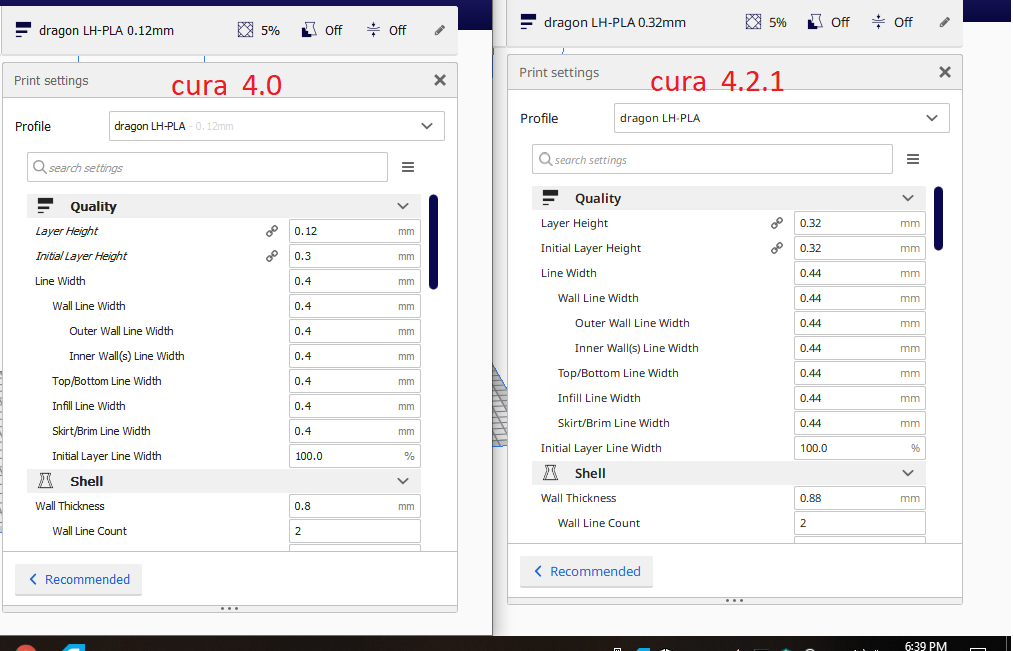
Attached is a side by side of the same profile in 4.0 and 4.2.1
Red dots denote the fields changed in 4.2.1

 OldGaf
All 40 comments
Is this by design?
Yes.
There are multiple threads on it now and response from development has been "you should have said you didn't want us to make changes no one would expect us to make before we made them and we won't go back now."
 FITPrinting
on 2 Aug 2019
FITPrinting
on 2 Aug 2019
OMG
OldGaf
on 2 Aug 2019
Ah, I totally realize that you need to make changes. But there should be a warning that upgrading will mess up your print profiles. It changed my layer height from 0.1 to 0.12 for some reason.
I'll stick to 4.1 for the time being as I'm in the middle of a 2 week print and still might have to make changes to some of the parts.
 Turbin-SE
on 2 Aug 2019
Turbin-SE
on 2 Aug 2019
I also get that you need / want to upgrade your software and add new things.... but the actual print profiles are OURS. You have really screwed over your user base and I can't understand how you thought this was a good move. I really love CURA, but I can't keep using it if my profiles get re-written every time I upgrade.
OldGaf
on 2 Aug 2019
@Oldgaf, just downgrade to a previous version and your profiles will be restored.
Turbin-SE
on 2 Aug 2019
I know thanks, I had to go back to 4.0... as manual supports are busted in 4.1
But... I assume if this "new way" is staying I will never be able to upgrade again unless I want to keep rewriting my profiles.
OldGaf
on 2 Aug 2019
Cura profiles are actually designed to do that (and actually have been doing that for the past 3 years or so). This is probably the first time that someone noticed that this happens though, probably because of the large number of settings that were changed.
Settings only mean the same thing if you don't upgrade. There will always be changes to how certain settings are interpreted due to behavioral changes in the engine.
As stated before; We got a ton of requests from people that wanted those changes. Since we get preciously few pull requests regarding actual profile improvements, we decided to merge them, as we got various reports that they dramatically improved the base profiles.
 nallath
on 2 Aug 2019
nallath
on 2 Aug 2019
@nallath, that sounds very promising!
I don't dare to update the software while I'm so long into a print as I am right now.
But I will update as soon it's finished.
Thanks for all your efforts in improving the quality of this, already great, software!
Turbin-SE
on 2 Aug 2019
I know thanks, I had to go back to 4.0... as manual supports are busted in 4.1
But... I assume if this "new way" is staying I will never be able to upgrade again unless I want to keep rewriting my profiles.
You can upgrade, it'll just be, as many have suggested, to a slicer that does non-destructive upgrades; like Prusa's.
FITPrinting
on 2 Aug 2019
@OldGaf Your image actually shows a fairly interesting bug/oversight with how Cura handles the profile overrides if two settings affect each other: you have set your profile to use 4 walls without touching the "Wall Thickness" option, expecting 4*0.4 = 1.6mm walls.
The new Creawesome base definition changes the base line width to be 0.44 which should then result in 4*0.44 = 1.76mm walls, but the new creawesome base profile defines wall_thickness = =line_width*2 which is overriding your custom setting, because wall_thickness has a higher priority than wall_count.
 JohnEdwa
on 2 Aug 2019
JohnEdwa
on 2 Aug 2019
sigh.... lol
OldGaf
on 2 Aug 2019
that is nothing, look at what got changed on MY profiles
 WillieRipple
on 3 Aug 2019
WillieRipple
on 3 Aug 2019
All my carefull build profiles are gone total useless. I am very disappointed. Little examples: In one of MY PLA profiles Cura raised the bed temperature to 80C and in one of MY PETG Profiles lowered the bed temperature to 60C. Some Cura developer can explain that to me ? I am not talking about all the other mess., there are too many. Back to 4.1.0 for now and although i loved Cura untill now, considering another slicer :(
 JohD50
on 4 Aug 2019
JohD50
on 4 Aug 2019
All my carefull build profiles are gone total useless. I am very disappointed. Little examples: In one of MY PLA profiles Cura raised the bed temperature to 80C and in one of MY PETG Profiles lowered the bed temperature to 60C. Some Cura developer can explain that to me ? I am not talking about all the other mess., there are too many. Back to 4.1.0 for now and although i loved Cura untill now, considering another slicer :(
Downgrade back to 4.0 to get them back mostly intact and then move to another slicer.
FITPrinting
on 5 Aug 2019
We change the defaults to better defaults once in a while, yes. That is expected behaviour. Instead, we try to keep the output g-code behaviour the same between releases as long as the settings are the same. If we'd keep both the settings the same and the output g-code the same, then you'd never ever get any improvements in slicing from a Cura update.
If you never want there to be any changes to Cura because you want your prints to be 100% reproducible, you can stay with the old release of course.
because wall_thickness has a higher priority than wall_count.
No, Wall Count has a higher priority than Wall Thickness. I don't know why the wall_line_count setting got removed from OldGaf's profile though. I can't reproduce that myself. Neither the original nor the new Creality profiles adjusted that setting.
 Ghostkeeper
on 9 Aug 2019
Ghostkeeper
on 9 Aug 2019
"_We change the defaults to better defaults once in a while, yes. That is expected behaviour. Instead, we try to keep the output g-code behaviour the same between releases as long as the settings are the same. If we'd keep both the settings the same and the output g-code the same, then you'd never ever get any improvements in slicing from a Cura update._"
I totally get having defaults change, but user created profiles should remain as is and left up to the user if they want to switch individual settings to the new default. (I believe non default settings are marked in the UI are the not?)
If I am able to put in my own values (over writing defaults) when creating a new user print profile, why can't you allow me to import profiles that do the same thing and over write?
The improvements you feel you have made would still be there for me to take advantage of in a much more controlled way. I could change fields bit by bit as I saw fit and have the option to consider the new defaults.
You know your software better then I do. I know my printer better then you do, and I know why I have each setting in my profiles set... You do not for the most part.
Also, how can changing things like printing temperature, infill % and pattern, travel speed etc be called default improvements? These settings are completely dependant on what the user is printing and what material/brand/color is being used. That is the whole point of creating these profiles. How can you see automatically changing these as an improvement?
OldGaf
on 9 Aug 2019
User created profiles are left alone as far as we know (except that I still can't reproduce that wall_line_count setting that seems to have been reset in your profile), but a profile only contains overrides for the things that you changed. It doesn't contain the setting values for all of Cura's 500 settings. If you didn't change a setting, then Cura assumes that you don't have a particular reason for that setting to be anything specific and allows updates to change the defaults.
Even for things like infill density, the defaults can be improved. If a particular printer has their default at 0% infill density I'd consider a change to 20% to be a likely improvement. And yes, there is a reason for printers to override the global default of 20% as well. For example printers without a heated bed usually want to use lower infill densities to reduce the chance of blobs pulling the print off the build plate. Similarly, they'll want to use a lower printing temperature to reduce warping, perhaps an infill pattern that reduces the number of crossings in the infill and a lower travel speed, all just because of the build plate. Those are improvements to the defaults.
Ghostkeeper
on 11 Aug 2019
Hi GhostKeeper,
Thanks for continuing to explain / discuss this further. I really like CURA and I respect all the hard work that goes into a FREE slicer.
Let me first say that I maybe using the term "defaults" incorrectly here and causing confusions... possibly because I miss interpreted how it was used in this or other threads pertaining to this issue.
CURA changing "Default settings" ... as in what it presents you in its "canned profiles" or what the "starting/base" values are for setting users have not changed are totally cool and indeed appreciated. When dev's find a new value they feel is better then that is progress.
User created profiles are left alone as far as we know
^ This ^ is precisely the issue here.
My problem (and indeed many others) is that when we load one of our USER print profiles in 4.2.1, MANY of our values that we have set and work perfectly are indeed changed. Look again at my profile for nut_bolt at the top of this post. Many if not most of these setting are not the default ones. They are values I have changed over time to get the perfect result. Print Temperature for example... the grey PLA I am using works best at 205... the new CURA changed it to 200. Optimize wall printing order has been turned off. Jerk and acceleration controls have been turned off... I had them on and my own valuers put in. My infill density was set to 15%... that was changed to 20%.
All these are values I input and saved in my USER profile named CR10_nut-bolt. If I print something using this profile in the new CURA the result will be a failed or sub-par print. I currently have 76 different user profiles for different models / materials / situations etc. I don't want to go through and manually check each one and basically "rebuild" them. I also don't what to stay with the same ver of CURA or I will miss out on any new features or fixes.
If I start a new profile based off one of the canned / default profiles (Fine, Normal, Draft etc) then I expect the starting default values to be whatever this new version of CURA feels is best to start with.
If I load one of my profiles, I expect any value in a setting I made and saved in my user profile to remain as it was. In fact, it would be FAR safer and useful for your user base if any value we made visible and saved in a profile should remain as is.... even if it is the "old" default.
Even for things like infill density, the defaults can be improved. If a particular printer has their default at 0% infill density I'd consider a change to 20% to be a likely improvement. And yes, there is a reason for printers to override the global default of 20% as well. For example printers without a heated bed usually want to use lower infill densities to reduce the chance of blobs pulling the print off the build plate.
The above is EXACTLY what we are saying... we have made changes to defaults for good reasons based on our own particular printer / environment / print job. And to make sure they say the same we save them to USER profile. That includes defaults and things we changed. Having anything changed in these users saved profiles defeats the purpose of having them.
OldGaf
on 11 Aug 2019
Yeah, like I said, I'm so far unable to reproduce that. I also had profiles in 4.1 and they are still intact in 4.2. I also tried creating profiles for CR10 in 4.1 and then upgrading to 4.2 and all of the overrides are intact. Something is seemingly different with your profiles in that the profiles got transferred fine but all of the overrides are empty.
Could you maybe export a project file using Cura 4.1 and attach that here? It contains your custom profile, so I can import that in 4.1, then do a version upgrade to 4.2 (it can be re-done by deleting the 4.2 folder from %APPDATA%\Roaming\cura). See if the profile sticks and if not why it gets emptied out.
Ghostkeeper
on 11 Aug 2019
I am going from 4.0 to 4.2.1
(I uninstalled 4.1 because the manual supports were busted.)
had to rename extension for upload...
OldGaf
on 11 Aug 2019
Also with that profile, it's not happening when I try to reproduce it on my home computer :disappointed:
Here's what I'm getting when I load in that nut_bolt profile, with the red dots indicating the settings that are different from Cura 4.0:
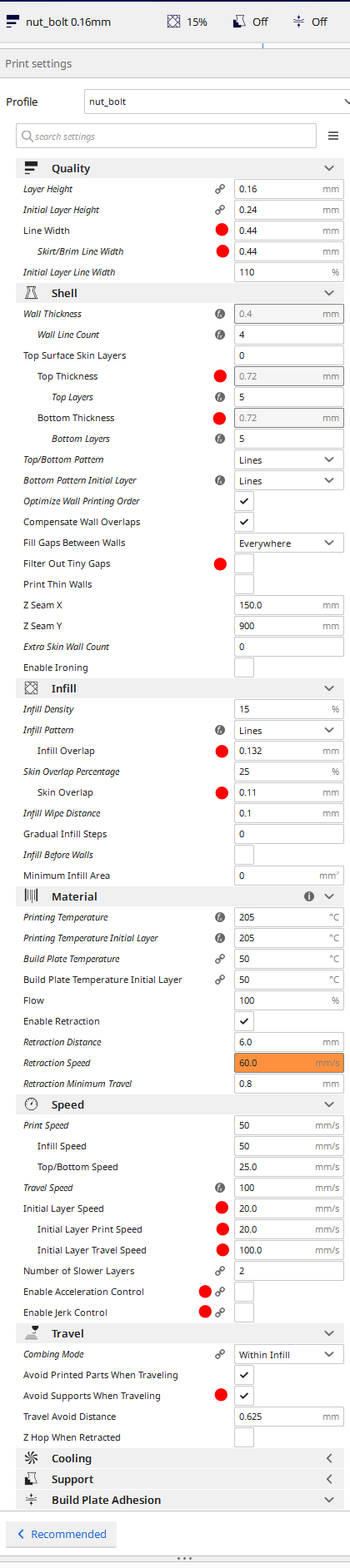
All settings that are different are not in the profile (they are not italic) except for Skirt/Brim Line Width. Skirt/Brim Line Width is set in your profile to be equal to Line Width, probably by clicking on the fx symbol to restore the link which overrides the profile, so since the Line Width changed the Skirt/Brim Line Width also changed.
But for me all those settings like Wall Line Count properly stay on whatever the profile said.
Ghostkeeper
on 11 Aug 2019
I just had the same problem, upgraded this morning from 4.0 -> 4.2.1 my custom profiles changed.
- Layer Height changes from 0.2 -> 0.32
- Line width changes from 0.4 -> 0.44
- Print speed changes from (several setting, eg 60 and 30) -> 50.
- Several others eg retraction.
While I can understand line with change (0.4 nozzle), if i wanted line with 0.44 i would have had that already in the profile. I assume the 0.4 -> 0.44 as it is inherited from the base profile. I guess this is the way Cura works. I wonder i I had had layer with 0.48 what would have happened.
At the moment I don't really understand layer height change.
Also I don't understand the speed change: some speeds where definitely different from base profile, but still reset to some default value.
This changed only in my custom profiles (all of them).
Standard profiles changed differently, layer height 0.1 -> 0.12, 0.15 -> 0.16. This definitely does make sense, agree to that !
These are the only ones i noticed (along with wall/topbottom thickness), i haven't checked hidden settings.
How is layer height calculcated ? is there a hidden setting somewhere ? or is the upgrade actually changing / updating the profile ?
I haven't removed 4.0, so going back to 4.0 still shows the correct settings.
If I just set back the layerheight/speeds etc. to correct value in 4.2, will this new profile be ok then ?
Is there a way to check/verify all settings ? (text file / diff ?)
 sugacube
on 13 Aug 2019
sugacube
on 13 Aug 2019
There is no hidden setting for layer height, just the main layer height and the initial layer height settings. The layer height of custom profiles changed for some printers because the quality profile that the custom profile was built upon didn't exist any more. It should snap to the existing quality profile with the closest layer height then in the upgrade from 4.1 to 4.2.
Ghostkeeper
on 13 Aug 2019
@Ghostkeeper thanks for explaining
sugacube
on 13 Aug 2019
I have this same issue after upgrade to 4.2. I am not sure if issue is reproducible by cura developers, but it is reproducible to me on both windows and linux.
I use setting made by one user on youtube (https://www.youtube.com/channel/UC5Lbnd97HV3rU98gcwHklzQ). Settings are for Creality Ender 3, made for printing miniatures. In 4.1 after import they have layer height 0.1 and wall thickness 0.4, and after import in 4.2 layer height is 0.12 and wall thickness is 0.44.
This settings can be found here:
https://www.dropbox.com/sh/vr9lkpjt6zw7s8s/AAA5DAVpvfkLJw_Wx4iv_O75a/Cura%20profiles?dl=0&subfolder_nav_tracking=1
 pperisin
on 14 Aug 2019
pperisin
on 14 Aug 2019
None of those 3 profiles override the layer height or the wall line width. So you're having the same misunderstanding here: Cura profiles are not flat profiles; they are stacked sets of overrides. It is intentional that the settings that are not overridden by your profile should get updated to the latest and greatest defaults.
Wall Thickness is being overridden though to 0.8mm, 1.2mm and 1.2mm. But I think you meant Wall Line Width.
Ghostkeeper
on 15 Aug 2019
Is it indicated in some way in GUI that a parameter in settings is linked to another parameter in some other setting? Also, is it possible to make fully flat profiles which are not in any way connected to other profiles? Maybe feature would be then be to have button to fully "unlink" selected profile, so that it's settings are not connected in any way with other settings.
pperisin
on 15 Aug 2019
Is it indicated in some way in GUI that a parameter in settings is linked to another parameter in some other setting?
Yes, when you hover over the setting it'll say that it's "affected by" a list of settings.
Also, is it possible to make fully flat profiles which are not in any way connected to other profiles? Maybe feature would be then be to have button to fully "unlink" selected profile, so that it's settings are not connected in any way with other settings.
Not normally, no. You could manually write all of the setting values in your profile .cfg files. Or write a plug-in to export that for you. It would jive against the way in which Cura profiles work though, so for instance you won't be able to switch materials or nozzles any more while still using that profile.
Ghostkeeper
on 16 Aug 2019
What is the information needed still? After reading through the thread and understanding what @Ghostkeeper has explained, should this still be labelled a bug?
I found this because I was affected the same way @pperisin was and came looking to see if it was reported before I reported it. However, after looking at the text files in the exported profiles, I can confirm the layer height (and such) are not explicitly defined in the exported profile. Implicitly, the layer height of quality type "normal" was .1mm. So it would seem it is behaving as intended.
However, this CreawesomeMod has made some pretty significant changes. By creating brand new profiles and getting rid of the old, this behavior is giving the appearance of 4.2.1 being "buggy" in the community and therefore Cura is getting bad press (again, ie 4.1.0). Perhaps it would be a good idea to put the previous quality types back in but hidden and use them only for importing old profiles so users won't get this negative surprise. Just my 2 cents.
As a PS, so far I have been getting much worse print quality compared to 4.0 on my Ender-3. I've sliced with the exact same settings having both versions side by side and so far 4.2.1 is producing much lower quality prints. However, I haven't done enough analysis yet to report anything officially as of yet.
 kazooless
on 27 Aug 2019
kazooless
on 27 Aug 2019
We don't like to be dragging along every version of every profile out there, and also like to include automatic updates to the defaults. After all we do need to update your defaults when e.g. we delete the square prime tower (as we did in 4.2). As long as changes are made to CuraEngine, having an update where nothing changed in the g-code will be very rare.
That said, this was a bigger change than usual for users of the Creality printers. They are not yet used to having profiles specific to material and nozzle. I don't mind people sticking with 4.1 until the profiles settle, that is very understandable.
Ideally, in my mind, we'd have a system where the machine definitions can be updated separately just like the plug-ins, material profiles and quality profiles. This allows users to choose when to update. However we're not there yet. A lot of things need to change to make printer definitions able to update on the fly. And we'd need to store a copy of the entire configuration space in the config folder too.
Ghostkeeper
on 27 Aug 2019
We don't like to be dragging along every version of every profile out there...
That said, this was a bigger change than usual for users of the Creality printers.
I can totally understand but like you said, this was a bigger change than usual. In fact, I did a lot of poking around today to see if I could understand just what has changed and discovered the old profiles do still exist in the code (draft, normal, fine, etc.). It looks to me like they're still assigned to all of the other printers and it is only Creality printers that have different names now. So...
This means you wouldn't be dragging them along, they're already there. So you can make use of it to "fix" this old profile import "problem" people are perceiving as I suggested.
If the behavior of one brand of printer is completely different from all the others, this seems like a bad choice from a consistency and branding perspective. I know of "Ultimaker" because of Cura and I assume that's part of the reason Ultimaker makes the software open source. A percentage of people introduced to Ultimaker through a 3rd party printer will very likely end up purchasing one of your printers. I humbly suggest you don't want their experience to be different and have different named profiles. In light of this fact, I would actually suggest getting rid of the new names.
I don't mind people sticking with 4.1 until the profiles settle, that is very understandable.
I mean this with no disrespect at all. This seems like a rather odd thing to say, especially in a software _development_ thread. It is the type of statement that some people receive very badly thinking it is an attitude of "well if you don't like it, tough." There are fantastic developments you've put in the new version that people want but these other issues, which people have taken the time and effort to report to you here instead of just rant unfruitfully elsewhere, keep people from getting that good experience. Anyway, I'm just saying I don't think it is a good idea to write this type of thing as it does nobody any good.
kazooless
on 28 Aug 2019
In fact, I did a lot of poking around today to see if I could understand just what has changed and discovered the old profiles do still exist in the code (draft, normal, fine, etc.). It looks to me like they're still assigned to all of the other printers and it is only Creality printers that have different names now.
That's not entirely true. The global print profiles indeed still exist and are used by printers that don't have specific quality profiles, but underneath those profiles it was using different defaults specific to the printer. For instance, the Ender 3 had these defaults that are now removed/changed: https://github.com/Ultimaker/Cura/blob/4.1/resources/definitions/creality_ender3.def.json
We make lots of changes every release so keeping the originals every time would be very inconvenient for us and confusing for the user.
If the behavior of one brand of printer is completely different from all the others, this seems like a bad choice from a consistency and branding perspective. I know of "Ultimaker" because of Cura and I assume that's part of the reason Ultimaker makes the software open source. A percentage of people introduced to Ultimaker through a 3rd party printer will very likely end up purchasing one of your printers. I humbly suggest you don't want their experience to be different and have different named profiles. In light of this fact, I would actually suggest getting rid of the new names.
Consistency is nice, but that would mean that every printer in Cura would be limited to have the same set of profiles as the Ultimaker printers. And that's just not appropriate because some printers are capable of printing very small layer heights (like Peopoly Moai) and some have huge layers (like the biggest nozzles of the Creality printers). Even within Ultimaker's printers the behaviour is different. Compare for instance Ultimaker's most modern printer, Ultimaker S5 with all specific profiles, with its first printer, the Ultimaker Original which uses the global profiles only.
I mean this with no disrespect at all. This seems like a rather odd thing to say, especially in a software development thread. It is the type of statement that some people receive very badly thinking it is an attitude of "well if you don't like it, tough." There are fantastic developments you've put in the new version that people want but these other issues, which people have taken the time and effort to report to you here instead of just rant unfruitfully elsewhere, keep people from getting that good experience. Anyway, I'm just saying I don't think it is a good idea to write this type of thing as it does nobody any good.
No indeed I didn't mean it as a "tough luck". We get many comments every release about how the new release sucks. And I don't agree with them, but I understand that they're scared of the changes and for some people or use cases the new release will probably be worse. So if they want to stick with the previous release that's fine with me, as long as they give feedback to make it better for them in the next release. And from what we've seen, people tend to update a few releases later anyway because indeed the new features are tasty!
Ghostkeeper
on 2 Sep 2019
What is the information needed still? After reading through the thread and understanding what @Ghostkeeper has explained, should this still be labelled a bug?
I still see this as a bug because some saved profile settings that have been changed from the defaults are still being changed on the update. If I have a profile with heat / infill setting set there is no good reason for these to be changed because I upgraded the software ver. No setting in saved profiles should be changed unless the particular option is no longer available. Only new "canned default" profiles should start with whatever the new standard defaults are for that particular printer.
OldGaf
on 3 Sep 2019
If those heat/infill settings are overridden by the profile, I'd not expect them to be changed by the upgrade. I'd consider that a bug. If the changed settings are not overridden by your profile, then I don't consider it a bug.
We still provide old Cura versions for download. This is the only way to guarantee that your g-code will not change. But we don't allow picking and choosing individual features which you want to update and which you don't. It'll just be too confusing and too much maintenance.
Ghostkeeper
on 5 Sep 2019
"If those heat/infill settings are overridden by the profile, I'd not expect them to be changed by the upgrade. I'd consider that a bug."
I am picking these ones out as I know they are settings that were not the original defaults but there are others.
So... let me make sure we are both talking apples here:
Lets say I install Cura for the first time at 4.0 (no user profiles yet).
I setup my CR10s and therefor get the default profiles available.
I then load up the default .2 profile and change the bed and nozzle temps, and the infill %.
Next I save that as "Better setting for my printer at .2"
Are you saying that if I upgrade to 4.2.1 and load my user profile, I should expect that the bed and nozzle temps as well as the infill maybe changed and that this is not a bug?
OldGaf
on 6 Sep 2019
Are you saying that if I upgrade to 4.2.1 and load my user profile, I should expect that the bed and nozzle temps as well as the infill maybe changed and that this is not a bug?
No, in that case the bed and nozzle temperatures should NOT change because you overrode them manually. Seems to work when I'm trying it. If they did change it would be a bug.
Ghostkeeper
on 9 Sep 2019
Upon all that has been discussed already, I've noticed that even though my layer height (which was changed to 0.24 with the upgrade) is set to 0.2, looking at the .gcode it is incrementing in 0.24!
Am I the only one with this odd behaviour!?
 jonferreira
on 12 Sep 2019
jonferreira
on 12 Sep 2019
I noticed this behaviour specifically with layer height. My profiles started their life initially as a standard draft profile that I edited heavily. At the time I did this (4.0) draft was defined with a layer height of 0.20. Now it is defined as 0.32. Thus the majority of my profiles had the layer height changed to 0.32, which seems like a very odd thing to do...
 acwest
on 12 Apr 2020
acwest
on 12 Apr 2020
For these sort of cases it would really help to share a project file that reproduces the problem.
Ghostkeeper
on 21 Apr 2020
This issue has been automatically closed because there has been no response to our request for more information from the original author. With only the information that is currently in the issue, we don't have enough information to take action. Please reach out if you have or find the answers we need so that we can investigate further.
![no-response[bot] picture](https://avatars2.githubusercontent.com/u/26350515?v=4&s=40) no-response[bot]
on 19 Jun 2020
no-response[bot]
on 19 Jun 2020
Related issues
 ferociousdiablo
·
3Comments
ferociousdiablo
·
3Comments
 konvoj
·
3Comments
konvoj
·
3Comments
 JRRN
·
3Comments
JRRN
·
3Comments
 probonopd
·
3Comments
probonopd
·
3Comments
 wi1k1n
·
3Comments
wi1k1n
·
3Comments
Most helpful comment
Yes.
There are multiple threads on it now and response from development has been "you should have said you didn't want us to make changes no one would expect us to make before we made them and we won't go back now."