Cura: New material diameter not effective until after restart
Application version: 4.0 + 4.1
Platform: Windows
Printer: CFDM
Reproduction steps: Create a custom material. Set diameter to 1.75 mm. Restart Cura. Duplicate previous material and change diameter of copy to something else, e.g. 1.9 mm. Select old material and slice. Select new material and slice.
Actual results: Both slicings result in same length of filament used (consistent with 1.75mm)
Expected results: The 1.9 mm material should use a shorter length of filament.
Additional information:
Original material:
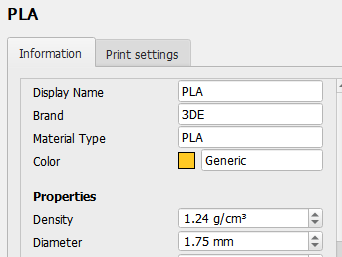
Slice result:

Duplicated material & changed to 1.9mm:
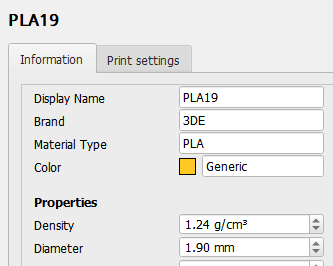
Slice result after selecting new material:

Only after restarting Cura completely, it works as expected:

 larsch
All 5 comments
When trying to reproduce this bug, I found that it didn't update the diameter at all (under water). As in, it didn't affect the used filament length but also reset to the original diameter after restarting Cura. We may have a regression on top of this bug in 4.2 right now.
 Ghostkeeper
on 18 Jun 2019
Ghostkeeper
on 18 Jun 2019
JIRA ticket: CURA-6590
 LipuFei
on 18 Jun 2019
LipuFei
on 18 Jun 2019
Hey @larsch, FYI - the original issue you reported is now fixed in Cura master build. (yaay!) But we put the ticket back to do as there is still a remaining small issue to be resolved. So as what Ghostkeeper said, we expect this fix to be officially in 4.2. :D
 Ellecross
on 20 Jun 2019
Ellecross
on 20 Jun 2019
I can confirm that this bug is still present in Cura 4.5.0.
 bullestock
on 13 May 2020
bullestock
on 13 May 2020
I ran into this issue with the Material Settings plugin, and the next version of that plugin will contain a fix for this issue. I will see if I can backport (forwardport?) this fix to upstream.
 fieldOfView
on 13 May 2020
fieldOfView
on 13 May 2020
Related issues
 ferociousdiablo
·
3Comments
ferociousdiablo
·
3Comments
 muhammadelmogy
·
3Comments
muhammadelmogy
·
3Comments
 Liger0
·
3Comments
Liger0
·
3Comments
 jornada812
·
3Comments
jornada812
·
3Comments
 probonopd
·
3Comments
probonopd
·
3Comments