Cura: Running Source Code on Windows Documentation
Is your feature request related to a problem? Please describe.
I have been trying to run the source code on Windows but I have been getting stuck with the required libraries (Uranium, Arcus, Protobuf, etc). This has been problematic for me since the Running Cura from Source on Windows has said "Coming soon!" since the beginning for 2018.
Describe the solution you'd like
I would like documentation on how to set up the dependencies for Windows. There is some documentation for the libraries, but the documentation is only for Linux.
Describe alternatives you've considered
I have tried using the cura-build instructions, but they didn't help much because of the libraries having instructions for Linux. The Ubuntu instructions work, but I wasn't able to adapt them past the make (or nmake with Windows) since there is no Makefile.
Affected users and/or printers
The reason I have been trying to do this is that the University makerspace I work at has been trying to move from a modified version of Cura 15.04 to Cura 3 or Cura 4, but we require some additional features specific to us like user validation, time limits, and additional logging.
 zxc8027
All 11 comments
At some point we really should provide the complete documentation.
There's also cura-build-environment, which you may also need at some point (unless you hunt for the dependencies yourself)..
In the meantime, see this post with attached document for windows-build steps (the rest of that thread might also help when trouble-shooting). Its a _very_ rough draft that we use internally, and may contain mistakes, omissions, etc. but it's probably better than nothing.
 rburema
on 7 Jun 2019
rburema
on 7 Jun 2019
The cura-build-environment wasn't working before, but it may have been one of several issues I resolved after looking at the post. My guess is I am most of the way there, but I am getting an import error from the typing library where it requires Python 3.5.2 for TYPE_CHECKING to be importable. The Python version is the part I am not sure about because the document doesn't specify the architecture (32-bit or 64-bit, although Protobuf wouldn't builder with 64-bit) and it doesn't mention anything about subversions. Am I expected to be using a newer version (like 3.5.4), or am I missing something?
Edit:
I compiled the libraries for Python 3.5.4, and they work. Now I am stuck at missing files (like the ConsoleLogger plugin).
Traceback (most recent call last):
  File "cura_app.py", line 137, in <module>
    app.run()
  File "C:\dev\Cura\cura\CuraApplication.py", line 725, in run
    super().run()
  File "C:\Users\[REDACTED]\AppData\Local\Programs\Python\Python35\lib\UM\Qt\QtApplication.py", line 304, in run
    super().run()
  File "C:\Users\[REDACTED]\AppData\Local\Programs\Python\Python35\lib\UM\Application.py", line 217, in run
    self.startSplashWindowPhase()
  File "C:\dev\Cura\cura\CuraApplication.py", line 460, in startSplashWindowPhase
    super().startSplashWindowPhase()
  File "C:\Users\[REDACTED]\AppData\Local\Programs\Python\Python35\lib\UM\Qt\QtApplication.py", line 183, in startSplashWindowPhase
    self._loadPlugins()
  File "C:\dev\Cura\cura\CuraApplication.py", line 714, in _loadPlugins
    self._plugin_registry.loadPlugin("ConsoleLogger")
  File "C:\Users\[REDACTED]\AppData\Local\Programs\Python\Python35\lib\UM\PluginRegistry.py", line 361, in loadPlugin
    raise PluginNotFoundError(plugin_id)
UM.PluginError.PluginNotFoundError: Could not find plugin ConsoleLogger
I decided to convert the internal document to a Wiki page that should be usable for the Ultimaker Cura's Wiki. I have validated the instructions on a Windows 10 1903 Virtual Machine.
Only the Running Cura from Source on Windows file has been changed.
https://github.com/zxc8027/Cura-Wiki-Windows-Sources/wiki/Running-Cura-from-Source-on-Windows
zxc8027
on 9 Jun 2019
https://github.com/zxc8027/Cura-Wiki-Windows-Sources/wiki/Running-Cura-from-Source-on-Windows
That appears to be a private repository. Or you deleted it since then.
To fix the plug-ins not being found, the plug-ins need to be located in one of the directories provided here:
In your case when running from source, I'd expect the ConsoleLogger to be located in the directory added at line 189: {__file__}/../plugins. However looking at the paths at which the error occurs I think that it's not being found because you installed UM to your Python installation, which doesn't take the plug-ins along.
Normally when running from source, we don't install Uranium into the Python installation but only add the source checkout to the PYTHONPATH environment variable.
 Ghostkeeper
on 10 Jun 2019
Ghostkeeper
on 10 Jun 2019
That appears to be a private repository. Or you deleted it since then.
I had it set as private during the setup and forgot to make it public. It should be public now.
To fix the plug-ins not being found, the plug-ins need to be located in one of the directories provided here:
In your case when running from source, I'd expect the ConsoleLogger to be located in the directory added at line 189:
{__file__}/../plugins. However looking at the paths at which the error occurs I think that it's not being found because you installed UM to your Python installation, which doesn't take the plug-ins along.Normally when running from source, we don't install Uranium into the Python installation but only add the source checkout to the PYTHONPATH environment variable.
That makes sense to me. I have modified the instructions for Uranium and added a note on what needs to be done to make it part of the main Python install.
zxc8027
on 10 Jun 2019
These instructions make a lot of sense. The only thing I'd change is to recommend calling pip via python -m pip rather than just pip3 so that you're sure it uses the same Python version without needing to check. It's probably also wise to mention specifically that you need the posix version of MinGW. We're using pthread. The example file name already has this correctly.
I could copy-paste this into the main Cura wiki. I'm not sure if there is a way in Github to retain your attribution on this?
Ghostkeeper
on 11 Jun 2019
You can do something with 'co-author' in the commit message, github will pick it up if you use the right syntax. Never mind I misunderstood.
rburema
on 11 Jun 2019
There are no commits there.
I think there is no method to do that. I've put the page of zxc8027 in our own Wiki now with my own slight modifications as I told above, putting attribution only in the edit history. Thank you for your investigation, zxc8027!
Ghostkeeper
on 11 Jun 2019
That appears to be a private repository. Or you deleted it since then.
I had it set as private during the setup and forgot to make it public. It should be public now.
To fix the plug-ins not being found, the plug-ins need to be located in one of the directories provided here:
https://github.com/Ultimaker/Uranium/blob/50da3a8cdedbb6afc90edc9c5c981de9a3c5dc5e/UM/Application.py#L173-L189
In your case when running from source, I'd expect the ConsoleLogger to be located in the directory added at line 189:{__file__}/../plugins. However looking at the paths at which the error occurs I think that it's not being found because you installed UM to your Python installation, which doesn't take the plug-ins along.
Normally when running from source, we don't install Uranium into the Python installation but only add the source checkout to the PYTHONPATH environment variable.That makes sense to me. I have modified the instructions for Uranium and added a note on what needs to be done to make it part of the main Python install.
Hello,
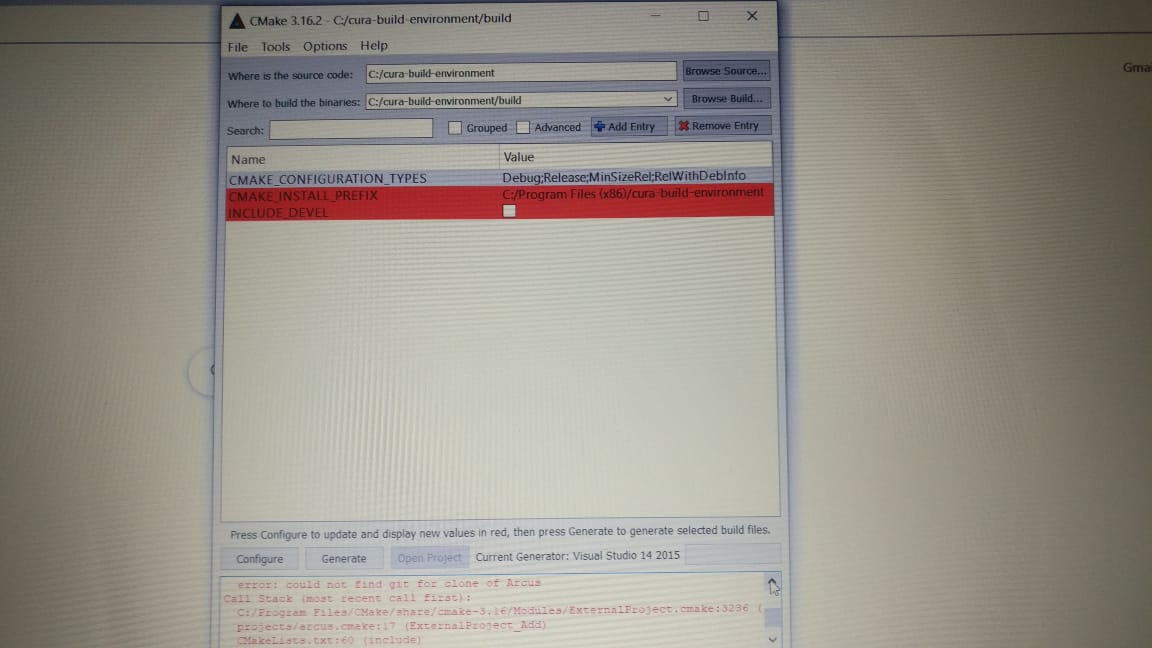
I followed the instructions from the updated document but still i am not able to proceed in windows 10 machine. any help on this is greatly appreciated.
 venkatahebbar
on 9 Jan 2020
venkatahebbar
on 9 Jan 2020
@NagarjunaHebbar The wiki right here on GH is the leading documentation now.
rburema
on 12 Jan 2020
Also, personally I find that, sometimes, cmake-gui doesn't fill in everything specified on the command-line correctly, so I have to double check everything. (Check the 'advanced' box in that screenshot.)
rburema
on 12 Jan 2020
Related issues
 DmitryBychkov
·
3Comments
DmitryBychkov
·
3Comments
 JRRN
·
3Comments
JRRN
·
3Comments
 dstulken
·
3Comments
dstulken
·
3Comments
 ferociousdiablo
·
3Comments
ferociousdiablo
·
3Comments
 wi1k1n
·
3Comments
wi1k1n
·
3Comments
Most helpful comment
I decided to convert the internal document to a Wiki page that should be usable for the Ultimaker Cura's Wiki. I have validated the instructions on a Windows 10 1903 Virtual Machine.
Only the
Running Cura from Source on Windowsfile has been changed.https://github.com/zxc8027/Cura-Wiki-Windows-Sources/wiki/Running-Cura-from-Source-on-Windows