Application Version
3.6 & 4.0
Platform
Windows 7 Ultimate
Machine
HP8740w EliteBook
Printer
Creality Ender 3
Steps to Reproduce
Slice a model and hit "save to file"
Actual Results
Crashes every time without saving a file.
it creates empty (0kb) file.
Expected results
Save G code to file
Solutions tried and failed
- Disabling "Send print information"
- Reinstalling
-Adding firewall exception
-Adding defender exception
-Different models
-Different save locations
 MartinKarmin
All 19 comments
Relevant parts of the log:
2019-05-07 17:04:02,063 - DEBUG - [MainThread] LocalFileOutputDevice.LocalFileOutputDevice.requestWrite [144]: Writing to Local File C:/Users/MK/Desktop/CE3_Dummy.gcode in text mode
Fatal Python error: Segmentation fault
Current thread 0x000022b8 (most recent call first):
  File "X:\4.0\build\inst\lib\python3.5\site-packages\UM\Qt\QtApplication.py", line 411 in event
  File "X:\4.0\build\inst\lib\python3.5\site-packages\cura\CuraApplication.py", line 925 in event
  File "X:\4.0\build\inst\lib\python3.5\site-packages\UM\View\GL\Texture.py", line 33 in bind
  File "X:\4.0\build\inst\lib\python3.5\site-packages\UM\View\GL\ShaderProgram.py", line 244 in bind
  File "X:\4.0\build\inst\lib\python3.5\site-packages\UM\View\RenderBatch.py", line 167 in render
  File "X:\4.0\build\inst\lib\python3.5\site-packages\UM\View\DefaultPass.py", line 23 in render
  File "X:\4.0\build\inst\lib\python3.5\site-packages\UM\Qt\QtRenderer.py", line 149 in render
  File "X:\4.0\build\inst\lib\python3.5\site-packages\UM\Qt\Bindings\MainWindow.py", line 220 in _render
  File "X:\4.0\build\inst\lib\python3.5\site-packages\UM\Qt\QtApplication.py", line 324 in exec_
  File "X:\4.0\build\inst\lib\python3.5\site-packages\cura\CuraApplication.py", line 761 in run
  File "X:\4.0\build\inst\bin\cura_app.py", line 132 in <module>
Qt seems to crash down on us in the Qt event handler, so somewhere in the QML or in the PyQt bindings.
Do I understand correctly that the crash happens after you've selected a file name and clicked "save", or does it happen before the save file dialogue is opened?
 Ghostkeeper
on 8 May 2019
Ghostkeeper
on 8 May 2019
It happens after the file location dialog. And if the filename exists, then after the overwrite filename dialog.
Note. I tried out to save on external SD drive, and it worked as a charm. But Cura still freezes when I want to save on the computer drive.
MartinKarmin
on 8 May 2019
Hmm. That it worked when saving to removable drive is a hint.
Maybe, have you got any post-processing scripts active?
Ghostkeeper
on 9 May 2019
Good day guys. I've tried running cura 3.5.1 cura 3.6 and 4.0.0 but all three opf them crasdh on saving gcode. I'm not a big fan of slicer but my hand is forced to use slicer please help
 armandjsmit
on 11 May 2019
armandjsmit
on 11 May 2019
You guys do have write permissions to the directory you're writing to? Not trying to save in Program Files or anything?
When writing to a write-protected directory, the expected behaviour is that you get an error message at the bottom of the Cura screen saying that it didn't get write permissions.
Ghostkeeper
on 13 May 2019
Yes, I belive I have all the permissions needed. Admin account should handle it's desktop?
Just in case, I'll ran Cura as admin. No sucess either. :(
MartinKarmin
on 13 May 2019
Same here cura works fine on desktop older version but crashes on 2 of my
laptops
On Mon, 13 May 2019, 17:25 MartinKarmin, notifications@github.com wrote:
Yes, I belive I have all the permissions needed. Admin account should
handle it's desktop?
Just in case, I'll ran Cura as admin. No sucess either. :(—
You are receiving this because you commented.
Reply to this email directly, view it on GitHub
https://github.com/Ultimaker/Cura/issues/5708?email_source=notifications&email_token=AMBMLVE3A5NRB4ABYB6VXM3PVGB6TA5CNFSM4HLJGGI2YY3PNVWWK3TUL52HS4DFVREXG43VMVBW63LNMVXHJKTDN5WW2ZLOORPWSZGODVIVIXQ#issuecomment-491869278,
or mute the thread
https://github.com/notifications/unsubscribe-auth/AMBMLVCSDVVLI4RAOLDMLKLPVGB6TANCNFSM4HLJGGIQ
.
armandjsmit
on 13 May 2019
Hmm, I'm out of ideas then. We haven't been able to reproduce this on our end. Saving to file works fine on all 3 platforms on our test computers.
Ghostkeeper
on 14 May 2019
One thing we could try, though it's a lot more technical, is to run Cura through the Visual Studio debugger (Windows) or GDB (MacOS and Linux). If someone encounters this and is able to give us a traceback even with mangled names, that'd help us determine if Qt is at fault here or CPython itself.
Ghostkeeper
on 14 May 2019
I am not very keen in computer sciences. This goes above my pay-grade :D Could this be machine specific error? Do laptops have something fundamentally different?
I'll try different laptops.
MartinKarmin
on 14 May 2019
Yeah, it could be different per laptop. For example, it's not happening on my laptop but it's happening on yours :smile:
Ghostkeeper
on 14 May 2019
as sharp as a knife today i see... maybe i should bring you my laptops...
On Tue, 14 May 2019, 10:27 Ghostkeeper, notifications@github.com wrote:
Yeah, it could be different per laptop. For example, it's not happening on
my laptop but it's happening on yours 😄—
You are receiving this because you commented.
Reply to this email directly, view it on GitHub
https://github.com/Ultimaker/Cura/issues/5708?email_source=notifications&email_token=AMBMLVBLNBIWZLXWJABASQLPVJZWFA5CNFSM4HLJGGI2YY3PNVWWK3TUL52HS4DFVREXG43VMVBW63LNMVXHJKTDN5WW2ZLOORPWSZGODVKVKAQ#issuecomment-492131586,
or mute the thread
https://github.com/notifications/unsubscribe-auth/AMBMLVGYOAYAM5UBZDZETJLPVJZWFANCNFSM4HLJGGIQ
.
armandjsmit
on 14 May 2019
I have just had this happening to me. It was ok Yesterday. I have un-installed and Re-Installed version 4.0 and still have the same problem
 Beardyface2007
on 16 May 2019
Beardyface2007
on 16 May 2019
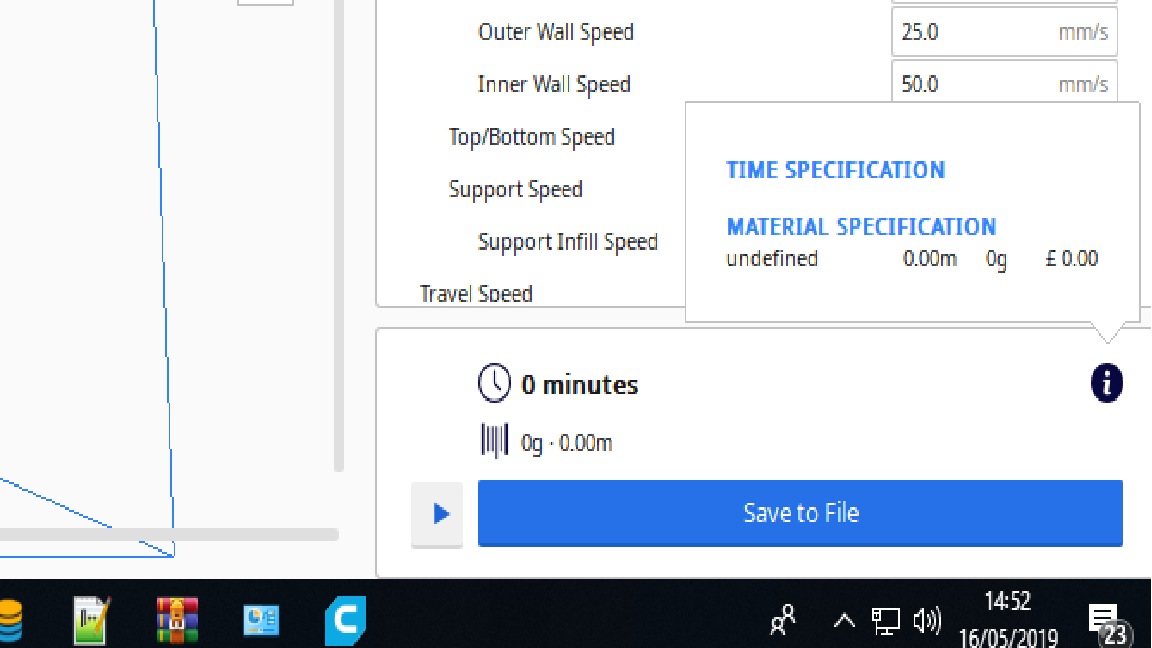
Here is some more information on the above problem. This picture shows the file information prior to saving
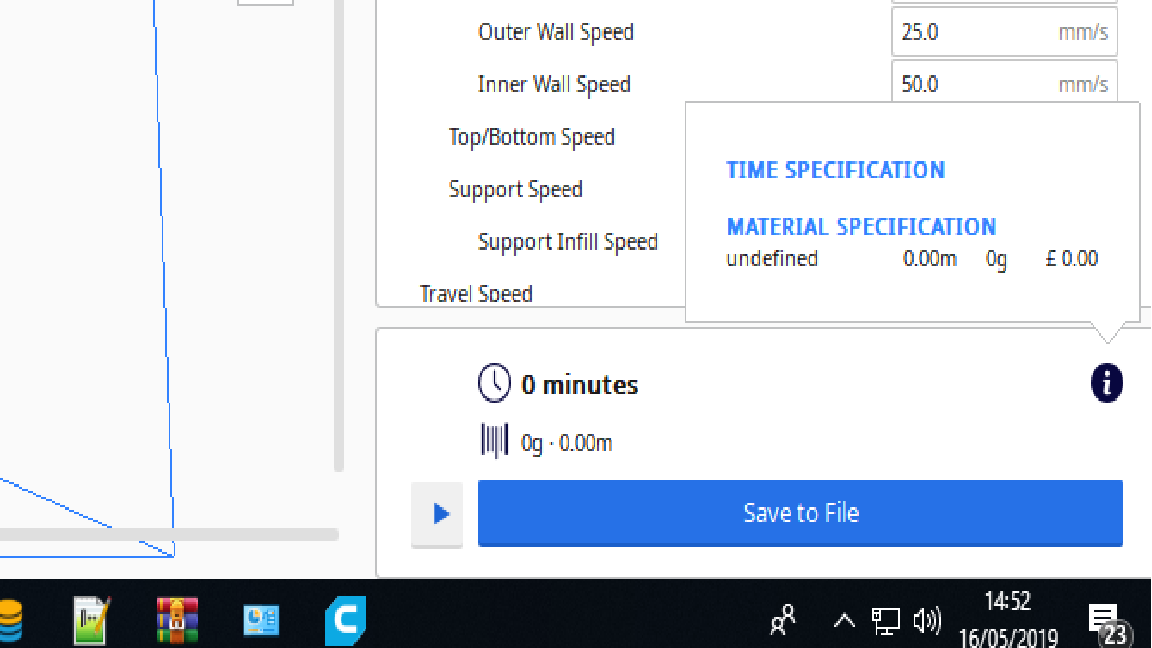
And the next picture shows the information in the preview screen. The model Is set at a layer height of .2mm but only shows up as 1 layer, but I would have expected to see approx 50 layers.
Beardyface2007
on 16 May 2019

Beardyface2007
on 16 May 2019
My problem has now been solved. It was due to an error in the mesh. Under 'Mesh Fixes' Tick 'Remove All Holes'. This cured the problem and I was able to save the file and print out the Item.
Many Thanks to the Facebook Cura Users group.
https://www.facebook.com/groups/1959877270949115/?ref=nf_target&fref=nf
Beardyface2007
on 17 May 2019
Are you at liberty to share the mesh that causes the problem, then, so that we can reproduce it? Cura shouldn't crash on it.
Ghostkeeper
on 17 May 2019
As per your request, here is the file in question. - https://www.thingiverse.com/thing:1637
Beardyface2007
on 17 May 2019
Hmm, well here that model doesn't crash either, not when saving it anywhere, not when slicing.
It does produce an empty g-code file with only the start-up and tear-down code. This is because the model has walls of 0.25mm thick (even though the file name would indicate double that amount; maybe it's been resized to 50%). The line width is 0.4mm, so nothing gets printed. Also, reducing the line width increases the outer wall inset, as per a formula set up by the Ender definition.
Maybe the empty g-code file is making it crash for some reason when saving to local file, but it's not happening on this side :confused:
Ghostkeeper
on 20 May 2019
Related issues
 muhammadelmogy
·
3Comments
muhammadelmogy
·
3Comments
 jornada812
·
3Comments
jornada812
·
3Comments
 ferociousdiablo
·
3Comments
ferociousdiablo
·
3Comments
 rudowinger
·
3Comments
rudowinger
·
3Comments
 JRRN
·
3Comments
JRRN
·
3Comments