Cura: [4.X GIT] Slice Summary Usage Garbled
Application Version
GIT Master (4.x)
Platform
Linux x86_64
Printer
Monoprice Ultimate / Duplicator 6
Steps to Reproduce
Add any model, slice, hover over the (i) icon next to the sliced model information.
Actual Results
Text appears stacked and garbled in the corner.
Expected results
Not that.
Additional Information
Probably easier to just see the issue rather than trying to explain it.
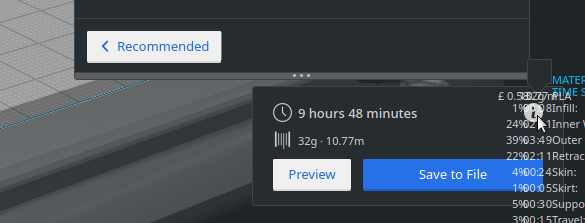
Not sure if you're just in the middle of redesigning this and it's not really a bug, but thought I should report it, just in case.
 Enverex
All 17 comments
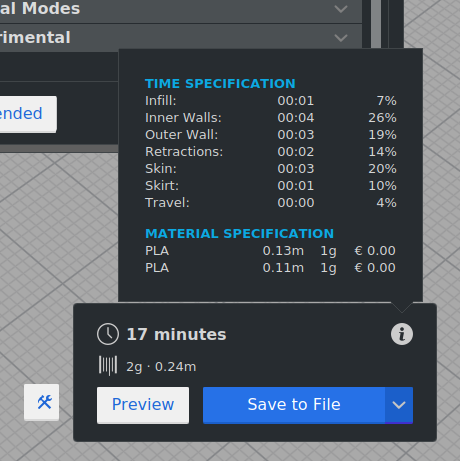
Hmm, strange. I've just checked master on my machine and there it does look correct.
 nallath
on 14 Feb 2019
nallath
on 14 Feb 2019
Also can't reproduce it here. Maybe it was just temporary?
 Ghostkeeper
on 18 Feb 2019
Ghostkeeper
on 18 Feb 2019
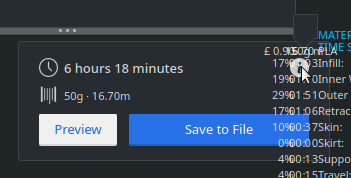
Just recompiled from source, still happening. Could it be a font/DPI/desktop environment issue?
Enverex
on 18 Feb 2019
Or maybe Qt version? Cura's builds are using Qt 5.9. I'm running Qt 5.11 when running from source.
Ghostkeeper
on 19 Feb 2019
Apparently I'm running Qt 5.12.1 on that machine.
Enverex
on 19 Feb 2019
Well, if you manage to fix it for 5.12, we'd love to merge it :) Eventually we'll upgrade to more modern Qt versions once we can drop support for MacOS 10.11.
Ghostkeeper
on 19 Feb 2019
I can live with it being broken as it's not something I really use. I just thought it was worth reporting given that I wasn't expecting it to be designed to look like that.
Enverex
on 19 Feb 2019
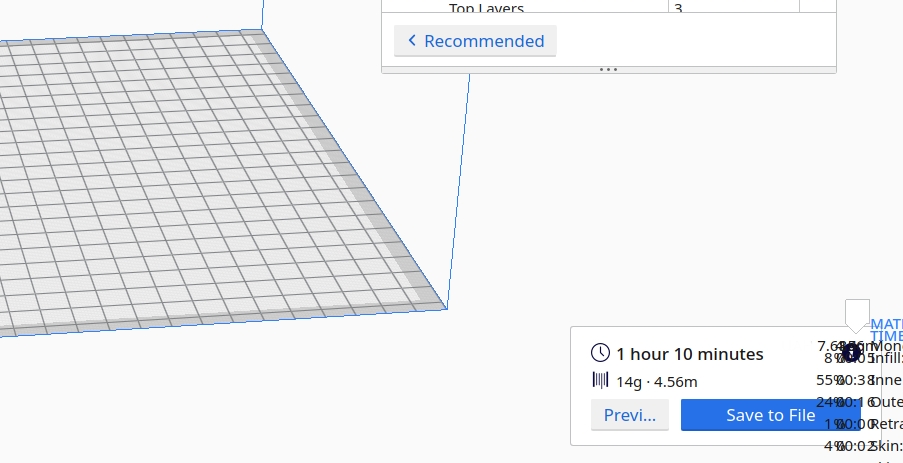
Confirming on _Antergos Linux_ + CURA 4.0.0 + Gnome 3.32.0.
The balloon with time and material info is opened garbled in both fullscreen and windowed modes.
 wilensky
on 28 Mar 2019
wilensky
on 28 Mar 2019
Use the AppImage.
The problem is the version of Qt. The AppImage includes Qt 5.10, your ArchLinux install probably uses Qt 5.12
 fieldOfView
on 28 Mar 2019
fieldOfView
on 28 Mar 2019
@fieldOfView, yes. Qt 5.12.2
Qt 5.12.2 (x86_64-little_endian-lp64 shared (dynamic) release build; by GCC 8.2.1 20181127) on "xcb"
OS: Antergos Linux [linux version 5.0.4-arch1-1-ARCH]
@wilensky For future reference, I wouldn't call Antergos "Arch" as they're still different distros with different setups.
Enverex
on 28 Mar 2019
@Enverex, indeed. My bad. Working on several machines and didn't pay attention from which I reported.
wilensky
on 28 Mar 2019
As this is closed, is there a bug open for QT 5.12 compatibility?
Enverex
on 29 Mar 2019
For the moment we don't want to switch our builds to Qt 5.12, since that would drop support for older MacOS versions that our users are still using.
That said, since this week I'm also on Qt 5.12 and have this issue as well so it's a matter of how long I can live with this issue I guess :wink:
Ghostkeeper
on 29 Mar 2019
v4.0.0 AppImage works like a charm. Reported issue not reproducing also no fonts problem.
Thanks!
wilensky
on 29 Mar 2019
I think this may now be affecting the machine settings page, as it now looks like this and is essentially unusable:
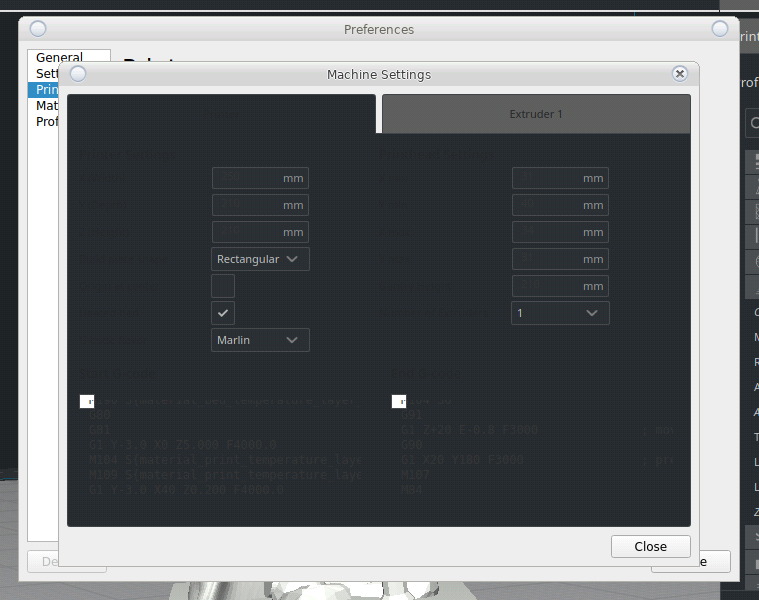
Sometimes these fields are also uneditable, for unknown reasons. Looks like the AppImage may now be the only usable option on Qt 5.12 systems.
Enverex
on 15 Apr 2019
Yeah we saw that too. It's introduced by recent changes to this page to make it work in our new onboarding workflow. We'll make sure it's readable again before launch.
Ghostkeeper
on 15 Apr 2019
Related issues
 muhammadelmogy
·
3Comments
muhammadelmogy
·
3Comments
 JRRN
·
3Comments
JRRN
·
3Comments
 mubarak111nsu
·
3Comments
mubarak111nsu
·
3Comments
 ferociousdiablo
·
3Comments
ferociousdiablo
·
3Comments
 timherrm
·
3Comments
timherrm
·
3Comments
Most helpful comment
Use the AppImage.
The problem is the version of Qt. The AppImage includes Qt 5.10, your ArchLinux install probably uses Qt 5.12