Cura: [3.5.1 / 3.6 / 4.0 / 4.1-Beta ] Multiple issues when displaying the Cura application interface.
Application Version - 3.5.1
Platform - ALT Linux, KDE5, Plasma Color Schemes - "Breeze Dark variant" end "Breeze High contrast".
Printer - Any
Steps to Reproduce end Actual Results
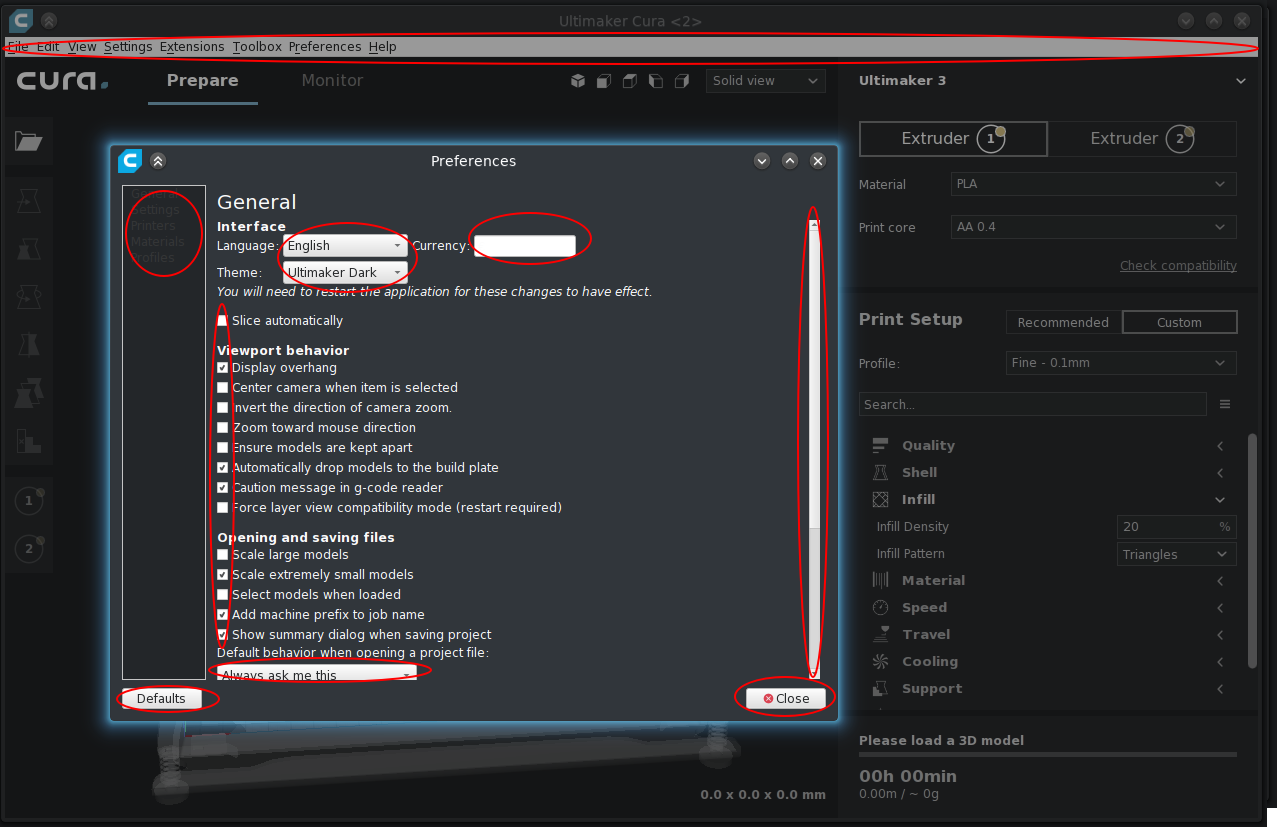
Red color highlights some (not all) problems.
- Cura themes - cura-dark, KDE5 Plasma Color Schemes - "Breeze Dark variant" end "Breeze High contrast" (I use it all the time.)
For comparison, version 3.4.1
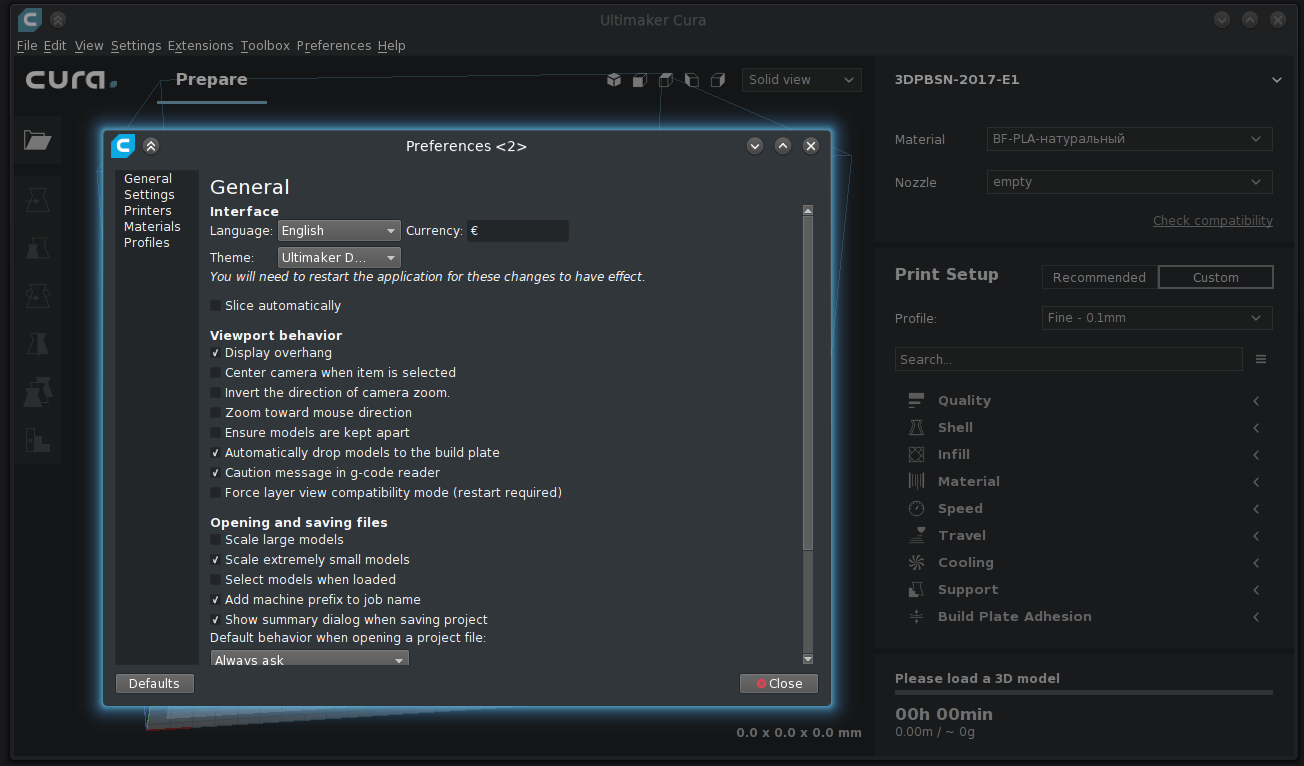
- Cura themes - cura-dark, KDE5 Plasma Color Schemes - "Breeze Dark .....".
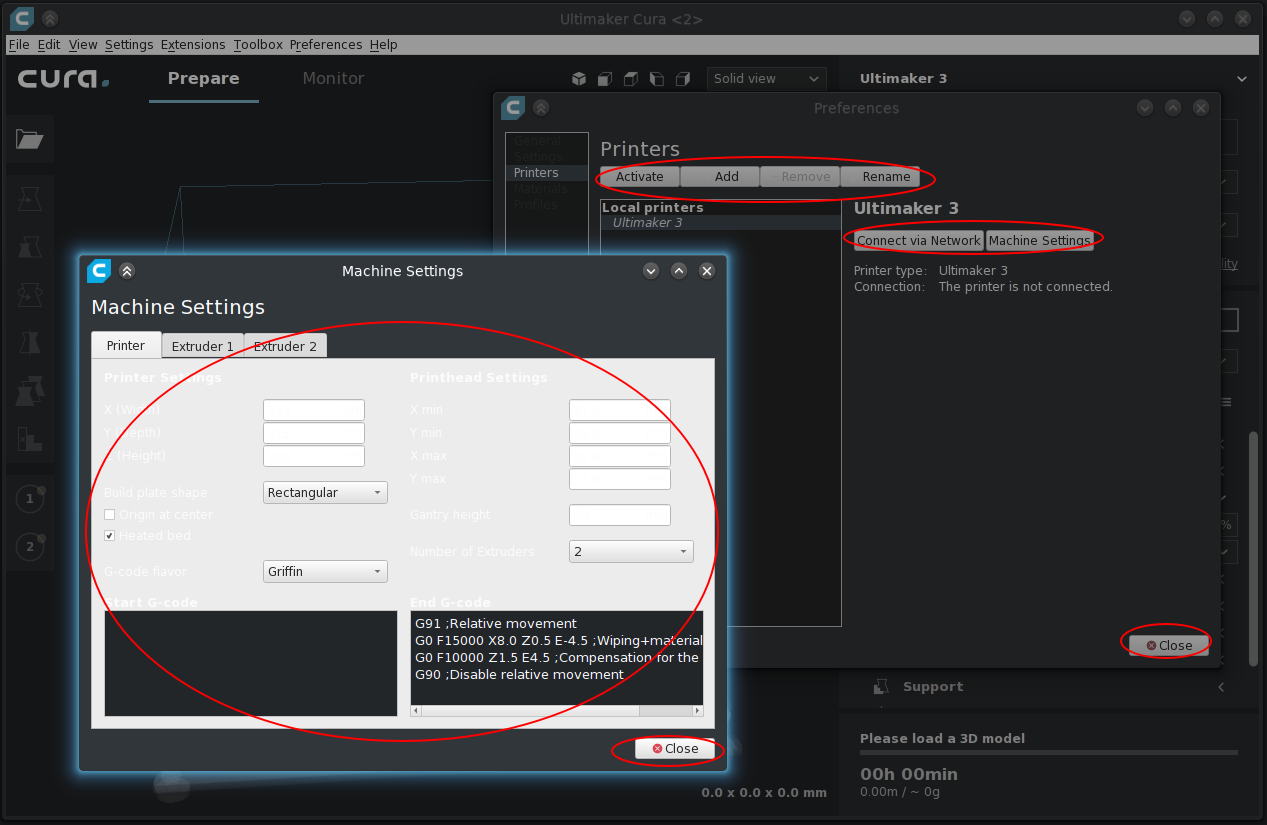

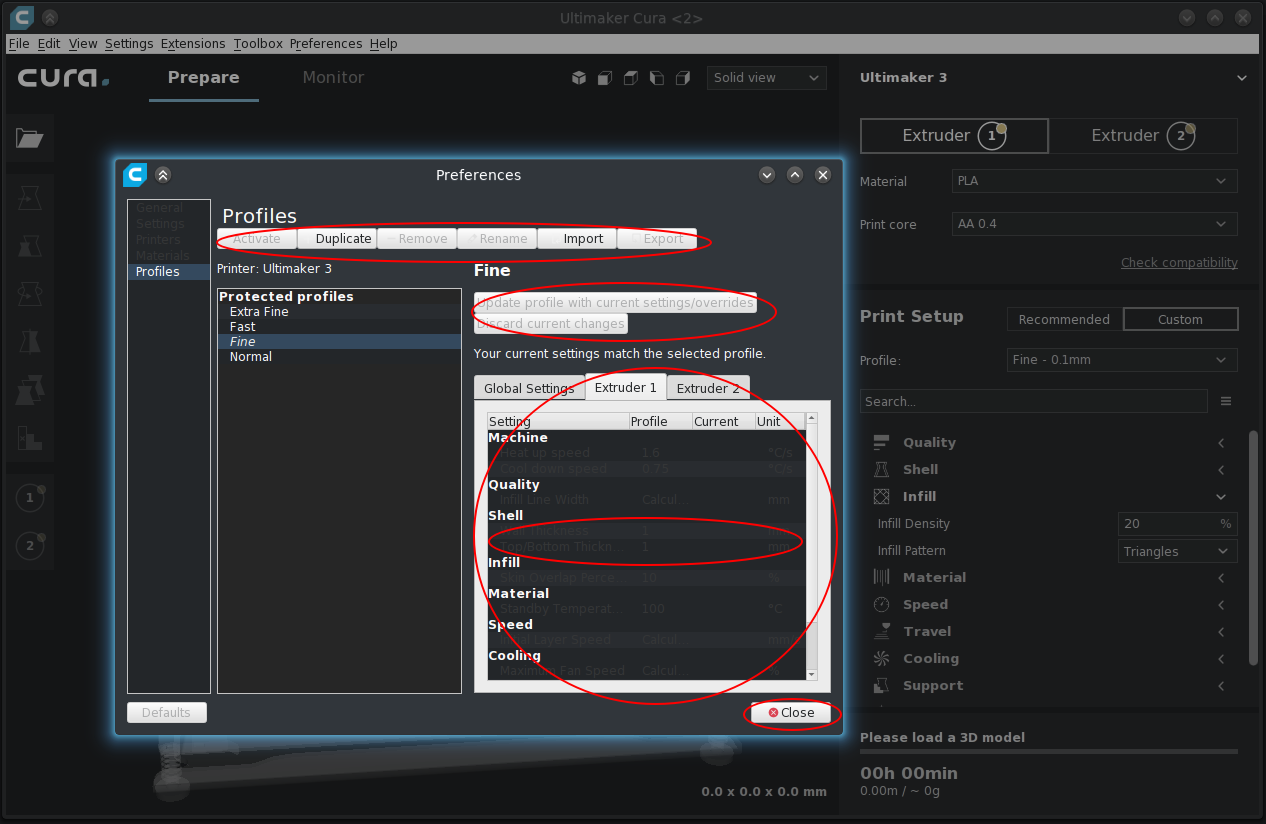
- Cura themes - cura-light, KDE5 Plasma Color Schemes - "Breeze Dark .....".

Further I will not continue - there are still a lot of shortcomings in the interface.
Expected results
- When using the light theme in the Cura, all the interface elements of the application must match the settings for the light theme.
- When using the dark theme in Cura, all the interface elements of the application must match the settings for the dark theme.
- The display of all interface elements of the Cura application should not depend on the color theme used in the KDE.
Additional Information
Similar issues were reported in: https://github.com/Ultimaker/Cura/issues/4522
I hope I did not tire you.
 bliser3d
All 19 comments
This problem is completely repeated in version 3.6.0.
bliser3d
on 14 Nov 2018
This problem is completely repeated in version 4.0 (beta).
Maybe someone knows when this problem can be eliminated?
Additional Information
Similar issues were reported in: #4826
bliser3d
on 28 Dec 2018
Yes, I have the same issue with KDE and Cura version +3.6
 matibarriento
on 17 Jan 2019
matibarriento
on 17 Jan 2019

Issue with my screen being stuck to the right side (minimized) and when large, can't see the menus open?
 captNtinker
on 18 Mar 2019
captNtinker
on 18 Mar 2019
can't drag it off, it's stuck to the right side :(
captNtinker
on 18 Mar 2019
@captNtinker that is a different problem altogether, but I guess you already came to the same conclusion since you opened a new issue here: https://github.com/Ultimaker/Cura/issues/5443
 fieldOfView
on 18 Mar 2019
fieldOfView
on 18 Mar 2019
Yah- I wasn’t sure how to put in the question- it’s got to be a window issue - still can’t get it to work- gonna ask the tech at work today see what he says! Might get a solution?
Sent from my iPhone
On Mar 18, 2019, at 4:02 AM, Aldo Hoeben notifications@github.com wrote:
@captNtinker that is a different problem altogether, but I guess you already came to the same conclusion since you opened a new issue here: #5443
—
You are receiving this because you were mentioned.
Reply to this email directly, view it on GitHub, or mute the thread.
captNtinker
on 18 Mar 2019
I'm unable to reproduce this problem, not on Ubuntu 18.10 (using theme Yaru-dark) nor on Fedora (I don't know which theme my colleague was using, but it was dark).
 Ghostkeeper
on 18 Mar 2019
Ghostkeeper
on 18 Mar 2019
Thanks yodor (https://github.com/Ultimaker/Cura/issues/4826) for the prompt.
Used the command "QT_QUICK_CONTROLS_STYLE=Desktop /home/User/Cura/AppRun".
It helped me.
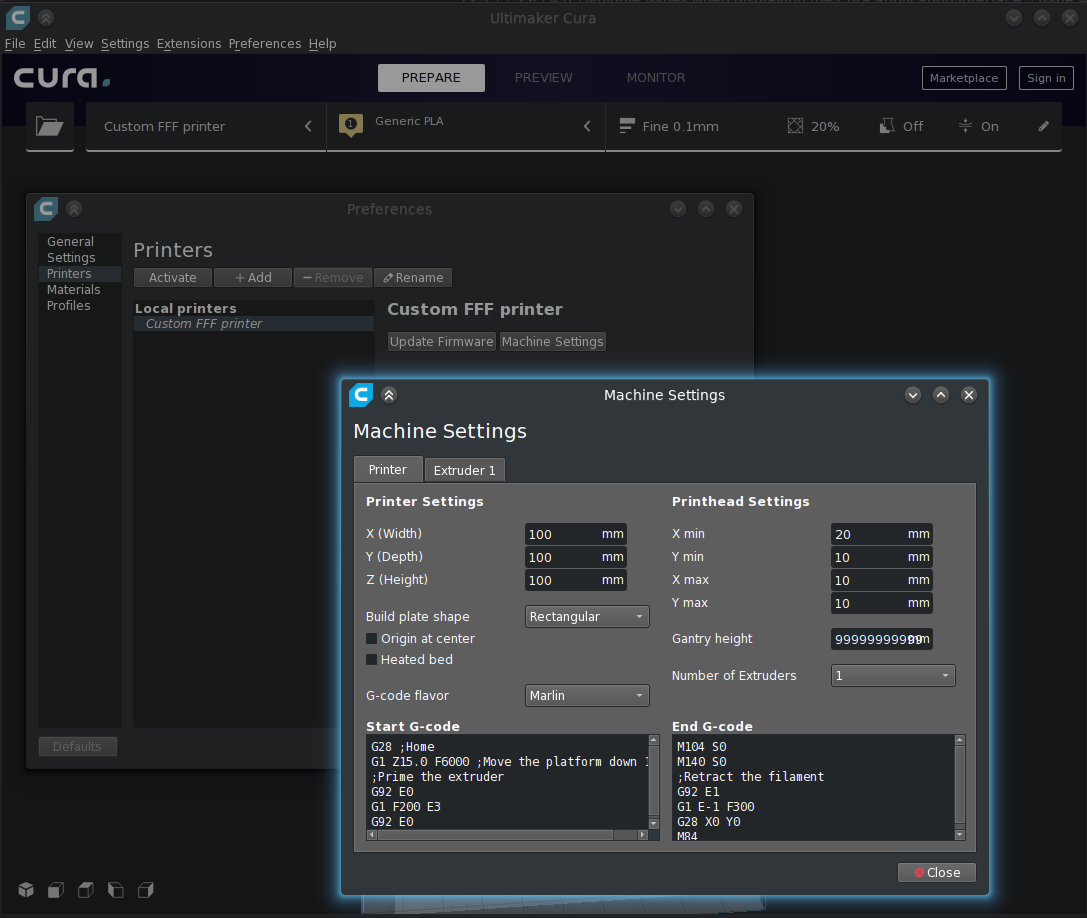
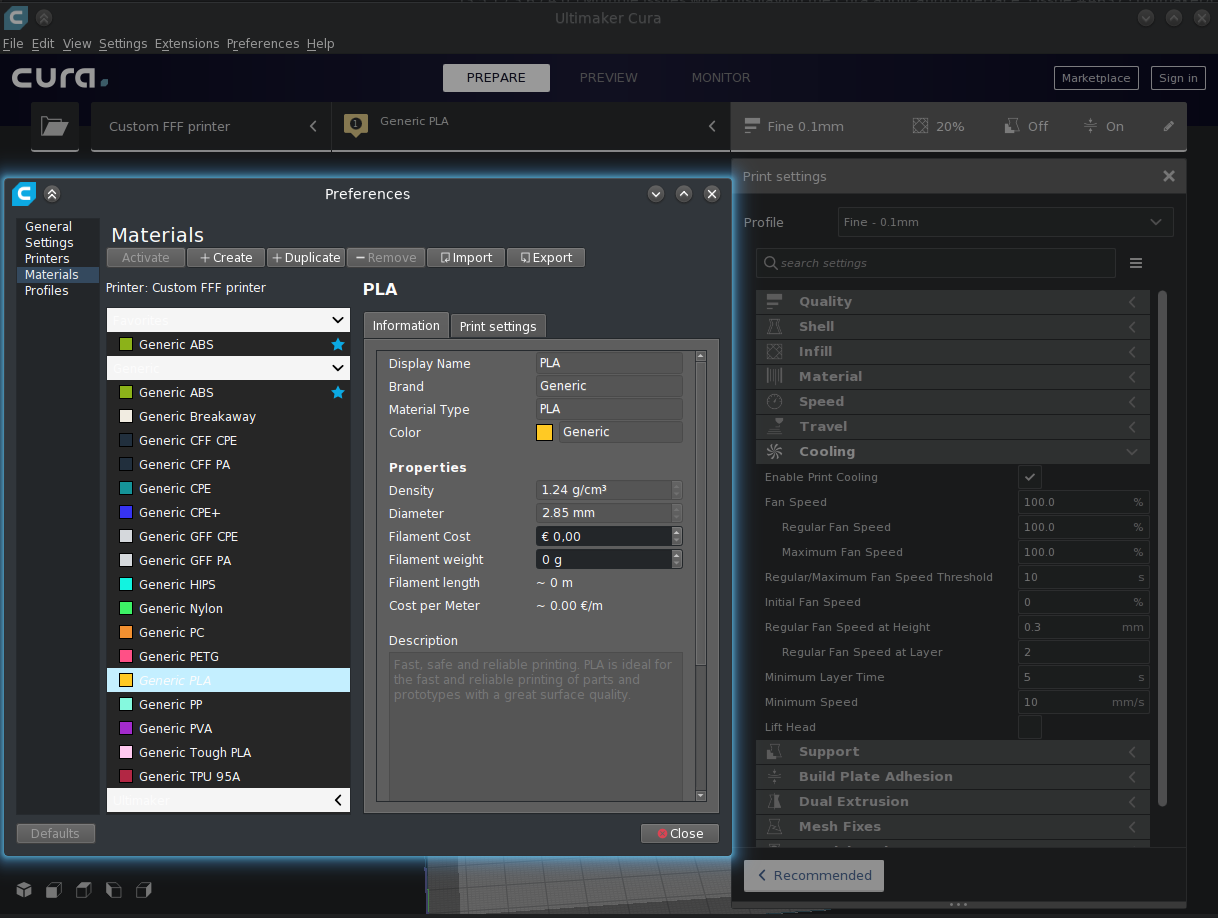
Small remarks remained, but this does not prevent the Cura from using.
Thank you all. I close the topic.
bliser3d
on 19 Mar 2019
@bliser3d That's a work-around at best. This is still broken in 3.6 and 4.0.
 muesli
on 23 Mar 2019
muesli
on 23 Mar 2019
Some shortcomings in the dark theme, I tried to fix it in #5499.
bliser3d
on 24 Mar 2019
We're planning to replace the system-themed parts in the preferences dialogue for Cura-themed elements, which would solve this issue. Combining the two themes is never a good idea.
Ghostkeeper
on 26 Mar 2019
@bliser3d , could you please clarify how you passed QT_QUICK_CONTROLS_STYLE=Desktop /home/User/Cura/AppRun to the application? Is there a command line flag I should use in conjunction with it? Also, I presume the command is a string literal, as opposed to needing to substitute for a specific file path?
Running under Mint 18.3, a very large number of the menus and text entry boxes are white-on-white, such that I have to interact with the system by trial-and-error. Thanks!
 VCF
on 20 Apr 2019
VCF
on 20 Apr 2019
VCF,
QT_QUICK_CONTROLS_STYLE=Desktop /home/User/Cura/AppRun - this is the start command Cura.
If interested, you can improve the interface further and in this way - #5499
bliser3d
on 23 Apr 2019
bliser3d thank you. Totally fixed it for me.
 e-anima
on 17 May 2019
e-anima
on 17 May 2019
The resolution for me was to unload it and load an earlier version :( but it’s working again!
Sent from my iPhone
On May 17, 2019, at 10:11 AM, e-anima notifications@github.com wrote:
bliser3d thank you. Totally fixed it for me.
—
You are receiving this because you were mentioned.
Reply to this email directly, view it on GitHub, or mute the thread.
captNtinker
on 17 May 2019
Rather the old version is working fine- I would have to hit Maximize just to get to it and then hit escape to even work in it, then couldn’t anchor it out of the way- it went way off the screen where I couldn’t get it :/
Sent from my iPhone
On May 17, 2019, at 10:11 AM, e-anima notifications@github.com wrote:
bliser3d thank you. Totally fixed it for me.
—
You are receiving this because you were mentioned.
Reply to this email directly, view it on GitHub, or mute the thread.
captNtinker
on 17 May 2019
In version 4.1-beta, problems with the display of the interface (previously indicates by me) remained.
Fixed only the display of the window "Machine Settings" - thanks for the correction.
bliser3d
on 18 May 2019
In 4.1, only the machine settings and the add printer dialogue was replaced with Cura-themed elements. The rest of the preferences menu is still system-themed. It's a lengthy process, sorry.
Ghostkeeper
on 20 May 2019
Related issues
 DmitryBychkov
·
3Comments
DmitryBychkov
·
3Comments
 jellewie
·
3Comments
jellewie
·
3Comments
 muhammadelmogy
·
3Comments
muhammadelmogy
·
3Comments
 tomoinn
·
3Comments
tomoinn
·
3Comments
 thopiekar
·
3Comments
thopiekar
·
3Comments
Most helpful comment
VCF,
QT_QUICK_CONTROLS_STYLE=Desktop /home/User/Cura/AppRun - this is the start command Cura.
If interested, you can improve the interface further and in this way - #5499