Cura: [3.3.1] Fonts not loaded for Russian
Application Version
3.3.1
Platform
Ubuntu 18.04 LTS x64
Good afternoon.
There is such a problem.
When I run Cura-3.3.1.AppImage, the console displays the following errors:
Fontconfig error: "/etc/fonts/conf.d/10-scale-bitmap-fonts.conf", line 72: non-double matrix element
Fontconfig error: "/etc/fonts/conf.d/10-scale-bitmap-fonts.conf", line 72: non-double matrix element
Fontconfig warning: "/etc/fonts/conf.d/10-scale-bitmap-fonts.conf", line 80: saw unknown, expected number
And when choosing the Russian language, all the inscriptions become distorted (the interval between letters increases and the design of the font disappears).
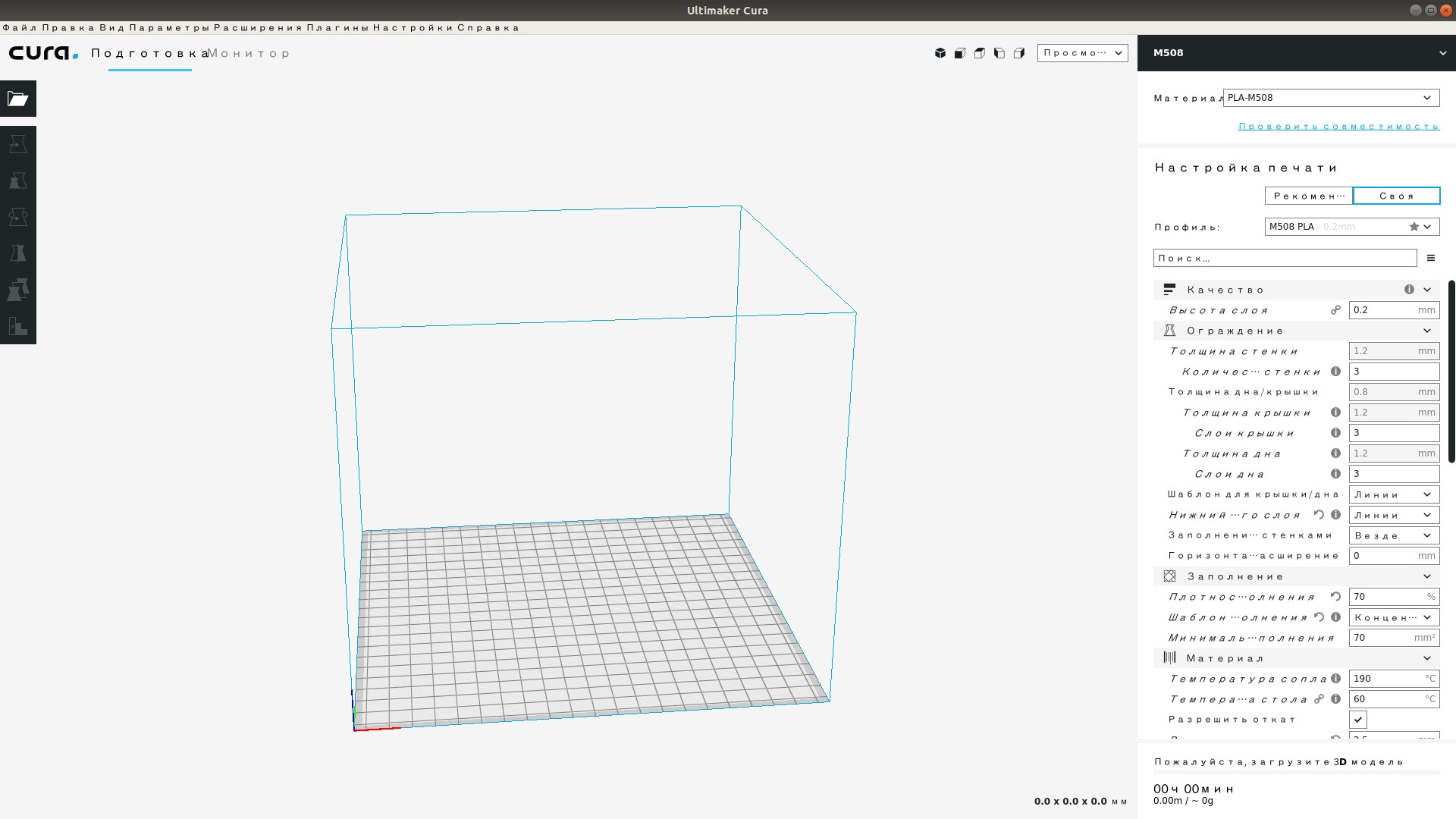
But if i copy the directory "noto-sans" from the program directory to "/usr/share/fonts/truetype/", then the font in the sidebar becomes correct, but nothing changes in the title of the window and the settings window.
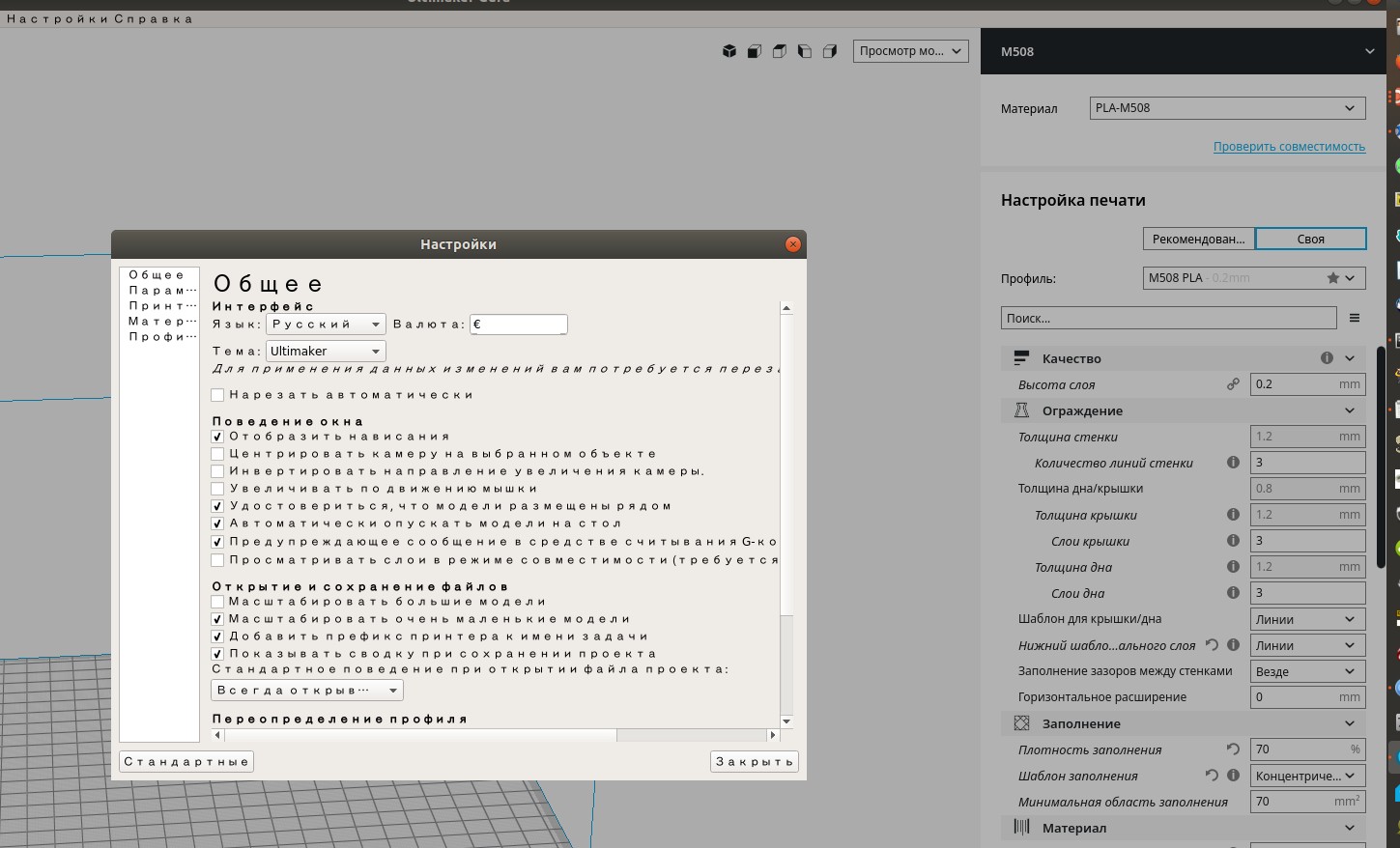
Copying the "noto-sans-display" directory to "/usr/share/fonts/truetype/" does not change anything.
Installation of these fonts in the system does not give anything.
I checked on different PCs with OS UBUNTU 18.04 LTS x64, the behavior is the same.
If it is not possible to quickly fix it, tell me please what fonts need to be installed and where.
Sorry for my English. I use Google translator.
 Shaman207
All 11 comments
My best guess is it has to do with the latest Ubuntu release, we haven't been able to test on that yet. Can you try the latest LTS release (17.04 I believe)?
 ChrisTerBeke
on 3 Jun 2018
ChrisTerBeke
on 3 Jun 2018
I've now checked on all Ubuntu systems I have available.
On a real PC
Ubuntu 17.10 x64
Ubuntu 16.04 x64
In the VMware virtual machine
Ubuntu 17.04 x64
Ubuntu 14.04 x64
Errors in the console and font errors have remained the same.
Shaman207
on 4 Jun 2018
I have the same problem on a Gentoo Linux
cura3.2.1 runs without this problem
cura3.3.1
Fontconfig error: "/etc/fonts/conf.d/10-scale-bitmap-fonts.conf", line 72: non-double matrix element
Fontconfig error: "/etc/fonts/conf.d/10-scale-bitmap-fonts.conf", line 72: non-double matrix element
Fontconfig warning: "/etc/fonts/conf.d/10-scale-bitmap-fonts.conf", line 80: saw unknown, expected number
 artbody
on 21 Jun 2018
artbody
on 21 Jun 2018
We know of this problem. We've seen it too. It happens on all Linux computers ever since we switched to Noto Sans. We don't know a solution to it though. Since the use case of Russian on Linux computers is pretty small, we haven't yet invested time to investigate a solution.
 Ghostkeeper
on 13 Jul 2018
Ghostkeeper
on 13 Jul 2018
Cura 4.0.0 same problem.
 difeid
on 20 Mar 2019
difeid
on 20 Mar 2019
maybe answer
 freexmonster
on 27 Mar 2019
freexmonster
on 27 Mar 2019
alternate fixed
cd /tmp
wget https://launchpad.net/~no1wantdthisname/+archive/ubuntu/ppa/+files/fontconfig-infinality_20130104-0ubuntu0ppa1_all.deb
sudo dpkg -i fontconfig-infinality_20130104-0ubuntu0ppa1_all.deb
sudo bash /etc/fonts/infinality/infctl.sh setstyle
Select a style:
   6) win7
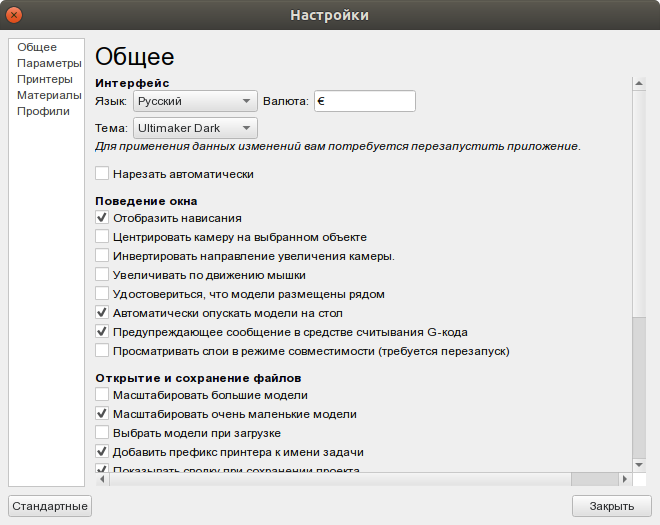
freexmonster
on 27 Mar 2019
Looks promising. I wouldn't know how we could get that in our AppImage though. This is out of my league in Linux-fu.
Ghostkeeper
on 29 Mar 2019
Thanks, it works well enough, but it requires tweak system fonts and may affect to other programs.
I tryed and with win7 style my pycharm began to look ugly, too thin fonts, looks good with linux style.
Seems Cura's font requres _infinality_ support, but linux officially not support it now, was replaced by TrueType v40.
difeid
on 9 Apr 2019
In version 4.5 we've updated the fonts to a newer version. Maybe that fixes it?
The bug doesn't reproduce for me when running from source, but that may also be due to having that "infinality" unknowingly installed on my system.
Ghostkeeper
on 17 Feb 2020
Let's assume this is fixed then.
Ghostkeeper
on 19 Mar 2020
Related issues
 jornada812
·
3Comments
jornada812
·
3Comments
 probonopd
·
3Comments
probonopd
·
3Comments
 JRRN
·
3Comments
JRRN
·
3Comments
 wi1k1n
·
3Comments
wi1k1n
·
3Comments
 timherrm
·
3Comments
timherrm
·
3Comments
Most helpful comment
alternate fixed