Cura: Adding M42 gcode to layer 2 on every slice?
This is not a bug. I just don't know where else to turn to.
I want to add an M42 P6 S255 to the start of layer 2 on every file I slice with cura.
How can I do that?
There is a place for start and end gcodes, but nothing in between.
I know there must be a way, but after a few hours, I give up.
Thanks for any help.
 PicoPi
All 16 comments
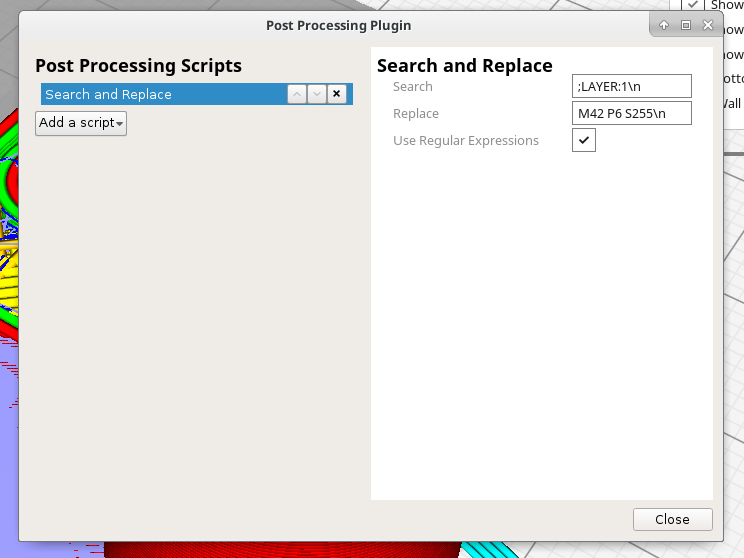
You can do this with the search and replace post-processing script. I have tested this and it works. There's something broken with entering text in Cura at the moment so it tends to forget what you have just entered into a field.
 smartavionics
on 6 Apr 2018
smartavionics
on 6 Apr 2018
Note that the Search in @smartavionics' example will only detect the first layer change. I would use this instead:
Search:
;LAYER:
Replace:
M42 P6 S255\n;LAYER:
That way it works on all layers and it keeps the layer number comments intact.
 fieldOfView
on 6 Apr 2018
fieldOfView
on 6 Apr 2018
Hi Aldo, the OP asks for the M42 to be output on the start of layer 2 not on all layers after layer 1 which is why I explicitly match that layer number. I agree that my solution leaves out the layer:1 comment.
smartavionics
on 6 Apr 2018
Doh, better brush up on my reading skills...
fieldOfView
on 6 Apr 2018
BTW, I tried using ;LAYER:1$ as the search string but it didn't seem to understand $. Is that right?
smartavionics
on 6 Apr 2018
The string that is being matched is the whole layer, consisting of multiple lines. "$" matches the end of the string, not the end of a line.
fieldOfView
on 6 Apr 2018
Ah, thanks, that makes sense.
smartavionics
on 6 Apr 2018
omg, Thank you. Works like a charm!
PicoPi
on 6 Apr 2018
It works, but as you said, it forgets!
Is there any way to fix the code?
As it is, it would be no different from opening the gcode in Notepad++ and doing a search and replace manually! Wanted to avoid doing that for each and every file I slice.
PicoPi
on 6 Apr 2018
In Cura 3.3, the setting will persist between launches of Cura. In the Cura 3.3 beta there is currently a bug that will make the setting not "take" unless you type it in very slowly.
fieldOfView
on 6 Apr 2018
Where do I get the 3.3? I found 3.3 Beta, but not 3.3!
PicoPi
on 6 Apr 2018
3.3 isn't released yet.
smartavionics
on 6 Apr 2018
me so sad :(
PicoPi
on 6 Apr 2018
I downloaded the 3.3 Beta for shits and giggles, and also out of desperation. I typed it slow, and now it remembers, and is no longer suffering from amnesia !! Yey
Do you happen to know which python source is responsible for this function?
PicoPi
on 6 Apr 2018
The amnesia problem is in Uranium, the commit that fixes it is:
https://github.com/Ultimaker/Uranium/commit/7b53e35fcb7f28ca4cda43a79102f5bfee44106d
smartavionics
on 6 Apr 2018
Dude! u d man.
PicoPi
on 6 Apr 2018
Related issues
 timherrm
·
3Comments
timherrm
·
3Comments
 muhammadelmogy
·
3Comments
muhammadelmogy
·
3Comments
 Liger0
·
3Comments
Liger0
·
3Comments
 wi1k1n
·
3Comments
wi1k1n
·
3Comments
 mnswamp1
·
3Comments
mnswamp1
·
3Comments
Most helpful comment
You can do this with the search and replace post-processing script. I have tested this and it works. There's something broken with entering text in Cura at the moment so it tends to forget what you have just entered into a field.