I posted something on the forum Ultimaker:
https://community.ultimaker.com/topic/21946-support-direction-angle/
 darkdvd
All 19 comments
It seems indeed that there is no infill direction parameter for support infill. I've flagged this ticket with the correct tags.
 ChrisTerBeke
on 13 Mar 2018
ChrisTerBeke
on 13 Mar 2018
Merci Chris !
darkdvd
on 13 Mar 2018
I suggest adding a function to the supports management in CURA: "Support Direction".
By default, the supports are printed along the X and Y axes, regardless of the angle of the object.
(Note that the object is positioned by default along the X and Y axes as well).
In certain cases, the geometry of the object to be printed poses a problem during printing: this is particularly the case for objects intended to be molded (The walls of these objects generally have angles of 2 ° in order to optimize demolding, sometimes it is the design of the piece that uses very tight angles ...).
I took as an example the piece that hides the linear bearings of the UM3: this piece is intended to be made of molded plastic (1905-H).
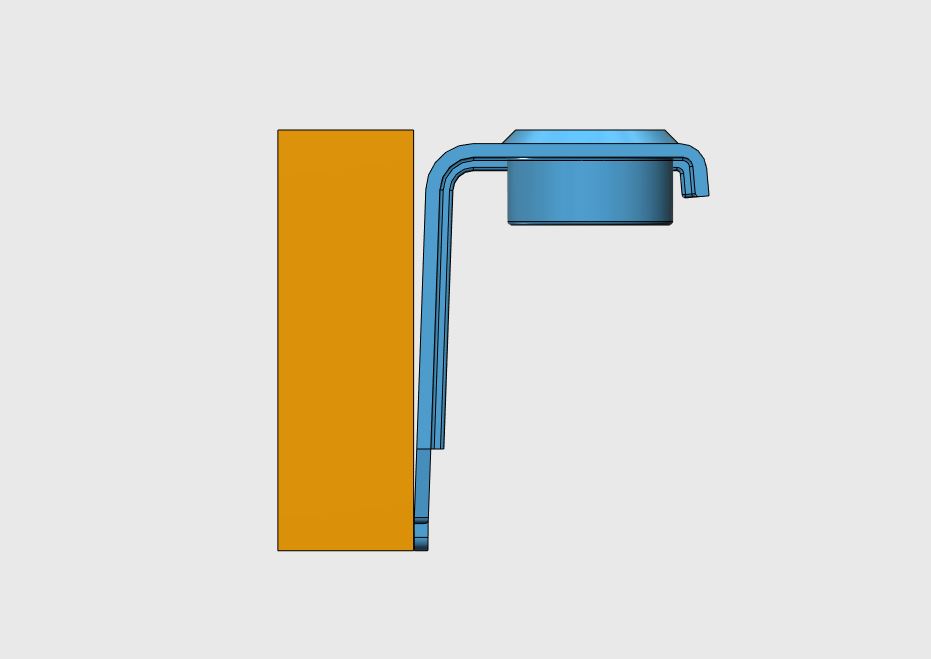
The front of this object has an angle of 2 °.
In my example, I print the object vertically to limit the amount of supports.
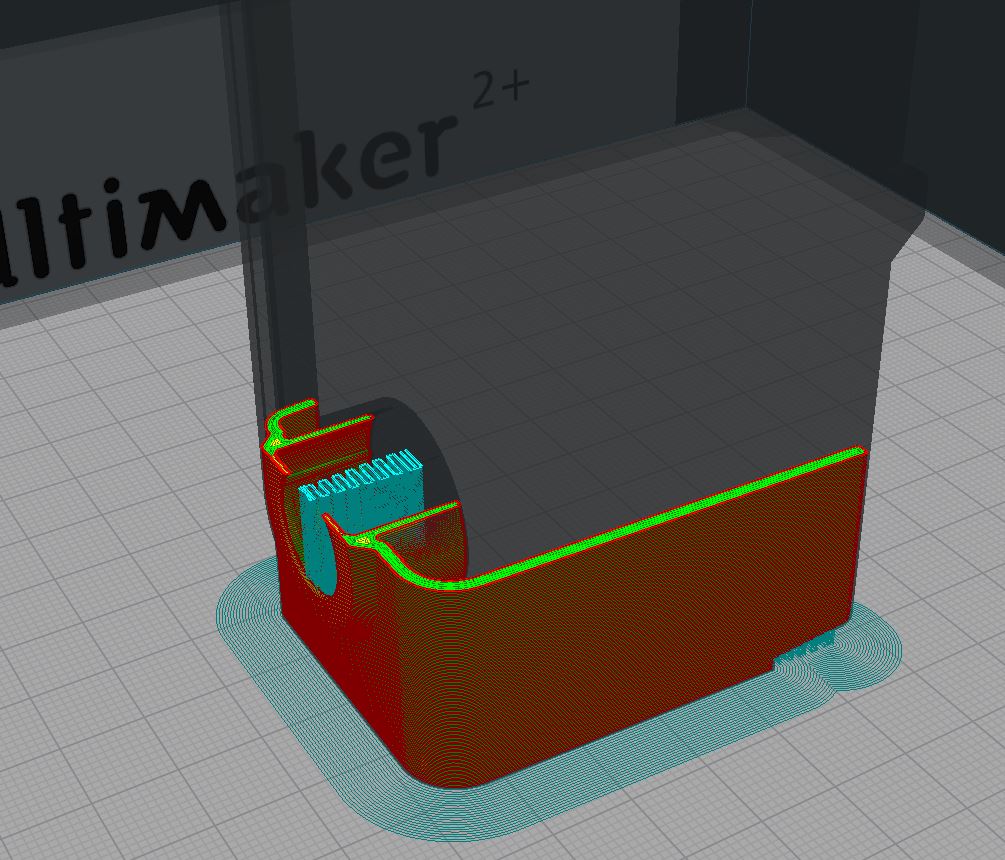
Problem # 1: this wall at 2 ° will be badly printed because the displacement of the head will not be precise enough to restore the wall which must be perfectly rectilinear.
Solution # 1: rotate the object at 45 °. The angle of this wall will be no longer 2 ° but 47 °, which changes everything.
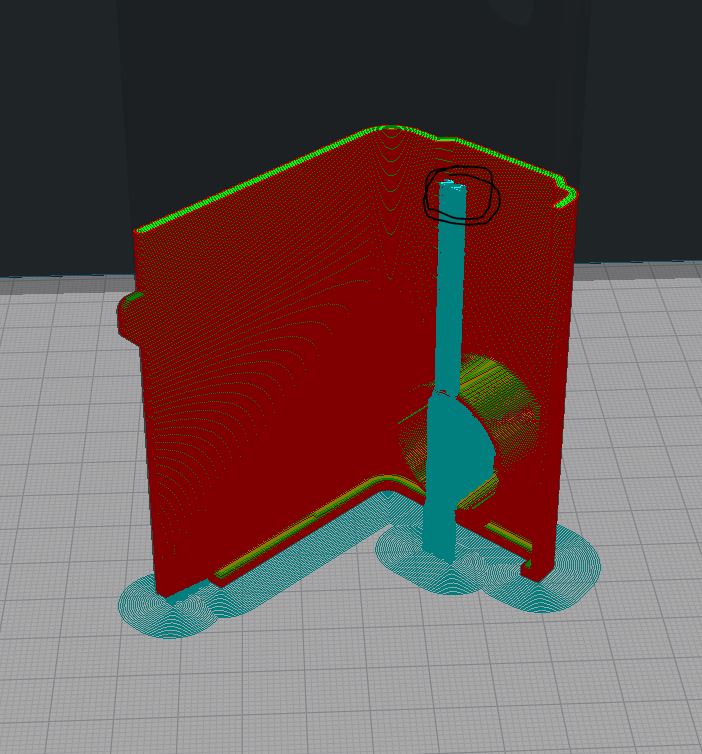
Problem # 2: the supports remain positioned on the X and Y axes and they overflow the object and the printing will necessarily be a failure.
Solution # 2: give the possibility to change the angle of the supports.
In this case, if the object is turned at 45 °, it is necessary to rotate the supports by 45 °, which is not possible at present (or I missed something ....).
Note #1 : The object contained in the STL has been modified to be printed vertically to limit the number of supports.
Note #2 : I use zigzag supports because they are (far) the best support in terms of finishing and easier to remove.
Note #3 : I am french...
darkdvd
on 14 Mar 2018
I think by default we could even align the support infill and normal infill directions, with the option to override that.
ChrisTerBeke
on 14 Mar 2018
Good idea.
darkdvd
on 14 Mar 2018
The "liberty" to choose the direction is a good option too.
By default, the value "align Infill to Object" is not checked.
If checked, the value "0" can be modified to any other value...
darkdvd
on 14 Mar 2018
So... ?
darkdvd
on 27 Mar 2018
Cura's backlog is super cramped, it takes a while until things are picked up. In the mean time, any developer is free to make a pull request for this.
@Appesteijn is this something you think is useful?
ChrisTerBeke
on 27 Mar 2018
Thank you @ChrisTerBeke !
Note : not only "useful" but "necessary"
darkdvd
on 27 Mar 2018
Haha, that's always a matter of opinion 😄
ChrisTerBeke
on 27 Mar 2018
Yes ! but no !
Imagine a large object that can only be printed at 45 °.
The supports are always printed according to the X/Y axes whereas logically they should also turn 45 °
darkdvd
on 27 Mar 2018
(I'm not sure my last sentence was in English...)
darkdvd
on 27 Mar 2018
I think it is very useful, but it will also depend on how much work this is if (and when) we can pick this up. I hope some devs can mingle in this discussion :)
 Appesteijn
on 29 Mar 2018
Appesteijn
on 29 Mar 2018
Thank you !
darkdvd
on 29 Mar 2018
The work on this is probably very little. We just have to fill this variable properly instead of hard-coding it to 0:
https://github.com/Ultimaker/CuraEngine/blob/2e8d4b0eca8702a9833349f4e7b306610f80e852/src/FffGcodeWriter.cpp#L2064
 Ghostkeeper
on 25 Apr 2018
Ghostkeeper
on 25 Apr 2018
Even still, our project manager just removed this feature from our planning. We won't be able to spend time on it soon.
Ghostkeeper
on 4 Jul 2018
I'll see what I can do.
BlackBelt Cura could benefit from this setting.
 fieldOfView
on 4 Jul 2018
fieldOfView
on 4 Jul 2018
See https://github.com/Ultimaker/CuraEngine/pull/819 and https://github.com/Ultimaker/Cura/pull/4212
fieldOfView
on 8 Aug 2018
Hi @darkdvd, the new setting "Support Infill Line Direction" will be available in next Cura release. I hope it will help to solve this issue and improve the quality of your 3D printed models.
Thank you @fieldOfView for making this fix.
 alekseisasin
on 31 Aug 2018
alekseisasin
on 31 Aug 2018
Related issues
 probonopd
·
3Comments
probonopd
·
3Comments
 Nemernemer
·
3Comments
Nemernemer
·
3Comments
 ferociousdiablo
·
3Comments
ferociousdiablo
·
3Comments
 Liger0
·
3Comments
Liger0
·
3Comments
 wi1k1n
·
3Comments
wi1k1n
·
3Comments
Most helpful comment
I'll see what I can do.
BlackBelt Cura could benefit from this setting.