Cura: Dual Extrusion - Move extruder to safe position
Application Version
Cura 3.2.1
Platform
Win 10 Pro, 64 bit
Display Driver
NVIDIA GeForce 840M
Printer
Custom printer
Steps to Reproduce
Select a dual extrusion printer and generate the gcode.
Actual Results
After the last extrusion toolpath of one extruder, the extruder will stop on top of the 3D print, waiting for the other extruder to reach the _Initial Printing temperature_, this could be a 5 seconds wait, and will make a little hole on the print.
Expected results
Move the extruder to a secure place, away from the print.
If a _Prime Tower_ is selected the waiting position could be inside the tower. For a _Ooze Shield_ the position could be xx cm from outside of the shield.

 amagr0
All 31 comments
For a custom FDM printer, these actions could be defined in the per-extruder start- and end-gcode. It would be nicer indeed if the default behaviour would be to wait inside the prime tower or another pre-defined coordinates (maybe even the home XY position).
 ChrisTerBeke
on 13 Mar 2018
ChrisTerBeke
on 13 Mar 2018
Hello Chris,
I'm actually using the end-gcode per-extruder to move to a save position (at the center of the "Prime Tower"), but when the temperature reaches the "Initial Printing Temperature" the extruder moves again to the top of the 3D print and then moves again to the "Prime Tower".
The end-gcode solves the problem, but this situation should be more optimized.

amagr0
on 14 Mar 2018
This feature is already implemented. Enable extruder start/end pos abs and set the extruder start/end positions in the machine settings.
These are not user settings, but I gathered there was a PR by @fieldOfView in the pipeline which makes all machine settings use editable.
 BagelOrb
on 16 Mar 2018
BagelOrb
on 16 Mar 2018
Hi @BagelOrb
How can a I set the "Enable extruder start/end pos abs" ?
Tks
amagr0
on 21 Mar 2018
By changing the .def.json file of your printer. Take a look at how other
printer definitions work.
On Wed, 21 Mar 2018, 12:26 AMagro, notifications@github.com wrote:
Hi @BagelOrb https://github.com/bagelorb
How can a I set the "Enable extruder start/end pos abs" ?Tks
—
You are receiving this because you were mentioned.
Reply to this email directly, view it on GitHub
https://github.com/Ultimaker/Cura/issues/3451#issuecomment-374906295,
or mute the thread
https://github.com/notifications/unsubscribe-auth/AIe9Ef9EbWinstaZRNq6PJgcA66uaCUsks5tgjj8gaJpZM4Sg0Mf
.
BagelOrb
on 21 Mar 2018
@BagelOrb
Is this parameter that you are talking about?
"extruder_prime_pos_abs"

amagr0
on 21 Mar 2018
No that parameter is.for when an extruder first starts in a print. You need
machine_extruder_start_pos_abs or something.
All settings are listed in fdmprinter.def.json except some extruder
settings which are defined in fdmextruder.def.json
BagelOrb
on 21 Mar 2018
Ok, tks.
I found two parameters in the "fdmextruder.def" file:
"machine_extruder_start_pos_abs":
"machine_extruder_end_pos_abs":
amagr0
on 21 Mar 2018
To make this work, you have to add the function definitions above (bool, etc), basically type in all the text pictured?
#: fdmextruder.def.json
msgctxt "machine_extruder_start_pos_abs label"
msgid "Extruder Start Position Absolute"
msgstr ""
Then this enables the options in the GUI and you set them there instead of hard coding into the JSON? It'll become:
#: fdmextruder.def.json
msgctxt "machine_extruder_start_pos_abs label"
msgid "Extruder Start Position Absolute"
msgstr ""
{ "label": "Absolute.....
That sure doesn't jive with the rest of the file, or I don't get it.
I agree with the OP - this should automatically be set to use the center (not the "position" of the prime tower, which seems to be on the outer edge?). I also get the behavior where setting it as a tool change script has the toolhead going back to the previous location on the print after the change and before the prime tower/next extrusion.
It seems it could be here:
`#: fdmprinter.def.json
msgctxt "extruder_prime_pos_z label"
msgid "Extruder Prime Z Position"
msgstr ""
: fdmprinter.def.json
msgctxt "extruder_prime_pos_z description"
msgid ""
"The Z coordinate of the position where the nozzle primes at the start of "
"printing."
msgstr ""
: fdmprinter.def.json
msgctxt "extruder_prime_pos_abs label"
msgid "Absolute Extruder Prime Position"
msgstr ""
: fdmprinter.def.json
msgctxt "extruder_prime_pos_abs description"
msgid ""
"Make the extruder prime position absolute rather than relative to the last-"
"known location of the head."
msgstr ""
`
from the file C:\Program Files\Ultimaker Cura 3.3\resources\i18n\fdmprinter.def.json.pot
In short I feel I'm not sure how to apply the information in this post to make the printer do nozzle changes at a user-defined position.
 AbeFM
on 15 May 2018
AbeFM
on 15 May 2018
No, the file that you found is a translation template. Editing that will have no effect because the template is there only for translators to submit new translations of Cura.
To modify these settings you would have to find the extruders that you're using in C:\Program Files\Ultimaker Cura 3.3\resources\extruders. For a Custom FDM Printer that would be the files called custom_extruder_1.def.json up through however many extruders you have. Then in the overrides category above the extruder_nr override, add the following code:
        "machine_extruder_start_pos_abs": {"default_value": true},
        "machine_extruder_start_pos_x": {"default_value": 0},
        "machine_extruder_start_pos_y": {"default_value": 0},
        "machine_extruder_end_pos_x": {"default_value": 0},
        "machine_extruder_end_pos_y": {"default_value": 0},
So it will look something like:
    "overrides": {
        "machine_extruder_start_pos_abs": {"default_value": true},
        "machine_extruder_start_pos_x": {"default_value": 0},
        "machine_extruder_start_pos_y": {"default_value": 0},
        "machine_extruder_end_pos_x": {"default_value": 0},
        "machine_extruder_end_pos_y": {"default_value": 0},
        "extruder_nr": {
            "default_value": 0,
            "maximum_value": "7"
        }
    }
This would cause the printer to move to position [0, 0] before switching extruders. However it modifies your Cura installation permanently (until you reinstall Cura).
A neater solution would be to actually create a new printer definition but that is a bit more work.
 Ghostkeeper
on 13 Jun 2018
Ghostkeeper
on 13 Jun 2018
Hello @Ghostkeeper,
I followed your sugestion with the overides codes, but the situation remains as I wrote on the first post.

Nothing is really happening during the extruder change, the extruder will stop on top off the print.

I normally add a code on the "Extruder End G-code" to move the extruder, but the extruder moves again to the top of the 3D print and then moves again to the "Prime Tower" position, as I wrote on my second post.
Is there any other way to solve this situation?
Thanks.
amagr0
on 27 Jul 2018
With the "Extruder End G-code" code, this is what happens:

I just simply want to go from the point A to point B.
amagr0
on 27 Jul 2018
@smartavionics Could you please help me here? Even with the @Ghostkeeper suggestion I still have issues, as you can see in the previous images.
Thanks
amagr0
on 20 Aug 2018
Hi, I should say that I know almost nothing about dual extruder setups. Anyway, I put the following into the end gcode for both extruders and it moves the nozzle to the prime area before waiting for the temps.
M83
G1 F3000 E-3
M82
G92 E0
G0 F6000 X250 Y150
 smartavionics
on 20 Aug 2018
smartavionics
on 20 Aug 2018
Hello @smartavionics thanks for your suggestion. I'm already use a G0 F3600 X160 Y175 on each "Extruder End G-code", this only solve half the problem, since the extruder goes again to the top of the print (and leave some drip filament of the extruder that has increased the temperature) and then moves back again to print the "Prime Tower".
amagr0
on 20 Aug 2018
Really? I didn't think it was going back to the print untll after it had done the warmup and prime. I attach the gcode I am getting.
smartavionics
on 20 Aug 2018
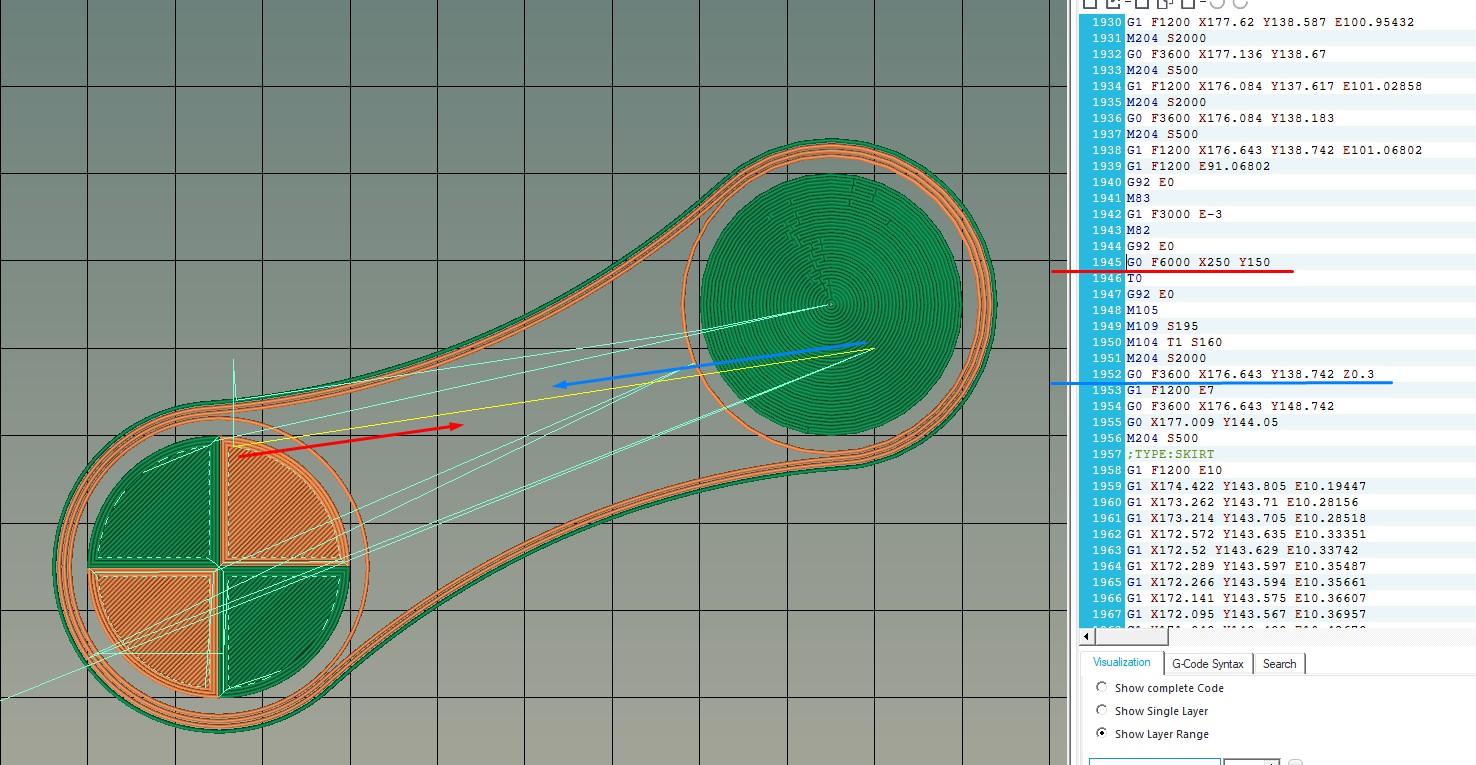
Is also happening in your g-code, after the M109, the extruder goes to the last printed position.
In the image bellow the extruder did not go back because it has to print the skirt, but during the remaing layers, it will always goes back to the print and then goes to the "Prime Tower" again.
Lines 1938 and 1952 has the same coordinates.
amagr0
on 20 Aug 2018
I have just realised that your setting of the extruder parameters above is wrong. You have:
https://user-images.githubusercontent.com/12901952/43321560-39ff3896-91a4-11e8-8c9a-9f04cc9f0fdd.jpg
But what you need is
    "overrides": {
        "machine_extruder_start_pos_abs": {"default_value": true},
        "machine_extruder_start_pos_x": {"default_value": 160},
        "machine_extruder_start_pos_y": {"default_value": 175},
        "machine_extruder_end_pos_x": {"default_value": 160},
        "machine_extruder_end_pos_y": {"default_value": 175},
        "extruder_nr": {
            "default_value": 0,
            "maximum_value": "7"
        }
    }
Your brackets are wrong!
smartavionics
on 20 Aug 2018
This is the complete code:
{
"id": "custom_extruder_1",
"version": 2,
"name": "Extruder 1",
"inherits": "fdmextruder",
"metadata": {
"machine": "custom",
"position": "0"
},
"overrides": {
        "machine_extruder_start_pos_abs": {"default_value": true},
        "machine_extruder_start_pos_x": {"default_value": 160},
        "machine_extruder_start_pos_y": {"default_value": 175},
        "machine_extruder_end_pos_x": {"default_value": 160},
        "machine_extruder_end_pos_y": {"default_value": 175},
        "extruder_nr": {
        "default_value": 0,
        "maximum_value": "7"
    }
}
}
Which is the bracket that is wrong?
amagr0
on 20 Aug 2018
That looks OK now but it isn't the same as what you showed above in the image in https://github.com/Ultimaker/Cura/issues/3451#issuecomment-408410705
smartavionics
on 20 Aug 2018
I assume that you have similar overrides for the other extruder?
smartavionics
on 20 Aug 2018
I don't know what is going wrong but I got it to print some diagnostics and the extruder start position absolute value is always false and those extruder start coordinates are all zero. So I don't think the above extruder overrides are working. Maybe those values are not saved in the project file?
smartavionics
on 20 Aug 2018
Hello @smartavionics, how can I also confirm that the overrides are working?
amagr0
on 21 Aug 2018
Sorry, I am not really familiar with how the configuration part of Cura functions. I think someone else like @BagelOrb or @Ghostkeeper could answer your question.
smartavionics
on 21 Aug 2018
Thanks again for your time @smartavionics .
amagr0
on 21 Aug 2018
extruder_nr doesn't have a closing bracket.
BagelOrb
on 21 Aug 2018
Your spacing conventions don't follow the same as our .def.json files. If you put { always on a new line and at the same indentation level as the '}' you can see very easily if you did something wrong. That's why we do it that way.
BagelOrb
on 21 Aug 2018
Hello @BagelOrb thanks for your attention.
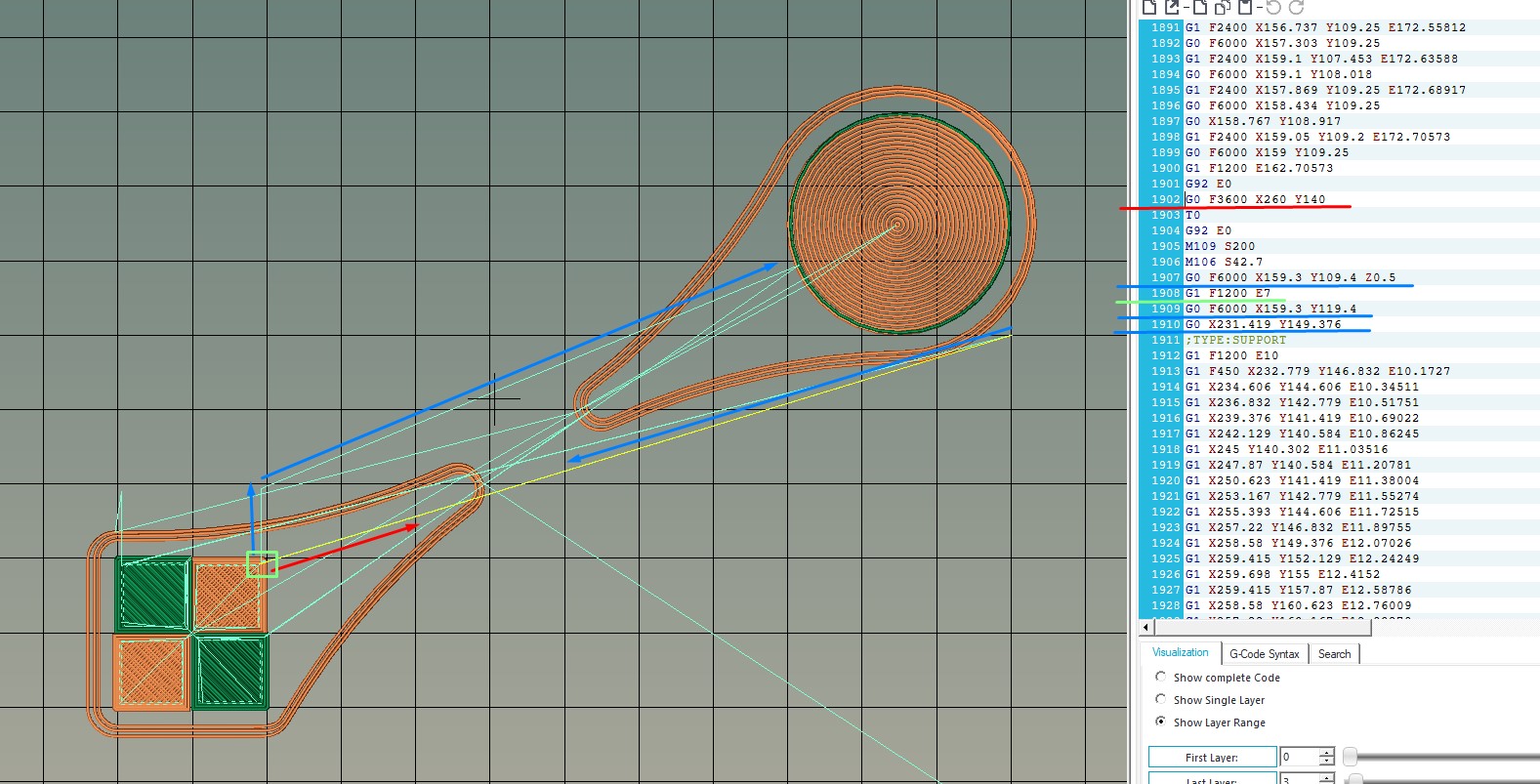
I did a Cura 3.4.1 clean install, modify custom extruders 1 and 2 files, and nothing really happens.
I generate a gcode without the modifications, and another with custom extruders mods, and both are the same.
In the image below you can see what is still happening.
I send in attachment the CuraProject, the custom extruders files, and the gcodes with and without the @Ghostkeeper suggestions.
Really appreciate your help.
amagr0
on 21 Aug 2018
Hello @fieldOfView, since the suggestions by the @Ghostkeeper did not solve what I describe in the issue, I tried to use your PrinterSettings Plugin and select the "Absolut Extruder Prime Position" checkbox, but unfortunately the results remains the same, as you can see in the image below.

Could you please confirm that you also have this issue?
Thanks
amagr0
on 14 Sep 2018
Resolved on 3.5.1!
Now this issue is officially closed ;)
amagr0
on 19 Oct 2018
Could you tell me how to do this now? I don't see anything in the regular settings for head position - are we to modify the printer definitions, or use start/end gcode...?
I started over with clean definitions (CR-10s and added extruder), right now the transition happens on a small first layer island which melts the part and takes it with the extruder when it moves.
AbeFM
on 20 Oct 2018
Related issues
 StanislavJochman
·
3Comments
StanislavJochman
·
3Comments
 jornada812
·
3Comments
jornada812
·
3Comments
 jellewie
·
3Comments
jellewie
·
3Comments
 muhammadelmogy
·
3Comments
muhammadelmogy
·
3Comments
 DmitryBychkov
·
3Comments
DmitryBychkov
·
3Comments