Cura: [3.2.1] Cura not sending to Octoprint
Application Version
3.2.1
Platform
Windows 10
Qt
PyQt
Display Driver
Steps to Reproduce
Slice an object in Cura and send to Octoprint
Actual Results
The Ocotprint side panel opens as if the print was sent, but nothing happens.
if you got to the Ocotprint web console you can see that no gcode file or any other file has been sent.
Expected results
a gocode file should be sent to Octoprint and it should begin printing
Additional Information
 rcg4
rcg4
All 17 comments
The log contains nothing that would suggest something went wrong with the octoprint connection.
Have you checked the "Store G-code on the printer SD card" checkbox in the Connect to OctoPrint dialog? If so, uncheck it and try again. Saving g-code to the printer SD Card through octoprint can take extremely lon (about as long as the print, depending on the complexity of the gcode).
 fieldOfView
on 24 Feb 2018
fieldOfView
on 24 Feb 2018
Thanks, I will check to see if I have that selected.
On Feb 24, 2018 1:36 AM, "Aldo Hoeben" notifications@github.com wrote:
The log contains nothing that would suggest something went wrong with the
octoprint connection.Have you checked the "Store G-code on the printer SD card" checkbox in the
Connect to OctoPrint dialog? If so, uncheck it and try again. Saving g-code
to the printer SD Card through octoprint can take extremely lon (about as
long as the print, depending on the complexity of the gcode).—
You are receiving this because you authored the thread.
Reply to this email directly, view it on GitHub
https://github.com/Ultimaker/Cura/issues/3389#issuecomment-368204990,
or mute the thread
https://github.com/notifications/unsubscribe-auth/AjE6AF9A-KrCR7qTCD8wHe9yMSZTcimuks5tX63TgaJpZM4SRtC0
.
rcg4
on 24 Feb 2018
I have same issue. in the printer manu there is no option to connect to Octoprint.
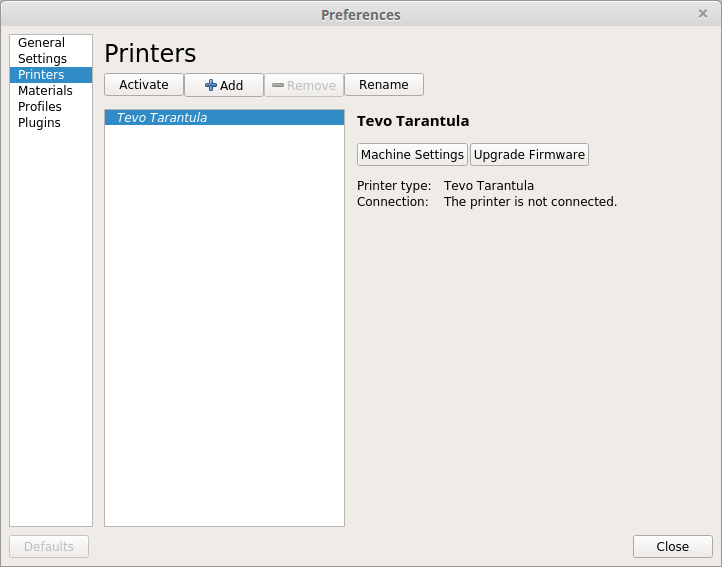
this is a screenshot of [3.2.1]
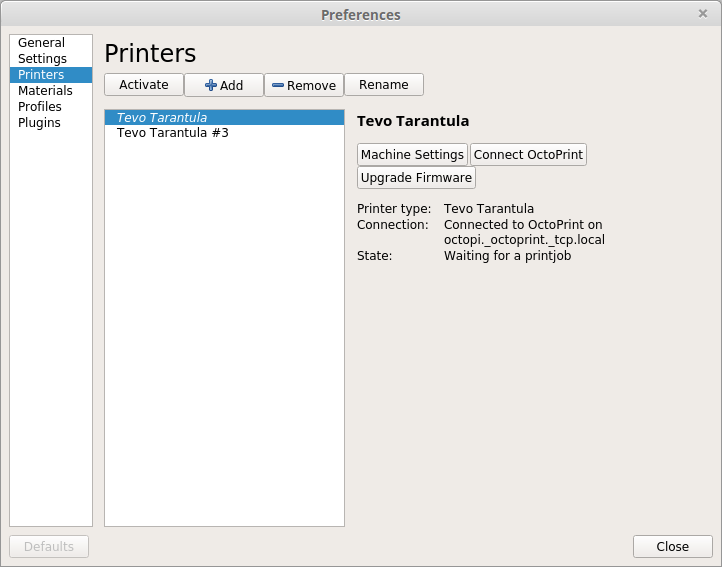
this is a screenshot of [3.1.0]
 oferfrid
on 26 Feb 2018
oferfrid
on 26 Feb 2018
Hello, did you just update to3.2.1? I found in my case that I had to add
the octoprint plugin again after the update, but even then, my prints do
not send to octoprint. I have found a check box - send print immediately
(I think that is the name) this is not checked, so I will try this next.
On Feb 26, 2018 10:53 AM, "Ofer Fridman" notifications@github.com wrote:
I have same issue. in the printer manu there is no option to connect to
Octoprint.
[image: screenshot from 2018-02-26 16 49 29]
https://user-images.githubusercontent.com/572224/36680092-8324606c-1b1d-11e8-82e6-beffa51cb53c.png
this is a screenshot of [3.2.1][image: screenshot from 2018-02-26 16 53 52]
https://user-images.githubusercontent.com/572224/36680221-d429e87e-1b1d-11e8-9f7f-77492b2285c1.png
this is a screenshot of [3.1.0]—
You are receiving this because you authored the thread.
Reply to this email directly, view it on GitHub
https://github.com/Ultimaker/Cura/issues/3389#issuecomment-368548546,
or mute the thread
https://github.com/notifications/unsubscribe-auth/AjE6AHdo8yu9buUJ-FDS80pt3FhR-ayAks5tYtNhgaJpZM4SRtC0
.
rcg4
on 26 Feb 2018
+1 on this. Having the same issue. Print with OctoPrint button is entirely non-functional.
Related commit? https://github.com/Ultimaker/Cura/commit/8cd943949792152796859b55b84b56afeb2fc68f
 alancnet
on 14 Mar 2018
alancnet
on 14 Mar 2018
You need to install the plugin from the plugin browser. This was announced in the 3.2 release. The button shouldn't appear though if the plugin is not installed.
 ChrisTerBeke
on 14 Mar 2018
ChrisTerBeke
on 14 Mar 2018
Hello,
First you must install the plugin !!
But since V3.2.1, i need config every time my printer with the Octopi API N° before each print.
Before not ! (Cura 3.1.0)
Certaily a plugin Bug !
Excusez mon mauvais anglais !!
Bye
 Leogenie
on 20 Mar 2018
Leogenie
on 20 Mar 2018
@Leogenie could you please post your cura.log somewhere so I can have a look? What OS do you use?
fieldOfView
on 20 Mar 2018
Windows 10
I send you log this evening.
YannPhone
Le 20 mars 2018 à 10:28, Aldo Hoeben notifications@github.com a écrit :
@Leogenie could you please post your cura.log somewhere so I can have a look? What OS do you use?
—
You are receiving this because you were mentioned.
Reply to this email directly, view it on GitHub, or mute the thread.
Leogenie
on 20 Mar 2018
Hello,
Windows 10 64 Pro.
No bug with new project and stl file.
Bug when open saved „.curaproject.3mf“ with the same printer and octoprint.
Can’t say if the files are 3.1 or 3.2 curaproject file at the origin ??
I have the habit, open curaproject.3mf who have at past good printed, and change the stl file.
Then i have this bug, and i must config API file in cura, then it’s OK.
I can just say that this bug is new ! Not this problem in cura 3.1.
Sorry, no cura.log file found.
Yannick
Leogenie
on 20 Mar 2018
For future reference, cura.log is located in your Configuration folder. See Help -> Show Configuration folder.
What happening is that the API key is normally stored in the cura.cfg file along with the rest of the preferences. A project contains a copy of all preferences, but the octoprint API key is omitted because you don't want to spread your octoprint API key when you send your curaproject to someone. Unfortunately when loading in that project, this resets the API key to nothing.
I will try to fix this for Cura 3.3.
fieldOfView
on 20 Mar 2018
Hello,
Tanks for your answere.
Happy that you find the source of the trouble.
This problem does’t exist in cura 3.1 or i did’t detect it.
Good job.
Tanks for this exelent Soft.
Yannick
Leogenie
on 20 Mar 2018
Hi
I do have the same issue and also Cura crashes if I want to change either the "Show webcam image" or the "Automacaly start..." setting.
So if I want to use the addtional features of 3.2.1 than the only solution is:
- store the gcode on my pc
- upload it manualy via the GUI to the Octoprint server
- start the the print manualy from the Octoprint GUI
Until we have a fix for the plugin.
Am I right?
Many thanks for the help.
Dario
 dario0766
on 22 Mar 2018
dario0766
on 22 Mar 2018
For future reference, cura.log is located in your Configuration folder. See Help -> Show Configuration folder.
What happening is that the API key is normally stored in the cura.cfg file along with the rest of the preferences. A project contains a copy of all preferences, but the octoprint API key is omitted because you don't want to spread your octoprint API key when you send your curaproject to someone. Unfortunately when loading in that project, this resets the API key to nothing.
I will try to fix this for Cura 3.3.
I have the same issue . running 3.2.1 with manually installed octoprint plugin. i work a lot with projects and I stopped using OctoPrint API connection since it's just not working/stabe enough. Instead i Drag&Drop gcode.
 Thisismydigitalself
on 24 Mar 2018
Thisismydigitalself
on 24 Mar 2018
@dario0766 can you check if there is an updated version of the OctoPrint plugin available in the Plugin browser (Plugins -> Browse plugins...)? This sounds like an error that was fixed during the Cura 3.2 beta period. The current version of the OctoPrintPlugin is 3.2.2
fieldOfView
on 24 Mar 2018
For the record, 3.2.2 is the one I'm using.

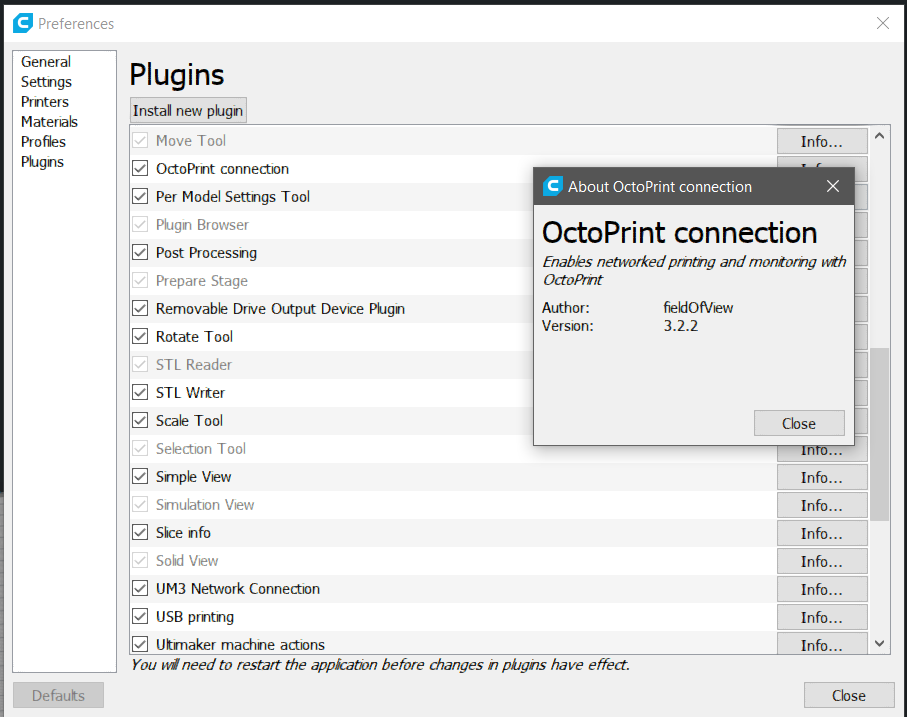
Thisismydigitalself
on 24 Mar 2018
Hi All
Many thanks for the help. The hint with the version lead to the solution.
Somehow I still had the OctoPrint plugin version 3.1. I could not change that, So I uninstalled Cura 3.2.1 and what did I see! The OctoPrint plugin folder was still left. I deleted the folder, reinstalled Cura and finaly the OctoPrint plugin 3.2.2 is there. :)
Again, many thanks!!
Cheers
Dario
dario0766
on 25 Mar 2018
Related issues
 timherrm
·
3Comments
timherrm
·
3Comments
 DmitryBychkov
·
3Comments
DmitryBychkov
·
3Comments
 probonopd
·
3Comments
probonopd
·
3Comments
 ferociousdiablo
·
3Comments
ferociousdiablo
·
3Comments
 mubarak111nsu
·
3Comments
mubarak111nsu
·
3Comments
Most helpful comment
Hello, did you just update to3.2.1? I found in my case that I had to add
the octoprint plugin again after the update, but even then, my prints do
not send to octoprint. I have found a check box - send print immediately
(I think that is the name) this is not checked, so I will try this next.
On Feb 26, 2018 10:53 AM, "Ofer Fridman" notifications@github.com wrote: