Cura: moving without sense to X0Y0 when dual extruding support

Cura 3.1.0. If support is set to extruder2 then move below X0Y0 occurs, causing in my case crash and skipping steps. Happening in different settings variations (support, skirt, brim extruder2 select). Should be easy to reproduce.
Tested on two machine definitions, few stl files even different computer with fresh install.
G1 F2400 E14.0731
G1 F300 Z62.44
G0 F9000 X-17.9 Y0.00 Z62.44
;TIME_ELAPSED:52025.106791
;LAYER:311
M106 S102
G0 X-17.9 Y0.00 Z62.64
It seems like Cura adds extruder offset as absolute positioning into gcode between last layer where second extruder was used.
on cura 3.0.4 it's working fine. Maybe it is some way related to the problem with offset definition if extruder 2 enabled. #2963
 an-tech
All 11 comments
I also have the same problem.
But it happens to me with version 3.0.4 and with new 3.1
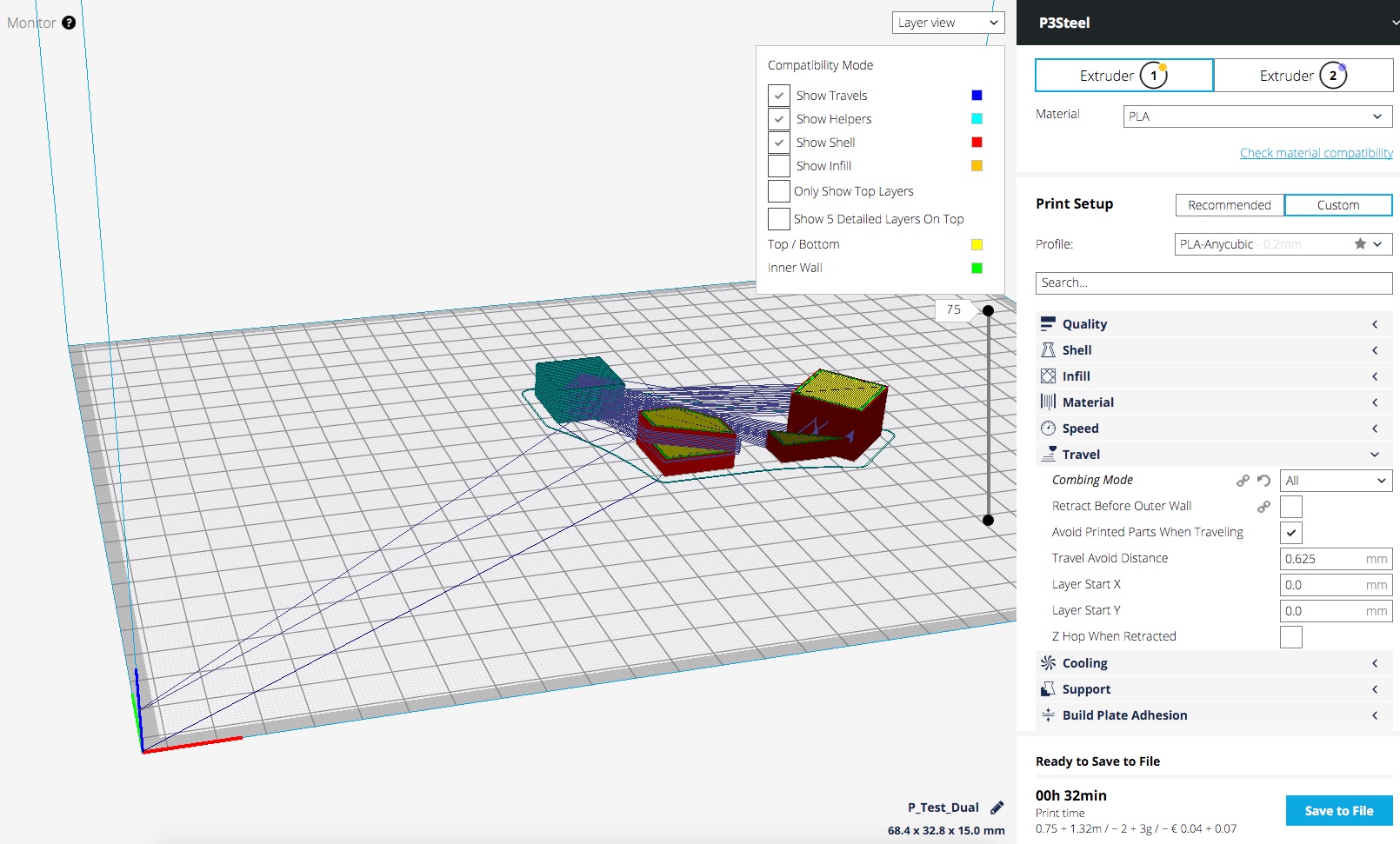
My printer is type Prusa Steel, with 2 extruder (Chimera type), with offset by firmware.
When slicer model dual, in one or several layers goes to the origin X0 Y0,... and then returns to the next position and continues.
 joseking
on 18 Dec 2017
joseking
on 18 Dec 2017
joseking
on 18 Dec 2017
I don't think it has anything to do with the nozzle offset problem you described there.
But I can't reproduce this.

There is one travel move from the starting position but nothing goes back.
Maybe it's still related to the machines you're using? Which printer are you using? I don't have any definition for Prusa Steel.
 Ghostkeeper
on 4 Jan 2018
Ghostkeeper
on 4 Jan 2018
It's happening on "custom fdm printer" profile in my case
an-tech
on 4 Jan 2018
I am also having this issue when slicing for dual extruder. Custom FDM Printer.
There are a number of moves that specify X0 Y0 in the GCode.
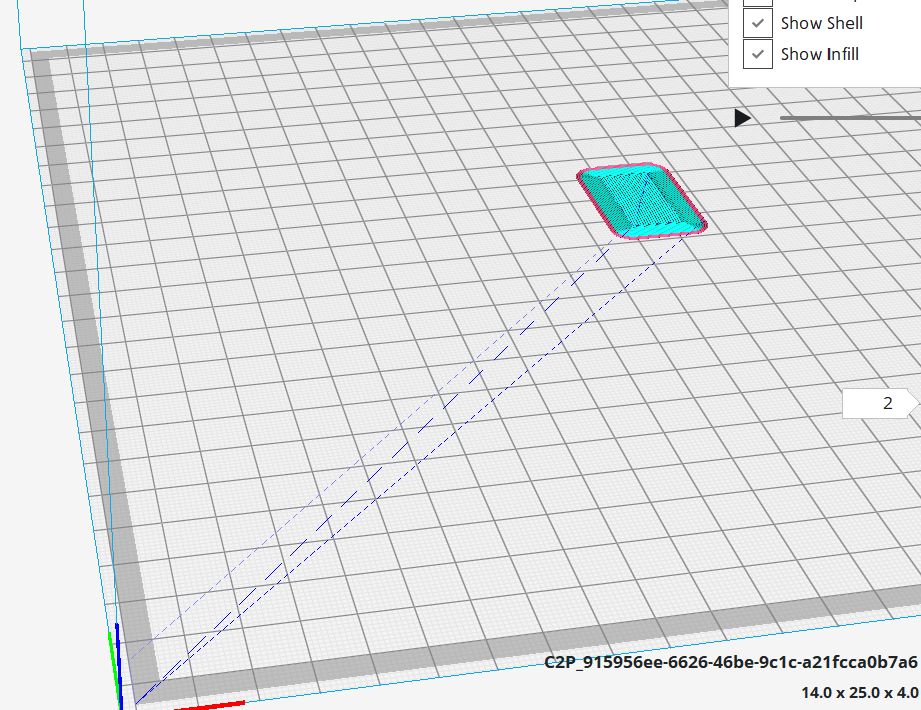
Looks like this in the GCode
>
G1 X147.16 Y130.211 E21.82927
G0 F3600 X0.00 Y0.00
;TIME_ELAPSED:88.944805
;LAYER:1
M140 S85
G1 F1500 E15.32927
M106 S255
M104 S230
G0 F5400 X0.00 Y0.00 Z0.36
G1 F1200 E5.82927
G92 E0
T1
G92 E0
M109 S225
M104 T0 S120
G0 F5400 X0.00 Y0.00 Z0.36
G1 F1200 E9.5
G0 F5400 X0.00 Y10
G0 X128.845 Y130.622
G0 X130.024 Y130.622
G0 X142.89 Y154.488
G0 X142.96 Y154.558
;TYPE:WALL-INNER
 JorgenLindell
on 7 Jan 2018
JorgenLindell
on 7 Jan 2018
I have exactly the same problem as described above. Problem happens with Cura 3.04 and 3.2.
The problem occurs when printing an object with two extruders at the first layer, where only one extruder is active. Say, you print an inner ring with 3mm height from extruder 1 and an outer ring with 2 mm height from extruder 2. Then you will see the strange motion between the last layer of outer ring and the first layer with only one extruder (i.e. between Z2 and Z2.1).
The problem is visible in the G-Code:
G0 X92.833 Y96.421
G0 X92.8 Y96.392
G0 X-16.5 Y0.00 <--- Problem: negative X coodinate
;TIME_ELAPSED:416.724787
;LAYER:24
G0 X-16.5 Y0.00 Z5.1 <--- Problem: negative X coordinate
G1 F1200 E3.02209
G92 E0
T0
G92 E0
M109 S240
M104 T1 S120
G1 F1200 E9.5
G0 F7200 X16.5 Y0.00 Z5.1 <--- Well, not really a big problem, but unnecessary travel
G0 X126.508 Y95.442
G0 X127.498 Y96.257
G0 X127.958 Y96.324
If you look at "normal" extruder changes, i.e. extruder changes which do not occur on the last dual-layer, they look different:
G1 F1800 X125.697 Y99.822 E34.65389
G0 F7200 X125.894 Y99.88
G1 F1200 E18.65389
G92 E0
T1
G92 E0
M109 S205
M104 T0 S240
G1 F1200 E9.5
G0 F7200 X94.489 Y100.357 Z3.7
G0 X94.767 Y100.249
M104 S215
;TYPE:SUPPORT
G1 F1500 E16
G1 F1182.5 X94.646 Y100.658 E16.01419
G1 X94.642 Y100.668 E16.01454
 schneehorn
on 15 Feb 2018
schneehorn
on 15 Feb 2018
I have to slightly correct my previous post. My current hypothesis is: this error occurs, if a change of extruder coincides with a layer change. Usually, Cura switches between the extruders in the middle of layers, there is no switching between extruders on layer changes. However, in some circumstances - e.g. as described above, if the next layer does not use the extruder which is currently in use - there are extruder changes at the same time as layer changes. My current hypothesis is that these trigger the weird motions.
Actually, these weird motions are a serious problem for me, as the printer head moves out of the admissible area (negative coordinate) and thus looses ticks. Hence, the next layer is shifted (in my case by roughly 14 mm) and the entire workpiece is not usable...
schneehorn
on 16 Feb 2018
This seems to be a duplicate of #2433 and #690.
Ghostkeeper
on 8 Mar 2018
It is quite sad that this issue is just closed without any further attention.
As I mentioned before, it is a serious problem, since it results in a unusable workpiece. Reading the other posts, there seems to be no workaround. Right now, the only option for using Cura with the dual head printer is to manually edit the erroneous lines in the gcode.
schneehorn
on 13 Mar 2018
I second scheehorns comment. Cura is currently unusable for dual extruder prints.
JorgenLindell
on 13 Mar 2018
Yes, but issue https://github.com/Ultimaker/Cura/issues/2433 is not closed. Please continue discussion there. We can keep the discussion in one place then.
Ghostkeeper
on 12 Apr 2018
Related issues
 probonopd
·
3Comments
probonopd
·
3Comments
 ferociousdiablo
·
3Comments
ferociousdiablo
·
3Comments
 DamianSepczuk
·
3Comments
DamianSepczuk
·
3Comments
 jellewie
·
3Comments
jellewie
·
3Comments
 StanislavJochman
·
3Comments
StanislavJochman
·
3Comments