Cura: Material settings not applied to Print Setup
After choosing a profile which includes a printing temperature setting of 235 degrees C, I then select a material from my custom material list whose print settings include a default print temperature of 225 degrees C. This seems to have no effect on the temperature settings for slicing as the front page of Cura is still showing print temperatures at 235. I would expect that applying a new material to the setup would also apply the settings of that material.
(Noticed this in 2.6.x as well.)
Thanks!
 DorJamJr
All 14 comments
What you set in the sidebar, either by typing it in or by selecting a quality profile always overrides what is set by the printer definition or by the material. This is by design, but the UI could do a better job to convey the design.
 fieldOfView
on 10 Aug 2017
fieldOfView
on 10 Aug 2017
Hi Aldo,
Thanks for the quick response.
So is the temperature that is saved with the material just a reference then? I can certainly understand that if I change a sidebar temperature after I have selected the material, that the sidebar temperature must take precedence. But wouldn’t it make sense that immediately following the change of the material (the material having a different temperature than the original sidebar temperature), the sidebar should take on the temperature of the material? The user could then, of course, change the sidebar temp to whatever is desired.
Having the temperature stored with the material is a powerful feature, which would be even more useful if it was applied to the sidebar when the material was selected.
Again, thanks for your quick response and a great program.
Jim
On Aug 9, 2017, at 11:34 PM, Aldo Hoeben notifications@github.com wrote:
What you set in the sidebar, either by typing it in or by selecting a quality profile always overrides what is set by the printer definition or by the material. This is by design, but the UI could do a better job to convey the design.
—
You are receiving this because you authored the thread.
Reply to this email directly, view it on GitHub https://github.com/Ultimaker/Cura/issues/2235#issuecomment-321455256, or mute the thread https://github.com/notifications/unsubscribe-auth/AK9ak8xEo6ZjguHxwnZL_vdDfVYtbCb0ks5sWpZugaJpZM4OyyVw.
DorJamJr
on 10 Aug 2017
Perhaps my question should have been... Is there a way to apply a material temperature to the sidebar, or is the material temperature for reference only?
Sent from my iPad
On Aug 9, 2017, at 11:34 PM, Aldo Hoeben notifications@github.com wrote:
What you set in the sidebar, either by typing it in or by selecting a quality profile always overrides what is set by the printer definition or by the material. This is by design, but the UI could do a better job to convey the design.
—
You are receiving this because you authored the thread.
Reply to this email directly, view it on GitHub, or mute the thread.
DorJamJr
on 10 Aug 2017
So is the temperature that is saved with the material just a reference then?
That temperature is used when there is no temperature set in the sidebar or in the profile. Unfortunately once a temperature is set in a profile, there is no easy way to remove it. That could do with some UX rework/rethinking.
Note that there can be values for all of the settings in different "levels":
- Printer type ("definition")
- Machine settings ("definition_changes")
- Nozzle type ("variant", not all printers have variants)
- Material ("material")
- Default profiles ("quality")
- User-generated profiles ("quality_changes")
- Current settings that are not yet in a profile ("user")
A value for a setting further down this list always overrides a value further up in the list. The order in which the values are set does not matter.
fieldOfView
on 10 Aug 2017
For this reason we've more recently been making quality profiles that say "take whatever the material temperature is and add 5 degrees", instead of a fixed number. Quality profiles often have a temperature set in them because when printing at greater speeds with higher filament flow you typically want to use a slightly higher temperature than when printing at lower speeds.
There is a way to make it use the temperature in the material profile: Click on the _i_ icon next to the printing temperature setting.
 Ghostkeeper
on 24 Aug 2017
Ghostkeeper
on 24 Aug 2017
Old issue, and seems to have a possible fix. Closing until re-appears.
 ChrisTerBeke
on 2 Mar 2018
ChrisTerBeke
on 2 Mar 2018
There is a way to make it use the temperature in the material profile: Click on the _i_ icon next to the printing temperature setting.
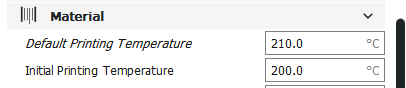
Having the same problem.
I can't see that _i_ icon.
I don't think this is fixed...
 dartrax
on 26 Jan 2019
dartrax
on 26 Jan 2019
Yup, this is quite ridiculous.
 yhaiovyi
on 2 Feb 2019
yhaiovyi
on 2 Feb 2019
Which set-up are you using? Which:
- Printer
- Nozzle
- Material
- Quality level
In other words, how do I reproduce your problem?
Ghostkeeper
on 4 Feb 2019
So the point is that entire material settings section must be separated from the printer settings.
yhaiovyi
on 5 Feb 2019
That's not the point of this bug report. Please create a new ticket for it if you think there is a bug there. It's also impossible. Different materials also require changing other settings than just the ones in the material category. Like, for flexible materials you typically want to choose a different infill pattern, like Cross 3D. Or you need a more stringent support angle for hot materials.
The issue that Dartrax was seeing is most likely a problem in his printer's quality profile, so we may be able to fix it if we know which printer set-up he has.
Ghostkeeper
on 6 Feb 2019
Hi Ghostkeeper, thanks for looking into it.
My Print profile in Cura 4.0.0:
- Printer type = "Custom FFF Printer"
- Nozzle size = 0.4
- Materials = customized copy of "Generic PETG" and "Generic PLA"
- Quality level = customized copy of "Extra Fine"
My Print profile in Cura 3.5.1:
- Printer type = "Prusa i3"
- Nozzle size = 0.4
- Materials = customized copy of "Generic PETG" and "Generic PLA"
- Quality level = customized copy of "Extra Fine"
I've edited the quality profile with a text editor to remove the line
default_material_print_temperature = 210.0
in the File
%APPDATA%\cura\3.5\quality_changes\fdmextruder_%232_d-extra_fine.inst.cfg.
After restarting Cura, the property line is not italic anymore and the value changes when I change the material.
But as soon as I overwrite the temperature and save the profile, there is no possibility to go back to the calculated material settings value via the UI in both Versions of Cura.
dartrax
on 6 Feb 2019
I had a window pop up once when I changed the material that asked if I wanted to use the settings for this material. But that one time I didn't and it never pops up anymore. Why is it that the moderators always call these bugs "features" then try to explain how without giving a logical response?
 TJOBriens
on 18 Jul 2020
TJOBriens
on 18 Jul 2020
@TJOBriens In the preferences screen there is a drop-down that says "Default behaviour for changed setting values when switching to a different profile:" If you set that to "Always ask me this" then it should give you that screen again:
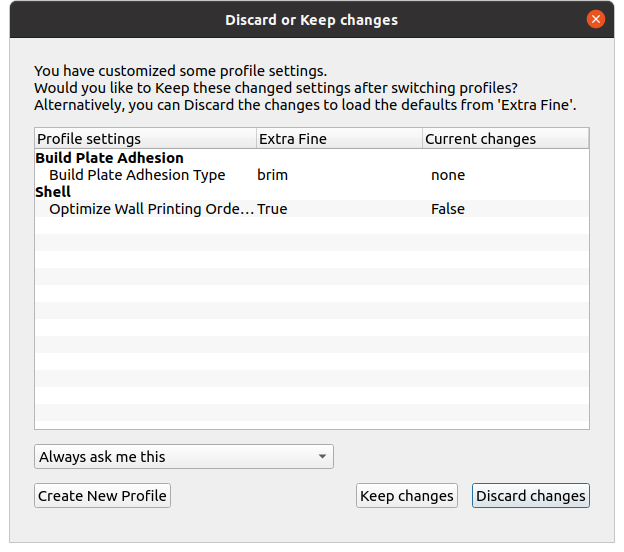
On the screen there is a drop-down too that allows you to change the same preference. Maybe you changed it there without realising what it does.
In different issues it's being discussed that we might need to change the wording of that screen to clarify better what's going on.
Ghostkeeper
on 21 Jul 2020
Related issues
 thopiekar
·
3Comments
thopiekar
·
3Comments
 probonopd
·
3Comments
probonopd
·
3Comments
 jornada812
·
3Comments
jornada812
·
3Comments
 mnswamp1
·
3Comments
mnswamp1
·
3Comments
 DmitryBychkov
·
3Comments
DmitryBychkov
·
3Comments