Cura: 2.6.2 nozzle temperature changes during print
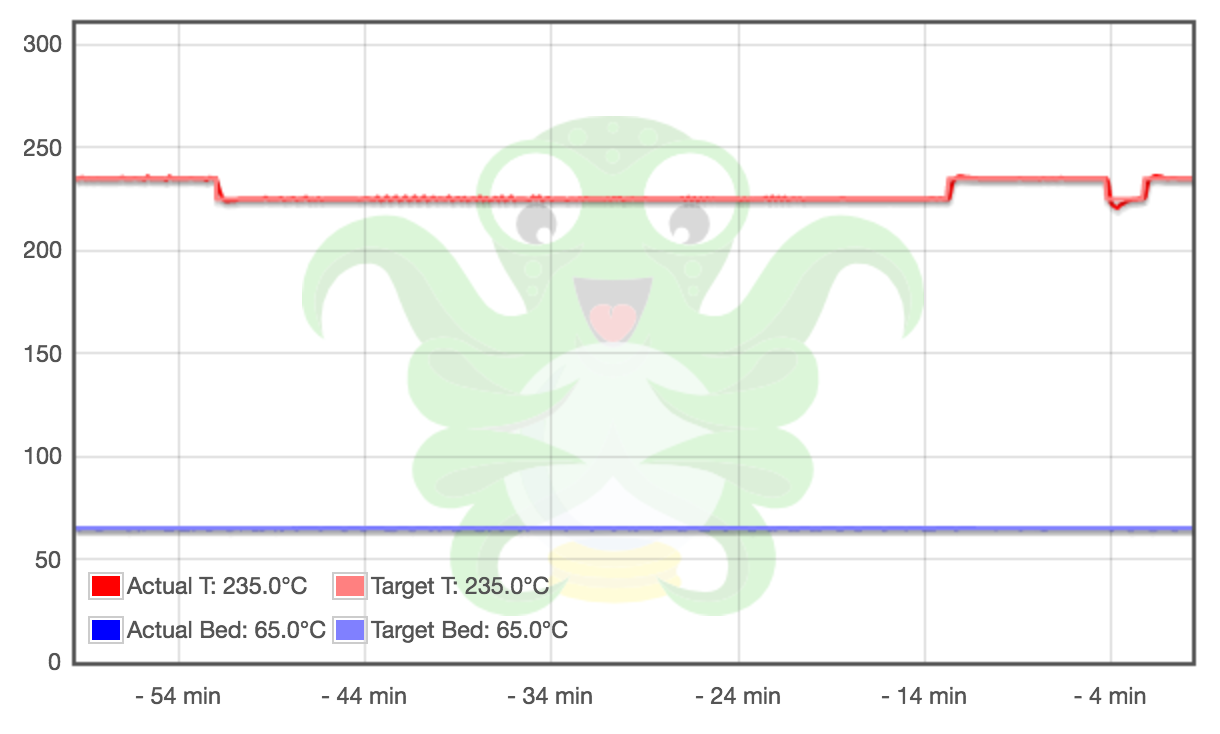
I have a profile configured with Material temperature 235 which results in Cura calculating the following temperature settings:
Default printing: 235
Printing: 235
Printing initial layer: 235
Initial printing: 225
Final printing: 220
In the final gcode (RepRap flavour) there are multiple temperature changes (between 235 and 225) and I can't figure out why Cura decides to place them there. Could this be a bug or is this expected behaviour (maybe something to do with material volume)?
Output Gcode is attached.
 aequitas
All 12 comments
IF this is a dual extrusion print it is a feature, otherwise it is a bug.
Is it a dual extrusiopn print?
 BagelOrb
on 21 Jul 2017
BagelOrb
on 21 Jul 2017
It's not a dual extrusion.
While investigating the issue I read about the feature you mention. I'm eager to try it out when I have configured a second extruder.
But for my current single setup I think this was a cause of under extrusion problems I was having (instead of my original assumption of a to low printing temperature).
I will try to replicate this gcode as I have not seen this behaviour consistently in other prints. I will come back with more examples and the source settings if I'm able.
aequitas
on 21 Jul 2017
I figured out which settings was responsible for this. When setting both retraction distance to 0mm and retraction speed to 0mm/s these temperature switches are introduced. Setting only retraction distance or speed shows normal behaviour.
Tested with a default profile and default PLA material settings, originally this issue surfaced for a TPE material setting which I accidentally left on for a PLA print, hence I did not encounter it more often.
GCODE files can be found here: https://gist.github.com/aequitas/c325abeecd7a8d637f037c075bcba8d9
What to look for:
~/Desktop $ grep M104 *3DBenchy-pla*
#3DBenchy-pla-draft-quality-retract-0mm-0mm:s.gcode:M104 S200
#3DBenchy-pla-draft-quality-retract-0mm-0mm:s.gcode:M104 S190
#3DBenchy-pla-draft-quality-retract-0mm-0mm:s.gcode:M104 S200
#3DBenchy-pla-draft-quality-retract-0mm-0mm:s.gcode:M104 S190
#3DBenchy-pla-draft-quality-retract-0mm-0mm:s.gcode:M104 S200
#3DBenchy-pla-draft-quality-retract-0mm-0mm:s.gcode:M104 S190
#3DBenchy-pla-draft-quality-retract-0mm-0mm:s.gcode:M104 S200
#3DBenchy-pla-draft-quality-retract-0mm-0mm:s.gcode:M104 S0

#3DBenchy-pla-draft-quality-retract-0mm.gcode:M104 S200
#3DBenchy-pla-draft-quality-retract-0mm.gcode:M104 S0

#3DBenchy-pla-draft-quality-retract-speed-0mm:s.gcode:M104 S200
#3DBenchy-pla-draft-quality-retract-speed-0mm:s.gcode:M104 S0

#3DBenchy-pla-draft-quality.gcode:M104 S200
#3DBenchy-pla-draft-quality.gcode:M104 S0
For me knowing the source resolves my problem as I know how to prevent it. Feel free to close this issue if it is not deemed a bug.
aequitas
on 21 Jul 2017
This still seems like quite a critical bug to me. Could you share the project file which caused the bug?
Are you even using the frontend to slice gcode? The end of the gcode doesn't have the settings attached.
What machine are you slicing for?
BagelOrb
on 23 Jul 2017
I uploaded the project and generated GCODE, for reference I also included the STL but its just the default Benchy. I tested another model and the problem shows there as well so no reason to assume it is related to the model.
I use the frontend on OSX, I used the Save to File as I though the direct print option (via Octiprint) did not include the metadata, but as it seems this neither then? All GCODE in this zip and in the previous sample where generated with the Save method, the first GCode I uploaded was downloaded from Octoprint after printing.
The machine I'm slicing for is a Geeetech G2s Delta with single extruder instead of the original dual and running latest Marlin. GCode flavour is Reprap (Marlin/Sprinter), no start/stop GCode and afaik I have no other Cura plugins installed.
If you need any more info that is not in the 3MF let me know.
aequitas
on 23 Jul 2017
Something is wrong with that link you posted or with its host, Amazon AWS. When I try to download it I just get an XML file saying that the payload wasn't signed.
 Ghostkeeper
on 24 Jul 2017
Ghostkeeper
on 24 Jul 2017
I can't reproduce this. I'm using Custom FDM Printer with the Reprap flavour and loaded up Benchy. I'm only getting the M104 S235.
Ghostkeeper
on 24 Jul 2017
I uploaded the file to this Github issue, didn't know Github was using amazon for some of its hosting. I can download the file just fine atm. Let me know if the problem persists for you and i'll try uploading another way.
aequitas
on 24 Jul 2017
The uploading issue was with Github using a redirect with quotes in it (") which was caught by NoScript as an XSS attack. Got myself a workaround...
Indeed, this problem reproduces for me now. Perhaps I didn't read the thread well enough previous time and didn't set those retraction settings. I can imagine that setting the retraction speed to 0 can cause some trouble here and there. Perhaps something is going wrong with the pre-heat predictions.
Ghostkeeper
on 31 Jul 2017
Good to hear you could work around it.
One thing I forgot to mention that I noticed as well is the input fields for extruder settings turn orange when entering the zero values. Don't know if that signifies a configuration warning or if its just a notification of a deviant value or something. I don't get that color when I enter other 'normal' values.
aequitas
on 31 Jul 2017
I've now disallowed a retraction speed of 0: f298c29d5f92d4c67a075492e1eb1a5c17c2ded7
This seems to be caused by a division of 0/0 (which is NaN) in computeNaiveTimeEstimates.
Ghostkeeper
on 31 Jul 2017
The yellow colour indicates a warning value, by the way. It means that we expect that the setting won't produce a nice print.
Ghostkeeper
on 15 Aug 2017
Related issues
 dstulken
·
3Comments
dstulken
·
3Comments
 StanislavJochman
·
3Comments
StanislavJochman
·
3Comments
 jornada812
·
3Comments
jornada812
·
3Comments
 JRRN
·
3Comments
JRRN
·
3Comments
 tomoinn
·
3Comments
tomoinn
·
3Comments