Cura: "Save to Removable Drive" (2.6.0/2.6.1/2.6.2)
CURA 2.6.0 / 2.6.1
Ulrimaker 2
No problem to save gcode to the SD CARD (R: Under my Windows 10 installation)
No problem to eject the SD CARD but CURA don't switch from "Save to Removable Drive" to "Save to File" as usual.
If the SD CARD is insert, CURA does not save on the SD card : must use "Save to File" to save the file on the SD CARD
No problem on previous versions since 15.x, 2.5, just with CURA 2.6.0/2.6.1
 darkdvd
All 17 comments
This is because for some reason the SD card is not detected as being a removable device for some reason. Does it also not work for thumbdrives?
 nallath
on 28 Jun 2017
nallath
on 28 Jun 2017
Same problem with thumbdrive
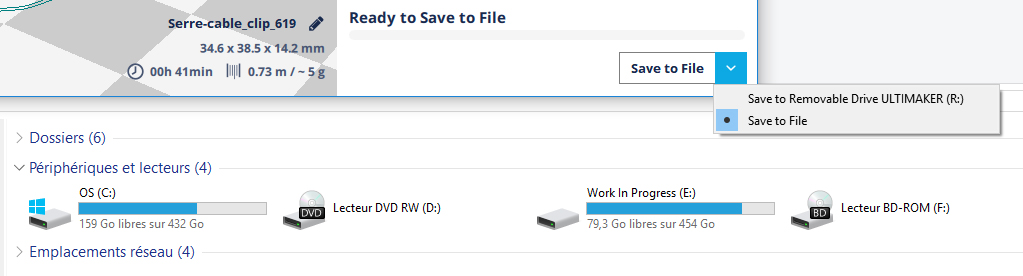
After the SD Card OR Thumbdrives is ejected from the system, CURA continue to propose it. see screen capture.
After the SD or Thumbdrives was ejected, if I insert a second time the SD or the Thumbdrives , I am unable to click to "Save to Removable Drive" : CURA does nothing
darkdvd
on 28 Jun 2017
When I first open 2.6.1 I can save my gcode to an SD card. If I leave the program open and want to make a change, I am unable to "save to removable drive", I have to "save to file".
Windows 10, Cura 2.6.1
 jrdiesel76
on 3 Jul 2017
jrdiesel76
on 3 Jul 2017
same here.
 rawdilz
on 3 Jul 2017
rawdilz
on 3 Jul 2017
Please mention your OS.
I have now seen this reported for both Windows 10 and OS X.
 fieldOfView
on 3 Jul 2017
fieldOfView
on 3 Jul 2017
See also this issue: https://github.com/Ultimaker/Cura/issues/2024
 Ghostkeeper
on 3 Jul 2017
Ghostkeeper
on 3 Jul 2017
bug is in CURA 2.6.0, 2.6.1 and 2.6.2
darkdvd
on 7 Jul 2017
In Linux Mint 18.2 Cura 2.6.2 see right SD card only on start .
If I change card, Cura does not see new card and offer to save file on the previous sd card.
 1nt
on 18 Jul 2017
1nt
on 18 Jul 2017
Just in case this is useful, I have noticed since upgrading to Windows 10 and Cura 2.6.2 (both at the same time), that after I eject the removable drive it doesn't disappear from Cura, and if I put a new one in, it doesn't seem to be detected.
Also, (and I know there's an issue #1602 for this) I used to get an error message "There is no disk in the drive. Please insert a disk into drive D:." if I started Cura with my USB card reader inserted, but without an SD card in it. I could click "continue" a couple of times and it would go away. Now, this message keeps reappearing until I insert a card, i.e. Cura won't start with an empty USB card reader connected. It may be that this last change in behaviour is a Windows 10 thing, but I thought I'd mention it in case it was relevant. After reading #1602 I suspect it's my USB dongle causing the issue, but I'll post this here anyway in case it helps someone.
I have checked with a USB stick, and the same detection issue applies - i.e. the "save to removable drive" option in Cura doesn't change to "save to file" after it's ejected. I think that probably rules out the card reader as the sole cause of the issue for me...
 rwb27
on 19 Jul 2017
rwb27
on 19 Jul 2017
1602 has already been fixed. That was a windows only issue.
nallath
on 20 Jul 2017
Great, thanks for pointing that out. I think I still have this issue though. I'll update my other machine (on Win 10 already, and with the save to removable drive thing working perfectly) to 2.6.2 and see if I can reproduce the issue.
rwb27
on 20 Jul 2017
Oh sorry, i wasn't quite clear; It's fixed for 2.7
nallath
on 20 Jul 2017
So "Save to Removable Drive" will be fixed in CURA 2.7 ? Right ?
darkdvd
on 20 Jul 2017
At least the message spam on windows is fixed. The other issue is not yet fixed, but we are looking into it. I hope to get it fixed as it's an issue that effects a lot of people.
nallath
on 20 Jul 2017
I just had this issue on a laptop with 2.7, running windows 10Prox64.
The laptop has an SD card slot, but no card in the slot.
Disabling the card slot in device manager allowed me to get past it.
But the issue is still there...
 MFHFozzy
on 31 Aug 2017
MFHFozzy
on 31 Aug 2017
Yeah, the same issue popped up but with a different reason this time. I'm sorry about all this. Now it only happens if the your SD card is in the D slot (My fix ensured that all other drives are now "safe")
nallath
on 31 Aug 2017
Old version of Cura, old ticket. Closing until problem resurfaces.
 ChrisTerBeke
on 28 Sep 2018
ChrisTerBeke
on 28 Sep 2018
Related issues
 jellewie
·
3Comments
jellewie
·
3Comments
 StanislavJochman
·
3Comments
StanislavJochman
·
3Comments
 jornada812
·
3Comments
jornada812
·
3Comments
 konvoj
·
3Comments
konvoj
·
3Comments
 mubarak111nsu
·
3Comments
mubarak111nsu
·
3Comments
Most helpful comment
bug is in CURA 2.6.0, 2.6.1 and 2.6.2