Cudatext: Access violation, "autocomplete_autoshow_chars": 3
While writing some python i get a pop up with this message:
Access violation.
Press OK to ignore and risk data corruption.
Press Abort to kill the program.

Doesn't matter if i click in OK or Abort button. The cudatext stops responding.
In the console output i get the following:
(cudatext:32704): Gtk-CRITICAL **: 10:21:20.543: IA__gtk_selection_owner_set: assertion 'widget == NULL || gtk_widget_get_realized (widget)' failed
[TGtk2WidgetSet.Destroy] WARNING: There are 9 unreleased DCs, a detailed dump follows:
[TGtk2WidgetSet.Destroy]  DCs:   00007F8D913A7240 00007F8DB8355840 00007F8DB8352840 00007F8DB8351440 00007F8DB8350E40 00007F8DB8351240 00007F8DB8351040
[TGtk2WidgetSet.Destroy] WARNING: There are 30 unreleased GDIObjects, a detailed dump follows:
[TGtk2WidgetSet.Destroy]   GDIOs: 00007F8DA8047440 00007F8D917DE6C0 00007F8D917DB5C0 00007F8DA8047BC0 00007F8DA8049BC0 00007F8D917D9C40 00007F8DA8047040
[TGtk2WidgetSet.Destroy]   gdiBitmap: 9
[TGtk2WidgetSet.Destroy]   gdiBrush: 5
[TGtk2WidgetSet.Destroy]   gdiFont: 9
[TGtk2WidgetSet.Destroy]   gdiPen: 5
[TGtk2WidgetSet.Destroy]   gdiRegion: 2
[TGtk2WidgetSet.Destroy] WARNING: There are 1 TimerInfo structures left, I'll free them
(cudatext:33368): Gtk-CRITICAL **: 10:23:22.902: IA__gtk_selection_owner_set: assertion 'widget == NULL || gtk_widget_get_realized (widget)' failed

(cudatext:33368): GLib-GObject-WARNING **: 10:23:35.215: gsignal.c:1207: no emission of signal "button-release-event" to stop for instance '0x204d910'

(cudatext:33368): GLib-GObject-WARNING **: 10:23:42.505: gsignal.c:1207: no emission of signal "button-release-event" to stop for instance '0x204d910'
Version:

 demanuel
All 15 comments
I need some reproduction steps for this error, please.
Does it happen on the clean Cud? or your settings file user.json is needed? If the latter, pls attach it.
 Alexey-T
on 5 Aug 2021
Alexey-T
on 5 Aug 2021
my user.json:
{
  "autocomplete_autoshow_chars": 3,
  "bracket_highlight": true,
  "caret_view" : "7,-100",
  "caret_view_ovr" : "-50,-50",
  "fold_style": 1,
  "font_ligatures" : false,
  "font_name__linux" : "Roboto Mono",
  "font_size__linux" : 10,
  "gutter_fold_always": false,
  "numbers_center": true,
  "numbers_for_carets": true,
  "numbers_show": true,
  "show_cur_line": true,
  "show_cur_line_minimal": true,
  "show_full_sel_bg": false,
  "show_full_syntax_bg": false,
  "show_mouse_sel_frame" : false,
  "smooth_scroll": false,
  "tab_spaces": false,
  "ui_one_instance": true,
  "ui_tab_disabled" : false,
  "ui_tab_flat" : true,
  "ui_tab_fullcolor" : false,
  "ui_tab_show" : true,
  "ui_tab_show_plus" : false,
  "ui_tab_switcher_dialog" : true,
  "ui_tab_x_rounded" : false,
  "ui_taskbar_mode__linux" : true,
  "ui_theme" : "",
  "ui_theme_syntax" : "",
  "ui_title_path" : true,
}
I have these plugins installed:
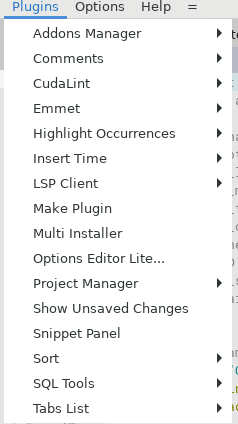
I'm on RHEL 7.9 with kernel: 3.10.0-1160.15.2.el7.x86_64
demanuel
on 5 Aug 2021
- This option
"autocomplete_autoshow_chars": 3,
together with LSP Client. It may give slow work.
- I have no repro yet...
- You have shown the Windows screenshot?
Alexey-T
on 5 Aug 2021
I will remove that option.
The cuda runs on RHEL. I'm connecting to the linux host via NX - it's similar as connecting to the linux box via ssh with X forwarding.
demanuel
on 5 Aug 2021
I made new binaries with debug info! 2 binaries (linux x64, win x64) are here, 30M file
http://uvviewsoft.com/c/
I hope they can show more details in the crash error message?
Alexey-T
on 5 Aug 2021
Thanks i will try them
demanuel
on 5 Aug 2021
Updated files in that same URL. added: if error is in parser, then no message, but file instead! cudatext.error in home-dir (near the cudatext.exe on Win).
so after a bug - look if this file exists or not.
Alexey-T
on 5 Aug 2021
I think it's because of the option "autocomplete_autoshow_chars": 3,.
If i enable it the cudatext (the oficial build) starts behaving weirdly. For example now it just froze, no error popup.

I'm trying to reproduce the issue now with the debug build.
demanuel
on 5 Aug 2021
@halfbrained Let's repeat this issue. See my above comment here - I posted debug exe.
Alexey-T
on 5 Aug 2021
With the debug version this appears in the output:
[FORMS.PP] ExceptionOccurred
Sender=EAccessViolation
Exception=Access violation
Stack trace:
$00007F02856F8588
$00007F02857013CF
But this is the case above (no popup).
EDIT: It seems to be the case. The autocompletion appears and the cudatext freezes. Second time in a row.
EDIT2: changing that option from user.json to the lexer seems to work without issues (but much slower) - but i need more tests.
demanuel
on 5 Aug 2021
Using debug binary.
Issue is reproducible - just typing import it will occasionally freeze.
In terminal on freeze appears similar stack trace as above. No other errors/dialogs.
commenting out ed.complete_alt(... in LSP-client "fixes" the issue
 halfbrained
on 6 Aug 2021
halfbrained
on 6 Aug 2021
Cannot see that freeze...
Alexey-T
on 6 Aug 2021
Just got the Access Violation pop up with the debug version, without the "autocomplete_autoshow_chars": 3 in the configurations.
The error message is the same:
[FORMS.PP] ExceptionOccurred
Sender=EAccessViolation
Exception=Access violation
Stack trace:
$00007FF1EAD56588
$00007FF1EAD5F3C
demanuel
on 6 Aug 2021
I found the reproduction. fixed! Pls take new beta from http://uvviewsoft.com/c/ (in zip - only binary).
Alexey-T
on 6 Aug 2021
(To repro- we must press Space in the completion listbox).
Alexey-T
on 6 Aug 2021
Related issues
Alexey-T
·
7Comments
 JairoMartinezA
·
7Comments
Alexey-T
·
5Comments
Alexey-T
·
3Comments
JairoMartinezA
·
5Comments
JairoMartinezA
·
7Comments
Alexey-T
·
5Comments
Alexey-T
·
3Comments
JairoMartinezA
·
5Comments