Cudatext: Highlight all matches, Ctlr+F and disable autoscrolling
Hi @Alexey-T,
Let's imagine we have code like that:
func1(data):
    code...
    code...
    data
    code...

func2(data):
    code...
    data
    code...
    code...
The func1 and func2 functions are big and placed on different screens. Once, working with func2, I decide to check how often the data variable is used within func2. Then I perform:
- Double-click on the data word
- Press Ctr+F
I always have highlight all matches option enables, so I'm just expecting to see rectangles around the data word, nothing more. But CT scrolls the screen up to first match, i.e. in func1. If you compare it with ST, it will not scroll after pressing Ctrl+F. Is it possible in CT to have an option (not mandatory behaviour) not to scroll for the first match after pressing Ctrl+F (same as in CT) if the option highlight all matches is enabled?
 xcme
xcme
All 13 comments
But ST moves caret/scroll to the 1st found match in Hi-all mode. you tell it does not. maybe it does not, only if current view-area has some of found matches? so logic is: if current view-area has one of mathes, do not scroll?
 Alexey-T
on 20 May 2021
Alexey-T
on 20 May 2021
try this file
bb
zz


aa
bb


aa
bb


aa
bb


aa
bb


aa
bb
kk
and this ST window size
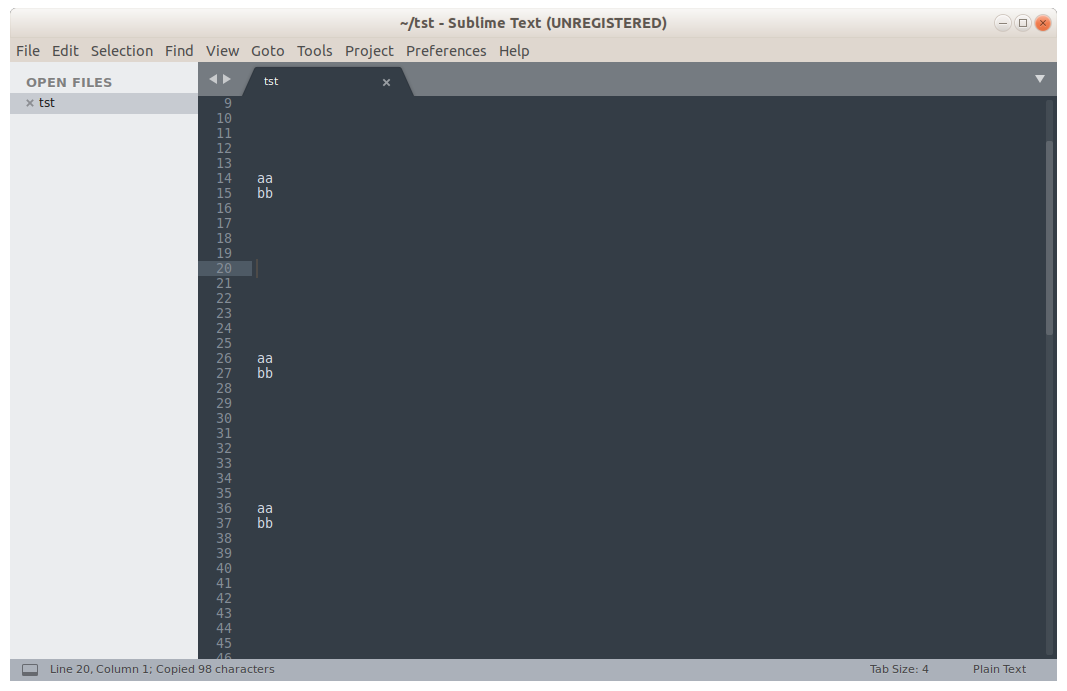
1-- if I type "z" ST does NOT scroll to up
2-- if I type "k" ST does scroll down
maybe logic is: scroll ONLY down, not up?
Alexey-T
on 20 May 2021
1-- if I type "z" ST does NOT scroll to up
2-- if I type "k" ST does scroll down
I have 3.2.2 build 3211 and with the same text it scrolls the visible area in both direction as for "z" as for "k" as well
if current view-area has one of mathes, do not scroll?
Seems, yes. I'm OK with that logic, so if it has something to highlight in the visible area in doesn't scroll, otherwise it scrolls the area.
It doesn't scroll for "a" and "b" but scrolls for "z" and "k" in my case. It would be great to have an option to enable the same feature in CT :)
xcme
on 21 May 2021
@halfbrained @jairomartineza Do you confirm my idea about Sublime logic? Or do you confirm @xcme idea?
Alexey-T
on 22 May 2021
about this?
1-- if I type "z" ST does NOT scroll to up
Shouldn't this be on the 'wrapped search' option? - If 'on' - scroll to "z", 'off' - don't scroll. Basically just scroll to the first occurrence, but from the cursor position
And the idea in general - I think is a good one
 halfbrained
on 22 May 2021
halfbrained
on 22 May 2021
'wrapped search' option
Yes!
@Alexey-T, I tested with/w/o this options and it depends. If I disable it I see the same behavior as you described. I mean it doesn't scroll up to "z".
xcme
on 22 May 2021
OK, made work on it. will be in next beta.
Alexey-T
on 22 May 2021
beta updated! folder /c.
Alexey-T
on 22 May 2021
Works well.
Is there a way to change to highlight color? Green is almost invisible on my theme.
halfbrained
on 23 May 2021
This green is taken from the syntax theme- so yes
Alexey-T
on 23 May 2021
Found - "SeparLine", thanks. I was looking for something "search"-related in color names :)
halfbrained
on 23 May 2021
@xcme I hope now it is OK.
Alexey-T
on 24 May 2021
problem found with this patch, #3422.
reverting some part of this...
Alexey-T
on 1 Jun 2021
Related issues
Alexey-T
·
4Comments
xcme
·
5Comments
Alexey-T
·
4Comments
Alexey-T
·
5Comments
 jczanfona
·
5Comments
jczanfona
·
5Comments
Most helpful comment
about this?
Shouldn't this be on the 'wrapped search' option? - If 'on' - scroll to "z", 'off' - don't scroll. Basically just scroll to the first occurrence, but from the cursor position
And the idea in general - I think is a good one