Cudatext: CT failed to restore 'last'/'saved' session
CT failed to save/restore 'last' session as well as 'saved' session which was same with the 'last' one. It could not open them during the start of CT!
After starting, saved session displayed just empty groups of single tab. Only the number of groups is OK. All tabs are gone!!! Which means that session store/restore operation is not reliable at all!!!
This is a very serious operational matter!
 GHNewbiee
All 51 comments
- What OS, Cud version?
- can you try to open from "Session Manager" plugin the file "settings/history session.json"?
- is this file empty (almost empty)?
- how do you start Cud (click on icon, terminal, from TotalCommander)?
 Alexey-T
on 1 Feb 2021
Alexey-T
on 1 Feb 2021
And it may be - you run Cud with commnd-line param, and had
"ui_reopen_session_cmdline":false
in user.json
Alexey-T
on 1 Feb 2021
* What OS, Cud version?OS: LinuxMint 20.1, CT: 1.123.0.6 (btw, in 'Help' -> 'About...' version cannot be copied; I had to go to 'Help' -> 'Check for updates' to copy the version)
* can you try to open from "Session Manager" plugin the file "settings/history session.json"?

* is this file empty (almost empty)?
No, it is not; it includes most probably the last session I lost or an older one, I cannot remember.
* how do you start Cud (click on icon, terminal, from TotalCommander)?Always from icon!
Very important note: History session includes file that does not exist any longer. Does it play any role why the session cannot be opened or is not restored?
GHNewbiee
on 1 Feb 2021
And it may be - you run Cud with commnd-line param, and had
"ui_reopen_session_cmdline":false
in user.json
No, negative.
GHNewbiee
on 1 Feb 2021
History session includes file that does not exist any longer. Does it play any role why the session cannot be opened or is not restored?
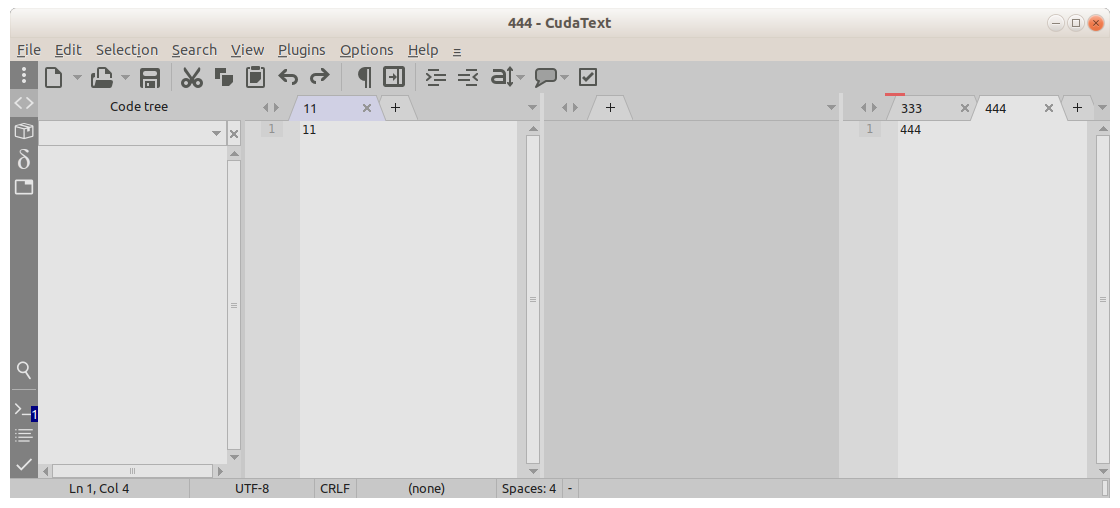
if one file was removed, only this file must be missed in session!
here I deleted file '222' in group-2, reopened Cud: files 111, 333, 444 are here.
Alexey-T
on 1 Feb 2021
So, missing/deleted file has not caused the problem.
GHNewbiee
on 1 Feb 2021
Can you try to open from "Session Manager" plugin the file "settings/history session.json"?
Alexey-T
on 1 Feb 2021
Can you try to open from "Session Manager" plugin the file "settings/history session.json"?
Oups! Now, it is different than before! Now lost everything! In addition, I do not also see a file like "previous session" (if I remember correct)!
GHNewbiee
on 1 Feb 2021
You said that 'history session.json' isnt empty so I suggested that.
maybe see files .json (.cuda-session) in settings/ folder, some is maybe OK.
if session file is lost, I need 'reproduction steps', pls.
or 'error message' in Cud's console panel (bottom).
Alexey-T
on 1 Feb 2021
You said that 'history session.json' isnt empty so I suggested that.
No, it is not empty. But now, it is very short:
{
  "groups" : 1,
  "gr" : {
    "panel" : "0,0",
    "pages" : "100,100,0,0,0,0,0,0,0,0,0,0,"
  },
  "tab_index" : {
    "g0" : 0,
    "g1" : 0,
    "g2" : 0,
    "g3" : 0,
    "g4" : 0,
    "g5" : 0,
    "g_active" : 0
  },
  "panels" : {
    "side_show" : false,
    "side_panel" : "Project",
    "side_size" : 247,
    "bottom_show" : false,
    "bottom_panel" : "",
    "bottom_size" : 200
  },
  "000" : {
    "modified" : false,
    "file" : "~/.config/cudatext/settings/history session.json",
    "group" : 1,
    "kind" : "",
    "lexer" : "JSON",
    "enc" : "UTF-8",
    "ruler" : true,
    "tab_size" : 2,
    "tab_spaces" : true,
    "crt" : "0,0,-1,-1,"
  }
}
Before it was totally different!
maybe see files _.json (_.cuda-session) in settings/ folder, some is maybe OK.
if session file is lost, I need 'reproduction steps', pls.
Session file was finally saved because I saw it; it did not get lost because it was there; but it was not restored for some reason.
or 'error message' in Cud's console panel (bottom).
I was surprised; I did not expect that; So, I did not took a screenshot of the message. Next time I will be prepared.
Note: Please change the title to "CT failed to restore ..."
GHNewbiee
on 1 Feb 2021
Session file was finally saved because I saw it; it did not get lost because it was there; but it was not restored for some reason.
I only know one reason: you run CT with command-line param, and had "ui_reopen_session_cmdline":false.
or it crashed.
Alexey-T
on 1 Feb 2021
Neither the former nor the latter.
GHNewbiee
on 2 Feb 2021
Question: After a CT update, the Session Manager "memory" is also reset or not? What I suspect is that after last update Session Manager did not open the private session file which lies in my project folder but tried to open it from the .config folder. It did not find the file there and, hence, it displayed the warning message which I read but I do not remember its content! Is it possible?
GHNewbiee
on 2 Feb 2021
the Session Manager "memory" is also reset or not?
not, if "settings" folder wasn't deleted (by default).
@kvichans ?
https://wiki.freepascal.org/CudaText#Location_of_folders_.27settings.27.2C_.27py.27.2C_.27data.27
Alexey-T
on 2 Feb 2021
Поясните вопрос
 kvichans
on 2 Feb 2021
kvichans
on 2 Feb 2021
For example: I save the session in a file called mySession.... which lies in my project folder/directory and not in .config/... folder. Every time I start CT, CT is aware of the existance of mySession... file and loads/reads it. Now, I update the app and start it. Does CT is still aware of the existence of mySession... or for some reason this info has been lost/overwritten and tries to load the default file from .config/...folder?
Например: я сохраняю сеанс в файле с именем mySession..., который находится в папке/каталоге моего проекта, а не в папке .config/... Каждый раз, когда я запускаю CT, CT знает о существовании файла mySession... и загружает/читает его. Теперь я обновляю приложение и запускаю его. Знает ли CT о существовании mySession... или по какой-то причине эта информация была потеряна/перезаписана и пытается загрузить файл по умолчанию из папки .config/...?
GHNewbiee
on 2 Feb 2021
не готов переводить посты, сорри :) я вобщем ответил. @kvichans
Alexey-T
on 2 Feb 2021
Я уже сделал это.
GHNewbiee
on 2 Feb 2021
Теперь я обновляю приложение и запускаю его. Знает ли CT о существовании mySession... или по какой-то причине эта информация была потеряна/перезаписана и пытается загрузить файл по умолчанию из папки .config/...?
Что такое "обновляю приложение"?
kvichans
on 2 Feb 2021
Доступно обновление CudaText.
Местный: 1.123.0.6
Интернет: 1.123.2.0
Открыть URL загрузки в браузере?
It's just come in the right moment! I will try to see what will happen!
Это как раз в нужный момент! Постараюсь посмотреть, что будет!
GHNewbiee
on 2 Feb 2021
Я не пользуюсь общим обновлением. Даже не знаю как оно происходит.
Вопрос был как раз про это. Как вы его делаете, что меняется в Куд?
kvichans
on 2 Feb 2021
After update, the session from my project folder was loaded successfully! So, Alexey, if you wish, you may close it.
После обновления сессия из папки моего проекта была успешно загружена! Так что, Алексей, при желании можете закрыть.
GHNewbiee
on 2 Feb 2021
@Alexey-T Как происходит обновление?
kvichans
on 2 Feb 2021
@kvichans Просто браузер открывается с URL of filename
Юзер сам делает обн-ие.
@GHNewbiee
В новой версии менялось это
- change: program will not save to session filenames from CudaText: "settings/history.json", "settings/history session.json"
фикса не делалось. (repro нету же).
Alexey-T
on 2 Feb 2021
Юзер сам делает обн-ие.
Что при этом происходит?
kvichans
on 2 Feb 2021
Что при этом происходит?
Не знаю, наверно распаковывают zip в старую папку
Alexey-T
on 2 Feb 2021
no repro, so I will close this in a few days. sorry.
Alexey-T
on 5 Feb 2021
Similar thing happened to me. Here is the log:
Loaded session: "sesh_fm.cuda-session", 950ms, 18 file(s)
...
Saved session: "sesh_fm.cuda-session", 18 file(s)
ERROR: Exception in CudaText for on_tab_change: Access violation
ERROR: Exception in CudaText for openPrev: Access violation
Saved session: "sesh_fm.cuda-session", 1 file(s)
Loaded session: "sesh_txt.cuda-session", 50ms, 8 file(s)
...
Saved session: "sesh_txt.cuda-session", 8 file(s)
Loaded session: "sesh_fm.cuda-session", 0ms, 0 file(s)
Here I'm swapping sessions ('fm' and 'txt') with "Session Manager/Open previous session" (like I did hundreds of times over the last few months).
Error happened when I pressed the hotkey to swap sessions, it just cleared the tabs without changing the session. Then I had an empty session on my hands (hurray for backups)
(Not sure if this will be of any help in figuring out the issue...)
 halfbrained
on 27 Apr 2021
halfbrained
on 27 Apr 2021
ERROR: Exception in CudaText for on_tab_change: Access violation
ERROR: Exception in CudaText for openPrev: Access violation
A.V. is always a bug!
let's find the repro steps? can I make 2 simple sessions with 1-2 files and repro it?
Alexey-T
on 27 Apr 2021
Error happened when I pressed the hotkey to swap sessions, it just cleared the tabs
hotkey to what command did you call?
@halfbrained
Alexey-T
on 27 Apr 2021
let's find the repro steps? can I make 2 simple sessions with 1-2 files and repro it?
Like I said - I have been doing the same thing hundreds of times, I have no idea what could have caused it this time.
hotkey to what command did you call?
"Session Manager/Open previous session"
halfbrained
on 27 Apr 2021
Well I changed the project (by accident) for the first time in a year before that happened... I'll play with that a bit
halfbrained
on 27 Apr 2021
Nope, doesn't want to break anymore :) ... I'll keep this in mind
halfbrained
on 27 Apr 2021
I want to fix it, let's find why AV happened.
ERROR: Exception in CudaText for on_tab_change: Access violation
this means some plugin API called in on_tab_change gives AV
Alexey-T
on 27 Apr 2021
I only have one plugin that does anything in on_tab_change - personal scrollbars plugin, it adds widgets to Editor's parent. I can post the code if that would help, but again - it worked fine for months
halfbrained
on 27 Apr 2021
for months, because we did not have threaded-parser.
Alexey-T
on 27 Apr 2021
pls send it to me - support(at)uvviewsoft.com
Alexey-T
on 27 Apr 2021
Sorry, I should have mentioned it -- this happened on my main installation - version 1.132.0.6, not multi-threaded version
(sent the plugin)
halfbrained
on 27 Apr 2021
got it, will see soon.
Alexey-T
on 27 Apr 2021
we must repeat it on multi-threaded beta, coz I am not sure it was not fixed in the meantime. it's still repro'ed?
Alexey-T
on 27 Apr 2021
It only happened once, and my attempts to reproduce it were completely unsuccessful.
halfbrained
on 27 Apr 2021
I still got no repro for this issue. closing?
Alexey-T
on 10 May 2021
I just lost my data in unsaved sessions. There was a bug with my OS and I had to force shut it down. Then on reboot all my unsaved work in CudaText was gone (even though that data was added hours earlier). For some reason, I can't reproduce this by going into task manager and ending the process - the text files are saved here. Where it happened for me I had to force power down the entire system, although I haven't tried reproducing this yet.
My suggestion for now is to make sure all the files you want to keep are saved so they can't be wiped for whatever reason the sessions don't save properly.
 Snuupy
on 26 Jul 2021
Snuupy
on 26 Jul 2021
If you mean the text which is saved to the session file, this file is saved on app closing- if PC is turned off, I cannot save this data.
Alexey-T
on 26 Jul 2021
Yes, exactly. I am/was a sublime text user and this is surprising to me as a new user - how are they able to implement saved sessions without losing data if the computer were to crash?
Snuupy
on 26 Jul 2021
I don't know about ST- maybe try to find how they do it? do they save some temp-file with current unsaved docs?
Alexey-T
on 26 Jul 2021
I had similar problems when I moved my project folder to another place. It seems Cuda always expects files to be present and fails with unpredictable behavior when they are deleted/moved.
 veksha
on 26 Jul 2021
veksha
on 26 Jul 2021
Cud doesn't fail to load a session, it session files are deleted-- it only shows a yellow warning line in the Console, like "file from session is not found..."
Alexey-T
on 26 Jul 2021
I reproduced bug I was talking about.
This time I just moved my whole Cud folder to another place and noticed that all tabs from last session are gone. (and still last project was correctly loaded in Project Panel which is weird)
OK. maybe I open some files from project, then restart and all will be good? not so fast. from now on tabs are not saved / not restored on each restart.
Investigation led me to the file settings\history.json and key named "session". there was a path to old/nonexistent place.
I emptied the value of this key and boom. session now restoring with all tabs.
so quick fix will be just checking for this path on Cud start and empty it if file not exist.
and as a follow up: make Cud support full portable mode (save relative paths to config files).
veksha
on 28 Jul 2021
Agreed, and added saving of 'session' key as relative (to the path of 'settings'). beta is here, pls test-
http://www.uvviewsoft.com/c/
Alexey-T
on 28 Jul 2021
yes. test is passed. now it is more robust that way. thanks.
veksha
on 28 Jul 2021
Related issues
Alexey-T
·
4Comments
 jczanfona
·
5Comments
Alexey-T
·
5Comments
jczanfona
·
5Comments
Alexey-T
·
5Comments
 xcme
·
5Comments
Alexey-T
·
5Comments
xcme
·
5Comments
Alexey-T
·
5Comments