When "Options -> Settings - hotkeys... " a modal windows appears with "To customize hotkeys, call "Help - Command palette", focus needed command, and press F9, you'll see additional dialog".
IMHO, the "Command palette" should directly get opened.
After "Help -> Command palette..." we have to press F9. Keep in mind that until a new user does not open "Options -> Settings - hotkeys... " is not aware of F9!
IMHO, a button like "hotkey" should be added to the modal to make assignment simpler and easier.
 GHNewbiee
All 27 comments
Hi @Alexey-T
I am thinking one possibility is to work in a kind of "Initial Tour", "First Steps with CT" or "Tip of day" that is displayed when CT detects a fresh install in the system.
From IJ:
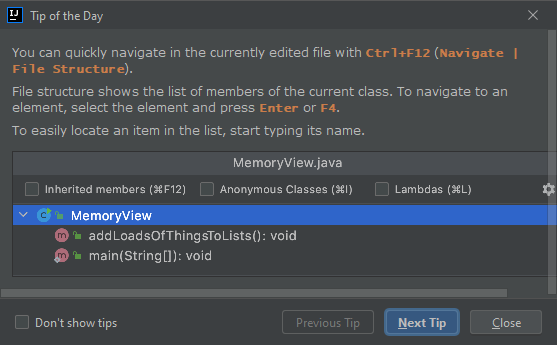
Currently I am not even an expert in Pascal (I never have touched the Pascal code 😆) but I can try to do something with Python and the API to show that kind of dialog (text + images).
 JairoMartinezA
on 25 Jan 2021
JairoMartinezA
on 25 Jan 2021
What ever helps a new user to easily orientate (him/her)self and finds out what and how the CT does should be more than welcome!
GHNewbiee
on 26 Jan 2021
@Jairo-Martinez I think a (very) quick tour where a few of the basics are explained or at least hinted at might be useful. The trouble starts when trying to identify what "basic" means... Cud has so many features and people so vastly differing requirements that this might prove tricky (I look at four things in any editor before I even install it for a test drive: does it do full regexes for Find/Replace, does it have full column block support, does it support sessions and is it easily expanded via some script language? A "No" for any of these disqualifies the software immediately. These are "basics" for me but probably not for some other people.)
Another idea would be to create a structured bullet list of things Cud supports (with some explanatory words thrown in, if necessary) and perhaps the relevant commands/shortcuts.
BTW, "Tip of the Day" is the first thing I disable in any software :-)
 tmsg-gh
on 26 Jan 2021
tmsg-gh
on 26 Jan 2021
(Forgot to say that I would be willing to start and edit such a list... time permitting...)
tmsg-gh
on 26 Jan 2021
BTW, "Tip of the Day" is the first thing I disable in any software :-)
Hahahaha I know but in my specific case using IJ, this IDE has a lot of features that is the only "software" where I never have disabled that feature (Talking about IJ tips, has an engine that not show always the same info and IMHO the info that shows always is "relevant"), but yes you are right in the most of cases.
JairoMartinezA
on 26 Jan 2021
IMHO and generally speaking, the "simpler" and "cleaner" but maybe more "painful" way is to try to correct/fix any imperfection at its root than trying to "cover" it by placing above that a beautiful carpet. "Making" a carpet also requires time.
Maybe, I write maybe, it's time for Alexey, considering the available resources, to start thinking of v2 and start making plans and putting priorities. V1 will be only for small fixes. So, time will be saved and consumed to some fresh and new.
GHNewbiee
on 26 Jan 2021
So, @Alexey-T
What do you think? Do you consider that adding a kind of "First steps in CudaText" plugin can add value to the project? I am asking for that, to start with a first draft of this, if not, no problem ok.
JairoMartinezA
on 27 Jan 2021
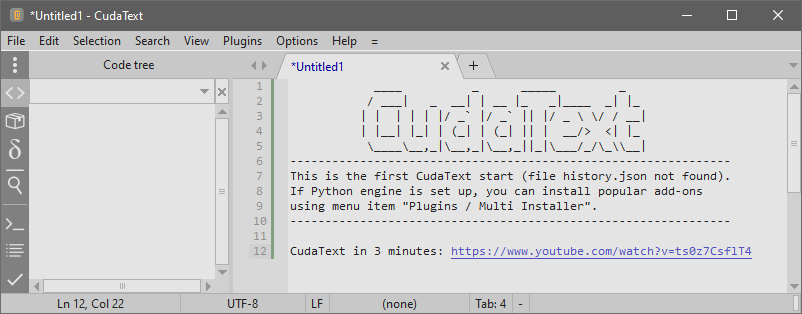
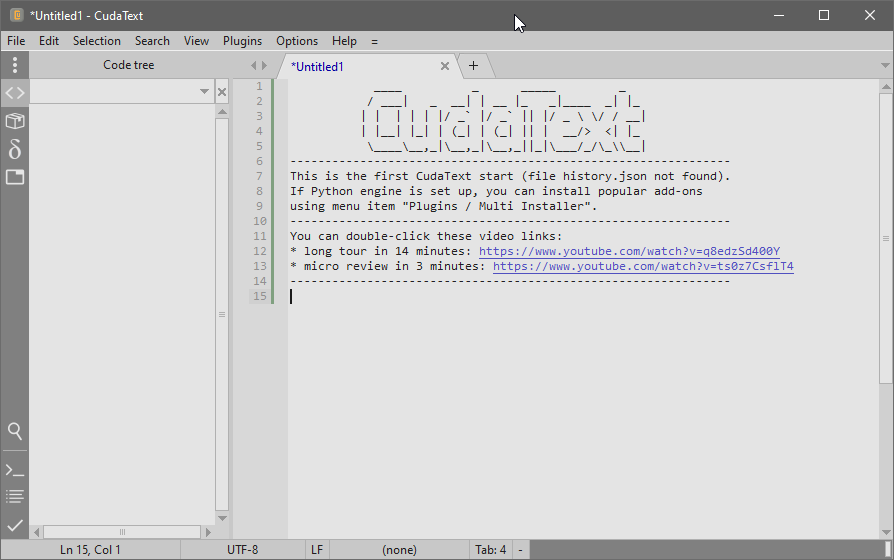
I am thinking I dont want to embed this plugin to distro. reason: Cud 1st start is detected by 'file history.json not found', and history.json is created then. ONLY FIRST start is first. so 'tip of the day' plugin will run ONLY ONE time? bad.
and 2) it will slow down the start of Cud.
 Alexey-T
on 27 Jan 2021
Alexey-T
on 27 Jan 2021
Excellent answer, another suggestion 😁
JairoMartinezA
on 27 Jan 2021
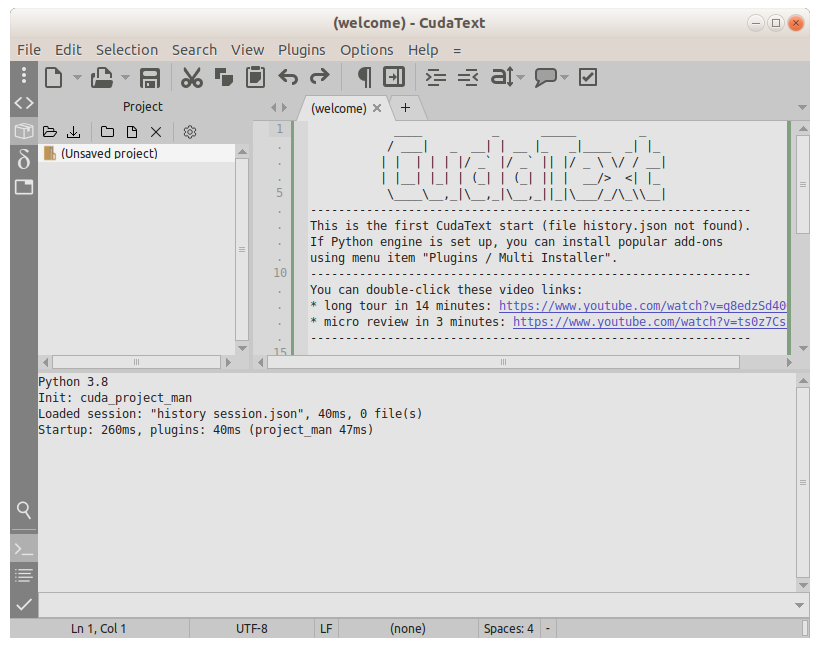
Okay, I may add 2 youtube links to that page.
Alexey-T
on 27 Jan 2021
done:
Alexey-T
on 27 Jan 2021
@Jairo-Martinez, thanks for great idea. Thanks to this, many people will be able to watch my review of CT :)
@Alexey-T, I'm partially agree with initial post of this issue. The Options/Settings-Hotkeys is kind of useless thing. In fact it's nothing, but just an information window. I agree with:
IMHO, the "Command palette" should directly get opened.
But with one small improvement. I suggest to open Command Pallette but keep there only commands with hotkeys, sorted by "key". It may look like this, but sorted (Alt...,Ctrl...., Shift... and so on):
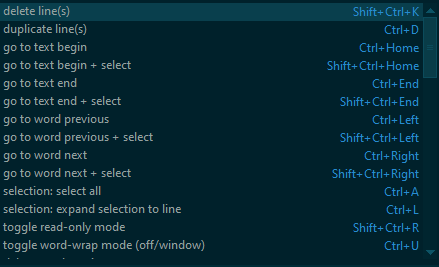
This suggestion only for Options/Settings-Hotkeys. Opening the Command Palette itself should work as usually.
Can we also use blinking in status bar? Now it says I can use F9 when I'm opening the Command Palette, but I never have seen this message until now because it's so inconspicuous. It disappears after a second and one blink could help users to pay attention to status bar.
 xcme
on 28 Jan 2021
xcme
on 28 Jan 2021
@Alexey-T any comments so far?
xcme
on 9 Feb 2021
Can we also use blinking in status bar? Now it says I can use F9 when I'm opening the Command Palette,
it will be irritating, after user teaches the F9, he won't need this blinking but it will be again...
about Subj- maybe it's ok to add statusbar __inside the menu dialogs (Cmd Palette)__.
Alexey-T
on 9 Feb 2021
I suggest to open Command Pallette but keep there only commands with hotkeys, sorted by "key".
it makes little sense, if does at all. ConfigHotkeys plugin must have such feature if @kvichans has time for it.
Alexey-T
on 9 Feb 2021
Можно в двух словах пояснить чего не хватает?
 kvichans
on 9 Feb 2021
kvichans
on 9 Feb 2021
it will be irritating, after user teaches the F9, he won't need this blinking but it will be again...
Agree
about Subj- maybe it's ok to add statusbar inside the menu dialogs (Cmd Palette).
I don't get the idea. Initially we were talking about useless menu item, not status bar. This menu item just asks a user to open other menu item and the proposal was to make it useful. :)
xcme
on 9 Feb 2021
I dont agree 'how to make it useful', ie show also Cmd Palette with another state. funky feature.
Alexey-T
on 9 Feb 2021
OK. No questions from my side. It was just an proposal, but if you don't want I don't mind also. :)
xcme
on 9 Feb 2021
Hi @Alexey-T
I remember to have known F9 functionality because you commented that in an issue when I started my first steps with CT, I don't know how I could have discovered it by myself.
I am agreed with other comments that we need to think how you can do CT more friendly considering the new CT's users. (The users often don't read the documentation, an experienced user maybe.)
Ok, it is my opinion, why don't put the message panel in the status bar with another background color? in order to "say" to users that they need to put attention in that part too:
A second option is only to change the background color when CT needs to inform about "important" things (not blinks, just change the background and preserves this accent color until the message life is over). One more step following this approach, could be add a new option to control the "important" things behavior, when the users become experienced in CT, maybe they want to "cancel" the background changes for that important things, so they can have an option to do that: change_bg_status_msg = true (default)/false
JairoMartinezA
on 10 Feb 2021
New BG color of last cell of statusbar? bad, it will irritate users who teached F9. maybe later I will add statusbar to CmdPalette dialog.
Alexey-T
on 11 Feb 2021
What I have suggested in the initial message is a button (eg "hotkey", "Change", "Assign", "Re-assign") to be added to the "Command palette..." modal. See photo below.
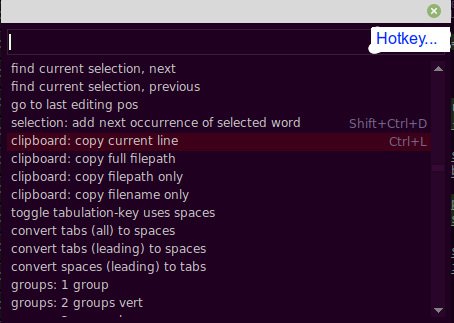
When click it, then "Hotkey: clipboard: copy current line" directly appears.
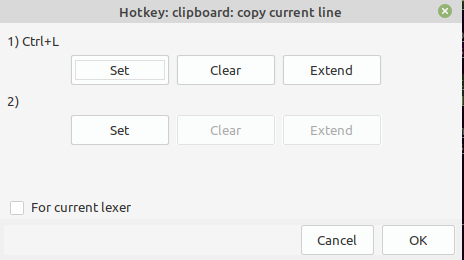
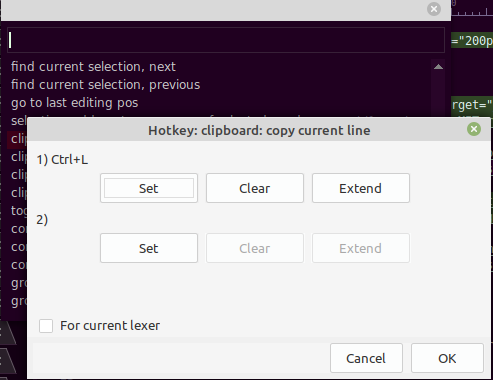
For the time being, we cannot directly go from one modal to the other unless we are aware of "F9".
GHNewbiee
on 12 Feb 2021
It's nice idea. maybe I will add such a button.
Alexey-T
on 12 Feb 2021
Why instead of:
maybe later I will add statusbar to CmdPalette
Could be to put a texthint to command palette like:
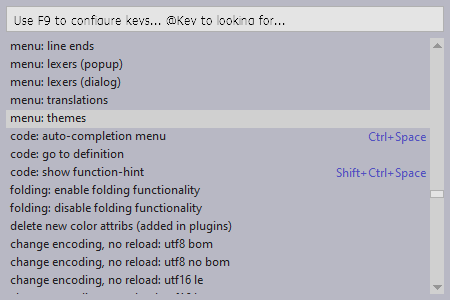
In a previous month the labels in Search/Replace functionality were changed using this approach:
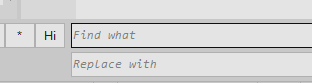
JairoMartinezA
on 12 Feb 2021
Ok, now it's
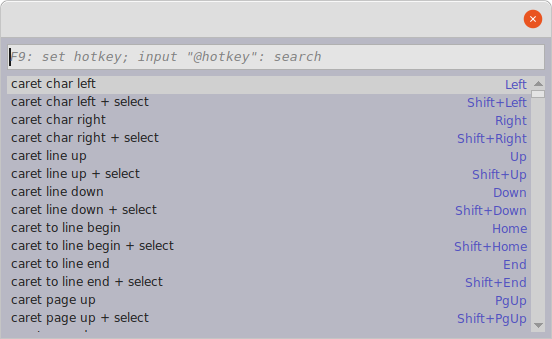
Alexey-T
on 12 Feb 2021
@JairoMartinezA
If one uses "hotkeys" to navigate is ok. For those who uses a mouse to navigate they have to move/use the 2nd hand instead of just one more clicking.
You suggestion is very well known to be implemented, so it takes priority and, at least, the user now is aware of "F9". My suggestion needs extra work. So, it can be left for the future.
GHNewbiee
on 12 Feb 2021
another suggestions (add a 'config hotkey' button in Cmd Palette, add 'gear' icon) is not good for me. current 'F9 hint' is okay for me.
seems solved now.
Alexey-T
on 15 Feb 2021
Related issues
Alexey-T
·
4Comments
xcme
·
5Comments
Alexey-T
·
4Comments
 EchedeyLR
·
3Comments
EchedeyLR
·
3Comments
 charliewales
·
4Comments
charliewales
·
4Comments
Most helpful comment
Ok, now it's
