Cudatext: Some awkwardness in menu drawing
(Допускаю, что причиной нижеописанных неприятностей является не CudaText, а какой-то использованный в нём чужой компонент. Но жаловаться буду здесь, ибо а где же ещё?..)
Со времён появления в программах в середине 80-х годов прошлого века строки горизонтального выпадающего меню было принято, что:
- Полоска маркера, выделяющая (подсвечивающая) текущий пункт меню в строке, шире названия этого пункта меню не менее, чем на ширину одного символа (изначально - по тогдашним аппаратным причинам).
- Полоска симметрична относительно середины названия пункта меню и поэтому выступает справа и слева от него на одинаковой расстояние.
- Промежуток между соседними пунктами меню делится ровно пополам: левая половина относится к тому пункту, который стоит слева, а правая - к тому, который стоит справа.
Именно это сейчас и можно наблюдать в программах, в которых меню рисуется средствами ОС. (По крайней мере, в тех ОС, с которыми мне приходилось иметь дело.)
А как обстоят дела в CudaText (в режиме _"ui_menu_themed" : true_)? Сначала всё хорошо, всё как по инструкции:
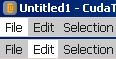
Но на этом следование инструкции и заканчивается:
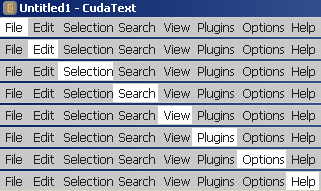
Хорошо видно, что дальше никакой симметричности нет - маркер ощутимо смещён влево, иногда вплоть до полного отсутствия выступания справа.
А вот с заполнением прямоугольков выпадающих подменю картина обратная - там всё смещено вправо и длинные строчки доходят практически до правого обреза:
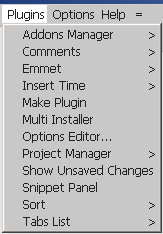
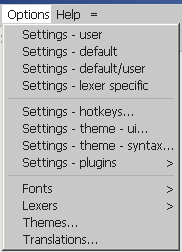
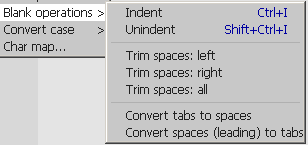
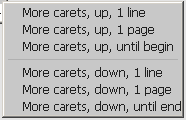
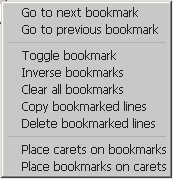
Да, я понимаю, что слева оставлено поле для меток включённых пунктов меню, но всё же примерно такой же ширины поле справа не помешало бы. Тем более, что сейчас длинные названия иногда даже каким-то чудом не помещаются в прямоугольник меню (и потому обрезаются):
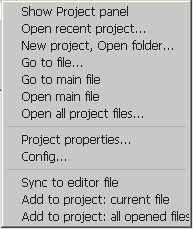
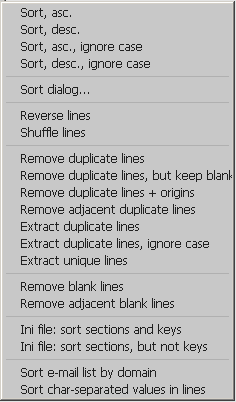
А ещё из-за нехватки ширины на последние буквы длинных пунктов меню накладываются стрелочки, отмечающие наличие подменю:
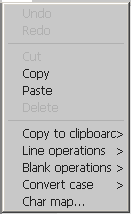
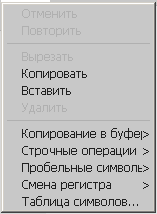
И не только стрелочки, но и подсказки клавиатурных сокращений:
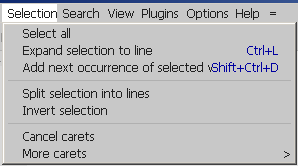
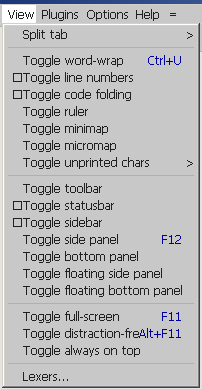
Да и вообще эти синие подсказки явно слишком задвинуты влево, и возле длинных названий начинается чересполосица, в которой глаза просто вязнут:
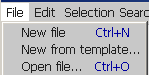
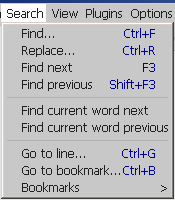
В общепринятом дизайне вертикальные блоки меню, как правило, визуально разделены на две зоны: в левой - названия, в правой - подсказки, и эти чести не пересекаются, даже если названия пунктов длинные:
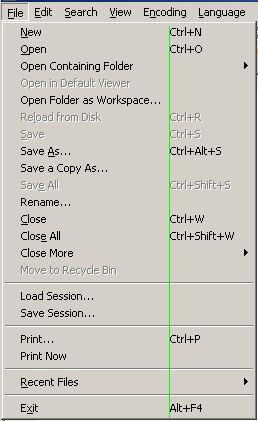
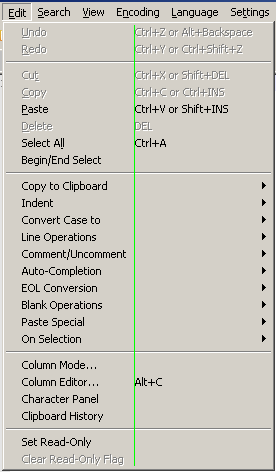
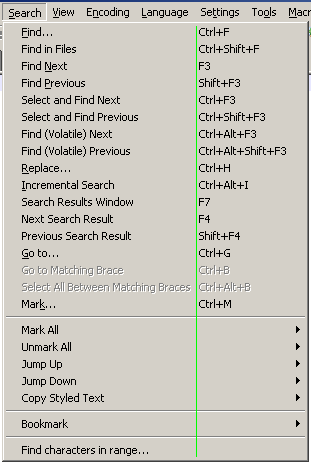
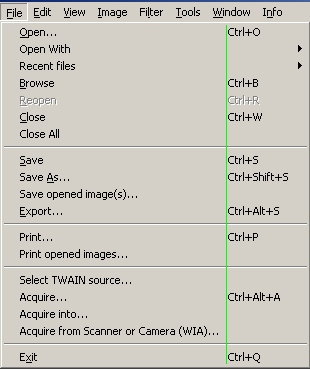
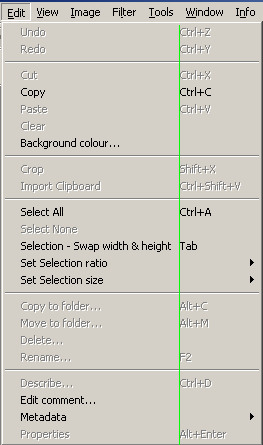
И даже если применяется дизайн, в котором зоны пересекаются, то всё равно расстояние от названий до подказок намного больше, чем в CudaText, и - что важно - там подсказки всё равно выступают вправо от концов даже самых длинных названий:
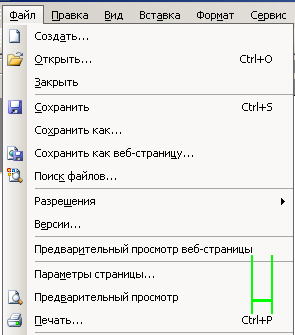
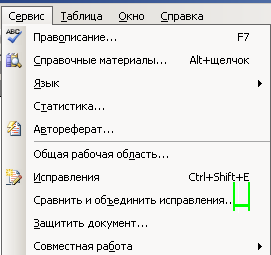
а в CudaText они "утоплены" влево:
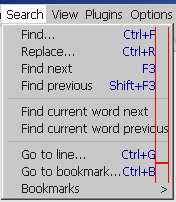
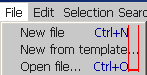
Разыскивать нужные пункты в таких меню весьма тяжело.
Да, всё это, кроме последней проблемы, присутствует только когда _"ui_menu_themed" : true_. При _"ui_menu_themed" : false_ используется обычное для ОС меню, в котором всё выглядит намного приятнее, и только излишне смещённые влево подсказки несколько портят картину.
 zanud
zanud
All 32 comments
А ещё из-за нехватки ширины на последние буквы длинных пунктов меню накладываются стрелочки
ui_menu_themed_font_size - можем задать фонт поменьше и тогда будет ОК.
 Alexey-T
on 14 Jan 2021
Alexey-T
on 14 Jan 2021
Вы слышали когда-нибудь: "Unix - это стройная система костылей и подпорок"?
Загонять строки в размер прямоугольника меню - как раз типичный костыль. Ведь это размер прямоугольника должен подгоняться библиотекой GUI к размеру его содержимого, а не наоборот.
И когда мы в ресурсы Windows-программы прописываем меню, то пишем только текст, без задания каких-либо параметров его визуализации, но потом это меню правильно показывается на любой машине, независимо от выбранного пользователем в настройках Windows имени шрифта и его размера.
Да, собственно, при _"ui_menu_themed" : false_ всё правильно вычисляется и показывается (средствами ОС). Чудеса начинаются при _"ui_menu_themed" : true_, когда, как я догадываюсь, вместо ОС меню начинает рисоваться средствами какой-то кросс-платформенной библиотеки.
Это всё вроде-бы и мелочь (на функциональности-то не сказывается), но программа в результате выглядит коряво, и у среднестатичнического потенциального пользователя подсознательно возникает убеждение, что и внутри программа так же коряво сделана. Разве не обидно?
zanud
on 14 Jan 2021
когда, как я догадываюсь, вместо ОС меню начинает рисоваться средствами какой-то кросс-платформенной библиотеки.
И либа эта имеет такой недостаток. она надеется что шрифт отрисуется в нужном размере. потом @dinkumoil заметил что это не так на его машине. из-за scale. и я ввел вторую опцию "размер фонта"
Пока не лечится
Alexey-T
on 14 Jan 2021
Можно кое что еще сделать наверное с моей стороны, дать в ОС мою ширину пунктов, и тогда будет ОК
Может попробую попозже.
Пока что ОС берет свою ширину - под "свой шрифт" и я потом рисую в этой ширине "моим шрифтом" (мой- берется из опций Куд).
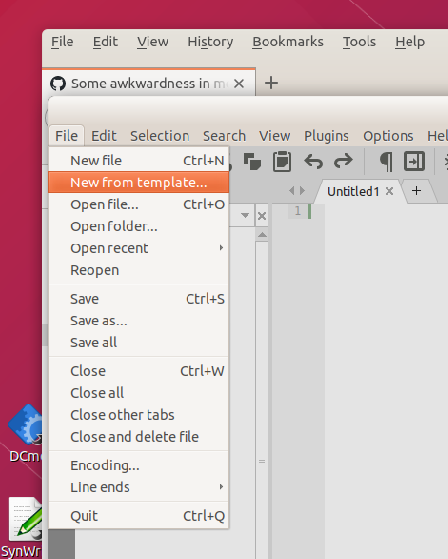
И еще, вы неправы что всегда есть 2 колонки. Ubuntu делает так
Alexey-T
on 14 Jan 2021
проверил еще в Win10-- все красиво и недостатков не видно! видимо у вас более другая Вин. у меня блоки симметрично выступают. места хватает на хоткеи. видимо шрифт - у меня рисуется "тем же шрифтом что и в ОС" а у вас "не тем же".
Alexey-T
on 14 Jan 2021
И либа эта имеет такой недостаток. она надеется что шрифт отрисуется в нужном размере.
Но если включён перенос длинных строк в окне редактора, то вроде, они режутся вовремя, за пределы видимой области не выходят. Там эта библиотека не используется или просто мне повезло не наткнуться на такие случаи?
Пока что ОС берет свою ширину - под "свой шрифт" и я потом рисую в этой ширине "моим шрифтом" (мой- берется из опций Куд).
А, тогда понятно.
И еще, вы неправы что всегда есть 2 колонки. Ubuntu делает так
На моих картинках тоже такой вариант имеется - в самом конце, там, где MS Word. И на Вашей картинке та же особенность, что и у Word: концы подсказок находятся правее концов самых длинных названий пунктов меню, т.е. подсказки выступают наружу по отношению к блоку названий, а не упрятаны внутрь него, да и в каждой отдельной строке между концом названия и началом подсказки имеется длинный просвет.
А вот то, что справа чистого поля практически нет, - это плохо. Поверьте мне как человеку, по работе много занимавшемуся вопросами удобочитаемости. Или хотя бы посмотрите на страницы любой книги.
проверил еще в Win10-- все красиво и недостатков не видно! видимо у вас более другая Вин.
Прежде чем писать, я специально проверил на трёх разных машинах c разными версиями Windows: XP, 10 и Server 2008. Вид везде был абсолютно одинаковый.
zanud
on 15 Jan 2021
проверил еще в Win10-- все красиво и недостатков не видно! видимо у вас более другая Вин. у меня блоки симметрично выступают. места хватает на хоткеи. видимо шрифт - у меня рисуется "тем же шрифтом что и в ОС" а у вас "не тем же".
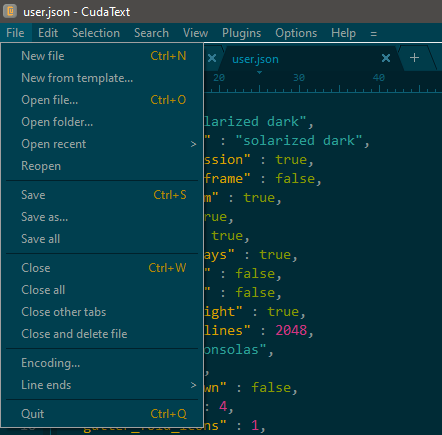
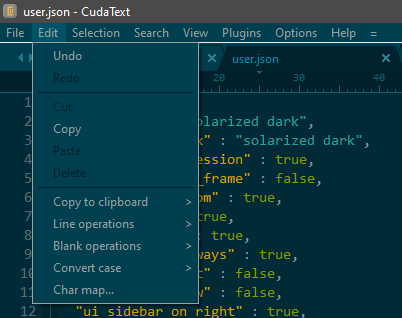
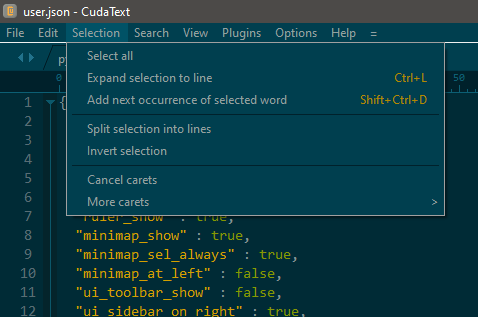
I can confirm. At first glance I see no difference with the element alignment for "ui_menu_themed" : true/false. But I have default settings for font size and so on in Windows.
Is something wrong here?
 xcme
on 15 Jan 2021
xcme
on 15 Jan 2021
This is how menu looks on Windows Server 2008 R2 with default editor's settings:
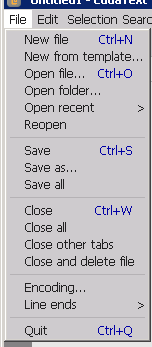
Perhaps, some Windows screen properties (themes?) have impact on this...
zanud
on 16 Jan 2021
@zanud, any progress so far? :) I can't help you here because I don't have problems with the interface. But I wish it was fixed anyway.
xcme
on 20 Jan 2021
@xcme
Not yet. Usually on my computer (Windows XP) the Classic theme is used and the Themes service is disabled. I launched it and switched to the standard "Windows XP" theme - no changes in CudaText menu.
Then I created a new user (to be sure that all visual appearance related settings are in their default state) - no changes in CudaText menu.
But also I tried to run CudaText on Windows 10, and here everything is exactly as on your screenshots. Later (in a few days) I will try to "break" this system by changing some settings and disabling services.
zanud
on 21 Jan 2021
marked the issue 'hard todo' because I don't have WinXP nor Win2008Server.
Alexey-T
on 24 Jan 2021
@Alexey-T
It seems, I have found the cause of problem.
In one of the previous messages you wrote that CudaText draws themed menus in 2 stages:
- Estimates menu rectangle dimensions for system default font (typeface + style + size).
- Writes menu lines by its own code.
As I see, for stage 2 it uses typeface, style, and size from its settings or its own defaults (in win32menustyler.pas):
  with MenuStylerTheme do
  begin
[...]
    FontName:= 'default';
    FontSize:= 9;
[...]
  end;
This works nicely for Windows 10, because here default menu font size is 9 pt. But in Windows XP and Windows Server 2008 (and, probably, Windows 7) default menu font size is 8(!) pt. (And even in Windows 10 an advanced user can change menu font size from 9 to anything on his own taste.)
Yes, your suggestion about _ui_menu_themed_font_size_ does allow to fix menu appearance, but I think that it would be better to use as a default font size not a predefined number (9) but a system font size.
On Windows it is encoded in a first byte of HKCUControl Panel\Desktop\WindowMetrics\MenuFont binary (REG_BINARY) parameter, and can be calculated from it as
256 - V - (258 - V) DIV 4
where _V_ is value of the above mentioned byte, or selected from a lookup table:
ff -> 1

fd -> 2
fc -> 3
fb -> 4

f9 -> 5
f8 -> 6
f7 -> 7

f5 -> 8
f4 -> 9
f3 -> 10

f1 -> 11
f0 -> 12
ef -> 13

ed -> 14
ec -> 15
eb -> 16

etc.
(Sorry, I do not know how to determine font size on *nixes.)
zanud
on 28 Jan 2021
Added the partial fixing, w/o using registry (it will need usage of additional lib, I dont want it).
Alexey-T
on 28 Jan 2021
There is a way to determine font parameters without registry reading: SystemParametersInfo(SPI_GETNONCLIENTMETRICS, ...) function call returns a record with a lot of information, including _lfMenuFont_ - a pointer to a record with menu font parameters.
Perhaps, this call will not require additional libraries.
zanud
on 28 Jan 2021
@dinkumoil @vhanla Hello, maybe you can make the function from the above post?
Alexey-T
on 28 Jan 2021
Here is a Delphi example.
Additionally:
- _lfMenuFont_ is a pointer to a LOGFONT record.
As I discovered, MenuFont registry parameter holds a pure LOGFONT record.
So, the table and formula above should be applicable to function call result as well.
- As I discovered, _lfHeight_ (font height) field binary value is DPI-dependent. So, the table and formula above are not always correct.
I am investigating further.
zanud
on 28 Jan 2021
Actually, one of the links above contains a formula for _lfHeight_ calculation from font size:
lfHeight = -MulDiv(PointSize, GetDeviceCaps(hDC, LOGPIXELSY), 72);
that can be reversed easily.
But _hDC_ in it is a handle to device context, and the question was: how to obtain it for menu?
Finally, I realized that all contexts on the very same device should have identical physical parameters. So in this query you can use any device context handle that your code already operates.
Additionally, this link contains some clarifications about positive and negative _lfHeight_ values (alongside with the reversed formula:PointSize := MulDiv(-lfHeight, 72, GetDeviceCaps(hDC, LogPixelsY);)
zanud
on 28 Jan 2021
Final note: perhaps, TCanvas object type that your currently use accepts the _lfHeight_ value as a font size directly - without any transformations.
zanud
on 28 Jan 2021
Applied the changes, thanks for detailed help. it works on win10, will give beta.
Alexey-T
on 28 Jan 2021
try the beta please: http://uvviewsoft.com/c/
Alexey-T
on 28 Jan 2021
Brilliant!
Now for default system settings menu dimensions are absolutely identical in standard and themed modes - checked on 2 computers with Winsows XP and Windows 10 (in 100% and 125%).
Also CudaText accepts menu font changes in the system settings on the fly - immediately after pressing OK in the Control Panel applet.
But at that point some incompleteness have appeared:
In themed mode CudaText changes menu dimensions only, but font typeface name, style, size always remains the same - even after restart.
In the CudaText settings I see a _"ui_menu_themed_font_size"_ parameter, but there is no a correspondent parameter for a typeface name. And this raises a question: from where it gets this name? Definitely not from the system settings.
It seems, I misunderstand the purpose of the default.json settings file. I assumed that it is purposed for a multiuser environment: if CudaText do not see some settings in the user.json it looks for them in the default.json. But when I changed the _"ui_menu_themed_font_size"_ parameter in the default.json and restart CudaText - font size have not changed. Whereas adding this parameter to the user.json makes necessary change.
And yet one inconsistency in the user settings file handling:
When I add or change some settings in the user.json, immediately after file save CudaText accepts these changes. But when I delete or comment out some lines, after file save CudaText leaves correspondent parameters in their previous state, and does not resets them to the defaults.
zanud
on 28 Jan 2021
It seems, I misunderstand the purpose of the default.json settings file.
https://wiki.freepascal.org/CudaText#Configs
your questions are still valid?
Alexey-T
on 28 Jan 2021
But when I delete or comment out some lines, after file save CudaText leaves correspondent parameters in their previous state, and does not resets them to the defaults.
Yes; it's designed so, missed lines must do so.
Alexey-T
on 28 Jan 2021
your questions are still valid?
Thanks, this is the answer.
Personally, I think this approach is somewhat overcomplicated. But it is your decision.
missed lines must do so.
Excuse me, missed lines must do WHAT?
When CudaText reads its settings file at start, any missed parameter means "use default value".
When CudaText reads its settings file after edition, the same missed parameter means "use current value".
And when after restart CudaText reads the same file, the same missed parameter again means "use default value"?
This is exactly what I named "inconsistency".
zanud
on 28 Jan 2021
Missed lines must not affect values which are read before (in the same app session). so removing lines from user.json do not reset to default.
Alexey-T
on 28 Jan 2021
Missed lines must not affect values which are read before (in the same app session).
Let think about user who do not know this rule. He spent a lot of time tweaking thoroughly editor's settings and finally achieved the result that completely satisfied him. Then he closed the editor, but when he launched it next time he see that its behavior is different and some of previous "achievements" are lost forever.
Imagine, who will be blamed on this.During tweaking user added some parameters to the user.json and then actively edited/deleted some of them. And after all that how can he determine what settings are in effect now? Does CudaText provide a way to see (and, possibly, save) them? No.
(One of text editors that I use also provide possibility to change settings on the fly without reflecting them in the configuration file. But at least it provides a way to examine at any time a full list of its current settings and to save them if necessary.)
zanud
on 28 Jan 2021
Let think about user who do not know this rule.
and about code. let's think... if code will reset the values (missed lines), it will make me hard to apply 'lexer specific configs' layer. this applying needs to keep old value in memory.
DoLoadCfg('user.json')
DoLoadCfg('default lexer C++.json')
DoLoadCfg('lexer C++.json')
Alexey-T
on 28 Jan 2021
Sorry, I am not aware of such details yet.
How this looks in my imagination :
Now
Step 1. At start CudaText allocates some memory area ("configuration area") for its settings and fills it with default values. Then it parses user.json and overrides values in the configuration area by values from this file.
Step 2. After user.json changing CudaText parses it and overrides values in the configuration area again.
What should be (in my opinion)
Step 1. The same as current.
Step 2. Repeat the current Step 1 and then execute current Step 2.
WRT lexers
Without knowing details I can not tell anything smart, and, moreover, I can be essentially wrong, but, again, how this looks in my imagination:
For lexer CudaText either creates a separate copy of the common configuration area and overrides it by values from lexer-specific config file, or creates a lexer configuration area with values from lexer-specific config file only and provides the lexer with that area and a pointer to the common configuration area.
In both scenarios lexer does not parse user.json by itself, but is aware that any value in the configuration area can be changed at any time.
As a result, I do not see any difference for the lexer between "new value of some parameter in the configuration area was taken from the user.json" and "new value of some parameter was taken from the default set of values".
zanud
on 28 Jan 2021
DoLoadCfg('settings/user.json')
DoLoadCfg('settings_default/lexer C++.json')
DoLoadCfg('settings/lexer C++.json')
this means pseudo code - how config is loaded. 3 calls. 3 layers. you suggest- DoLoadCfg resets missed opt. bad. layers will break.
Alexey-T
on 28 Jan 2021
DoLoadCfg('settings/user.json')
DoLoadCfg('settings_default/lexer C++.json')
DoLoadCfg('settings/lexer C++.json')
- :-))
DoLoadCfg('settings_default/lexer C++.json')
DoLoadCfg('settings/lexer C++.json')
but no
DoLoadCfg('settings_default/default.json')
DoLoadCfg('settings/user.json')
- Unfortunately, you pseudo code does not allow to understand why parameters resetting is bad.
Definitely, I need to look at sources. But not today. Right now and a few next days I will be busy by home repairing (some disaster have happened).
zanud
on 28 Jan 2021
settings_default/default.json is NOT read by Cud, it's for copying only.
it is documented (wiki).
so we have 3 layers (3 files maximum).
Alexey-T
on 28 Jan 2021
we are talking about Offtopic, let's close this topic... subj is solved.
Alexey-T
on 28 Jan 2021
Related issues
 junguler
·
5Comments
Alexey-T
·
7Comments
junguler
·
5Comments
Alexey-T
·
7Comments
 JairoMartinezA
·
7Comments
xcme
·
5Comments
JairoMartinezA
·
7Comments
xcme
·
5Comments
 EchedeyLR
·
3Comments
EchedeyLR
·
3Comments