Cudatext: Opening a file from the file manager: a new window is created instead of a new tab
Situation: CudaText is already running and several files are open in it. When you open a file by association (from the file manager), a new window is launched, in which the tabs opened in the first window are repeated. Those tabs that are open in the second window are ignored (if another Cud windows already exists at the moment).
Expected Behavior: The file opens in a new tab of the last active window (which was the last to lose focus).
Is this a bug or a feature? For me, this behavior is counterintuitive.
 wb027
wb027
All 29 comments
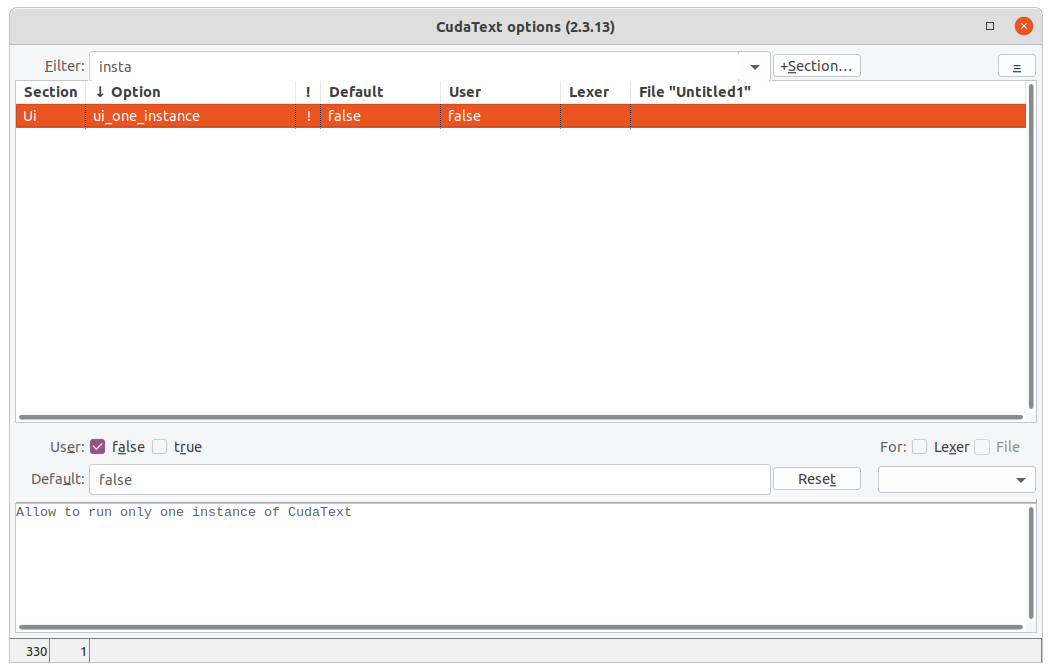
Option may help?
 Alexey-T
on 18 Jul 2020
Alexey-T
on 18 Jul 2020
Not in my practice. I keep 2-3 projects open on different desktops all the time, sometimes even on the same desktop.
This is an important feature for me.
wb027
on 18 Jul 2020
I don't understand why file from explorer must be in existing window. Option controls it.
Alexey-T
on 19 Jul 2020
Because most tabbed programs behave like this. This is what the most popular browsers do, and many text editors do this, including VSCode and Sublime. This is the usual and expected behavior for the user.
Ok, let it be a feature of the author's personal preference. But I don't understand the logic of the current behavior at all when the whole set of tabs from the first open window are opened in each new window. I have never seen this anywhere before.
I could understand the logic if one tab opens in a new window. It may be even better than opening in an existing window. But I do not understand at all why to open duplicates of already open tabs. For me personally, this is unexpected and very inconvenient.
I think the ability to customize this behavior was good for everyone.
wb027
on 19 Jul 2020
Yes, it sounds logical. Will see this, ok.
Any steps I can do to see the issue, on clean Cud install ? With using command line only- if possible
Alexey-T
on 19 Jul 2020
I understood what the problem is!
"ui_auto_save_session": true
Reproduced on a clean installation with this single custom setting.
wb027
on 19 Jul 2020
I see the issue. with ui_reopen_session:true, Cud opens all session files in EVERY instance of Cud. so N instances open with the same M files from session + command-line file.
Suggestion: any command-line file/folder must disable(skip) loading session. @kvichans @dinkumoil - OK?
Alexey-T
on 19 Jul 2020
I suggest making an additional setting: open from the command line in a new window / in a new tab.
wb027
on 19 Jul 2020
not sure we need this new setting. @kvichans @dinkumoil @jairo-martinez What do you think?
Alexey-T
on 19 Jul 2020
Question: is it possible to memorize several sessions for each window separately?
Sublime can do this by default.
wb027
on 19 Jul 2020
Plugin Session Manager gives all commands for sessions.
Alexey-T
on 19 Jul 2020
Pls try beta
http://uvviewsoft.com/c/
Alexey-T
on 19 Jul 2020
Linux beta has not been updated...
wb027
on 19 Jul 2020
Updated now
Alexey-T
on 19 Jul 2020
Test OK with "ui_auto_save_session" : true. Tabs are no longer duplicated in a new window.
wb027
on 19 Jul 2020
command line has option
-n - Ignore option "ui_one_instance", open new app window
Idea, to add option -no, which is "ignore ui_one_instance, and reuse old app window".
then Win shell extension will run Cud with -no, so file will be in old app window.
@wb027 suggested to reuse old window from shell extension.
is it ok?
@dinkumoil @wb027 @kvichans
Alexey-T
on 22 Jul 2020
I do not understand. IMO
_Ignore "ui_one_instance"_ means _enforce multi-instance mode_
and
_reuse old app window_ means _enforce single-instance mode_
which are mutually exclusive statements. What do I miss?
Furthermore, to tell you my opinion about that new command line switch I need a more thoroughly crafted description of the targeted use case(s), i.e. state of Cud settings (like session and history handling, single instance mode, and so on) related to the problem.
Hint
If Cud is in multi instance mode, there is no "old app window" (i.e. a main instance window). There are only a bunch of Cud processes. Which one to use as the "old app window"? When a user selects a file in an _Explorer_ window there is no active Cud window anymore because the _Explorer_ window has the input focus. Thus, it is not possible to answer the question above with _"the focused Cud window"_. If the answer is _"the topmost of all Cud windows"_ I'm not sure if it is possible to determine that window programmatically.
 dinkumoil
on 22 Jul 2020
dinkumoil
on 22 Jul 2020
Ignore "ui_one_instance" means enforce multi-instance mode
it means ignore the option value (any value), then we either set or reset single instance.
Alexey-T
on 22 Jul 2020
There are only a bunch of Cud processes. Which one to use as the "old app window"?
IMO any Cud window is okay. Eg user has 3 cud Windows with one file per window. Shell extension must (user wish) open its param in any of em.
Alexey-T
on 22 Jul 2020
I'm still confused.
Please make a matrix that covers all possible cases. A case is an arbitrary combination of the states listed below (maybe there are more):
- state of _ui_one_instance_ option
- state of _ui_reopen_session_ option
- command line switch _-no_ present/absent
- no instance of Cud running
- only one running instance of Cud
- multiple running instances of Cud
- user wants to open one file
- user wants to open multiple files
Describe for every case exactly what to do.
BTW: What exactly is the users wish? I thought this issue has been solved, @wb027 stated that 3 days ago.
dinkumoil
on 22 Jul 2020
@Wb027, please clarify.
Alexey-T
on 22 Jul 2020
What exactly needs to be clarified?
The original proposal was:
Expected Behavior: The file opens in a new tab of the last active window (which was the last to lose focus).
Because most tabbed programs behave like this. This is what the most popular browsers do, and many text editors do this, including VSCode and Sublime. This is the usual and expected behavior for the user.
I can only add that this is a long and familiar user experience.
However, I was personally satisfied with opening a single file in a new window. As it is now.
If an option appears in the future: "open in a new window or in the last used window", I will be completely satisfied.
P.S. I can't say anything smart about single instance mode, because I never use one, sorry.
wb027
on 22 Jul 2020
@wb027 некоторые фичи которые мне не нужны, я делаю. как эту. на обмен на что-то , что-то для редактора. обзор (хороший).. или видео в ютуб (En, длинное)
Alexey-T
on 27 Jul 2020
@Alexey-T
Видео, тем более на аглицком — не осилю.
Могу запилить статью на хабр. Толковую, без воды и соплежевания. Это я умею.
В принципе, можно сделать серию статей. Подумать надо.
Но: хорошая, толковая статья — дело непростое, трудоемкое и не быстрое.
И, если таки соберусь написать, сделаю просто так, для пользователей, не для получения личных преференций.
wb027
on 30 Jul 2020
@wb027 @dinkumoil
again checked this report
Situation: CudaText is already running and several files are open in it. When you open a file by association (from the file manager), a new window is launched, in which the tabs opened in the first window are repeated. Those tabs that are open in the second window are ignored (if another Cud windows already exists at the moment).
Expected Behavior: The file opens in a new tab of the last active window (which was the last to lose focus).
checked on Linux. with the option "ui_one_instance":true. Here I run from 2 terminals 2 commands: "cudatext aaa" then "cudatext bbb". both files "aaa" and "bbb" are opened in the same Cud instance.
what is the problem? do you want to open files "aaa" and "bbb" in the same instance __even with multi instance mode__?
2nd problem:
in which the tabs opened in the first window are repeated.
it was solved this 2020 year AFAIK. in history.txt you can find it:
+ add: option "ui_reopen_session_cmdline" (thanks @notteumani)
+ add: before: editor doesn't load last session when command-line file is opened; now: it also doesn't save current session in this case, so old session is not lost (thanks @notteumani)
- fix: regression for last session loading when using command line (thanks @MiroslavMatas)
@wb027 The similar problem was fixed this week, #3407, reported by @JairoMartinezA, so check the last release 1.133.5.5.
Alexey-T
on 31 May 2021
Alex
With new release now, it happens if I have two CudaText locations, (I use one for "PROD" and I have the last beta in another location), if I try to open both CudaText versions, now is not possible. Is not a big problem for me, because at the end if I need to test the beta, I only need to close the PROD version, I just comment it so you know.
 JairoMartinezA
on 13 Jun 2021
JairoMartinezA
on 13 Jun 2021
now it is not possible? because default of "one instance" option was changed to 'true'. so you can toggle this option. do it for both Cud copies. it will be ok?
Alexey-T
on 13 Jun 2021
Closing (I didn't do more fixes).
Alexey-T
on 25 Aug 2021
Related issues
 xcme
·
5Comments
Alexey-T
·
4Comments
xcme
·
5Comments
Alexey-T
·
4Comments
 charliewales
·
4Comments
Alexey-T
·
5Comments
Alexey-T
·
7Comments
charliewales
·
4Comments
Alexey-T
·
5Comments
Alexey-T
·
7Comments