Cudatext: Plugin 'Calc Expression' with culture specific data formats
It would be nice if the 'Calc Expression' plugin was configurable to set the decimal and thousand separators.
And, it may also be a good idea to define the texts to skip ($, €, kg, ...).
I think that via config plugin is the best way, more flexible, better than use the _locale_ module of python (although it can take the initial values from there).
 jczanfona
All 23 comments
I can add 2 options: decimal_separator, thousand_separator.
It is some work so i will do it for donation http://uvviewsoft.com/donate.htm , e.g. $20
Not sure it's ok to skip any chars, better to show error and not calculate.
 Alexey-T
on 17 Dec 2019
Alexey-T
on 17 Dec 2019
Only PayPal... Is it possible?
jczanfona
on 17 Dec 2019
yes, payment method Paypal is available for UV Pro program.
Alexey-T
on 17 Dec 2019
Done!
jczanfona
on 17 Dec 2019
Plugin is updated! see new readme.txt file.
plugin for CudaText.
reads selected text as math expression, e.g. "2.4*sin(pi/3)" and evaluates it by Python.
tries to use "safe evaluation", without dangerous python functions enabled.
gives commands (menu Plugins / Calc Expression) to replace selection with number result,
or just show the result in the statusbar.

these Python functions are supported:

  abs      cosh       frexp      pow
  acos     degrees    hypot      radians
  asin     e          ldexp      sin
  atan     exp        log        sinh
  atan2    fabs       log10      sqrt
  ceil     floor      modf       tan
  cos      fmod       pi         tanh

  min(x1, x2, ...)
  max(x1, x2, ...)
  sum( [x1, x2, ...] )
  mean( [x1, x2, ...] )
  median( [x1, x2, ...] )

details:
https://docs.python.org/3/library/math.html
https://docs.python.org/3/library/statistics.html

plugin has config file, call menu item "Options / Settings-plugins / Calc Expression / Config".
it has separator options:
  [calc_expression]
  decimal_separator=.
  thousand_separator=
  list_separator=,

decimal_separator can be changed to e.g. "," or another.
thousand_separator can be set to non-empty, it will be skipped by Python anyway.
list_separator is used in functions with several arguments, e.g. min, max, mean.
Please, format the output too (thousand separator)
jczanfona
on 18 Dec 2019
done, plugin updated.
Alexey-T
on 18 Dec 2019
Is everything right?
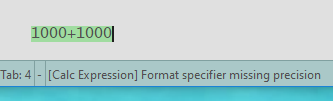
Same result, for example, with: 1.000+3
[snippet_panel]
folder=HTML - Color names+values
[calc_expression]
decimal_separator=,
thousand_separator=.
list_separator=;
jczanfona
on 18 Dec 2019
Made a fix-- updated!
Alexey-T
on 18 Dec 2019
I leave this simple macro to take better advantage of this plugin.
This macro adds to the selected expression the operator '=' followed by the result
Calc
ed.cmd(cmds.cCommand_ClipboardCopy)
app.app_proc(app.PROC_EXEC_PLUGIN, 'cuda_calc_expr,replace,')
ed.cmd(cmds.cCommand_ClipboardPaste)
ed.cmd(cmds.cCommand_TextInsert,'=')
jczanfona
on 18 Dec 2019
@kvichans Macro above :)
Alexey-T
on 18 Dec 2019
I can't see where is the problem...
wrong: 107.728,09-99.822,66=7.905,42999999999
right: 8,09-2,66=5,43
jczanfona
on 12 Jan 2020
Pls post the config file of plugin: Cud/settings/plugins.ini
Alexey-T
on 12 Jan 2020
Why wrong? it's ok result, run in console:
Python 3.6.9
Loading toolbar config (21ms)
Startup: total: 810ms, including plugins: 20ms
>>> 107728.09-99822.66
7905.429999999993
[snippet_panel]
folder=HTML - Color names+values
[calc_expression]
decimal_separator=,
thousand_separator=.
list_separator=;
jczanfona
on 12 Jan 2020
See above reply.
Alexey-T
on 12 Jan 2020
The result must be 7.905,43
not 7.905,42999999999
jczanfona
on 12 Jan 2020
Hmm, maybe we can add option "how many digits to show after decimal". and round result.
Alexey-T
on 12 Jan 2020
Ok, good idea
jczanfona
on 12 Jan 2020
But it will give not nice result if this option is too small and expression has big count of digits
Alexey-T
on 12 Jan 2020
I don't think it's going to look bad, if it's formatted it will be clear
jczanfona
on 16 Jan 2020
Plugin updated in GitHub , use Addon Manager/ Install from GitHub - url is in plugin install.inf file
Alexey-T
on 27 Jan 2020
@jczanfona Is option okay? You can ask for more but pls, for some post about editor on some good software site, not short.... or for a YouTube lesson.
Alexey-T
on 27 Jan 2020
Related issues
Alexey-T
·
4Comments
Alexey-T
·
4Comments
 junguler
·
5Comments
junguler
·
5Comments
 JairoMartinezA
·
7Comments
JairoMartinezA
·
7Comments
 xcme
·
5Comments
xcme
·
5Comments