Cucumber-jvm: Step definitions are not getting recognised with out glue code and duplicate step definitions error is thrown with glue code
Summary
- While running the cucumber features with glue path in RuncukesTest.java, hooks is not getting launched. Gives the error message duplicate step definitions
- While running the cucumber features without glue path, hooks file is called but the feature is not recognizing the step definitions. But eclipse can find the step definition clicking on finding step
Expected Behavior
Features should run in both cases with or with out glue code
Current Behavior
- While running the cucumber features with glue path in RuncukesTest.java, hooks is not getting launched. Gives the error message duplicate step definitions
- While running the cucumber features without glue path, hooks file is called but the feature is not recognizing the step definitions. But eclipse can find the step definition clicking on finding step
Steps to Reproduce (for bugs)
Project can be downloaded from the link https://drive.google.com/open?id=0B4SgyzyvwKhiN3NCeFVpdXlBcWc
- Open RunCukesTest.java file and run the file
- Notice that duplicate step definition is notice
- Open RunCukesTest.java file, comment glue code and run the file
- Notice that, browser is launched and step definitions are not message is noticed in console
Context & Motivation
Trying to set up the BDD framework for our project.
Your Environment
OS: Mac OS
Browser: Firefox 53.0.3
cucumber-java: 1.2.5
junit: 4.12
cucumber-junit: 1.2.5
selenium-java: 3.4.0
Stack overflow issue for the same issue can be found here https://stackoverflow.com/questions/44106280/cucumber-cannot-fin-stepdefinitions-while-running-the-code-but-manually-using-th/44116470#44116470
 nagarjun64
All 12 comments
Fact 1: glue = step definitions + hooks
Fact 2: there is not such thing as "running the cucumber features without glue path"
When not explicitly stated in the @CucumberOptions annotation the glue path is implicitly specified as the package of the class with the @CucumberOptions annotation. The conclusion from what you describe is that you have put the hooks in the same packages (or sub package) as the class with the @CucumberOptions annotation, and the step definitions in another package. In that case you need to explicitly specify both the package of the step definitions and the package of the hooks (that is the package of the class with the @CucumberOptions annotation) as glue in the @CucumberOptions annotation.
That eclipse can find the step definition clicking on finding step has nothing to do with Cucumber-JVM, is a result of how the eclipse plugin you are using works.
 brasmusson
on 23 May 2017
brasmusson
on 23 May 2017
@brasmusson
Thanks for explaining this. As mentioned by you, provided the glue code for the package in which hooks file is present. Actually runner class and hooks class are present in same package helpers.
But still getting the message that step definitions cannot be found.
Explained below how the project is structured and the glue code is mentioned below.
- (package in src/main/java)helpers
- (class) Hooks.java
- (class) RunCukesTes.java
- (package in src/main/java)stepDefinitions
- (class) SDNavigation.java
- (features in src/test/resources)features
package helpers;

import org.junit.runner.RunWith;

import cucumber.api.CucumberOptions;
import cucumber.api.junit.Cucumber;

@RunWith(Cucumber.class)
@CucumberOptions(
        features = {"classpath:features"},
        plugin = {"pretty", "html:target/cucumber-html-report"},
        tags = {"@Second"},
        glue={"helpers","classpath/stepDefinitions", "classpath/stepDefinitions.LogIn","classpath/stepDefinitions.Publish"},
//      dryRun = true,
        monochrome = true
        )
public class RunCukesTest{

}
Remove "classpath/" from the glue option values.
brasmusson
on 24 May 2017
Then getting below error
cucumber.runtime.DuplicateStepDefinitionException: Duplicate step definitions in stepDefinitions.LogIn.SDLogin.user_enter_the_valid_credentials() in file:/Users/nagarjunareddy/Documents/projectworkspace/eclipse/s360UIAutomationCC/target/classes/ and stepDefinitions.LogIn.SDLogin.user_enter_the_valid_credentials() in file:/Users/nagarjunareddy/Documents/projectworkspace/eclipse/s360UIAutomationCC/target/classes/
    at cucumber.runtime.RuntimeGlue.addStepDefinition(RuntimeGlue.java:33)
    at cucumber.runtime.java.JavaBackend.addStepDefinition(JavaBackend.java:151)
    at cucumber.runtime.java.MethodScanner.scan(MethodScanner.java:68)
    at cucumber.runtime.java.MethodScanner.scan(MethodScanner.java:41)
    at cucumber.runtime.java.JavaBackend.loadGlue(JavaBackend.java:86)
    at cucumber.runtime.Runtime.<init>(Runtime.java:92)
    at cucumber.runtime.Runtime.<init>(Runtime.java:70)
    at cucumber.runtime.Runtime.<init>(Runtime.java:66)
    at cucumber.api.junit.Cucumber.createRuntime(Cucumber.java:80)
    at cucumber.api.junit.Cucumber.<init>(Cucumber.java:59)
    at sun.reflect.NativeConstructorAccessorImpl.newInstance0(Native Method)
    at sun.reflect.NativeConstructorAccessorImpl.newInstance(NativeConstructorAccessorImpl.java:62)
    at sun.reflect.DelegatingConstructorAccessorImpl.newInstance(DelegatingConstructorAccessorImpl.java:45)
    at java.lang.reflect.Constructor.newInstance(Constructor.java:422)
    at org.junit.internal.builders.AnnotatedBuilder.buildRunner(AnnotatedBuilder.java:104)
    at org.junit.internal.builders.AnnotatedBuilder.runnerForClass(AnnotatedBuilder.java:86)
    at org.junit.runners.model.RunnerBuilder.safeRunnerForClass(RunnerBuilder.java:59)
    at org.junit.internal.builders.AllDefaultPossibilitiesBuilder.runnerForClass(AllDefaultPossibilitiesBuilder.java:26)
    at org.junit.runners.model.RunnerBuilder.safeRunnerForClass(RunnerBuilder.java:59)
    at org.junit.internal.requests.ClassRequest.getRunner(ClassRequest.java:33)
    at org.eclipse.jdt.internal.junit4.runner.JUnit4TestReference.<init>(JUnit4TestReference.java:33)
    at org.eclipse.jdt.internal.junit4.runner.JUnit4TestClassReference.<init>(JUnit4TestClassReference.java:25)
    at org.eclipse.jdt.internal.junit4.runner.JUnit4TestLoader.createTest(JUnit4TestLoader.java:48)
    at org.eclipse.jdt.internal.junit4.runner.JUnit4TestLoader.loadTests(JUnit4TestLoader.java:38)
    at org.eclipse.jdt.internal.junit.runner.RemoteTestRunner.runTests(RemoteTestRunner.java:444)
    at org.eclipse.jdt.internal.junit.runner.RemoteTestRunner.runTests(RemoteTestRunner.java:675)
    at org.eclipse.jdt.internal.junit.runner.RemoteTestRunner.run(RemoteTestRunner.java:382)
    at org.eclipse.jdt.internal.junit.runner.RemoteTestRunner.main(RemoteTestRunner.java:192)
That's because you have duplication in your glue option, Cucumber-JVM will search the package and sub-packages for glue value, so "stepDefinitions" already include both "stepDefinitions.LogIn" and "stepDefinitions.Publish". Change the glue option to glue={"helpers","classpath/stepDefinitions"}
brasmusson
on 24 May 2017
Finally, this is working. I was under the assumption that I have to all the package names containing the step definitions. thanks a lot.
nagarjun64
on 24 May 2017
You dont need to glue.
If your feature-file is called "DriveCar.feature", and you call your stepdef file "DriveCarStep.java", then you dont need to glue.
 perbi1977
on 18 Oct 2017
perbi1977
on 18 Oct 2017
@perbi1977 do both feature and java files supposed to be in the same package??? I tried as you suggest and it did not work.
 idenizov7799
on 31 May 2018
idenizov7799
on 31 May 2018
Hello!
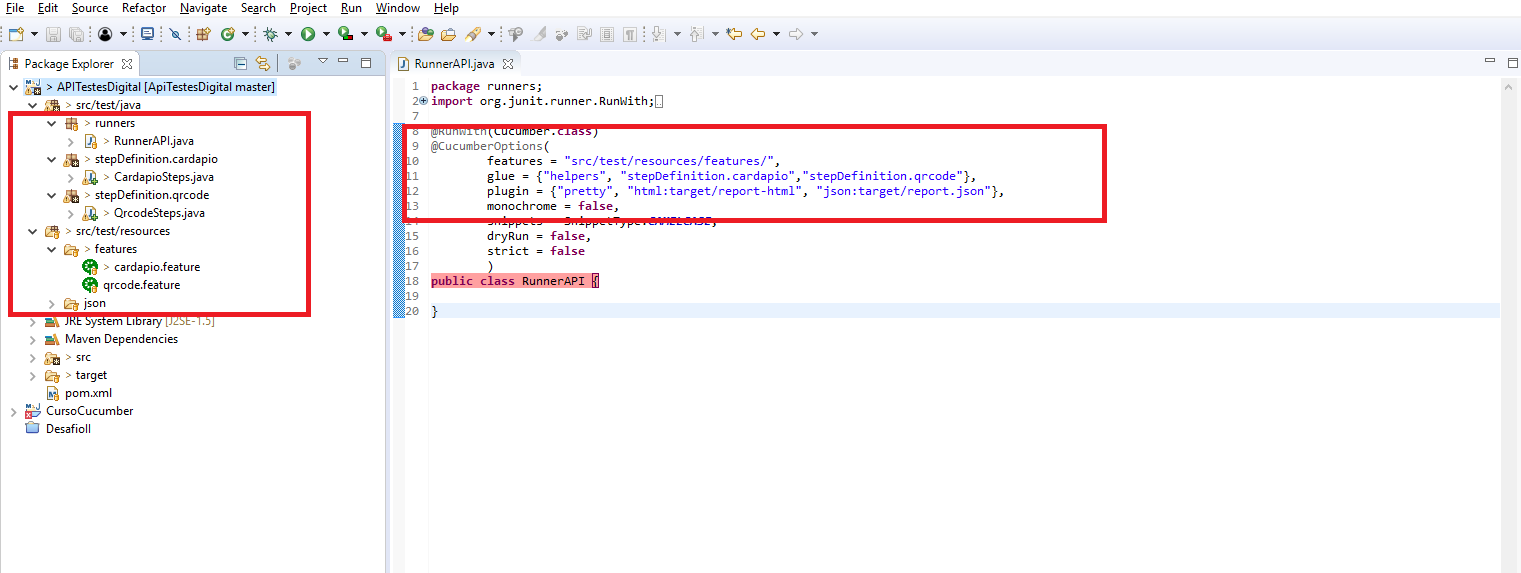
I make your suggestions, but I do not succeed. I have a step in two steps and resource files, but I have a problem "cucumber.runtime.DuplicateStepDefinitionException:"
As the image continues to accuse error, even after separating into two packets and insert into the runner. How do I do for each feature check the corresponding file of steps?
 pdrogf
on 13 Aug 2018
pdrogf
on 13 Aug 2018
Hello @pdrogf - you are commenting on a closed issue. If you need help, please try the support options. Or, if you want to report a bug or request a feature; you can open a new issue.
Without having your code or full stack trace, it's hard to say exactly what's causing this Exception. It looks like you have duplicate step definitions in your step definition files. Note that Cucumber does not distinguish between steps defined in different files; i.e. having the same step definition in 2 different files is still a duplicate step. You can either define a step that can be used by both features, or you'll have to define one unique step per feature. Coupling steps to a particular feature is considered an anti-pattern.
 mlvandijk
on 14 Aug 2018
mlvandijk
on 14 Aug 2018
Hello @pdrogf
YOU NEED TO DELETE HELPERS FROM YOUR GLUE SECTION SINCE THERE IS NO HELPER PACKAGE IN YOUR CODE, REST LOOKS FINE
 metacubeqa
on 7 Oct 2018
metacubeqa
on 7 Oct 2018
This thread has been automatically locked since there has not been any recent activity after it was closed. Please open a new issue for related bugs.
![lock[bot] picture](https://avatars.githubusercontent.com/in/6672?v=4&s=40) lock[bot]
on 7 Oct 2019
lock[bot]
on 7 Oct 2019
Related issues
 JSlain
·
7Comments
JSlain
·
7Comments
 tcwmj
·
10Comments
tcwmj
·
10Comments
 Argelbargel
·
5Comments
Argelbargel
·
5Comments
 thalesh87
·
4Comments
thalesh87
·
4Comments
 nocon
·
3Comments
nocon
·
3Comments
Most helpful comment
You dont need to glue.
If your feature-file is called "DriveCar.feature", and you call your stepdef file "DriveCarStep.java", then you dont need to glue.