Cuckoo: Cuckoo Router Not Forwarding Traffic from Guest to Internet
My Cuckoo setup is working with the exception of providing Internet connectivity to my Win 7 guest.
I can provide Internet connectivity to my guest by using the "old school" iptables rules but not when I use the Cuckoo router.
Guest config:
IP address: 192.168.56.100/24
Gateway: 192.168.56.1
DNS server: 192.168.56.1
Cuckoo routing.conf configuration below.
user01@user01-Workstation:~/.cuckoo/conf$ cat ./routing.conf
[routing]
# Default network routing mode if none is specified by the user.
# In none mode we don't do any special routing - the VM doesn't have any
# network access (this has been the default actually for quite a while) aside
# from the subnet it exists in.
# In internet mode by default all the VMs will be routed through the network
# interface configured below (the "dirty line").
# And in VPN mode by default the VMs will be routed through the VPN identified
# by the given name of the VPN (as per the VPNs listed in the vpn section).
# Note that just like enabling VPN configuration setting this option to
# anything other than "none" requires one to run utils/rooter.py as root next
# to the Cuckoo instance (as it's required for setting up the routing).
route = none

# Network interface that allows a VM to connect to the entire internet, the
# "dirty line" so to say. Note that, just like with the VPNs, this will allow
# malicious traffic through your network. So think twice before enabling it.
# (For example, to use eth0 as dirty line: "internet = eth0").
internet = eth0

# Routing table name/id for "dirty line" interface. If "dirty line" is
# also default gateway in the system you can leave "main" value. Otherwise add
# new routing table by adding "<id> <name>" line to /etc/iproute2/rt_tables
# (e.g., "200 eth0"). ID and name must be unique across the system (refer to
# /etc/iproute2/rt_tables for existing names and IDs).
rt_table = main

# To route traffic through multiple network interfaces Cuckoo uses
# Policy Routing with separate routing table for each output interface
# (VPN or "dirty line"). If this option is enabled Cuckoo on start will try
# to automatically initialise routing tables by copying routing entries from
# main routing table to the new routing tables. Depending on your network/vpn
# configuration this might not be sufficient. In such case you would need to
# initialise routing tables manually. Note that enabling this option won't
# affect main routing table.
auto_rt = yes

# The drop route basically drops any outgoing network (except for Cuckoo
# traffic) whereas the regular none route still allows a VM to access its own
# subnet (e.g., 192.168.56.1/24). It is disabled by default as it does require
# the optional rooter to run (unlike the none route, where literally nothing
# happens). One can either explicitly enable the drop route or if the rooter
# is enabled anyway, it is automatically enabled.
drop = no

[inetsim]
# Route a VM to your local InetSim setup (could in theory also be any other
# type of web service / etc).
enabled = yes
server = 192.168.56.150

[tor]
# Route a VM through Tor, requires a local setup of Tor (please refer to our
# documentation).
enabled = no
dnsport = 5353
proxyport = 9040

[vpn]
# Are VPNs enabled?
enabled = no

# Comma-separated list of the available VPNs.
vpns = vpn0


[vpn0]
# Name of this VPN. The name is represented by the filepath to the
# configuration file, e.g., cuckoo would represent /etc/openvpn/cuckoo.conf
# Note that you can't assign the names "none" and "internet" as those would
# conflict with the routing section in cuckoo.conf.
name = vpn0

# The description of this VPN which will be displayed in the web interface.
# Can be used to for example describe the country where this VPN ends up.
description = Spain, Europe

# The tun device hardcoded for this VPN. Each VPN *must* be configured to use
# a hardcoded/persistent tun device by explicitly adding the line "dev tunX"
# to its configuration (e.g., /etc/openvpn/vpn1.conf) where X in tunX is a
# unique number between 0 and your lucky number of choice.
interface = tun0

# Routing table name/id for this VPN. If table name is used it *must* be
# added to /etc/iproute2/rt_tables as "<id> <name>" line (e.g., "201 tun0").
# ID and name must be unique across the system (refer /etc/iproute2/rt_tables
# for existing names and IDs).
rt_table = tun0
Contents of /etc/iproute2/rt_tables:
user01@user01-Workstation:~/.cuckoo/conf$ cat /etc/iproute2/rt_tables
#
# reserved values
#
255 local
254 main
253 default
0   unspec
#
# local
#
#1  inr.ruhep

400 eth0
When I submit a URL like google.com via the Cuckoo web interface and choose Internet connectivity, the guest has no Internet connectivity.
Any ideas on what I am doing wrong here please?
 ghost
ghost
All 50 comments
I am executing the following commands to submit my sample.
user01@user01-Workstation:~$ . venv/bin/activate
(venv)user01@user01-Workstation:~$ cuckoo rooter --sudo -g user01
[sudo] password for user01:

user01@user01-Workstation:~$ . venv/bin/activate
(venv)user01@user01-Workstation:~$ cuckoo web runserver
Performing system checks...

System check identified no issues (0 silenced).
May 31, 2017 - 08:29:11
Django version 1.8.4, using settings 'cuckoo.web.web.settings'
Starting development server at http://127.0.0.1:8000/
Quit the server with CONTROL-C.

user01@user01-Workstation:~$ . venv/bin/activate
(venv)user01@user01-Workstation:~$ cuckoo

  _____________________________________/\/\_______________________________
  ___/\/\/\/\__/\/\__/\/\____/\/\/\/\__/\/\__/\/\____/\/\/\______/\/\/\___
  _/\/\________/\/\__/\/\__/\/\________/\/\/\/\____/\/\__/\/\__/\/\__/\/\_
  _/\/\________/\/\__/\/\__/\/\________/\/\/\/\____/\/\__/\/\__/\/\__/\/\_
  ___/\/\/\/\____/\/\/\/\____/\/\/\/\__/\/\__/\/\____/\/\/\______/\/\/\___
  ________________________________________________________________________

 Cuckoo Sandbox 2.0.3
 www.cuckoosandbox.org
 Copyright (c) 2010-2017

 Checking for updates...
 You're good to go!
2017-05-31 08:29:43,520 [cuckoo.core.startup] WARNING: Unable to import yara (install with `pip install yara-python==3.5.0`)
2017-05-31 08:29:43,589 [cuckoo.core.scheduler] INFO: Using "virtualbox" as machine manager
2017-05-31 08:29:44,605 [cuckoo.core.scheduler] INFO: Loaded 1 machine/s
2017-05-31 08:29:44,633 [cuckoo.core.scheduler] INFO: Waiting for analysis tasks.
Then I login to the web interface, submit my sample URL (www.google.com) with the Internet option selected. The guest VM starts but has no Internet access (page cannot be displayed), the analysis completes and the results are logged.
I can provide more details of my configuration if needed. Thanks in advance for any ideas on how I can get this working.
ghost
on 31 May 2017
hi, can you execute cuckoo -d rooter --sudo -g user01 and execute analysis if your url, it will provide debug info and post here plz
 doomedraven
on 31 May 2017
doomedraven
on 31 May 2017
Sure. Here is the output. I submitted the URL, http://google.com with the Internet option enabled. I saw a page cannot be displayed error still.
(venv)user01@user01-Workstation:~$ cuckoo -d rooter --sudo -g user01
2017-05-31 13:07:15,044 [cuckoo.apps.rooter] DEBUG: Processing command: forward_drop
2017-05-31 13:07:15,052 [cuckoo.apps.rooter] DEBUG: Processing command: state_disable
2017-05-31 13:07:15,065 [cuckoo.apps.rooter] DEBUG: Processing command: state_enable
2017-05-31 13:07:15,072 [cuckoo.apps.rooter] DEBUG: Processing command: nic_available eth0
2017-05-31 13:07:15,080 [cuckoo.apps.rooter] DEBUG: Processing command: rt_available main
2017-05-31 13:07:15,087 [cuckoo.apps.rooter] DEBUG: Processing command: disable_nat eth0
2017-05-31 13:07:15,100 [cuckoo.apps.rooter] DEBUG: Processing command: enable_nat eth0
2017-05-31 13:07:15,107 [cuckoo.apps.rooter] DEBUG: Processing command: flush_rttable main
2017-05-31 13:07:15,107 [cuckoo.apps.rooter] DEBUG: Processing command: init_rttable main eth0
2017-05-31 13:07:16,880 [cuckoo.apps.rooter] DEBUG: Processing command: forward_drop
2017-05-31 13:07:16,886 [cuckoo.apps.rooter] DEBUG: Processing command: state_disable
2017-05-31 13:07:16,900 [cuckoo.apps.rooter] DEBUG: Processing command: state_enable
2017-05-31 13:07:16,907 [cuckoo.apps.rooter] DEBUG: Processing command: nic_available eth0
2017-05-31 13:07:16,914 [cuckoo.apps.rooter] DEBUG: Processing command: rt_available main
2017-05-31 13:07:16,921 [cuckoo.apps.rooter] DEBUG: Processing command: disable_nat eth0
2017-05-31 13:07:16,933 [cuckoo.apps.rooter] DEBUG: Processing command: enable_nat eth0
2017-05-31 13:07:16,940 [cuckoo.apps.rooter] DEBUG: Processing command: flush_rttable main
2017-05-31 13:07:16,940 [cuckoo.apps.rooter] DEBUG: Processing command: init_rttable main eth0
2017-05-31 13:07:23,483 [cuckoo.apps.rooter] DEBUG: Processing command: forward_drop
2017-05-31 13:07:23,491 [cuckoo.apps.rooter] DEBUG: Processing command: state_disable
2017-05-31 13:07:23,504 [cuckoo.apps.rooter] DEBUG: Processing command: state_enable
2017-05-31 13:07:23,511 [cuckoo.apps.rooter] DEBUG: Processing command: nic_available eth0
2017-05-31 13:07:23,519 [cuckoo.apps.rooter] DEBUG: Processing command: rt_available main
2017-05-31 13:07:23,526 [cuckoo.apps.rooter] DEBUG: Processing command: disable_nat eth0
2017-05-31 13:07:23,538 [cuckoo.apps.rooter] DEBUG: Processing command: enable_nat eth0
2017-05-31 13:07:23,545 [cuckoo.apps.rooter] DEBUG: Processing command: flush_rttable main
2017-05-31 13:07:23,545 [cuckoo.apps.rooter] DEBUG: Processing command: init_rttable main eth0
2017-05-31 13:07:24,908 [cuckoo.apps.rooter] DEBUG: Processing command: forward_disable vboxnet0 eth0 192.168.56.100
2017-05-31 13:08:22,584 [cuckoo.apps.rooter] DEBUG: Processing command: nic_available eth0
2017-05-31 13:08:22,590 [cuckoo.apps.rooter] DEBUG: Processing command: drop_enable 192.168.56.100 192.168.56.1 2042
2017-05-31 13:08:22,686 [cuckoo.apps.rooter] DEBUG: Processing command: forward_enable vboxnet0 eth0 192.168.56.100
2017-05-31 13:08:22,699 [cuckoo.apps.rooter] DEBUG: Processing command: srcroute_enable main 192.168.56.100
2017-05-31 13:09:56,859 [cuckoo.apps.rooter] DEBUG: Processing command: forward_disable vboxnet0 eth0 192.168.56.100
2017-05-31 13:09:56,872 [cuckoo.apps.rooter] DEBUG: Processing command: srcroute_disable main 192.168.56.100
2017-05-31 13:09:56,884 [cuckoo.apps.rooter] DEBUG: Processing command: drop_disable 192.168.56.100 192.168.56.1 2042
hm no idea, everything looks fine, and if old style iptables works, then it more weird, maybe someone else can help you
doomedraven
on 31 May 2017
Interesting. Is this portion of my routing.conf file correct?
user01@user01-Workstation:~/.cuckoo/conf$ cat ./routing.conf
[routing]
# Default network routing mode if none is specified by the user.
# In none mode we don't do any special routing - the VM doesn't have any
# network access (this has been the default actually for quite a while) aside
# from the subnet it exists in.
# In internet mode by default all the VMs will be routed through the network
# interface configured below (the "dirty line").
# And in VPN mode by default the VMs will be routed through the VPN identified
# by the given name of the VPN (as per the VPNs listed in the vpn section).
# Note that just like enabling VPN configuration setting this option to
# anything other than "none" requires one to run utils/rooter.py as root next
# to the Cuckoo instance (as it's required for setting up the routing).
route = none

# Network interface that allows a VM to connect to the entire internet, the
# "dirty line" so to say. Note that, just like with the VPNs, this will allow
# malicious traffic through your network. So think twice before enabling it.
# (For example, to use eth0 as dirty line: "internet = eth0").
internet = eth0

# Routing table name/id for "dirty line" interface. If "dirty line" is
# also default gateway in the system you can leave "main" value. Otherwise add
# new routing table by adding "<id> <name>" line to /etc/iproute2/rt_tables
# (e.g., "200 eth0"). ID and name must be unique across the system (refer to
# /etc/iproute2/rt_tables for existing names and IDs).
rt_table = main
Also, did I do the right thing by adding 400 eth0 to the bottom of the rt_tables file?
user01@user01-Workstation:~/.cuckoo/conf$ cat /etc/iproute2/rt_tables
#
# reserved values
#
255 local
254 main
253 default
0   unspec
#
# local
#
#1  inr.ruhep

400 eth0
Maybe I will try running Cuckoo outside of a virtual environment.
ghost
on 1 Jun 2017
the rt_table is only for vpn as far as i know(documentation says also) i never use internet direct exit so can't say i always use inetsim/tor/vpn/drop only
doomedraven
on 1 Jun 2017
Ok. I hope someone can help me get the Internet option working for when I submit samples. Please let me know if I can submit further details to help solve this. Thanks
ghost
on 1 Jun 2017
I am having the exact same issues. I can provide more logs if needed.
 Lost4Now
on 15 Jun 2017
Lost4Now
on 15 Jun 2017
Is the Cuckoo host running a DNS server?
 jbremer
on 23 Jun 2017
jbremer
on 23 Jun 2017
It's not
On Jun 23, 2017, at 6:02 AM, Jurriaan Bremer notifications@github.com wrote:
Is the Cuckoo host running a DNS server?
—
You are receiving this because you authored the thread.
Reply to this email directly, view it on GitHub, or mute the thread.
ghost
on 23 Jun 2017
What should the dns server be set to though on the guest VM?
On Jun 23, 2017, at 6:02 AM, Jurriaan Bremer notifications@github.com wrote:
Is the Cuckoo host running a DNS server?
—
You are receiving this because you authored the thread.
Reply to this email directly, view it on GitHub, or mute the thread.
ghost
on 23 Jun 2017
Well, what about a regular DNS server such as 8.8.8.8? :p
jbremer
on 23 Jun 2017
Yeah that's what I have configured on the guest VM and on the host
On Jun 23, 2017, at 9:12 AM, Jurriaan Bremer notifications@github.com wrote:
Well, what about a regular DNS server such as 8.8.8.8? :p
—
You are receiving this because you authored the thread.
Reply to this email directly, view it on GitHub, or mute the thread.
ghost
on 23 Jun 2017
I've similiar issue. When I configure rooter to route request to an external Inetsim (same guest vlan) I get no results on Http tab. when I set Inetsim as primary DNS on guests VM Suricata module fails but I get results from Inetsim
Traceback (most recent call last):
File "/usr/local/lib/python2.7/dist-packages/cuckoo/core/plugins.py", line 240, in process
data = current.run()
File "/usr/local/lib/python2.7/dist-packages/cuckoo/processing/suricata.py", line 290, in run
self.parse_files()
File "/usr/local/lib/python2.7/dist-packages/cuckoo/processing/suricata.py", line 242, in parse_files
"ids": int(filepath.split(".", 1)[-1]),
 Nwinternights
on 21 Jul 2017
Nwinternights
on 21 Jul 2017
but can you connect from cuckoo host for example nc -vvv inetsim_ip 53 or 80
doomedraven
on 21 Jul 2017
Yep nc -vvv 192.168.56.200 80
Connection to 192.168.56.200 80 port [tcp/http] succeeded!
suricata is 3.2.3
Nwinternights
on 21 Jul 2017
found the problem! after suricata upgrade it misses "one todo" config present here(https://github.com/cuckoosandbox/cuckoo/blob/master/stuff/suricata.sh)
Nwinternights
on 21 Jul 2017
Can you please be more specific on how you fixes it? Thanks!
On Jul 21, 2017, at 3:38 AM, Nwinternights notifications@github.com wrote:
found the problem! after suricata upgrade it misses "one todo" config present here(https://github.com/cuckoosandbox/cuckoo/blob/master/stuff/suricata.sh)
—
You are receiving this because you authored the thread.
Reply to this email directly, view it on GitHub, or mute the thread.
ghost
on 21 Jul 2017
@raveydaveygravy I thought I had solved but after some deeper analysis I had more or less the same problem.
Firstly I used Inetsim on a different machine (rooter configured) but with no luck. Then I installed inetsim on the the host cuckoo doing a port redirection from vboxnet (from 53 to 5342) I configured Inetsim to listen on 5342 for DNS on the Vboxnet.
Now Inetsim works but suricata keeps crashing.
here my iptables
:PREROUTING ACCEPT [409:28741]
:INPUT ACCEPT [216:13680]
:OUTPUT ACCEPT [9:563]
:POSTROUTING ACCEPT [0:0]
-A PREROUTING -i vboxnet0 -p udp -m udp --dport 53 -j REDIRECT --to-ports 5342
-A PREROUTING -i vboxnet0 -p tcp -m tcp --dport 53 -j REDIRECT --to-ports 5342
-A POSTROUTING -s 192.168.56.0/24 -o enp4s0f0 -j MASQUERADE
-A POSTROUTING -j MASQUERADE
-A INPUT -m state --state RELATED,ESTABLISHED -j ACCEPT
-A FORWARD -m state --state RELATED,ESTABLISHED -j ACCEPT
-A FORWARD -s 192.168.56.0/24 -j ACCEPT
-A FORWARD -s 192.168.56.0/24 -d 192.168.56.0/24 -j ACCEPT
-A FORWARD -j LOG
-A FORWARD -m conntrack --ctstate RELATED,ESTABLISHED -j ACCEPT
COMMIT
Suricata error:
2017-07-21 17:16:00,093 [cuckoo.core.plugins] ERROR: Failed to run the processing module "Suricata" for task #2:
Traceback (most recent call last):
File "/usr/local/lib/python2.7/dist-packages/cuckoo/core/plugins.py", line 240, in process
data = current.run()
File "/usr/local/lib/python2.7/dist-packages/cuckoo/processing/suricata.py", line 290, in run
self.parse_files()
File "/usr/local/lib/python2.7/dist-packages/cuckoo/processing/suricata.py", line 242, in parse_files
"ids": int(filepath.split(".", 1)[-1]),
ValueError: invalid literal for int() with base 10: 'cuckoo/storage/analyses/2/suricata/files/file.79'
@doomedraven @jbremer any ideas?
regards
Nwinternights
on 21 Jul 2017
I've the same problem RE: Per-analysis routing using iNetSim. iNetSim is installed in a Turnkey Linux VM and configured correctly to serve fake responses to a Win 7 VM. The network medium is Host Only on vboxnet and it only works when setting the DNS address in the Win 7 VM to the IP of iNetSim. Here's my configuration:
Cuckoo version: 2.0.4a3
routing.conf:
-- [inetsim]
--- enabled = yes
--- server = 192.168.56.200
iNetSim:
-- service_bind_address: 0.0.0.0
-- dns_default_ip: 192.168.56.200
-- dns_bind_port: 53
Turnkey Linux:
-- ip address: 192.168.56.200
-- netmask: 255.255.255.0
-- gateway: 192.168.56.1
-- dns_nameserver: 192.168.56.1
Windows 7:
-- ip address: 192.168.56.101
-- netmask: 255.255.255.0
-- gateway: 192.168.56.1
-- dns_nameserver: 8.8.8.8
I can analyse samples and get HTTP responses when routing with the dirty line, tor, none, but not iNetSim. Been trying to get this one up as it is the most important one for controlling network activity. Any help would be appreciated.
Could it be an iptables problem? Or is Cuckoo not injecting the rules correctly? I probably need to analyse this with wireshark, but thought someone could give me a heads up or a clue. Thanks...
 Hullgj
on 24 Jul 2017
Hullgj
on 24 Jul 2017
can you do from cuckoo host curl 192.168.56.200 and see if it return inetsim response?
doomedraven
on 25 Jul 2017
I get the response from inetsim with curl from the cuckoo host, which is running on the bare metal:
This is the default HTML page for INetSim HTTP server fake mode.
This file is an HTML document.
Hullgj
on 25 Jul 2017
on baremetal cuckoo or inetsim?, inetsim works just fine, so should be something different which fails to you, which is the cuckoo version?
doomedraven
on 25 Jul 2017
The cuckoo host is running on bare metal, version 2.0.4a3. iNetSim is running in a VM Turnkey Linux.
If I manually set the DNS address in the Windows 7 VM to the IP of the inetsim all web pages result in the fake response. But when running cuckoo the iptable routing rules aren't enough to redirect all traffic to inetsim.
Do I need to disable systemd routing in the host, on the bare metal to override the static DNS address set in Win 7?
Hullgj
on 25 Jul 2017
maybe someone who uses vbox can respond to you, but roouter iprables should be more than enough, @jbremer
doomedraven
on 25 Jul 2017
So you @doomedraven have inetsim setup on the bare metal or some other hypervisor?
Hullgj
on 25 Jul 2017
inside of the vm in the same network as cuckoo vms
doomedraven
on 25 Jul 2017
I started from scratch and now I've Inetsim on the same Cuckoohost (listen on all default services/ports) ,rooter configured to route Intesim to the CuckooHost 192.168.56.1 and suricata installed too.
Iptables :http://docs.cuckoosandbox.org/en/latest/installation/host/routing/
Suricata: https://github.com/cuckoosandbox/cuckoo/blob/690f8595bbac3d84832095ce1192c34071f257c7/stuff/suricata.sh
and it works 100%
hope it helps
Nwinternights
on 28 Jul 2017
Hello,
Is there a way to let cuckoo and Inetsim work on separate machines? Did someone have success with such a configuration?
Seems from what i read above and from what i personally tested that the DNAT iptables set by cuckoo rooter to redirect the traffic to the INETSIM IP works only if INETSIM is located in the same server of Cuckoo Itself.
I would like to have instead a separate server acting only as sinkhole.
 CaliCaliIT
on 4 Jan 2018
CaliCaliIT
on 4 Jan 2018
check inetsim rules in router and modify for your needs is the easier solution
doomedraven
on 4 Jan 2018
@Hullgj and @CaliCaliIT did you find a solution for this particular problem? I'm experiencing the same issue as you've described. Analysis with cuckoo rooter and dirty line works fine, but inetsim fails. I'm running inetsim via a REMnux VM (as per the Cuckoo documentation) and analysis of a domain name always results in lookup failures.
From both the cuckoo host and the client VM machines I can do an nslookup google.com ip_of_inetsim_VM which returns the expected value from the REMnux/inetsim VM. I can also reach the web service for inetsim and get the default inetsim webpage returned. However cuckoo rooter redirecting traffic and DNS requests to the REMnux/inetsim VM appears to fail.
 crahan
on 24 Jan 2018
crahan
on 24 Jan 2018
I reported this originally and never found a resolution. If you do, please share
On Jan 23, 2018, at 4:49 PM, Thomas Bouve notifications@github.com wrote:
@Hullgj and @CaliCaliIT did you find a solution for this particular problem? I'm experiencing the same issue as you've described. Analysis with cuckoo rooter and dirty line works fine, but inetsim fails. I'm running inetsim via a REMnux VM (as per the Cuckoo documentation) and analysis of a domain name always results in lookup failures.
From both the cuckoo host and the client VM machines I can do an nslookup google.com ip_of_inetsim_VM which returns the expected value from the REMnux/inetsim VM. I can also reach the web service for inetsim and get the default inetsim webpage returned. However cuckoo rooter redirecting traffic and DNS requests to the REMnux/inetsim VM appears to fail.
—
You are receiving this because you were mentioned.
Reply to this email directly, view it on GitHub, or mute the thread.
ghost
on 24 Jan 2018
idk, why you have that problem, it works just fine here. you should have something wrong, debug your iptables
doomedraven
on 24 Jan 2018
@doomedraven do you run using VirtualBox or another virtualization platform?
(Update: initially forgot to enable ip forwarding so I reran the test and updated the results below)
My setup details are as follows:
- 192.168.56.1 is the IP of the Ubuntu 16.04 host running cuckoo (which has the vboxnet0 interface)
- 192.168.56.101 is the Windows XP analysis VM (configured to use 8.8.8.8 for DNS)
- 192.168.56.10 is the REMnux VM running inetsim
I've tried to debug this as best as I could (but I'm not an expert on iptables). I started by adding the following log lines to iptables (based on the iptables commands I could find related to inetsim in rooter.py):
iptables -t nat -I PREROUTING --source 192.168.56.101 -p tcp --syn ! --dport 2042 -j LOG
iptables -t nat -I PREROUTING --source 192.168.56.101 -p udp -j LOG
iptables -t nat -I PREROUTING -p tcp --dport 53 --source 192.168.56.101 -j LOG
iptables -t nat -I PREROUTING -p udp --dport 53 --source 192.168.56.101 -j LOG
iptables -I FORWARD -i vboxnet0 -o vboxnet0 --source 192.168.56.101 -j LOG
iptables -I FORWARD -i vboxnet0 -o vboxnet0 --destination 192.168.56.101 -j LOG
Once an analysis for the example.com domain name is submitted and cuckoo rooter adds the required iptables entries to enable traffic redirection to the inetsim VM the iptables output is as follows:
# iptables -t nat --list
Chain PREROUTING (policy ACCEPT)
target     prot opt source               destination
LOG        udp  --  192.168.56.101       anywhere             udp dpt:domain LOG level warning
LOG        tcp  --  192.168.56.101       anywhere             tcp dpt:domain LOG level warning
LOG        udp  --  192.168.56.101       anywhere             LOG level warning
LOG        tcp  --  192.168.56.101       anywhere             tcp dpt:!2042 flags:FIN,SYN,RST,ACK/SYN LOG level warning
DNAT       tcp  --  192.168.56.101       anywhere             tcp dpt:!2042 flags:FIN,SYN,RST,ACK/SYN to:192.168.56.10
DNAT       udp  --  192.168.56.101       anywhere             to:192.168.56.10
DNAT       tcp  --  192.168.56.101       anywhere             tcp dpt:domain to:192.168.56.10:53
DNAT       udp  --  192.168.56.101       anywhere             udp dpt:domain to:192.168.56.10:53

Chain INPUT (policy ACCEPT)
target     prot opt source               destination

Chain OUTPUT (policy ACCEPT)
target     prot opt source               destination

Chain POSTROUTING (policy ACCEPT)
target     prot opt source               destination
# iptables --list
Chain INPUT (policy ACCEPT)
target     prot opt source               destination

Chain FORWARD (policy ACCEPT)
target     prot opt source               destination
LOG        all  --  anywhere             192.168.56.101       LOG level warning
LOG        all  --  192.168.56.101       anywhere             LOG level warning
ACCEPT     all  --  192.168.56.101       anywhere
ACCEPT     all  --  anywhere             192.168.56.101

Chain OUTPUT (policy ACCEPT)
target     prot opt source               destination
DROP       all  --  anywhere             anywhere             ctstate INVALID
DROP       all  --  anywhere             anywhere             state INVALID
DROP       all  --  192.168.56.101       anywhere
Now, running tcpdump -nn -i vboxnet0 not port 2042 and not port 8000 on the cuckoo host (which has the vboxnet0 interface) I see the following data:
21:32:26.463293 ARP, Request who-has 192.168.56.101 tell 192.168.56.1, length 28
21:32:27.487289 ARP, Request who-has 192.168.56.101 tell 192.168.56.1, length 28
21:32:28.511286 ARP, Request who-has 192.168.56.101 tell 192.168.56.1, length 28
21:32:40.555259 ARP, Request who-has 192.168.56.101 tell 192.168.56.1, length 28
21:32:41.567294 ARP, Request who-has 192.168.56.101 tell 192.168.56.1, length 28
21:32:42.591344 ARP, Request who-has 192.168.56.101 tell 192.168.56.1, length 28
21:32:44.624841 ARP, Request who-has 192.168.56.101 tell 192.168.56.1, length 28
21:32:44.625173 ARP, Reply 192.168.56.101 is-at 08:00:27:6f:47:fb, length 28
21:32:46.100093 IP 192.168.56.101.64573 > 8.8.8.8.53: 34122+ A? example.com. (29)
21:32:46.100163 IP 192.168.56.101.64573 > 192.168.56.10.53: 34122+ A? example.com. (29)
21:32:46.580359 IP 192.168.56.101.50071 > 8.8.8.8.53: 46791+ A? www.live.com. (30)
21:32:46.580419 IP 192.168.56.101.50071 > 192.168.56.10.53: 46791+ A? www.live.com. (30)
21:32:46.580917 IP 192.168.56.101.50726 > 8.8.8.8.53: 41953+ A? example.com. (29)
21:32:46.580949 IP 192.168.56.101.50726 > 192.168.56.10.53: 41953+ A? example.com. (29)
21:32:47.098468 IP 192.168.56.101.64573 > 8.8.8.8.53: 34122+ A? example.com. (29)
21:32:47.098563 IP 192.168.56.101.64573 > 192.168.56.10.53: 34122+ A? example.com. (29)
21:32:47.578605 IP 192.168.56.101.50071 > 8.8.8.8.53: 46791+ A? www.live.com. (30)
21:32:47.578750 IP 192.168.56.101.50071 > 192.168.56.10.53: 46791+ A? www.live.com. (30)
21:32:47.579618 IP 192.168.56.101.50726 > 8.8.8.8.53: 41953+ A? example.com. (29)
21:32:47.579680 IP 192.168.56.101.50726 > 192.168.56.10.53: 41953+ A? example.com. (29)
21:32:48.099648 IP 192.168.56.101.64573 > 8.8.8.8.53: 34122+ A? example.com. (29)
21:32:48.099729 IP 192.168.56.101.64573 > 192.168.56.10.53: 34122+ A? example.com. (29)
21:32:48.579728 IP 192.168.56.101.50071 > 8.8.8.8.53: 46791+ A? www.live.com. (30)
21:32:48.579815 IP 192.168.56.101.50071 > 192.168.56.10.53: 46791+ A? www.live.com. (30)
21:32:48.580421 IP 192.168.56.101.50726 > 8.8.8.8.53: 41953+ A? example.com. (29)
21:32:48.580469 IP 192.168.56.101.50726 > 192.168.56.10.53: 41953+ A? example.com. (29)
21:32:50.102226 IP 192.168.56.101.64573 > 8.8.8.8.53: 34122+ A? example.com. (29)
21:32:50.102337 IP 192.168.56.101.64573 > 192.168.56.10.53: 34122+ A? example.com. (29)
21:32:50.582892 IP 192.168.56.101.50071 > 8.8.8.8.53: 46791+ A? www.live.com. (30)
21:32:50.582983 IP 192.168.56.101.50071 > 192.168.56.10.53: 46791+ A? www.live.com. (30)
21:32:50.583818 IP 192.168.56.101.50726 > 8.8.8.8.53: 41953+ A? example.com. (29)
21:32:50.583871 IP 192.168.56.101.50726 > 192.168.56.10.53: 41953+ A? example.com. (29)
21:32:51.295293 ARP, Request who-has 192.168.56.10 tell 192.168.56.1, length 28
21:32:51.295795 ARP, Reply 192.168.56.10 is-at 08:00:27:57:b2:ef, length 46
21:32:54.108494 IP 192.168.56.101.64573 > 8.8.8.8.53: 34122+ A? example.com. (29)
21:32:54.108622 IP 192.168.56.101.64573 > 192.168.56.10.53: 34122+ A? example.com. (29)
21:32:54.588680 IP 192.168.56.101.50071 > 8.8.8.8.53: 46791+ A? www.live.com. (30)
21:32:54.588777 IP 192.168.56.101.50071 > 192.168.56.10.53: 46791+ A? www.live.com. (30)
21:32:54.589588 IP 192.168.56.101.50726 > 8.8.8.8.53: 41953+ A? example.com. (29)
21:32:54.589637 IP 192.168.56.101.50726 > 192.168.56.10.53: 41953+ A? example.com. (29)
21:33:01.121579 IP 192.168.56.101.137 > 192.168.56.255.137: NBT UDP PACKET(137): QUERY; REQUEST; BROADCAST
21:33:01.121587 IP 192.168.56.101.137 > 192.168.56.255.137: NBT UDP PACKET(137): QUERY; REQUEST; BROADCAST
21:33:01.590543 IP 192.168.56.101.137 > 192.168.56.255.137: NBT UDP PACKET(137): QUERY; REQUEST; BROADCAST
21:33:01.590564 IP 192.168.56.101.137 > 192.168.56.255.137: NBT UDP PACKET(137): QUERY; REQUEST; BROADCAST
21:33:01.592212 IP 192.168.56.101.137 > 192.168.56.255.137: NBT UDP PACKET(137): QUERY; REQUEST; BROADCAST
Which appears to be confirmed by the iptables log entries (on the same host):
Jan 24 21:32:39 cuckoo kernel: [ 5677.986587] vboxdrv: 0000000000000000 VBoxEhciR0.r0
Jan 24 21:32:46 cuckoo kernel: [ 5684.777487] IN=vboxnet0 OUT= MAC=0a:00:27:00:00:00:08:00:27:6f:47:fb:08:00 SRC=192.168.56.101 DST=8.8.8.8 LEN=57 TOS=0x00 PREC=0x00 TTL=128 ID=771 PROTO=UDP SPT=64573 DPT=53 LEN=37
Jan 24 21:32:46 cuckoo kernel: [ 5684.777491] IN=vboxnet0 OUT= MAC=0a:00:27:00:00:00:08:00:27:6f:47:fb:08:00 SRC=192.168.56.101 DST=8.8.8.8 LEN=57 TOS=0x00 PREC=0x00 TTL=128 ID=771 PROTO=UDP SPT=64573 DPT=53 LEN=37
Jan 24 21:32:46 cuckoo kernel: [ 5684.777516] IN=vboxnet0 OUT=vboxnet0 MAC=0a:00:27:00:00:00:08:00:27:6f:47:fb:08:00 SRC=192.168.56.101 DST=192.168.56.10 LEN=57 TOS=0x00 PREC=0x00 TTL=127 ID=771 PROTO=UDP SPT=64573 DPT=53 LEN=37
Jan 24 21:32:46 cuckoo kernel: [ 5685.257731] IN=vboxnet0 OUT= MAC=0a:00:27:00:00:00:08:00:27:6f:47:fb:08:00 SRC=192.168.56.101 DST=8.8.8.8 LEN=58 TOS=0x00 PREC=0x00 TTL=128 ID=2663 PROTO=UDP SPT=50071 DPT=53 LEN=38
Jan 24 21:32:46 cuckoo kernel: [ 5685.257735] IN=vboxnet0 OUT= MAC=0a:00:27:00:00:00:08:00:27:6f:47:fb:08:00 SRC=192.168.56.101 DST=8.8.8.8 LEN=58 TOS=0x00 PREC=0x00 TTL=128 ID=2663 PROTO=UDP SPT=50071 DPT=53 LEN=38
Jan 24 21:32:46 cuckoo kernel: [ 5685.257759] IN=vboxnet0 OUT=vboxnet0 MAC=0a:00:27:00:00:00:08:00:27:6f:47:fb:08:00 SRC=192.168.56.101 DST=192.168.56.10 LEN=58 TOS=0x00 PREC=0x00 TTL=127 ID=2663 PROTO=UDP SPT=50071 DPT=53 LEN=38
Jan 24 21:32:46 cuckoo kernel: [ 5685.258274] IN=vboxnet0 OUT= MAC=0a:00:27:00:00:00:08:00:27:6f:47:fb:08:00 SRC=192.168.56.101 DST=8.8.8.8 LEN=57 TOS=0x00 PREC=0x00 TTL=128 ID=2664 PROTO=UDP SPT=50726 DPT=53 LEN=37
Jan 24 21:32:46 cuckoo kernel: [ 5685.258284] IN=vboxnet0 OUT= MAC=0a:00:27:00:00:00:08:00:27:6f:47:fb:08:00 SRC=192.168.56.101 DST=8.8.8.8 LEN=57 TOS=0x00 PREC=0x00 TTL=128 ID=2664 PROTO=UDP SPT=50726 DPT=53 LEN=37
Jan 24 21:32:46 cuckoo kernel: [ 5685.258290] IN=vboxnet0 OUT=vboxnet0 MAC=0a:00:27:00:00:00:08:00:27:6f:47:fb:08:00 SRC=192.168.56.101 DST=192.168.56.10 LEN=57 TOS=0x00 PREC=0x00 TTL=127 ID=2664 PROTO=UDP SPT=50726 DPT=53 LEN=37
Jan 24 21:32:47 cuckoo kernel: [ 5685.775875] IN=vboxnet0 OUT=vboxnet0 MAC=0a:00:27:00:00:00:08:00:27:6f:47:fb:08:00 SRC=192.168.56.101 DST=192.168.56.10 LEN=57 TOS=0x00 PREC=0x00 TTL=127 ID=2835 PROTO=UDP SPT=64573 DPT=53 LEN=37
Jan 24 21:32:47 cuckoo kernel: [ 5686.256033] IN=vboxnet0 OUT=vboxnet0 MAC=0a:00:27:00:00:00:08:00:27:6f:47:fb:08:00 SRC=192.168.56.101 DST=192.168.56.10 LEN=58 TOS=0x00 PREC=0x00 TTL=127 ID=2836 PROTO=UDP SPT=50071 DPT=53 LEN=38
Jan 24 21:32:47 cuckoo kernel: [ 5686.256964] IN=vboxnet0 OUT=vboxnet0 MAC=0a:00:27:00:00:00:08:00:27:6f:47:fb:08:00 SRC=192.168.56.101 DST=192.168.56.10 LEN=57 TOS=0x00 PREC=0x00 TTL=127 ID=2837 PROTO=UDP SPT=50726 DPT=53 LEN=37
Jan 24 21:32:48 cuckoo kernel: [ 5686.777007] IN=vboxnet0 OUT=vboxnet0 MAC=0a:00:27:00:00:00:08:00:27:6f:47:fb:08:00 SRC=192.168.56.101 DST=192.168.56.10 LEN=57 TOS=0x00 PREC=0x00 TTL=127 ID=3218 PROTO=UDP SPT=64573 DPT=53 LEN=37
Jan 24 21:32:48 cuckoo kernel: [ 5687.257067] IN=vboxnet0 OUT=vboxnet0 MAC=0a:00:27:00:00:00:08:00:27:6f:47:fb:08:00 SRC=192.168.56.101 DST=192.168.56.10 LEN=58 TOS=0x00 PREC=0x00 TTL=127 ID=3219 PROTO=UDP SPT=50071 DPT=53 LEN=38
Jan 24 21:32:48 cuckoo kernel: [ 5687.257730] IN=vboxnet0 OUT=vboxnet0 MAC=0a:00:27:00:00:00:08:00:27:6f:47:fb:08:00 SRC=192.168.56.101 DST=192.168.56.10 LEN=57 TOS=0x00 PREC=0x00 TTL=127 ID=3220 PROTO=UDP SPT=50726 DPT=53 LEN=37
Jan 24 21:32:50 cuckoo kernel: [ 5688.779535] IN=vboxnet0 OUT=vboxnet0 MAC=0a:00:27:00:00:00:08:00:27:6f:47:fb:08:00 SRC=192.168.56.101 DST=192.168.56.10 LEN=57 TOS=0x00 PREC=0x00 TTL=127 ID=3565 PROTO=UDP SPT=64573 DPT=53 LEN=37
Jan 24 21:32:50 cuckoo kernel: [ 5689.260159] IN=vboxnet0 OUT=vboxnet0 MAC=0a:00:27:00:00:00:08:00:27:6f:47:fb:08:00 SRC=192.168.56.101 DST=192.168.56.10 LEN=58 TOS=0x00 PREC=0x00 TTL=127 ID=3567 PROTO=UDP SPT=50071 DPT=53 LEN=38
Jan 24 21:32:50 cuckoo kernel: [ 5689.261056] IN=vboxnet0 OUT=vboxnet0 MAC=0a:00:27:00:00:00:08:00:27:6f:47:fb:08:00 SRC=192.168.56.101 DST=192.168.56.10 LEN=57 TOS=0x00 PREC=0x00 TTL=127 ID=3568 PROTO=UDP SPT=50726 DPT=53 LEN=37
Jan 24 21:32:54 cuckoo kernel: [ 5692.785663] IN=vboxnet0 OUT=vboxnet0 MAC=0a:00:27:00:00:00:08:00:27:6f:47:fb:08:00 SRC=192.168.56.101 DST=192.168.56.10 LEN=57 TOS=0x00 PREC=0x00 TTL=127 ID=4126 PROTO=UDP SPT=64573 DPT=53 LEN=37
Jan 24 21:32:54 cuckoo kernel: [ 5693.265803] IN=vboxnet0 OUT=vboxnet0 MAC=0a:00:27:00:00:00:08:00:27:6f:47:fb:08:00 SRC=192.168.56.101 DST=192.168.56.10 LEN=58 TOS=0x00 PREC=0x00 TTL=127 ID=4491 PROTO=UDP SPT=50071 DPT=53 LEN=38
Jan 24 21:32:54 cuckoo kernel: [ 5693.266672] IN=vboxnet0 OUT=vboxnet0 MAC=0a:00:27:00:00:00:08:00:27:6f:47:fb:08:00 SRC=192.168.56.101 DST=192.168.56.10 LEN=57 TOS=0x00 PREC=0x00 TTL=127 ID=4492 PROTO=UDP SPT=50726 DPT=53 LEN=37
Jan 24 21:33:01 cuckoo kernel: [ 5699.798406] IN=vboxnet0 OUT= MAC=ff:ff:ff:ff:ff:ff:08:00:27:6f:47:fb:08:00 SRC=192.168.56.101 DST=192.168.56.255 LEN=78 TOS=0x00 PREC=0x00 TTL=128 ID=6057 PROTO=UDP SPT=137 DPT=137 LEN=58
Jan 24 21:33:01 cuckoo kernel: [ 5700.267408] IN=vboxnet0 OUT= MAC=ff:ff:ff:ff:ff:ff:08:00:27:6f:47:fb:08:00 SRC=192.168.56.101 DST=192.168.56.255 LEN=78 TOS=0x00 PREC=0x00 TTL=128 ID=6069 PROTO=UDP SPT=137 DPT=137 LEN=58
Jan 24 21:33:01 cuckoo kernel: [ 5700.269067] IN=vboxnet0 OUT= MAC=ff:ff:ff:ff:ff:ff:08:00:27:6f:47:fb:08:00 SRC=192.168.56.101 DST=192.168.56.255 LEN=78 TOS=0x00 PREC=0x00 TTL=128 ID=6070 PROTO=UDP SPT=137 DPT=137 LEN=58
Jan 24 21:33:01 cuckoo kernel: [ 5700.546148] IN=vboxnet0 OUT= MAC=ff:ff:ff:ff:ff:ff:08:00:27:6f:47:fb:08:00 SRC=192.168.56.101 DST=192.168.56.255 LEN=78 TOS=0x00 PREC=0x00 TTL=128 ID=6178 PROTO=UDP SPT=137 DPT=137 LEN=58
Jan 24 21:33:02 cuckoo kernel: [ 5701.017255] IN=vboxnet0 OUT= MAC=ff:ff:ff:ff:ff:ff:08:00:27:6f:47:fb:08:00 SRC=192.168.56.101 DST=192.168.56.255 LEN=78 TOS=0x00 PREC=0x00 TTL=128 ID=6187 PROTO=UDP SPT=137 DPT=137 LEN=58
Jan 24 21:33:02 cuckoo kernel: [ 5701.017520] IN=vboxnet0 OUT= MAC=ff:ff:ff:ff:ff:ff:08:00:27:6f:47:fb:08:00 SRC=192.168.56.101 DST=192.168.56.255 LEN=78 TOS=0x00 PREC=0x00 TTL=128 ID=6188 PROTO=UDP SPT=137 DPT=137 LEN=58
Jan 24 21:33:02 cuckoo kernel: [ 5701.296651] IN=vboxnet0 OUT= MAC=ff:ff:ff:ff:ff:ff:08:00:27:6f:47:fb:08:00 SRC=192.168.56.101 DST=192.168.56.255 LEN=78 TOS=0x00 PREC=0x00 TTL=128 ID=6189 PROTO=UDP SPT=137 DPT=137 LEN=58
Jan 24 21:33:03 cuckoo kernel: [ 5701.767882] IN=vboxnet0 OUT= MAC=ff:ff:ff:ff:ff:ff:08:00:27:6f:47:fb:08:00 SRC=192.168.56.101 DST=192.168.56.255 LEN=78 TOS=0x00 PREC=0x00 TTL=128 ID=6596 PROTO=UDP SPT=137 DPT=137 LEN=58
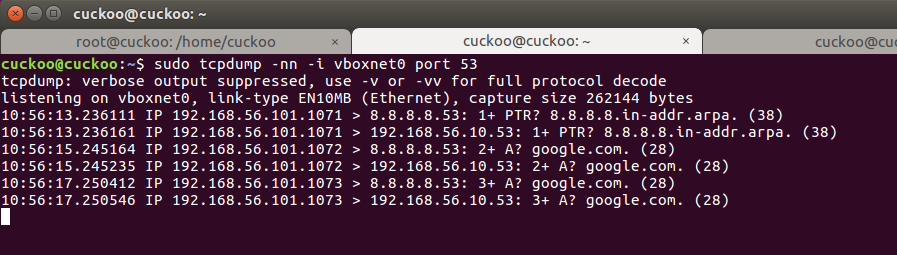
The tcpdump session on the cuckoo host appears to indicate that iptables is doing something with the DNS requests from 192.168.56.101 to 8.8.8.8 since we see each DNS request from 192.168.56.101 duplicated to 192.168.56.10 (the inetsim VM).
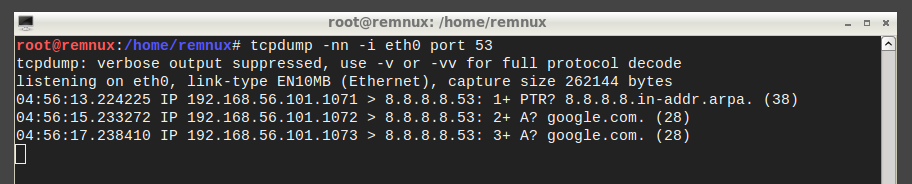
So packet redirection is apparently happening. Unfortunately, the redirected DNS requests to 192.168.56.10 never arrive at the inetsim VM network interface. A tcpdump session run on the inetsim VM (192.168.56.10) only shows ARP and broadcast traffic being captured during the cuckoo analysis.
I did find the following resource which describes a similar issue: https://serverfault.com/questions/664637/iptables-drops-packets-after-postrouting where the original author replied with "Unfortunately, the problem was in the way VirtualBox emulates the interface and/or network stack, so no amount of flailing on iptables was helping".
There's no additional details though so I'm wondering if this might indeed be related to an issue with how host-only networking works in VirtualBox.
I appreciate your time and input!
crahan
on 24 Jan 2018
kvm :)
oh that sad, if that the vbox problem, maybe anyone who uses vbox can confirm the issue?
doomedraven
on 25 Jan 2018
Thanks @doomedraven.
Even more interesting. When I set the network card in the inetsim VM to promiscuous mode it only captures the DNS requests from the XP analysis VM to 8.8.8.8 and still not the redirected packets (which are captured by the tcpdump session on the cuckoo host).
Cuckoo host tcpdump (original DNS requests + redirected requests):
inetsim VM tcpdump (promiscuous mode lets us capture the original DNS request leaving the XP machine. But even now we're not able to capture the redirected requests):
I believe @dfir-dave and @Hullgj were also using VirtualBox when they ran into this issue. I'll hop over to the VirtualBox forums and see if anyone there can confirm these findings. If this is in fact related to how host-only networking in VirtualBox is designed then it's not much use trying to find a fix :)
crahan
on 25 Jan 2018
would be great, to confirm that, that would make vbox less atractive :D
doomedraven
on 25 Jan 2018
Submitted at https://forums.virtualbox.org/viewtopic.php?f=7&t=86462. If anything comes out of that I'll post an update.
crahan
on 25 Jan 2018
There was some response to the vbox forum post, but ultimately the answer there was I'm using host-only networking for something it wasn't intended to do. So I went ahead and tried moving my virtual machines over to KVM and I'm happy to report that inetsim works perfectly fine out of the box using cuckoo rooter.
I'll consider that a good enough fix to my problem! :D
crahan
on 26 Jan 2018
just in case ;) http://www.doomedraven.com/#modifying-kvm-qemu-kvm-settings-for-malware-analysis
good to know what kvm always rulez ;)
doomedraven
on 26 Jan 2018
@doomedraven do you happen to also run a Windows 7 analysis VMs in combination with inetsim? It appears that while switching to KVM for virtualisation has fixed the redirect issue for my XP analysis VM, my Windows 7 VM refuses to acknowledge the received DNS responses from inetsim.
I ran a packet capture on the Windows 7 host and I can see DNS requests to 8.8.8.8 (default DNS server on that VM) going out and replies from 192.168.122.10 (inetsim) coming in (since iptables redirects the request to inetsim and that host replies with its own IP). However, while the DNS response clearly arrives on the Windows 7 host, the OS doesn't do anything with it. Instead it sends out the DNS request again.
Since it works with the XP VM I'm thinking it's not related to iptables, cuckoo rooter, or inetsim but most likely a specific setting on the Windows 7 VM I missed.
crahan
on 30 Jan 2018
yes i have here with w7, but it works fine, firewall disabled no?
doomedraven
on 30 Jan 2018
Yes, the firewall is disabled. Wireshark packet capture actually receives the DNS responses from my inetsim VM so I don't think anything is blocking those.
crahan
on 30 Jan 2018
Ok I found the issue. I needed to add the following iptables rule for things to work:
iptables -t nat -A POSTROUTING -o $outinferface -j MASQUERADE
That rule ensures that the the source IP of the redirected DNS response matches the original destination IP. So before the masquerade rule was added the Windows VM would send a DNS request to 8.8.8.8, and it would receive a response with source IP 192.168.122.10 (the inetsim host). Windows 7 doesn't like that.
With the masquerade rule in place the responses have the correct source IP set. So in the example above the inetsim VM sends a DNS response which arrives at the Windows host with 8.8.8.8 as its source IP which Windows does accept.
That being said, when I look at the inetsim_enable function in rooter.py I don't see any iptables rules that configure that masquerade/nat setting. Is that correct?
crahan
on 30 Jan 2018
ah i forgot, i have my router tricked with more features, as more hardened against leaks, you can propose PR
doomedraven
on 30 Jan 2018
Ok I'll try and take a stab at updating rooter.py with the rule (I think it would just be a matter of calling the nat_enable() and nat_disable() functions in the 2 inetsim functions in rooter.py) and submit a pull request. Thanks again for the feedback!
crahan
on 30 Jan 2018
PR submitted. Looks like coverage has decreased, but I'm guessing that's due the test suite not covering the inetsim-specific functions in rooter.py?
crahan
on 31 Jan 2018
maybe idk
doomedraven
on 31 Jan 2018
Edit: already reported in #2446
I actually have the same issue as the OP @threatpunter when using internet routing.
Cuckoo rooter seems to disable the connection of the VMs to the internet. However using "none" routing with the Simple Global Routing works fine.
My setup is as follows:
Cuckoo Host:
- Cuckoo version: 2.0.6
- OS: Ubuntu 18.04
- Interfaces: virbr0 for communicating with VMs, ens3 for internet access
- IP: 192.168.122.1 (virbr0)
- Hypervisor: KVM
Windows XP VM:
- IP: 192.168.122.101
- DNS: 8.8.8.8
- Default gateway: 192.168.122.1
Step by step reproduction
- Here is my
routing.conf:
[routing]
route = internet
internet = ens3
rt_table = main
auto_rt = yes
drop = no
- Here are the contents of
rt_tables:
#
# reserved values
#
255 local
254 main
253 default
0   unspec
#
# local
#
#1  inr.ruhep
400 ens3
- Starting with clean
iptables, i flushed all the rules and defined the fault policy asACCEPT
user1@cuckoo:~$ sudo iptables -L
Chain INPUT (policy ACCEPT)
target     prot opt source               destination

Chain FORWARD (policy ACCEPT)
target     prot opt source               destination

Chain OUTPUT (policy ACCEPT)
target     prot opt source               destination

user1@cuckoo:~$ sudo iptables -L -t nat
Chain PREROUTING (policy ACCEPT)
target     prot opt source               destination

Chain INPUT (policy ACCEPT)
target     prot opt source               destination

Chain OUTPUT (policy ACCEPT)
target     prot opt source               destination

Chain POSTROUTING (policy ACCEPT)
target     prot opt source               destination
- Launched
cuckoo -d rooter --sudo -g user1and here is the initial output:
2019-05-17 14:33:15,385 [cuckoo] INFO: Starting Cuckoo Rooter (group=user1)!
2019-05-17 14:33:22,672 [cuckoo.apps.rooter] DEBUG: Processing command: forward_drop
2019-05-17 14:33:22,681 [cuckoo.apps.rooter] DEBUG: Processing command: state_disable
2019-05-17 14:33:22,691 [cuckoo.apps.rooter] DEBUG: Processing command: state_enable
2019-05-17 14:33:22,796 [cuckoo.apps.rooter] DEBUG: Processing command: nic_available ens3
2019-05-17 14:33:22,808 [cuckoo.apps.rooter] DEBUG: Processing command: rt_available main
2019-05-17 14:33:22,817 [cuckoo.apps.rooter] DEBUG: Processing command: disable_nat ens3
2019-05-17 14:33:22,825 [cuckoo.apps.rooter] DEBUG: Processing command: enable_nat ens3
2019-05-17 14:33:22,832 [cuckoo.apps.rooter] DEBUG: Processing command: flush_rttable main
2019-05-17 14:33:22,833 [cuckoo.apps.rooter] DEBUG: Processing command: init_rttable main ens3
2019-05-17 14:33:23,206 [cuckoo.apps.rooter] DEBUG: Processing command: forward_disable virbr0 ens3 192.168.122.101
2019-05-17 14:33:23,219 [cuckoo.apps.rooter] DEBUG: Processing command: forward_disable virbr0 ens3 192.168.122.100
- These are the resulting
iptablesrules that got added:
user1@cuckoo:~$ sudo iptables -L
Chain INPUT (policy ACCEPT)
target     prot opt source               destination
ACCEPT     all  --  anywhere             anywhere             state RELATED,ESTABLISHED

Chain FORWARD (policy DROP)
target     prot opt source               destination

Chain OUTPUT (policy ACCEPT)
target     prot opt source               destination

user1@cuckoo:~$ sudo iptables -L -t nat
Chain PREROUTING (policy ACCEPT)
target     prot opt source               destination

Chain INPUT (policy ACCEPT)
target     prot opt source               destination

Chain OUTPUT (policy ACCEPT)
target     prot opt source               destination

Chain POSTROUTING (policy ACCEPT)
target     prot opt source               destination
MASQUERADE  all  --  anywhere             anywhere
- Next, an url (https://cybermap.kaspersky.com/) is submitted for analysis via cuckoo's REST API
- The rooter provides additional output:
2019-05-17 14:46:48,117 [cuckoo.apps.rooter] DEBUG: Processing command: nic_available ens3
2019-05-17 14:46:48,142 [cuckoo.apps.rooter] DEBUG: Processing command: drop_enable 192.168.122.101 0.0.0.0 20420
2019-05-17 14:46:48,171 [cuckoo.apps.rooter] DEBUG: Processing command: forward_enable virbr0 ens3 192.168.122.101
2019-05-17 14:46:48,191 [cuckoo.apps.rooter] DEBUG: Processing command: srcroute_enable main 192.168.122.101
- And these are the result
iptablesrules. Note that I defined 20420 as the result server port.
user1@cuckoo:~$ sudo iptables -L
Chain INPUT (policy ACCEPT)
target     prot opt source               destination
ACCEPT     all  --  anywhere             anywhere             state RELATED,ESTABLISHED
ACCEPT     tcp  --  192.168.122.101      0.0.0.0              tcp dpt:20420
DROP       all  --  192.168.122.101      anywhere

Chain FORWARD (policy DROP)
target     prot opt source               destination
ACCEPT     all  --  192.168.122.101      anywhere
ACCEPT     all  --  anywhere             192.168.122.101

Chain OUTPUT (policy ACCEPT)
target     prot opt source               destination
ACCEPT     tcp  --  0.0.0.0              192.168.122.101      tcp dpt:8000
DROP       all  --  192.168.122.101      anywhere

user1@cuckoo:~$ sudo iptables -L -t nat
Chain PREROUTING (policy ACCEPT)
target     prot opt source               destination

Chain INPUT (policy ACCEPT)
target     prot opt source               destination

Chain OUTPUT (policy ACCEPT)
target     prot opt source               destination

Chain POSTROUTING (policy ACCEPT)
target     prot opt source               destination
MASQUERADE  all  --  anywhere             anywhere
I don't understand why the rule DROP all -- 192.168.122.101 anywhere is added here. If someone could please clarify... This rule is what making this fail apparently as I demonstrate later.
- This is a
tcpdumpof the interface between cuckoo host (192.168.122.1) and windows XP VM (192.168.122.101):
root@cuckoo:~# tcpdump -n -i virbr0 port not ssh and host not 192.168.122.1
tcpdump: verbose output suppressed, use -v or -vv for full protocol decode
listening on virbr0, link-type EN10MB (Ethernet), capture size 262144 bytes
14:47:33.819827 IP 192.168.122.101.138 > 192.168.122.255.138: NBT UDP PACKET(138)
14:47:40.528571 IP 192.168.122.101.138 > 192.168.122.255.138: NBT UDP PACKET(138)
14:47:40.529982 IP 192.168.122.101.137 > 192.168.122.255.137: NBT UDP PACKET(137): QUERY; REQUEST; BROADCAST
14:47:41.275287 IP 192.168.122.101.137 > 192.168.122.255.137: NBT UDP PACKET(137): QUERY; REQUEST; BROADCAST
14:47:42.025891 IP 192.168.122.101.137 > 192.168.122.255.137: NBT UDP PACKET(137): QUERY; REQUEST; BROADCAST
Here I am excluding direct communication between host and guest because i wanted to see if any dns request is made at all (which isn't) and if any packets directed to the requested url show up at all, which they don't.
- Waiting for a bit results in the following
iptablesrules being active:
Chain INPUT (policy ACCEPT 223 packets, 16938 bytes)
 pkts bytes target     prot opt in     out     source               destination
 2202  136K ACCEPT     all  --  *      *       0.0.0.0/0            0.0.0.0/0            state RELATED,ESTABLISHED
    0     0 ACCEPT     tcp  --  *      *       192.168.122.101      0.0.0.0              tcp dpt:20420
  435 21320 DROP       all  --  *      *       192.168.122.101      0.0.0.0/0

Chain FORWARD (policy DROP 0 packets, 0 bytes)
 pkts bytes target     prot opt in     out     source               destination
    0     0 ACCEPT     all  --  virbr0 ens3    192.168.122.101      0.0.0.0/0
    0     0 ACCEPT     all  --  ens3   virbr0  0.0.0.0/0            192.168.122.101

Chain OUTPUT (policy ACCEPT 2047 packets, 4110K bytes)
 pkts bytes target     prot opt in     out     source               destination
    0     0 ACCEPT     tcp  --  *      *       0.0.0.0              192.168.122.101      tcp dpt:8000
    0     0 DROP       all  --  *      *       192.168.122.101      0.0.0.0/0
user1@cuckoo:~$ sudo iptables -L -n -v -t nat
Chain PREROUTING (policy ACCEPT 445 packets, 22092 bytes)
 pkts bytes target     prot opt in     out     source               destination

Chain INPUT (policy ACCEPT 2 packets, 388 bytes)
 pkts bytes target     prot opt in     out     source               destination

Chain OUTPUT (policy ACCEPT 83 packets, 5296 bytes)
 pkts bytes target     prot opt in     out     source               destination

Chain POSTROUTING (policy ACCEPT 80 packets, 5068 bytes)
 pkts bytes target     prot opt in     out     source               destination
    3   228 MASQUERADE  all  --  *      ens3    0.0.0.0/0            0.0.0.0/0
- Finally, I get the following messages on cuckoo's side. It looks like the analysis fails altogether.
2019-05-17 14:48:00,886 [cuckoo.processing.behavior] WARNING: Analysis results folder does not exist at path '/home/user1/.cuckoo/storage/analyses/58/logs'.
...
2019-05-17 14:48:00,900 [cuckoo.processing.debug] ERROR: Error processing task #58: it appears that the Virtual Machine hasn't been able to contact back to the Cuckoo Host. There could be a few reasons for this, please refer to our documentation on the matter: https://cuckoo.sh/docs/faq/index.html#troubleshooting-vm-network-configuration
- And the iptables additional rules are reverted on cuckoo rooter as expected:
2019-05-17 14:48:00,768 [cuckoo.apps.rooter] DEBUG: Processing command: forward_disable virbr0 ens3 192.168.122.101
2019-05-17 14:48:00,783 [cuckoo.apps.rooter] DEBUG: Processing command: srcroute_disable main 192.168.122.101
2019-05-17 14:48:00,795 [cuckoo.apps.rooter] DEBUG: Processing command: drop_disable 192.168.122.101 0.0.0.0 20420
Conclusions
By removing the DROP all -- 192.168.122.101 anywhere rule during the execution of the analysis by doing sudo iptables -D INPUT 3 it ends up finishing adequately and everything goes as normal: I see communication and dns requests in the previously posted tcpdump and packets are actually forwarded when looking at the output of iptables -L -v -n.
My question is, why is the drop rule included if I explicitly disabled drop in the routing.conf?
Why does the routing.conf say that drop is automatically enabled when using the rooter?
One can either explicitly enable the drop route or if the rooter is enabled anyway, it is automatically enabled.
If so, what is the use case for internet routing? It should be similar to simple firewall rules with none routing as stated here:
Internet Routing | Full internet access as provided by the given network interface (similar to the Simple Global Routing setup).
Can someone please clarify this? I am using this kind of routing wrong?
Thanks in advance.
 jfmalves
on 17 May 2019
jfmalves
on 17 May 2019
as i told so many times remove drop rules from router and it will work again, maybe @jbremer will fix that once
doomedraven
on 17 May 2019
Related issues
 Tigzy
·
8Comments
Tigzy
·
8Comments
 jens1o
·
7Comments
jens1o
·
7Comments
 shafaqat1
·
6Comments
Tigzy
·
7Comments
shafaqat1
·
6Comments
Tigzy
·
7Comments
 rodkinal
·
6Comments
rodkinal
·
6Comments