Cuckoo: Physical machinery doesn't work with new agent
Hi,
My host cuckoo is unable to communicate with the new client agent with the following error:
2017-04-12 11:33:08,922 [cuckoo.core.startup] WARNING: Unable to import yara (please compile from sources)
2017-04-12 11:33:08,922 [cuckoo.core.resultserver] DEBUG: ResultServer running on 192.168.163.129:2042.
2017-04-12 11:33:08,924 [cuckoo.core.scheduler] INFO: Using "physical" as machine manager
2017-04-12 11:33:09,015 [cuckoo.machinery.physical] DEBUG: Getting status for machine: physical1.
2017-04-12 11:33:09,025 [cuckoo.machinery.physical] DEBUG: Received unknown exception:
CuckooCriticalError: Error initializing machines: Unknown error occurred trying to obtain the status of physical machine physical1. Please turn it on and check the Cuckoo Agent.
(venv) aaa@ubuntu:~$
My current setup:
Host machine ip 192.168.163.129 (VM)
Running on Ubunbtu 16.04
It was setup following https://cuckoo.sh/docs/installation/host/requirements.html
Guest machine ip 192.168.163.200 (VM)
Running on Windows 7 32bit sp1
Installed with python 2.7.13, agent.py in startup folder and listening on port 8000
They are configured to talk to each other using physical machinery
Any help is greatly appreciated. Thanks!
 thebellcup
All 17 comments
a couple of things you can do is
Ping that IP address from your cuckoo to make sure it can be seen, if it cant please review the networking for the BMH and make sure youi have turned off the Windows FW etc.
telnet to your BMH on port 8000m, again if this isn't working then you have a network or agent issue issue, make sure your windoze FW is turned off
once you have verified that the comms is working in both directions let us know.
Cheers.
 SparkyNZL
on 12 Apr 2017
SparkyNZL
on 12 Apr 2017
Thanks SparkyNZL.
Both host and guest machine can ping each other.
Guest (windows) firewall had been turned off.
Host (ubuntu) iptables accept all traffic.
-P INPUT ACCEPT
-P FORWARD ACCEPT
-P OUTPUT ACCEPT
Telnet from host to guest machine port 8000 is accepted.
telnet 192.168.163.200 8000
Trying 192.168.163.200...
Connected to 192.168.163.200.
Escape character is '^]'.
Network detail of each machine:
Host IP 192.168.163.129
Host gateway 192.168.163.2
Guest IP 192.168.163.200
Guest gateway 192.168.163.129
Guest DNS 192.168.163.129
This configuration worked on previous versions of Cuckoo sandbox (2.0rc1).
Using cuckoo 2.0.0 host with 2.0rc1 client agent, the guest can be detected. However, once I switch to using the new 2.0.0 client agent, the error occurred every time cuckoo starts.
I am using none routing for my analysis.
thebellcup
on 12 Apr 2017
@jbremer correct me if im wrong, but the conf files have changed quite a lot, I would personally get cuckoo to generate a new set of conf files and re populate the them again and see if that solves your issue, i have had a similar issue with a VM and it was just a space in the wrong place :(. Oh you also have done a cuckoo community to update everything too ?
SparkyNZL
on 12 Apr 2017
Thanks SparkyNZL.
Some updates.
I used pip install cuckoo==2.0.1a3 to get the latest version, done cuckoo community(get the latest signature if i am not wrong). The config files are generated at .cuckoo folder using cwd.
Still facing the same issue.
thebellcup
on 12 Apr 2017
@thebellcup Hi, sorry! The New Agent isn't supported yet for bare metal analysis. Please deploy your machines with the Old Agent for that - as you used to do before (I assume). Cuckoo is completely backwards compatible with the Old Agent for the reason of users not being mandatory to update.
 jbremer
on 12 Apr 2017
jbremer
on 12 Apr 2017
Thanks jbremer! Tested cuckoo 2.0.1 with old agent and works as expected :)
thebellcup
on 17 Apr 2017
I currently face this issue when running old agent.py on physical analysis machine.
New agent.py code might solve the above problem.
if os.path.isdir(request.form["path"]):
    # Mark all files as readable so they can be deleted.
    for dirpath, _, filenames in os.walk(request.form["path"]):
        for filename in filenames:
            os.chmod(os.path.join(dirpath, filename), stat.S_IWRITE)
 osh2ep
on 17 Jul 2017
osh2ep
on 17 Jul 2017
same problem https://github.com/cuckoosandbox/cuckoo/issues/2050
 p3tr0v
on 8 Jan 2018
p3tr0v
on 8 Jan 2018
Hey, I am still having issues with the new agent on a physical machine.
Which version of cuckoo do I download to get the "old agent"?
Cuckoo host = 192.168.7.128
Cuckoo windows guest = 192.168.7.130
pip show cuckoo
Name: Cuckoo
Version: 2.0.5.3
ping 192.168.7.130
PING 192.168.7.130 (192.168.7.130) 56(84) bytes of data.
64 bytes from 192.168.7.130: icmp_seq=1 ttl=128 time=1.42 ms
64 bytes from 192.168.7.130: icmp_seq=2 ttl=128 time=0.944 ms
---excluded stuff---
telnet 192.168.7.130 8000
Trying 192.168.7.130...
Connected to 192.168.7.130.
Escape character is '^]'.
^]
telnet> quit
Connection closed.
netstat -a
Active Connections
Proto Local Address Foreign Address State
TCP 0.0.0.0:135 DESKTOP-LO262JA:0 LISTENING
TCP 0.0.0.0:445 DESKTOP-LO262JA:0 LISTENING
TCP 0.0.0.0:8000 DESKTOP-LO262JA:0 LISTENING
---excluded stuff---
cuckoo -d
---excluded stuff---
2018-02-21 11:14:40,395 [cuckoo.core.resultserver] DEBUG: ResultServer running on 192.168.7.128:2042.
2018-02-21 11:14:40,396 [cuckoo.core.scheduler] INFO: Using "physical" as machine manager
2018-02-21 11:14:40,588 [cuckoo.machinery.physical] DEBUG: Getting status for machine: physical1.
2018-02-21 11:14:40,609 [cuckoo.machinery.physical] DEBUG: Received unknown exception:
2018-02-21 11:14:40,609 [cuckoo] CRITICAL: CuckooCriticalError: Error initializing machines: Unknown error occurred trying to obtain the status of physical machine physical1. Please turn it on and check the Cuckoo Agent.
 Jared-Harrington-Gibbs
on 21 Feb 2018
Jared-Harrington-Gibbs
on 21 Feb 2018
Ping. I m also having the above issue.
 kp625544
on 7 Jan 2019
kp625544
on 7 Jan 2019
求问怎么解决的啊 我的主和客户机也都能相互ping通啊 该配置的也都配置啦
 zhaozhibo1257
on 9 Jan 2019
zhaozhibo1257
on 9 Jan 2019
Which is the correct version of agent where physical machinery is working and where to find it?
 garanews
on 15 Jan 2019
garanews
on 15 Jan 2019
@garanews
You can find the OLD version of agent.py here:
https://github.com/spender-sandbox/cuckoo-modified/blob/master/agent/agent.py
 dobermat
on 21 Feb 2019
dobermat
on 21 Feb 2019
Same issue with the newest version and newest client 2.0.7
 caglarsayin
on 12 Mar 2019
caglarsayin
on 12 Mar 2019
This is correct, sorry. Fortunately we plan to address this issue before the end of next week! Will ping back here once it's resolved :-)
jbremer
on 12 Mar 2019
Hi, similar to the others threats, running cuckoo 2.0.6 on Ubuntu 16.04 LTS with FOG 1.5.5 for physical guest is not working (a Windows 7x64). When running with the recent agent(0.8) I get the same error as the guy creating this threat. When running the old agent, I can see that I can no longer communicate host-->guest with the agent process on port 8000.
Host : 172.16.0.1
Guest : 172.16.0.2
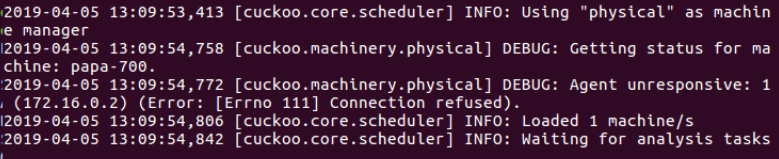

When I try running an analysis :

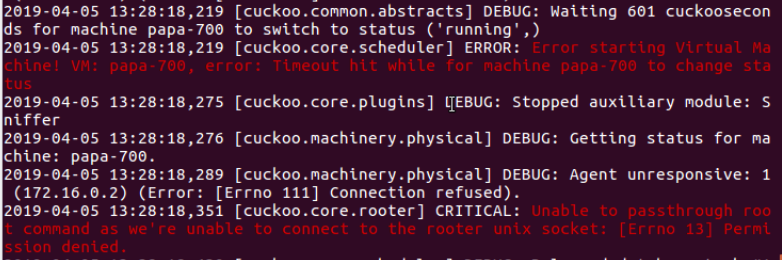

It seem the old agent is not binding to the port 8000 on the guest system.
 ComputerSaga
on 5 Apr 2019
ComputerSaga
on 5 Apr 2019
Has this been resolved?
 jwilczek
on 14 Feb 2020
jwilczek
on 14 Feb 2020
Related issues
 ness993
·
7Comments
ness993
·
7Comments
 kirill039
·
5Comments
kirill039
·
5Comments
 ishaansharma
·
3Comments
ishaansharma
·
3Comments
 capnspacehook
·
3Comments
capnspacehook
·
3Comments
 rodkinal
·
6Comments
rodkinal
·
6Comments