Csvhelper: Import RedShift UNLOAD files that use LazySimpleSerDe "SerDe properties"
Is your feature request related to a problem? Please describe.
Amazon RedShift and Athena uses a lame/bizarre version of CSV called Apache Hive SerDe where the escape mechanism for commas is not to quote the data but to escape the comma \,. To the best of my knowledge, CsvHelper doesn't support this scenario.
Describe the solution you'd like
Something like the following program - comment out the AllowEscapeComma = true to repro the issue.
var config = new CsvConfiguration(CultureInfo.CurrentCulture)
{
    Escape = '\\',
        AllowEscapeComma = true
};

using (var reader = new StringReader(@"NEW YORK \,INC.,0"))
using (var parser = new CsvParser(reader, config))
{
    parser.Configuration.TrimOptions = TrimOptions.Trim;
    var record = parser.Read();
    record.Dump();
}
Describe alternatives you've considered
- I looked at defining
Quoteas a string, and settingIgnoreQuotes = true, butQuoteis achar. - Reading every line and manually re-writing the string.
Additional context
834 mentions an AWS link that no longer exists for Amazon Athena. It looks like Amazon Athena now supports a new format called SerDe, which lets you customize the row format to your hearts content:
https://docs.aws.amazon.com/athena/latest/ug/serde-about.html
 jzabroski
All 51 comments
I think the format is called LazySimpleSerDe. I think SerDe Properties might actually be a good basis for thinking about refactoring the row formatting knobs in CsvHelper.
For now, I plan to open the csv as a FileStream, and seek to where I encounter a \,, replace it with a ",, then seek back to the previous , and replace it with ,". Although janky, this will work, since the first column in the file is not a string but a date field (the first column doesn't have a prior , to replace).
jzabroski
on 13 Jan 2021
Fields containing a comma must be escaped.
Excel escapes these values by embedding the field inside a set of double quotes, generally referred to as text qualifiers, i.e. a single cell with the text
apples, carrots, and orangesbecomes"apples, carrots, and oranges".Unix style programs escape these values by inserting a single backslash character before each comma, i.e. a single cell with the text
apples, carrots, and orangesbecomesapples\, carrots\, and oranges. If a field contains a backslash character, then an additional backslash character is inserted before it.
jzabroski
on 13 Jan 2021
Yikes...
Unix style programs have two distinct ways of escaping end of line characters within a field. Some Unix style programs use the same escape method as with commas, and just insert a single backslash before the end of line character. Other Unix style programs replace the end of line character using c style character escaping where CR becomes \r and LF becomes \n.
 JoshClose
on 13 Jan 2021
JoshClose
on 13 Jan 2021
How prevalent is this? This is the first I've heard of it.
I can't think of a way to integrate by just setting the escape to \ due to the possibility of changing \n to \r. There may have to be a couple settings modes.
- RFC4180
- Unix
- UnixReplace
Unix would ignore any character after a \. A \n would need to be preceded by a \ to be ignored though. \r isn't considered a line ending.
UnixReplace would do the same thing except a \n wouldn't need to be escape. All \r characters would be changed to \n when read.
Maybe the unix version would set the escape to \ by default.
JoshClose
on 13 Jan 2021
How prevalent is this? This is the first I've heard of it.
Well, in theory, if you're not munging data in C# and just using Amazon Kinesis FireHose, it's prevalent but not prevalent in C#. However, I think with products like Azure Delta Lake, it makes sense to be able to handle LazySimpleSerDe "SerDe properties". This is a broader discussion, but I think the way data engineers handle data is going to rapidly transform over the next decade and consolidate around data lakes, similar to how nobody uses TopShelf Windows Services any more because they have Azure Functions on the cloud instead.
I thought about it and I am going to give loading the file with Aspose.Cells a shot, and then writing the file back out to disk in place and see if that converts the data to Windows-style/Excel-style escapes. I think that's probably a lot cleaner than seeking in a file stream and munging the data.
I can't think of a way to integrate by just setting the escape to
\due to the possibility of changing\nto\r. There may have to be a couple settings modes.
I thought about this, and, in theory, you could treat it the way a Regex compiler works, and take a group of setting and compile a specialized reader per settings group - that would allow you to do many optimizations and fine-tune the performance of CsvHelper to be blazing fast, similar to the optimizations Stephen Toub added to the .NET Regex library in .NET 5. The settings should be a C# read-only struct where the values are only set via ctor.
jzabroski
on 13 Jan 2021
Give the beta a try. https://www.nuget.org/packages/CsvHelper/20.0.0-beta0020
The config is a record and has no setters.
JoshClose
on 13 Jan 2021
I should hopefully be releasing that this week... Though I could probably add this unix stuff in before that. Especially since I have the parser workings fresh in my head.
JoshClose
on 13 Jan 2021
All the settings that are used are copied local in the constructor, so I don't think it needs to be a struct, unless you have a compelling reason. This also allows people to inherit CsvConfiguration if they want.
JoshClose
on 13 Jan 2021
Give the beta a try. https://www.nuget.org/packages/CsvHelper/20.0.0-beta0020
Hmm... record.Dump(); prints True. Looks like you changed Read() to advance the token rather than return an object.
Beta doesn't solve the problem, unless I configured the below incorrectly.
Here is my new LINQPad 6.0 sample with https://www.nuget.org/packages/CsvHelper/20.0.0-beta0020:
var config = new CsvConfiguration(CultureInfo.CurrentCulture)
{
    Escape = '\\',
    HasHeaderRecord = false,
    TrimOptions = TrimOptions.Trim,
    Delimiter = ",",
};

using (var reader = new StringReader(@"NEW YORK STOCK EXCHANGE\, INC."))
using (var parser = new CsvParser(reader, config))
{
    var record = parser.Read();
    parser.Record.Dump();
}
prints:
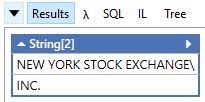
jzabroski
on 13 Jan 2021
No, doesn't solve the problem. It has the immutable config though. ;)
JoshClose
on 13 Jan 2021
It's also blazing fast.
JoshClose
on 13 Jan 2021
This article put a fire under my butt to finish the Span work on the parser. https://www.joelverhagen.com/blog/2020/12/fastest-net-csv-parsers
Turns out, Span wasn't the fastest route though. You can't set a ref struct to a field or put it in an array, so you have to hold Memory<char> and make spans from it. That ends up slowing it down.
JoshClose
on 13 Jan 2021
It's also blazing fast.

jzabroski
on 13 Jan 2021
It got it faster than the top one on that list if you don't use it's string pooling. After adding in all of the configs and compatibility, it got a little slower. It's still faster than string.Split though.
JoshClose
on 13 Jan 2021
This article put a fire under my butt to finish the
Spanwork on the parser. https://www.joelverhagen.com/blog/2020/12/fastest-net-csv-parsers
Unfortunately, he doesn't cover various corner cases like this one. I imagine a bunch of ❌ in a feature matrix would make the overall best parser stick out. What I like about CsvHelper is how quickly I can bang out the mappings.
It looks like the winner in that benchmark covers some of his tricks here: https://github.com/MarkPflug/Sylvan/blob/master/docs/Sylvan.Data.Csv.md
This whole conversation reminds me of a crazy post on Reddit where this guy asked for a code review of his csv parser library and it was littered with GOTO and he argued that was the best way to implement it for readability.
jzabroski
on 13 Jan 2021
goto would actually make things a lot easier easier, but I stayed away from that.
JoshClose
on 13 Jan 2021
gotowould actually make things a lot easier easier, but I stayed away from that.
Stephen Toub's blog post about the Regex tricks he did for .NET 5 actually points to how that can no longer be as necessary, as well as improving readability of generated DynamicMethod. https://devblogs.microsoft.com/dotnet/regex-performance-improvements-in-net-5/#codegen-like-a-dev-might-write
jzabroski
on 13 Jan 2021
Here is the source if you want to take a look. https://github.com/JoshClose/CsvHelper/blob/fast-parser/src/CsvHelper/CsvParser.cs
JoshClose
on 13 Jan 2021
Thanks for that NCsvPerf repository. I added a new benchmark request there: https://github.com/joelverhagen/NCsvPerf/issues/5
jzabroski
on 13 Jan 2021
I might actually have this done for you. Can you provide some example data that I can test with to make sure I have all the cases down correctly? Just some lines, not a whole file.
JoshClose
on 14 Jan 2021
Do escapes escape anything and basically ignore the character after it? That's what I'm doing.
That means in UnixReplace mode, having \\n would actually ignore the line ending. That makes me think that there could be just one Unix mode that escapes anything, and replaces any '\r' with '\n'. Always replacing the '\r' could be bad though. I guess you'll have to let me know your thoughts on that.
JoshClose
on 14 Jan 2021
I think I read this wrong before...
Other Unix style programs replace the end of line character using c style character escaping where CR becomes \r and LF becomes \n.
What does that mean? A \n becomes \\n? If that's the case, that is the same as escaping with \.
JoshClose
on 14 Jan 2021
I just released a new beta that I think will solve your issue. https://www.nuget.org/packages/CsvHelper/20.0.0-beta0021
IgnoreQuotes = true,
Escape = '\\',
It looks like IgnoreQuotes = true is needed to remove the \ char from the parsed data. However, if the field is quoted, it won't remove the quotes. I think that is the right behavior (and it will solve my issue) but I am curious what csvreader.com DataStreams.dll does (to compare) since they seem to be pretty proud of their "I can make anything work" features.
EDIT: I think the confusing part is we're not ignoring quotes, we're escaping commas.
In the below tests (LINQPad + Xunit - need to run inside a Runner to see all four combinations at once), the first test passes but the rest fail.
```c#
// requires https://www.nuget.org/packages/CsvHelper/20.0.0-beta0021
// requires https://www.nuget.org/packages/xunit/2.4.1
// requires https://www.nuget.org/packages/xunit.assert/2.4.1
void Main()
{
TestUnixEscapComma(true, @"NEW YORK STOCK EXCHANGE, INC.");
TestUnixEscapComma(false, @"NEW YORK STOCK EXCHANGE, INC.");
TestUnixEscapComma(true, @"""NEW YORK STOCK EXCHANGE, INC.""");
TestUnixEscapComma(false, @"""NEW YORK STOCK EXCHANGE, INC.""");
}
[Theory]
[InlineData(true, @"NEW YORK STOCK EXCHANGE, INC.")] // not-quoted
[InlineData(false, @"NEW YORK STOCK EXCHANGE, INC.")] // not-quoted
[InlineData(true, @"""NEW YORK STOCK EXCHANGE, INC.""")] // quoted
[InlineData(false, @"""NEW YORK STOCK EXCHANGE, INC.""")] // quoted
public void TestUnixEscapComma(bool ignoreQuotes, string input)
{
var config = new CsvConfiguration(CultureInfo.CurrentCulture)
{
Escape = '\',
IgnoreQuotes = ignoreQuotes,
HasHeaderRecord = false,
TrimOptions = TrimOptions.Trim,
Delimiter = ",",
};
using (var reader = new StringReader(input))
using (var parser = new CsvParser(reader, config))
{
    var success = parser.Read();
    parser.Record.Dump();
    Assert.Equal("NEW YORK STOCK EXCHANGE, INC.", parser.Record[0]);
}
}
// You can define other methods, fields, classes and namespaces here
```
jzabroski
on 14 Jan 2021
I guess IgnoreQuotes is really EscapeIgnoresQuotes ?
jzabroski
on 14 Jan 2021
Maybe it needs to be renamed to something more clear.
Do you have files that do a hybrid like that? Uses quotes around a field that has '\' for an escape?
The problem is, with normal RFC4180 files, escape and quote are the same character. So in this case the field needs to be enclosed in quotes. Fields that aren't don't have escapes in them. Unquoted fields can't even look for quotes because escapes are the same character. Yeah, there's probably some way to fenagle that, but I wouldn't go that route.
If you ignore quotes, meaning they're just another character and we don't worry about parsing them out of the ends of a field, then you can parse escapes everywhere, always.
Maybe IgnoreQuotes goes away, and a Mode is added for RFC4180 and Unix. If you have hybrid files like in your example, that won't work either.
JoshClose
on 14 Jan 2021
Do you have files that do a hybrid like that? Uses quotes around a field that has '' for an escape?
No. I don't think its a real requirement, that's why I suggested a head-to-head with CSVreader to compare and confirm. I think I was just thrown off by the name you chose, so I did a deep dive into what it did behaviorally.
jzabroski
on 14 Jan 2021
Broadly, I think the nicest abstraction would be one that reverses the SerDe Properties in Amazon. I think SerDe is becoming very popular due to its usage in data lakes.
jzabroski
on 14 Jan 2021
Is this what I need to follow?
https://docs.aws.amazon.com/athena/latest/ug/lazy-simple-serde.html#csv-example

JoshClose
on 14 Jan 2021
If that's it, that can be done currently. What we could do is create canned configurations to read different formats.
// pseudo code

class SerDeCsvConfiguration : CsvConfiguration
{
    Escape = '\\',
    Delimiter = ",",
    Mode = ParseModes.Unix,
}

class SerDeTsvConfiguration : SerDeCsvConfiguration
{
    Delimiter = '\t',
}
We could do that for various different formats. I like the system being flexible to do whatever you want with it. This would make it easier for people to not have to configure everything correctly.
JoshClose
on 14 Jan 2021
Thoughts? I'm going to release version 20.0.0 soon and this would be a breaking change I'd like to include.
JoshClose
on 15 Jan 2021
Here is what the mode looks like.
/// <summary>
/// Mode to use when parsing.
/// </summary>
public enum ParserMode
{
    /// <summary>
    /// Parses using RFC 4180 format.
    /// If a field contains a delimiter or line ending, it is wrapped in "s.
    /// If quoted field contains a ", it is escaped with a ".
    /// A line is terminated by \r\n, \r, or \n.
    /// </summary>
    RFC4180 = 0,

    /// <summary>
    /// Parses using escapes.
    /// If a field contains a delimiter, line ending, or escape, it is escaped with a \.
    /// A line is terminated by a \n.
    /// </summary>
    Escape = 1
}
I also added char CsvConfiguration.LineEnding that only works when ParserMode.Escape is enabled.
After looking through that code and all the libraries it references, I think this should cover most scenarios.
JoshClose
on 15 Jan 2021
@JoshClose Hey, just got a break from work.
That looks good, and the CsvConfiguration subclasses is a nice touch, but it could also be done using pure transformations like WithOpenCsvSerDeConfiguration();
so:
// pseudo code

class SerDeCsvConfiguration : CsvConfiguration
{
    Escape = '\\',
    Delimiter = ",",
    Mode = ParseModes.Unix,
}

class SerDeTsvConfiguration : SerDeCsvConfiguration
{
    Delimiter = '\t',
}
becomes:
```c#
new CsvConfiguration {
// Callbacks like PrepareHeaderForMatch, HeaderValidated, BadRecordFound, MissingFieldFound, etc.
}.WithSerDeTsv();
so you have:

```c#
public class CsvConfigurationExtensions
{
  public static CsvConfiguration WithSerDeTsv(this CsvConfiguration csvConfiguration)
  {
     configuration.Delimiter = '\t';
     return configuration;
  }
}
Just a thought. I guess the nice thing about the sub-class approach is some people have OO mindset and might have Meta-Keywords in their architecture that associate a specific configuration factory to a set of values, so they don't really care about the fluent interface, they just need to locate the values to configure.
jzabroski
on 16 Jan 2021
Is this what I need to follow?
This is the generalization of that: https://docs.aws.amazon.com/athena/latest/ug/serde-about.html (I mentioned it in my original post, but when I first logged the issue, I had literally just discovered the phrase SerDe for the first time, so I probably wasnt super clear)
jzabroski
on 16 Jan 2021
ROW FORMAT
DELIMITED FIELDS TERMINATED BY ','
ESCAPED BY '\\'
COLLECTION ITEMS TERMINATED BY '|'
MAP KEYS TERMINATED BY ':'
In this example, I think the COLLECTION ITEMS TERMINATED BY '|' could generalize and allow you to surface better documentation for how you handle arrays. But I am not positive I understand what that SerDe Property does. But that is the general idea of what I was saying - match SerDe, then you have bullet proof general support. Honestly, when you release 20.0, if you add the Tag SerDe to your nuget, you are going to be the ONLY nuget package that has that tag.
As the linked document mentions, the above sample I posted is equivalent to:
ROW FORMAT SERDE 'org.apache.hadoop.hive.serde2.lazy.LazySimpleSerDe'
WITH SERDEPROPERTIES (
'serialization.format' = ',',
'field.delim' = ',',
'collection.delim' = '|',
'mapkey.delim' = ':',
'escape.delim' = '\\'
)
https://github.com/JoshClose/CsvHelper/blob/bed36ee7bfbb1f85b3f01959b583931c4355ebbf/src/CsvHelper/CsvHelper.csproj#L24 add serde;opencsv;lazysimpleserde;opencsvserde to this list
jzabroski
on 16 Jan 2021
BTW, SerDe has way more formats than OpenCSVSerDe and LazySimpleSerDe. But for the purposes of a CSV library, those are the ones you care about I think. As I mentioned above, SerDe either came from Apache Hive or Rust programming language - not sure which came first. But in the context of RedShift and Athena, those databases are just running HadoopFS and something similar to Apache Hive under the hoods, so the DDL/DML languages is inspired by HiveQL and that's where the HiveSQL ROW FORMAT SERDE comes from.
Again, I just learned about this the day I filed this issue with you, but I inhale information rapidly.
jzabroski
on 16 Jan 2021
Off-topic, there was a ridiculous thread on reddit/r/csharp today and I gave you a shout out for fast-parser branch https://www.reddit.com/r/csharp/comments/kxrxl1/using_c_streamreader_in_systemio_i_am_able_to/gje4mod/?utm_source=reddit&utm_medium=web2x&context=3
jzabroski
on 16 Jan 2021
  /// <summary>
  /// Parses using escapes.
  /// If a field contains a delimiter, line ending, or escape, it is escaped with a \.
  /// A line is terminated by a \n.
  /// </summary>
  Escape = 1
Minor nit: I think rather than specifying \ as the escape, it should still be configurable by the Escape property, _which defaults to \_. If you look at how SERDE PROPERTIES works, there is the short-hand version and the long-hand version.
jzabroski
on 16 Jan 2021
This is the CSV SerDe spec. https://github.com/ogrodnek/csv-serde
jzabroski
on 16 Jan 2021
Nice! I commented. It's not faster with all the compatibility features added in.
JoshClose
on 17 Jan 2021
Minor nit: I think rather than specifying
\as the escape, it should still be configurable by the Escape property, _which defaults to\_. If you look at howSERDE PROPERTIESworks, there is the short-hand version and the long-hand version.
Yes, you can still configure all the values. Maybe I'll put that in the comments there so it doesn't confuse people.
JoshClose
on 17 Jan 2021
Updated doc:
/// <summary>
/// Mode to use when parsing.
/// </summary>
public enum ParserMode
{
    /// <summary>
    /// Parses using RFC 4180 format (default).
    /// If a field contains a delimiter or line ending, it is wrapped in "s.
    /// If quoted field contains a ", it is preceeded by ".
    /// A line is terminated by \r\n, \r, or \n.
    /// <see cref="IParserConfiguration.Quote"/>, <see cref="IParserConfiguration.Delimiter"/>,
    /// and <see cref="IParserConfiguration.Escape"/> are configurable in this mode.
    /// </summary>
    RFC4180 = 0,

    /// <summary>
    /// Parses using escapes.
    /// If a field contains a delimiter, line ending, or escape, it is preceeded by \.
    /// A line is terminated by \n.
    /// <see cref="IParserConfiguration.Quote"/>, <see cref="IParserConfiguration.Delimiter"/>,
    /// <see cref="IParserConfiguration.Escape"/>, and <see cref="IParserConfiguration.LineEnding"/>
    /// are configurable in this mode.
    /// </summary>
    Escape = 1
}
:shipit:
jzabroski
on 17 Jan 2021
Done.
JoshClose
on 18 Jan 2021
This changed a little. CsvConfiguration.NewLine change to a string and is used in either mode. The mode just chooses whether escaping is done with quotes around the field or just an escape character. Probably doesn't affect what you're doing.
JoshClose
on 18 Jan 2021
I think that makes a lot more sense. Do you have tests that cover something like:
hello, new york, hello\, new york, hello\\, new york
expected output:
| Field1 | Field2 | Field3 | Field4 | Field5 |
| ------- | ------ | ------- | ------- | ------ |
| hello | new york | hello, new york | hello\ | new york |
For my requirements, it doesnt matter, but it did occur to me that the nasty regex I wrote to solve my immediate problem doesn't cover hello\\, new york scenario. I honestly don't even know what OpenCSVSerDE does in that scenario. I would expect it to result in fields 4 and 5 above as I describe, but I don't know.
jzabroski
on 18 Jan 2021

JoshClose
on 18 Jan 2021
Looks good - was just suggesting that tests should cover it since it occurred to me my regex fails on this scenario. Thankfully, none of my data ends in \
jzabroski
on 18 Jan 2021
Yes. The way I'm doing it is really simple too. Just ignore the character after an escape.
JoshClose
on 18 Jan 2021
Related issues
 mabead
·
3Comments
JoshClose
·
5Comments
mabead
·
3Comments
JoshClose
·
5Comments
 Wagimo
·
4Comments
Wagimo
·
4Comments
 RizwanAhmedJutt
·
5Comments
JoshClose
·
4Comments
RizwanAhmedJutt
·
5Comments
JoshClose
·
4Comments
Most helpful comment