Csvhelper: "Field with names ['Name'] at index '0' does not exist. You can ignore missing fields by setting MissingFieldFound to null."
I don't understand this message. I am doing the following:
public class Program
    {
        static void Main(string[] args)
        {
            Program p = new CSVReader.Program();
        }

        public Program()
        {
            ReadCSV();
        }

        public void ReadCSV()
        {
            var path = @"C:\Example.csv";

            using (var fileReader = File.OpenText(path))
            {
                using (var csv = new CsvHelper.CsvReader(fileReader))
                {

                    csv.Configuration.RegisterClassMap<PersonMapper>();
                    csv.Configuration.HasHeaderRecord = true;
                    csv.Configuration.MissingFieldFound = null;

                    var records = csv.GetRecords<Person>().ToList();
                }
            }
        }
    }

    [Serializable]
    public class Person
    {
        public string Name { get; set; }
        public string Surname { get; set; }
        public int Age { get; set; }
    }

    public class PersonMapper : ClassMap<Person>
    {
        public PersonMapper()
        {
            Map(x => x.Name).Name("Name").Index(0);
            Map(x => x.Surname).Name("Surname").Index(1);
            Map(x => x.Age).Name("Age").Index(2);
        }
    }
The CSV file does contain three columns, Name, Surname, Age, and there is 4 rows in the CSV.
Why is this happening?
 andrewkemp797
All 17 comments
I can't tell without seeing the data. This example works fine. Can you modify this example to fail?
void Main()
{
    using (var stream = new MemoryStream())
    using (var writer = new StreamWriter(stream))
    using (var reader = new StreamReader(stream))
    using (var csv = new CsvReader(reader))
    {
        writer.WriteLine("Name,Surname,Age");
        writer.WriteLine("name 1,surname 1,1");
        writer.Flush();
        stream.Position = 0;

        csv.Configuration.RegisterClassMap<PersonMapper>();
        csv.GetRecords<Person>().ToList().Dump();
    }
}

[Serializable]
public class Person
{
    public string Name { get; set; }
    public string Surname { get; set; }
    public int Age { get; set; }
}

public class PersonMapper : ClassMap<Person>
{
    public PersonMapper()
    {
        Map(x => x.Name).Name("Name").Index(0);
        Map(x => x.Surname).Name("Surname").Index(1);
        Map(x => x.Age).Name("Age").Index(2);
    }
}
 JoshClose
on 13 Dec 2017
JoshClose
on 13 Dec 2017
Hi @andrewkemp797
Maybe you have met the same issue than me. In France we are using ";" for separate the rows so if it's the same for you, you have to use this configuration :
csv.Configuration.Delimiter = ";";
I have searched for a long time and the exception throwed was not very clear but when I saw the example of @JoshClose I saw than in english coutries they use the "," for separate the rows :)
 Metrakit
on 20 Dec 2017
Metrakit
on 20 Dec 2017
Just discovered the cause of my issue was that CsvHelper falls over on files where line ending is '\r' character. Note that this is non-standard, as the usual is '\r\n' or '\n'. However, dear old Excel (2017!) decides to store CSV files with this line separator, under the default "CSV UTF-8" format (Save As). Only "Windows Comma Separated" format adds the '\r\n' line separators. Took me a while to figure this one out.... And this is how I got the above error.
Essentially, CsvHelper parser doesn't work properly if '\r' is a line separator. Especially in the case where a line starts with ',' (comma), i.e. first column value is empty. In that case, the first comma is absorbed into the first row field. That means column indexes are not correct.
Feel free to copy to a separate issue. But adding here as I found this Issue via the error message I was seeing, which is similar to the one above about the missing field.
 gimelfarb
on 24 Jan 2018
gimelfarb
on 24 Jan 2018
@gimelfarb Can you create a new issue with a failing example? \r should work just fine. CsvHelper accounts for \r\n, \r, and \n.
JoshClose
on 24 Jan 2018
@JoshClose @gimelfarb logged with test on #914
 ChrisMcKee
on 6 Feb 2018
ChrisMcKee
on 6 Feb 2018
Josh,
I think I may be missing something here. I have a file that contains the following data.
,COLUMN1,COLUMN2,COLUMN3
,Value1,Value2,Value3
A call to GetField("COLUMN1") triggers this exception.
My question for you is very straightforward: is there any way to configure this reader to realize that the empty first column should be ignored? If not, is there a way to tell it that COLUMN1 is not at index 0 but at index 1 rather than 0?
Thanks much -- Stephen
 stephenwood
on 9 Feb 2018
stephenwood
on 9 Feb 2018
@stephenwood You'll need to give me a full example that fails. This seems to work fine for me.
void Main()
{
    using (var stream = new MemoryStream())
    using (var writer = new StreamWriter(stream))
    using (var reader = new StreamReader(stream))
    using (var csv = new CsvReader(reader))
    {
        writer.WriteLine(",Id,Name");
        writer.WriteLine(",1,one");
        writer.WriteLine(",2,two");
        writer.Flush();
        stream.Position = 0;

        csv.GetRecords<Test>().ToList().Dump();
    }
}

public class Test
{
    public int Id { get; set; }
    public string Name { get; set; }
}
Josh,
Thanks for your answer. Here is my code, and I am attaching the very file I'm reading.
    static void Main(string[] args)
    {
        StreamReader reader = new StreamReader(@"c:\csvtestfiles\testoutputfile.txt");
        CsvReader csvReader = new CsvReader(reader);
        csvReader.Read();

        List<Columns> c = csvReader.GetRecords<Columns>().ToList() ;
    }
}

class Columns
{
    public int COLUMN1 { get; set; }
    public int COLUMN2 { get; set; }
    public int COLUMN3 { get; set; }
}
You're calling Read which will read the first line. You then call GetRecords<Columns> which will start reading from the second line. This also means the headers haven't been parsed. If you just remove the Read call, it should work.
JoshClose
on 9 Feb 2018
These 2 are equivalent:
var records = new List<Columns>();
csv.Read();
csv.ReadHeader();
while (csv.Read())
{
    var record = csv.GetRecord<Columns>();
    records.Add(record);
}
var records = csv.GetRecords<Columns>().ToList();
Thanks, Josh. That works.
On a file like the one I attached, how would I successfully do a GetField call? I have to do a Read before making that call, but when I do, I get the zero index error.
    static void Main(string[] args)
    {
        StreamReader reader = new StreamReader(@"c:\csvtestfiles\testoutputfile.txt");
        CsvReader csvReader = new CsvReader(reader);

        csvReader.Read();
        string column1 = csvReader.GetField("COLUMN1",1);
    }
You need to do the first example I posted.
csv.Read();
csv.ReadHeader();
while (csv.Read())
{
    var column1 = csv.GetField<int>("COLUMN1");
}
Oh, also, don't use the index overload. That is if there are multiple columns with the same name. So if you had more than one COLUMN1 column, you could reference it by specifying which one you want.
JoshClose
on 9 Feb 2018
Thank you, Josh. This has been very helpful.
stephenwood
on 9 Feb 2018
You're welcome.
JoshClose
on 9 Feb 2018
Hello @JoshClose . I've got a problem few days ago. I get the same issue when I read a .csv file
"Field with names ['Report_Extracted_At'] at index '0' was not found."
System.ArgumentNullException: 'Value cannot be null. Parameter name: value'
` static OFSStoresDB ReadFile(string filename)
{
OFSStoresDB db = new OFSStoresDB();
StreamReader reader = new StreamReader(filename);
CsvReader csv = new CsvReader(reader);
csv.Read();
csv.ReadHeader();
csv.Configuration.HasHeaderRecord = true;
csv.Configuration.BadDataFound = null;
        // Log missing field.
        csv.Configuration.MissingFieldFound = (headerNames, index, context) =>
        {
            Console.WriteLine($"Field with names ['{string.Join("', '", headerNames)}'] at index '{index}' was not found. ");
        };

        while (csv.Read())
            {
                #region Read raw data

                var timestampConverter = new TimestampConverter();

                DateTime reportExtractedAt = csv.GetField<DateTime>("Report_Extracted_At", timestampConverter);
                string srcStoreId = csv.GetField("Src_Store_Id");`.....
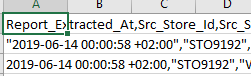
This is my file with many columns. how this can possible, may you help me?
 mranton152
on 17 Jun 2019
mranton152
on 17 Jun 2019
@mranton152 try adding
csv.Configuration.Delimiter = ",";
The default delimiter for your language is likely not a comma.
 AltruCoder
on 17 Jun 2019
AltruCoder
on 17 Jun 2019
Related issues
 Wagimo
·
4Comments
Wagimo
·
4Comments
 RizwanAhmedJutt
·
5Comments
RizwanAhmedJutt
·
5Comments
 dsotiriades
·
3Comments
dsotiriades
·
3Comments
 ruslanss
·
3Comments
ruslanss
·
3Comments
 GraceYuJuSong
·
4Comments
GraceYuJuSong
·
4Comments
Most helpful comment
Hi @andrewkemp797
Maybe you have met the same issue than me. In France we are using ";" for separate the rows so if it's the same for you, you have to use this configuration :
I have searched for a long time and the exception throwed was not very clear but when I saw the example of @JoshClose I saw than in english coutries they use the "," for separate the rows :)