Cryptomator: macOS (FUSE) - VolumeException: Unable to mount Filesystem
Description
Cryptonator fails to unlock vault when configured to use FUSE.
System Setup
- Operating system and version: macOS Big Sur 11.0.1 (20829)
- Cryptomator version: 1.5.8 )dmg-2308.108
- Volume type: FUSE
Steps to Reproduce
- Open Cryptomator.
- Select volume from list on left.
- Hit "Unlock..." and enter password if prompted.
Expected Behavior
Unlock/mount volume.
Actual Behavior
Receive "unexpected error occurred" message with stack trace.
Reproducibility
Always
Additional Information
Some additional troubleshooting steps (all still fail):
- Deleted and reinstalled Cryptonator.
- Temporarily elevated app privs in security settings (with restart).
- Created new vault volume.
FUSE was working fine before I upgraded from Catalina to Big Sur. The app still works fine using WebDAV volume type.
Sorry, file attachment is failing for some reason... short log anyway, so just putting it here:
17:44:57.975 [main] INFO  org.cryptomator.launcher.Cryptomator - Starting Cryptomator 1.5.8 on Mac OS X 10.16 (x86_64)
17:44:58.346 [JavaFX Application Thread] INFO  o.c.ui.launcher.FxApplicationStarter - JavaFX Runtime started.
17:45:03.257 [JavaFX Application Thread] WARN  o.c.keychain.KeychainManager - LOAD
17:45:05.548 [App Background Thread 004] ERROR o.c.ui.unlock.UnlockWorkflow - Unlock failed for technical reasons.
org.cryptomator.common.vaults.Volume$VolumeException: Unable to mount Filesystem
    at org.cryptomator.common.vaults.FuseVolume.mount(FuseVolume.java:107)
    at org.cryptomator.common.vaults.FuseVolume.mount(FuseVolume.java:58)
    at org.cryptomator.common.vaults.Vault.unlock(Vault.java:129)
    at org.cryptomator.ui.unlock.UnlockWorkflow.attemptUnlock(UnlockWorkflow.java:103)
    at org.cryptomator.ui.unlock.UnlockWorkflow.call(UnlockWorkflow.java:80)
    at org.cryptomator.ui.unlock.UnlockWorkflow.call(UnlockWorkflow.java:43)
    at javafx.concurrent.Task$TaskCallable.call(Task.java:1425)
    at java.base/java.util.concurrent.FutureTask.run(Unknown Source)
    at java.base/java.util.concurrent.Executors$RunnableAdapter.call(Unknown Source)
    at java.base/java.util.concurrent.FutureTask.run(Unknown Source)
    at java.base/java.util.concurrent.ThreadPoolExecutor.runWorker(Unknown Source)
    at java.base/java.util.concurrent.ThreadPoolExecutor$Worker.run(Unknown Source)
    at java.base/java.lang.Thread.run(Unknown Source)
Caused by: org.cryptomator.frontend.fuse.mount.CommandFailedException: ru.serce.jnrfuse.FuseException: Unable to mount FS
    at org.cryptomator.frontend.fuse.mount.MacMounter.mount(MacMounter.java:45)
    at org.cryptomator.common.vaults.FuseVolume.mount(FuseVolume.java:105)
    ... 12 common frames omitted
Caused by: ru.serce.jnrfuse.FuseException: Unable to mount FS
    at ru.serce.jnrfuse.AbstractFuseFS.mount(AbstractFuseFS.java:287)
    at org.cryptomator.frontend.fuse.mount.MacMounter.mount(MacMounter.java:43)
    ... 13 common frames omitted
Caused by: ru.serce.jnrfuse.FuseException: Unable to mount FS, return code = 1
    at ru.serce.jnrfuse.AbstractFuseFS.mount(AbstractFuseFS.java:283)
    ... 14 common frames omitted
17:45:06.124 [JavaFX Application Thread] INFO  o.cryptomator.ui.fxapp.UpdateChecker - Current version: 1.5.8, lastest version: 1.5.8
17:45:30.179 [main] INFO  org.cryptomator.launcher.Cryptomator - UI shut down
 slconley
All 4 comments
This bug report did ignore our issue template. 😞
Auto-closing this issue, since it is most likely not useful.
_This decision was made by a bot. If you think the bot is wrong, let us know and we'll reopen this issue._
![github-actions[bot] picture](https://avatars2.githubusercontent.com/in/15368?v=4&s=40) github-actions[bot]
on 15 Nov 2020
github-actions[bot]
on 15 Nov 2020
Related discussions:
 tobihagemann
on 15 Nov 2020
tobihagemann
on 15 Nov 2020
Apologies for not seeing the forum articles... was able to resolve issue by following instructions there. Closing this issue now. Thanks.
slconley
on 15 Nov 2020
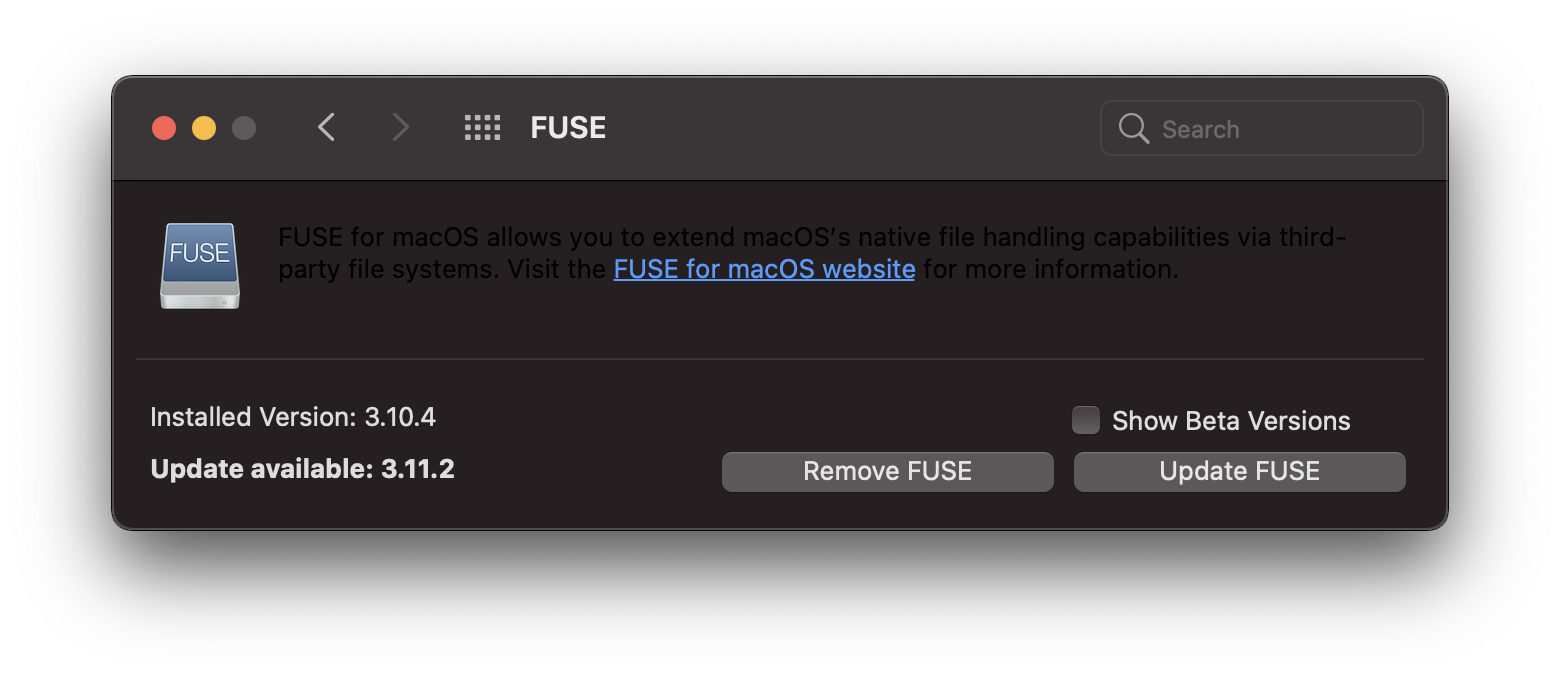
Just to make it easier for others: I'm on Cryptomator 1.5.8, updating FUSE from 3.10.4 to 3.11.2 fixed the problem, but it did require granting FUSE system extension permission and a reboot
 artem-zinnatullin
on 17 Nov 2020
artem-zinnatullin
on 17 Nov 2020
Related issues
 ErfolgreichCharismatisch
·
4Comments
ErfolgreichCharismatisch
·
4Comments
 morvarid123morvarid
·
3Comments
morvarid123morvarid
·
3Comments
 canitb
·
3Comments
canitb
·
3Comments
 overheadhunter
·
4Comments
overheadhunter
·
4Comments
 kbauer
·
4Comments
kbauer
·
4Comments
Most helpful comment
Just to make it easier for others: I'm on Cryptomator 1.5.8, updating FUSE from 3.10.4 to 3.11.2 fixed the problem, but it did require granting FUSE system extension permission and a reboot