Crud: addButtonFromModelFunction with a DropDown buttons
Bug report
I'm having trouble adding an additional button to table actions.
What I did:
In controller:
$this->crud->addButtonFromModelFunction('line', 'more', 'moreOptions', 'beginning');
In Model:
public function moreOptions($crud = false)
    {
        $button = '<div class="btn-group">
                        <button type="button" title="Mais" class="btn btn-xs btn-default dropdown-toggle"
                                            data-toggle="dropdown"><i class="fa fa-gear"></i> Mais
                                        <span class="fa fa-caret-down"></span></button>
                                    <ul class="dropdown-menu" role="menu">
                                         <li><a href="#">Teste 1</a></li>
                                          <li><a href="#">Teste 2</a></li>
                                    </ul>
                        </div>';

        return $button;

    }
What happened:
The menu is not on top the table.

Backpack, Laravel, PHP, DB version:
BackPack 3.5 With Laravel 5.7
 helesjunior
All 7 comments
Hello there! Thanks for opening your first issue on this repo!
Just a heads-up: Here at Backpack we use Github Issues only for tracking bugs. Talk about new features is also acceptable. This helps _a lot_ in keeping our focus on improving Backpack. If you issue is not a bug/feature, please help us out by closing the issue yourself and posting in the appropriate medium (see below). If you're not sure where it fits, it's ok, a community member will probably reply to help you with that.
Backpack communication mediums:
- Bug Reports, Feature Requests - Github Issues (here);
- Quick help (_How do I do X_) - Gitter Chatroom;
- Long questions (_I have done X and Y and it won't do Z wtf_) - Stackoverflow, using the
backpack-for-laraveltag;
Please keep in mind Backpack offers no official / paid support. Whatever help you receive here, on Gitter, Slack or Stackoverflow is thanks to our awesome _awesome_ community members, who give up some of their time to help their peers. If you want to join our community, just start pitching in. We take pride in being a welcoming bunch.
Thank you!
--
Justin Case
The Backpack Robot
![welcome[bot] picture](https://avatars0.githubusercontent.com/in/4141?v=4&s=40) welcome[bot]
on 30 Nov 2018
welcome[bot]
on 30 Nov 2018
Dunno if it will work, i didn't test, but have you tried to add to css .dropdown-menu: { z-index:99999; } ??
 pxpm
on 3 Dec 2018
pxpm
on 3 Dec 2018
Unfortunately it did not work either..... :(
helesjunior
on 3 Dec 2018
Excellent @johnpuddephatt, commenting on line 66 of the archive public/crud/css/list.css, solved the problem!
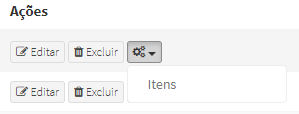
Thanks a lot!
helesjunior
on 4 Dec 2018
@helesjunior Commenting out that line may have some implications on other parts. (Like crud buttons going out of table (that's why overflow:hidden; was added there).
Could you check if using position:relative; in dropdown-menu fixes your issue ? (Remember to uncomment the line when testing) :)
pxpm
on 5 Dec 2018
@pxpm i don't think that will work, it'll position the dropdown relatively instead of absolutely meaning it won't 'act' as a dropdown. With overflow: hidden set the only child element that can overflow the parent is a position fixed element, and that's not much use.
 johnpuddephatt
on 5 Dec 2018
johnpuddephatt
on 5 Dec 2018
Hi guys,
Sorry - I introduced this issue in a hotfix. It's since been fixed, so this will fix it for you:
composer update
php artisan vendor:publish --provider="Backpack\CRUD\CrudServiceProvider" --tag=public --force
First reported here: https://github.com/Laravel-Backpack/CRUD/issues/1728
Fixed here: https://github.com/Laravel-Backpack/CRUD/commit/3ff04fb1f7501d6d6e50b89225671a30f8b7fbe2
Sorry again!
 tabacitu
on 6 Dec 2018
tabacitu
on 6 Dec 2018
Related issues
 GenericHero01
·
3Comments
GenericHero01
·
3Comments
 genesiscz
·
3Comments
genesiscz
·
3Comments
 jorgepires
·
3Comments
jorgepires
·
3Comments
 AlexanderWM
·
3Comments
AlexanderWM
·
3Comments
 abewartech
·
3Comments
abewartech
·
3Comments
Most helpful comment
Excellent @johnpuddephatt, commenting on line 66 of the archive public/crud/css/list.css, solved the problem!
Thanks a lot!