Crud: [4.0][Bug] Fields with dot notation result in an error
Bug report
What I did
I have companies CRUD which has 1:1 relationship with address (and I don't store the address in companies table for a good reason), but I need to be able to add fields to update the address at the same time with the company, or to create them both and associate them.
This is how it looks
      $this->crud->addFields([
           "address.email" => [
               "name" => "address_id",
               "key" => "email",
               "type" => "email",
               "entity" => "address",
               "attribute" => "email",
           ],
            "address.street" => [
               "name" => "address_id",
               "key" => "street",
               "type" => "text",
                "entity" => "address",
                "attribute" => "street",
           ],"address.city" =>  [
               "name" => "address_id",
               "key" => "city",
               "type" => "text",
                "entity" => "address",
                "attribute" => "city",
           ],"address.part" =>  [
               "name" => "address_id",
               "type" => "text",
                "key" => "city",
                "entity" => "address",
                "attribute" => "part",
           ], "address.zip" => [
               "name" => "address_id",
               "key" => "zip",
               "type" => "text",
                "entity" => "address",
                "attribute" => "zip",
           ], "address.state" => [
               "name" => "address_id",
               "key" => "state",
               "type" => "text",
                "entity" => "address",
                "attribute" => "state",
           ]
        ]);
I tried
It gives me the undefined name key error, because the address fields gets deep into an array:
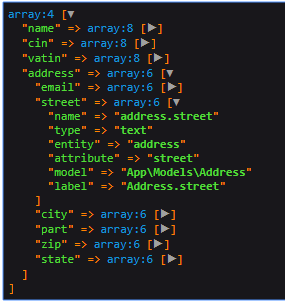
Just to be sure I didn't mess the code up, here it is
       $this->crud->addFields([
           "address.email" => [
               "name" => "address.email",
              // "key" => "email",
               "type" => "email",
               "entity" => "address",
               "attribute" => "email",
           ],
            "address.street" => [
               "name" => "address.street",
              // "key" => "street",
               "type" => "text",
                "entity" => "address",
                "attribute" => "street",
           ],"address.city" =>  [
               "name" => "address.city",
             //  "key" => "city",
               "type" => "text",
                "entity" => "address",
                "attribute" => "city",
           ],"address.part" =>  [
               "name" => "address.part",
               "type" => "text",
              //  "key" => "city",
                "entity" => "address",
                "attribute" => "part",
           ], "address.zip" => [
               "name" => "address.zip",
            //   "key" => "zip",
               "type" => "text",
                "entity" => "address",
                "attribute" => "zip",
           ], "address.state" => [
               "name" => "address.state",
             //  "key" => "state",
               "type" => "text",
                "entity" => "address",
                "attribute" => "state",
           ]
        ]);
- dot notation - fails, because the fields groups into another array and I get an error that $field['name'] doesn't exist in getModelAttributeValue
- naming by adress column names. Made weird queries and ending with SQL error
select * from `companies` where `companies`.`id` = '1' limit 1
select * from `addresses` where `addresses`.`id` in ('[email protected]', 'aaa, 984', 'aa', '', '51801', 'aa')
- the code above just creates a select to select from, but doesn't allow me to edit the fields
Also, I guess that the on-the-fly feature had a question from @tabacitu why would you edit a related entity on the fly. Or did I misread it? I can't seem to find it now. Anyway, here you go 👍
What I expected to happen
To get the related entity, take its id and update it along with the company model.
Last bug/propsal for today, I promise
 genesiscz
All 3 comments
Hello @genesiscz .
I think this is fixed in 4.1. You should use like:
$this->crud->addField([
    'name' => 'address.street',
    'type' => 'text',
]);

$this->crud->addField([
    'name' => 'address.zip_code',
    'type' => 'text',
]);
Could you check ?
Best,
Pedro
 pxpm
on 24 Jun 2020
pxpm
on 24 Jun 2020
Unfortunatelly after a long discussion with my boss we decided to go with Nova, since we were in time press and we couldn't wait for v4 to be released. It is nice because it is official but I miss a lot features Backpack has now. Can't try it, but feel free to close the issue if you feel so! Best wishes
genesiscz
on 25 Jun 2020
No problem, I'm just glad you fullfilled your requirements, and sorry we could not provide it earlier.
Maybe in future you can give Backpack a second chance, and be sure that there will be much more features at that time, we aim for productivity and flexibility :)
Wish you the best,
Pedro
pxpm
on 30 Jun 2020
Related issues
 AlexanderWM
·
3Comments
AlexanderWM
·
3Comments
 voidstate
·
3Comments
voidstate
·
3Comments
 sokvebolkol
·
3Comments
sokvebolkol
·
3Comments
 dividy
·
3Comments
dividy
·
3Comments
 M0H3N
·
3Comments
M0H3N
·
3Comments
Most helpful comment
No problem, I'm just glad you fullfilled your requirements, and sorry we could not provide it earlier.
Maybe in future you can give Backpack a second chance, and be sure that there will be much more features at that time, we aim for productivity and flexibility :)
Wish you the best,
Pedro