Crud: [Feature Request] Ability to save active filters in local cookie or in URL bar
It's frustrating to lose my filters every time I leave and re-enter a CRUD panel. I am consistently opening my edit screens in a new tab so I don't lose my place. It would be ideal if we could enable some sort of functionality which stored filtered values in local storage and returned those filters to active when the page was re-opened. Ideally this could be toggled on the front-end (similar to the "Save" button functionality) since it is a per-person preference in my mind.
This could also apply to the search bar.
I also see that in backpack CRUD 3.3, the URL bar can still take filters, but they are not passed into the AJAX url for the datatable. I can visit for instance:
myapp.com/admin/client?status=[2]
And the select_2_multiple filter will show as active and properly select status with the ID 2. However, the AJAX results are not filtered until I fire a change event on the filter by adjusting it.
All in all, the lack of saving of filters creates a difficult time navigating larger CRUDS when much editing needs to be done. To sum up my ideas for this:
- Automatically save filter parameters in the URL bar to localstorage, and use them in the AJAX call to load the table.
- Save additional filters to localstorage after they are changed and before making the AJAX call
- Potentially do the same thing for search queries by using
?q=exampleor by saving search queries to local storage as they are typed - [Optional] Create a toggleable "Save Filters" button in the filter bar which toggles this functionality
- [Optional] Customize the behavior of this in config files (how long to save, forget filters on logout, allow searches, etc)
I have looked through the query code and I think it would be possible to do this without editing each filter individually although I am not sure. I also don't know of any other places in backpack where settings are stored on the front-end, so this might require conversation about the best place to store and manage front-end settings. I am interested in contributing to this if I can and just wanted to float these ideas out there and see what you all think.
Thanks!
 jsiebach
All 16 comments
I seem to have no problem when I add "myapp.dev/crud?status=new" to my URL manually, when I visit my page it filters it properly. As for adding it by default to the URL i think it is better off without that as it adds to the url, can confuse people and is plain ugly in my opinion. If it was configurable sounds like a great idea, perhaps @tabacitu can chime in if he would like to see it in v4 and I can work something up as adding more configs could cause breaking changes.
For the time being you can customize the current filters this will do what you need and where you should place them.
                var ajax_table = $('#crudTable').DataTable();
                var current_url = ajax_table.ajax.url();
                var new_url = addOrUpdateUriParameter(current_url, parameter, value);

                // THE TWO LINES BELOW

                var shareable_url = new_url.replace('/search', '');
                window.history.pushState("", "", shareable_url);

                // THE TWO LINES ABOVE

                // replace the datatables ajax url with new_url and reload it
                new_url = normalizeAmpersand(new_url.toString());
                ajax_table.ajax.url(new_url).load();
 AbbyJanke
on 14 Jun 2018
AbbyJanke
on 14 Jun 2018
@jsiebach - I think that's... pretty brilliant :-) Storing the search query in a cookie, for a few minutes, should improve the admin's UX. I see this solving a common use case:
- admin applies filters or goes to the results page no 2 or no 3
- admin edits an item
- admin gets redirected back to the list
- but now in order to edit the NEXT item, the admin has to redo the filtering or go to page no 3; again;
However. I do think it's more difficult to implement than expected, and I'm not 100% sure this is something we can provide by default. I'm saying that because I've created a dirty prototype and played around for the past few hours, to see what can go wrong, and I've run into a few UX problems. Mainly because of the fact that _you'd expect_ that if filters get saved, everything else that modifies the results on the LIST page also gets saved. Like the search input. Or the "xxx records per page" dropdown. Or the page number (pagination).
So here are the "possible problems" I've got so far:
1) If you open a LIST page and get filtered results, because in the past you've searched something, there's no way for you to know that; we need to prepopulate datatable's search field;
2) if you open a LIST page and you are immediately shown the second, or third (etc) results page (not the first), there's no way for you to know that; the pagination doesn't show that;
3) in addition to those, I thought the experience would be a lot more inuitive with cookied search; and that's definitely the case when you edit something and go back; but it's NOT the case when doing various administrative tasks, within different entities; I set the cookie to 5 minutes, and I found myself forgetting that I've filtered the results; I was surprised to not see the entry I'm looking for; granted, this probably happens because of the search and pagination problems above, not filters (those are pretty obvious), but I do think that if we do something like this, the fact that not all results are shown should be A LOT more obvious; the best solution I could come up with was to re-use DataTable's "_Showing 1 to 10 of 90 entries (filtered from 4,124 total entries)_" text at the top of the page; fortunately, I think we do have a good place for that; since the default subheading says "_All entries in the db_" that's not quite accurate when you filter it, so that could be changed with Javascript to show the Datatables filtered text; And if necessary we could make it even more obvious by having the text text-yellow but I'm not sure that's necessary; what do you think?

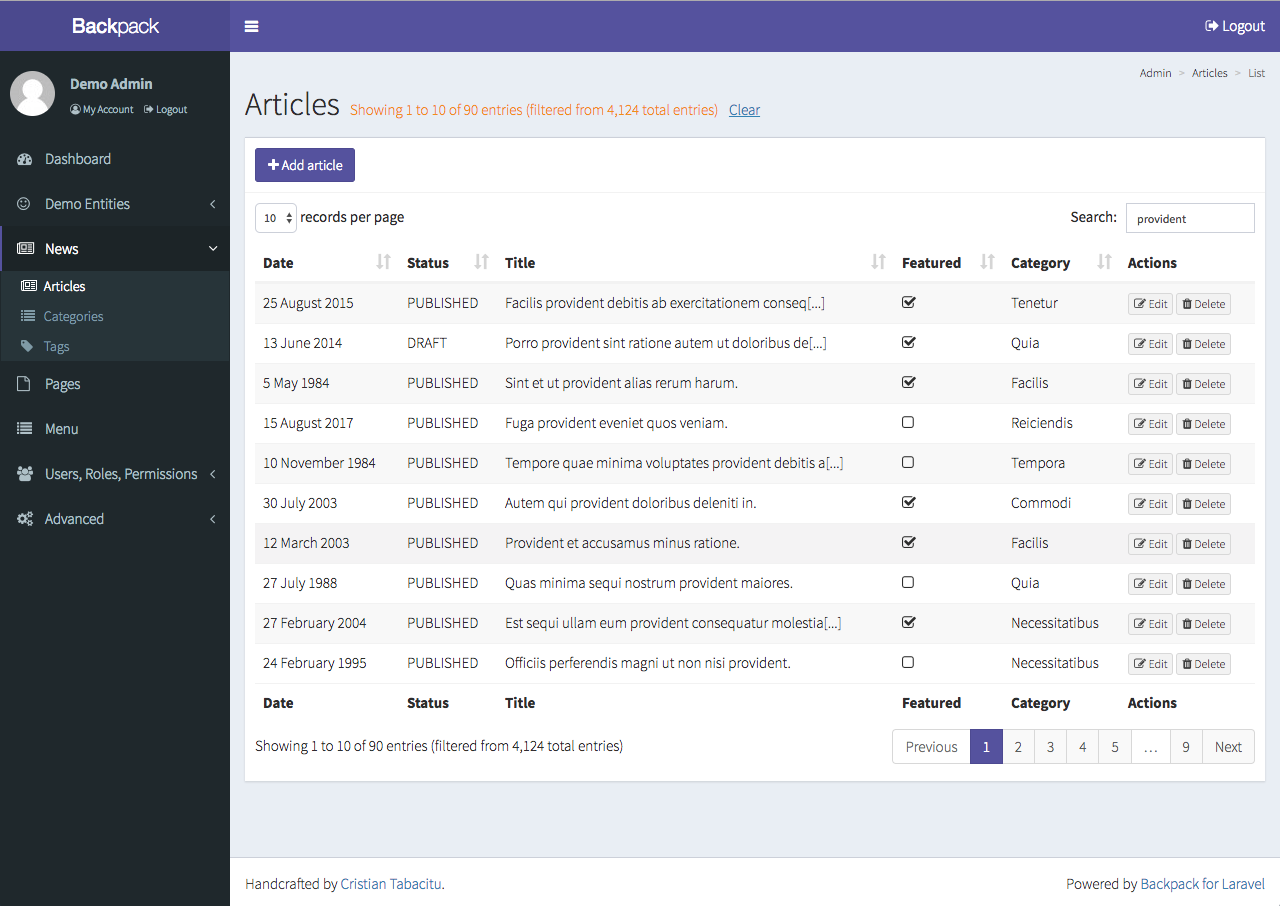
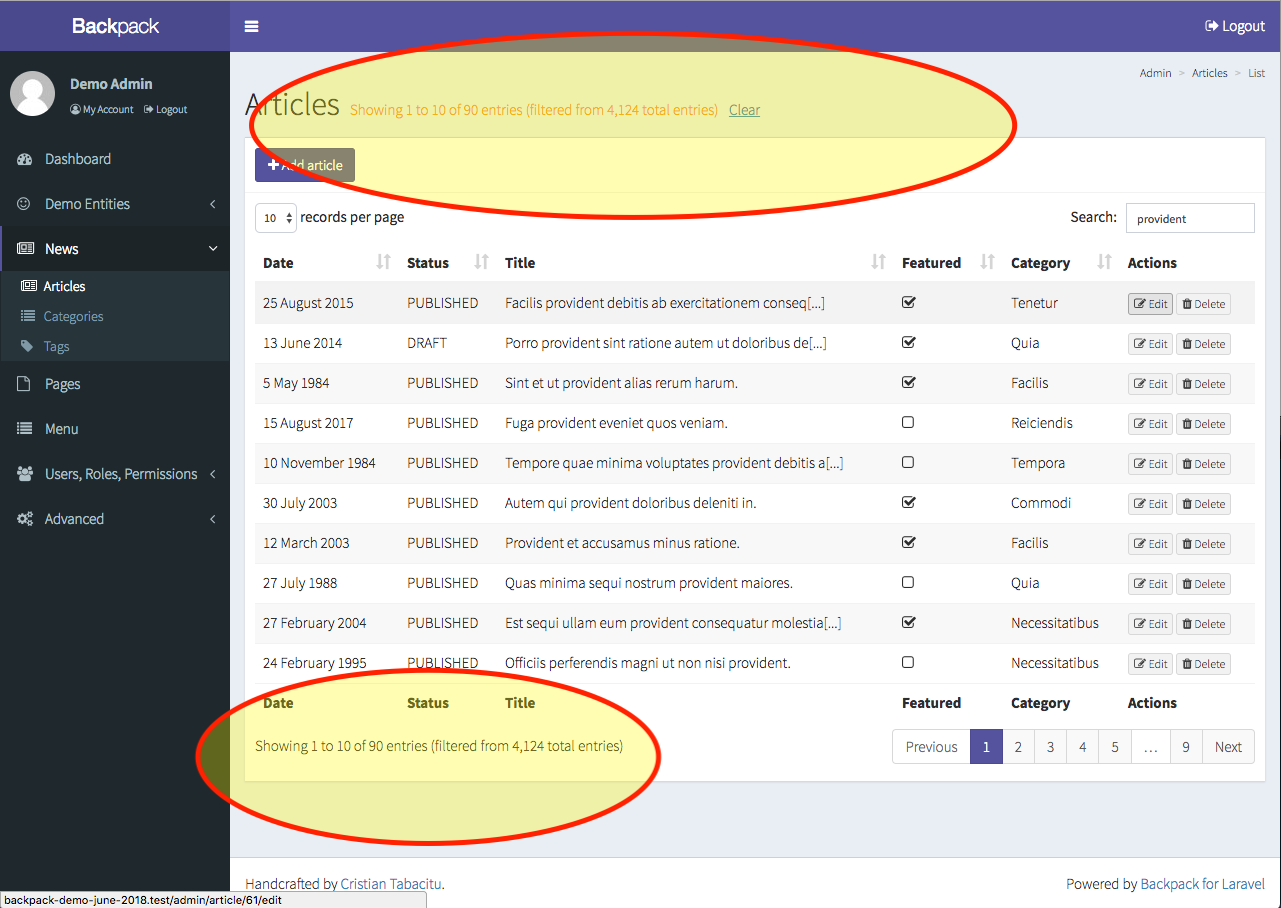
4) i also found myself needing to clear everything, just have a clean result set; you mentioned this too, I agree and think it's important; I included a "Clear" button in the screenshot above, I think the most intuitive place to put such a button is next to the text that says that it's filtered; not sure about the naming ("clear") though;
I do think we might be onto something great :-) So thank you for bringing this up. I think if we manage to build something like this, it would greatly improve the admin's UX in a few common use cases. But I do think it's more difficult to implement than expected, and that we could run into unexpected UX issues. Don't want to do more harm than good :-)
What do you think about my problems/solutions above? Do you foresee any other problems?
Thanks!
PS. You can check out this branch to see my dirty solution but I believe I've broken it in the end, so not sure it'll work by the time you try it. Plus, not sure this is the best way to solve this - your proposal of redirecting to a list URL with parameters might make a lot more sense.
 tabacitu
on 22 Jun 2018
tabacitu
on 22 Jun 2018
PS2. On your numbers above:
- [Optional] Create a toggleable "Save Filters" button in the filter bar which toggles this functionality
I don't really like the "Save Filters" button, but I can't explain why... I guess it's because I feel it would add UX complexity; it's something that's done _on top_ of something; and I feel a feature like this would better work _as default_, since it's the intuitive way to do stuff;
- [Optional] Customize the behavior of this in config files (how long to save, forget filters on logout, allow searches, etc)
I think we'd only need one config option, how long to save the cookie, in minutes. But if we figure out a sensible default, not even that config option is needed, imho :-) Laravel automatically deletes cookies on logout, I believe, so no point in overwriting that behaviour. I don't think anybody expects the filtering to be remembered long-term, only for a few minutes or so. And I think remembering search is a MUST. Otherwise the remembering functionality is counter-intuitive.
tabacitu
on 22 Jun 2018
Must admit, I've not read all this.
HOWEVER.
Maybe something that will solve it is.......... wait for it.
Simply use the history state API?
When a filter is applied, it simply makes an ajax call in the background.
This means the full filtered URL is already available.
When this same ajax call is made simply use something like history.replaceState({}, null, URL FROM THE AJAX)
this will then change the URL in the bar, so when people come back etc it will go to that URL, which will then automatically hit all the other hooks etc?
Simples...right? In my head its 1 line of code xD
 OwenMelbz
on 23 Jun 2018
OwenMelbz
on 23 Jun 2018
@AbbyJanke you are right, I now see the URL filter bar working when I visit ?status=[2] - I am not sure why I was not having success with that prior. That would make @OwenMelbz solution effective at making it easy to save and share filter configurations by URL, which would be a great feature I think.
I imagine we could also hook into the page change event in datatables and append a page=2 parameter to the history, right? Then at some point before the datatable generates, we can apply that URL param to the table? And finally, page length could be managed in the same way.
So all in all you could visit /admin/client, filter to status=2, set it to 50 per page, and click to page 2 and the URL bar would now say /admin/client?status=2&per_page=50&page=2 and that URL could be shared or saved and function.
That would be great! I believe though in order for Backpack to automatically return to this URL after an edit, we still need to save it in a cookie somewhere. Unless the "Save and return to index" somehow used the history API instead of just redirecting to the crud?
Perhaps we could have a new "After Save" action which caused a cookie to be used. This would resolve the confusion @tabacitu was referring to, how after you navigate away from the crud and come back, you should be back on page 1. In this case, we would only utilize the saved cookie with the active filters when someone edited an item and clicked save using the specific save action, or maybe also the cancel button.
I think based on some of @tabacitu s comments and my current use cases, saving the search bar contents might be too much here and would be confusing more often than not, so maybe we leave the search bar out of this feature.
So in summary, on any filter, page length, or page number change, we both save a cookie AND append the details to the URL. Then when an item is being edited, if the user saves or cancels the edit, they return to the previous URL using cookies to pre-populate the filters and pagination. This effect ONLY takes place when returning from an edit, not if you navigated away from the CRUD panel.
Sharable, returnable URLs... no losing your place... this could be a dream come true!
jsiebach
on 28 Jun 2018
@jsiebach the "save and back" uses Laravel's built-in style back() functions - so assuming it uses the referer it should be okay - there is no evidence to support any of this statement :D
OwenMelbz
on 29 Jun 2018
Things with [Feature Request] in their title should probably be labelled as such!
 lloy0076
on 3 Jul 2018
lloy0076
on 3 Jul 2018
Right...... here is alpha version of attempt one!
This might have other customisations in it because it's for a client - and also has other generic tidy ups - is a complete replacement for datatables_logic.blade.php with support for "text" and "select" filters.
@tabacitu if you wanna give it a whirl go for it! would be interesting to see how many times it will break lol, this is barely tested at all!
https://gist.github.com/OwenMelbz/eac1ba6872bbf26e02343b2301d496b2
OwenMelbz
on 12 Jul 2018
@OwenMelbz well done this is a great attempt at implementing full search persistence over edits, here's a suggestion for improvement : display the 'remove filter' button when coming back to a filtered page, just add this line after line 58
$('#remove_filters_button').removeClass('hidden');
 breizhwave
on 8 Oct 2018
breizhwave
on 8 Oct 2018
@OwenMelbz here's a fork for your nice piece of cookie intelligence, I just needed to use the scrollX parameter when responsive_table is set to false in the crud config
https://gist.github.com/breizhwave/59090a27f46e12accee8c422a149819c
breizhwave
on 1 Nov 2018
What does the scrollX do? 😂
On Thu, 1 Nov 2018 at 7:40 am, Erwan Pianezza notifications@github.com
wrote:
@OwenMelbz https://github.com/OwenMelbz here's a fork for your nice
piece of cookie intelligence, I just needed to use the scrollX parameter
when responsive_table is set to false in the crud confighttps://gist.github.com/breizhwave/59090a27f46e12accee8c422a149819c
—
You are receiving this because you were mentioned.
Reply to this email directly, view it on GitHub
https://github.com/Laravel-Backpack/CRUD/issues/1457#issuecomment-434958685,
or mute the thread
https://github.com/notifications/unsubscribe-auth/ABC0VI2-P2_3uh7TXRHt3tzRJx6Ofnywks5uqqVRgaJpZM4Umyc2
.>
Owen Melbourne
Lead UX Developer
www.owenmelbourne.com
www.selesti.com
OwenMelbz
on 1 Nov 2018
What does the scrollX do? 😂
OwenMelbz
on 1 Nov 2018
@OwenMelbz when you have too many columns for a small screen, can't access the edit button !! in responsive mode, datatables was not hiding extra columns... don't know why so I switch to non responsive mode, just to access edit button , and that's the purpose of the scrollX 🥇
breizhwave
on 1 Nov 2018
Ok so I’ve put together a complete PR for this, and I have to say - it’s shaping up pretty nicely :-)
Check it out here https://github.com/Laravel-Backpack/CRUD/pull/1702
The PR:
- makes filters change the URL - like @jsiebach and @AbbyJanke suggested;
- returns to the filtered URL after create/update/etc - like @jsiebach and @OwenMelbz suggested;
- adds a
persistent_tablefeature, which can be enabled or disabled (exactly likeresponsive_table) that makes the URL persist for 2 hours; even if you leave to another page or crud, when you come back it will load your previous filters, page number and items per page; like @tabacitu suggested, but without the “Clear” button (not necessary since Search is ignored - see below); - search is not taken into account, neither by the sharable URLs, nor the persistent table - like @jsiebach suggested;
- filter button appears by default on list page if needed - like @breizhwave suggested;
As you can see - this has TRULY been a team effort. Thank you everyone for pitching in!
Let me know what you think - let’s move the conversation inside the PR.
Cheers!
tabacitu
on 13 Nov 2018
@tabacitu just wanted to ping you to say thanks... this implementation is GREAT. It is extremely helpful. Appreciate the hard work!
jsiebach
on 28 Dec 2018
:D Thank you for the kind words, @jsiebach!
tabacitu
on 24 Jan 2019
Related issues
 deepaksp
·
3Comments
deepaksp
·
3Comments
 M0H3N
·
3Comments
M0H3N
·
3Comments
 AlexanderWM
·
3Comments
AlexanderWM
·
3Comments
 gotrecillo
·
3Comments
gotrecillo
·
3Comments
 voidstate
·
3Comments
voidstate
·
3Comments
Most helpful comment
Right...... here is alpha version of attempt one!
This might have other customisations in it because it's for a client - and also has other generic tidy ups - is a complete replacement for
datatables_logic.blade.phpwith support for "text" and "select" filters.@tabacitu if you wanna give it a whirl go for it! would be interesting to see how many times it will break lol, this is barely tested at all!
https://gist.github.com/OwenMelbz/eac1ba6872bbf26e02343b2301d496b2