Crud: Order by not working with enableDetailsRow
When i put
$this->crud->enableDetailsRow();
in my controller the order by (click on the columns titles) on the list is not working anymore.
 adbmdp
All 15 comments
Maybe fixed in https://github.com/Laravel-Backpack/CRUD/pull/619 if you want to give it a try, as it defines the column with the "+" sign as non sortable, and the problem seems to be Datatables ordering the wrong column due to a off by one error
 MarcosBL
on 20 Apr 2017
MarcosBL
on 20 Apr 2017
@adbmdp - do you happen to have ajaxDataTables enabled on that entity? If so - that's the problem - it's one of the many known and usolvable problems with ajaxDataTables.
 tabacitu
on 20 Apr 2017
tabacitu
on 20 Apr 2017
@tabacitu, yes i know about this ajaxDataTables bug. But this one really comes from enableDetailsRow. When i remove enableDetailsRow it works even with ajaxDataTables enable.
@MarcosBL, thanks i'll have a look
adbmdp
on 20 Apr 2017
Just as aditional info, I paste Gitter chat of this afternoon, as is related to this:
You can extended the search in the crud, and include aditional fields, and that's what I'm doing: I show 4-5 fields in the list, and define a custom search so I can search all othe fields I need, even seeing only those 4-5 fields in the list

something like allows me to access "notas" field both in search and in custom fields. That way, I can search by notes and get the companies that have that notes in the list, and as a plus, I also have access to those "notas" field in the custom fields, so I can set the title to show the notes, or show that special icon

If you enable ajax, and create that search() method in the crud controller, you can be able to search whatever fields you need. If also helps with the order.
So maybe we could have a
php
$this->crud->includeFields = ['includeField1', 'includeField2'];
we could define and help with the bugs of the Ajax Datatable.
MarcosBL
on 20 Apr 2017
@MarcosBL , I was thinking of a similar solution $this->crud->searchColumns, but it might not be needed with the new search feature in https://github.com/Laravel-Backpack/CRUD/pull/445. Let's talk about that there and keep this issue for enableDetailsRow.
@adbmdp - I can't seem to be able to replicate your issue. When ajaxDataTables is off, my column reordering works with and without enableDetailsRow... Try a composer update maybe?
tabacitu
on 20 Apr 2017
@adbmdp - I can't seem to be able to replicate your issue. When ajaxDataTables is off, my column reordering works with and without enableDetailsRow... Try a composer update maybe?
I've just upgrade to 3.2.10. Still got the bug.
Let me explain better:
- ajaxDataTables ON and enableDetailsRow ON --> order on 'basic' text column don't works
- ajaxDataTables ON and enableDetailsRow OFF --> order on 'basic' text column works
- ajaxDataTables OFF and enableDetailsRow ON --> order on 'basic' text column works
- ajaxDataTables OFF and enableDetailsRow OFF --> order on 'basic' text column works
adbmdp
on 21 Apr 2017
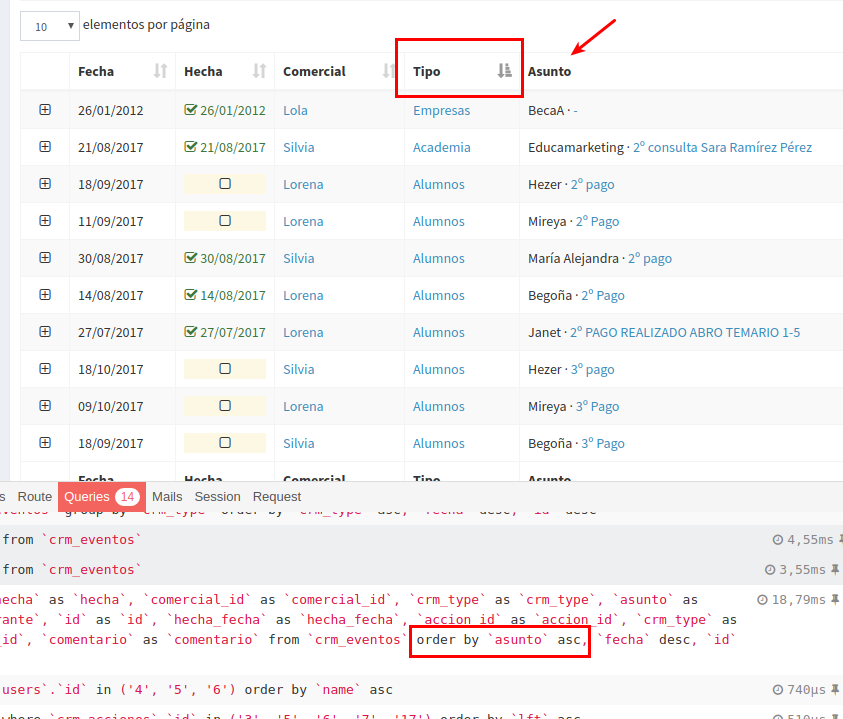
Confirmed here (3.2.10), Datatables is ordering the wrong column due to a off by one bug when enableDetailsRow is On: if you click on the 2º column, it will order by the 3º
For example, a click on "Hecha" sorts by "Comercial"

MarcosBL
on 21 Apr 2017
https://github.com/lloy0076/backpack-test/tree/r618b
Seems to work properly for me, i.e. I can't reproduce the problem.
 lloy0076
on 27 Apr 2017
lloy0076
on 27 Apr 2017
I have the same problem by using AjaxDataTables and enableDetailsRow. Seems to be an issue with LiveControl\EloquentDataTable\DataTable.
 ltalavera
on 6 Jul 2017
ltalavera
on 6 Jul 2017
@adbmdp Hi, the problem is solved?
I do not work even in these cases:
- ajaxDataTables ON and enableDetailsRow ON
- ajaxDataTables ON and enableDetailsRow OFF
 eddilou
on 3 Aug 2017
eddilou
on 3 Aug 2017
Guys, can you please confirm this isn't a bug anymore in the latest Backpack versions? My tests have showed up fine. I'll close the issue and reopen it in case anybody says they're still having problems.
Cheers!
tabacitu
on 4 Sep 2017
Still present
"backpack/crud": "^3.2",
MarcosBL
on 4 Sep 2017
+1
 lzuccaro
on 12 Oct 2017
lzuccaro
on 12 Oct 2017
Hi guys - I specifically solved this yesterday in the all-new upgrade branch, which includes an overhaul of the ajax data tables. It'll be available as Backpack\CRUD 3.3 by the end of the week.
If you want to use it / test it until then, you can do that by using the version dev-upgrade in your composer.json file, then running composer update.
Thanks a lot, cheers!
tabacitu
on 25 Oct 2017
@MarcosBL thanks for reopening it earlier!
tabacitu
on 25 Oct 2017
Related issues
 voidstate
·
3Comments
voidstate
·
3Comments
 mikael1000
·
3Comments
mikael1000
·
3Comments
 deepaksp
·
3Comments
deepaksp
·
3Comments
 abewartech
·
3Comments
abewartech
·
3Comments
 genesiscz
·
3Comments
genesiscz
·
3Comments
Most helpful comment
@MarcosBL thanks for reopening it earlier!