Fedora 33 is using systemd-resolved by default https://fedoraproject.org/wiki/Changes/systemd-resolved
We need to test how this impacts crc DNS setup
 cfergeau
All 24 comments
Internal Wildcard DNS setup via DNSMasq ends up broken.
Routes to applictions are not resolvable from the host into the crc cluster.
 childofthewired
on 23 Oct 2020
cfergeau
on 26 Oct 2020
childofthewired
on 23 Oct 2020
cfergeau
on 26 Oct 2020
@praveenkumar I have the same issue, just installed Fedora 33 and crc seems to run fine OOTB, but nothing can be deployed to the cluster with odo. Will have to swithc back to deb until this is fixed.
 dgolovin
on 28 Oct 2020
dgolovin
on 28 Oct 2020
Can you be a bit more specific about 'nothing can be deployed to the cluster with odo'? I would expect that application deployment goes fine with odo, but then the URL to which you deployed the application would not be reachable.
So far I've only tested f33 up to "the cluster starts up and oc get co is good", I'll have to run more tests with odo.
The goodhosts fallback code is apparently enough to get a cluster working reasonably well (oc get co is fine, but WARN Wildcard DNS resolution for apps-crc.testing does not appear to be working is shown during startup)
cfergeau
on 29 Oct 2020
@cfergeau after deploying CRC we are able to log into the console with "crc console" and we can deploy an application in the UI, but the wildcard DNS is not setup properly for the route.
When logging in from the console, we can 'oc get project' and get a list of our projects including the ones that we created, and all the objects in it.
childofthewired
on 29 Oct 2020
ok, if it's only wildcard DNS which is not working, this is good news as this was the part most likely to break. This can be worked around by adding manually entries in /etc/hosts if needed, though Praveen is working on a better fix.
cfergeau
on 30 Oct 2020
@cfergeau after deploying CRC we are able to log into the console with "crc console" and we can deploy an application in the UI, but the wildcard DNS is not setup properly for the route.
When logging in from the console, we can 'oc get project' and get a list of our projects including the ones that we created, and all the objects in it.
@cfergeau I am working with @childofthewired and added the application name and ip of the cluster to my /etc/hosts and it resolved properly, thank you
 jlyle
on 2 Nov 2020
jlyle
on 2 Nov 2020
An alternative which worked fine for me is:
sudo resolvectl domain crc ~testing
sudo resolvectl dns crc 192.168.130.11
sudo resolvectl default-route crc false
Can you be a bit more specific about 'nothing can be deployed to the cluster with odo'? I would expect that application deployment goes fine with odo, but then the URL to which you deployed the application would not be reachable.
@cfergeau sorry for not being clear, you are correct here, I can create components with odo, push them to the crc managed cluster, but cannot reach them.
dgolovin
on 5 Nov 2020
I'm currently having success with adding
$ cat 10-crc
#!/bin/sh
# This is a NetworkManager dispatcher script to configure split DNS for
# the 'crc' libvirt network.
# The corresponding bridge is recreated each time the system reboots, so
# it cannot be configured permanently through NetworkManager.
# Changing DNS settings through nmcli requires the connection to go down/up,
# so we directly do the change through resolvectl
export LC_ALL=C
if [ "$1" = crc ] && [ "$2" = up ]; then
resolvectl domain crc ~testing
resolvectl dns crc 192.168.130.11
resolvectl default-route crc false
fi
exit 0
in /etc/NetworkManager/dispatcher.d/10-crc and making the file executable. This will need a destroy/start of the libvirt crc network, or a reboot of the host as this is only triggered when the crc NM interface state changes to up
cfergeau
on 6 Nov 2020
Thank you @cfergeau, your dispatcher script resolves the wildcard dns issue on Fedora 33.
Cosmetics: If you put the script into /etc/NetworkManager/dispatcher.d/pre-up.d it works too and you can omit the second condition ([ "$2" = up ]). I just discovered the subdirectories and thought that this would be the designated directory...
 tanwald
on 13 Nov 2020
tanwald
on 13 Nov 2020
Another usecase for systemd-resolved support https://github.com/code-ready/crc/issues/1663#issuecomment-727201187
But if this is not the default RHEL setup (I don't think it is), then distro checks won't be enough to manage this.
cfergeau
on 14 Nov 2020
Cosmetics: If you put the script into
/etc/NetworkManager/dispatcher.d/pre-up.dit works too and you can omit the second condition ([ "$2" = up ]). I just discovered the subdirectories and thought that this would be the designated directory...
Ah that's a good point, I saw the directory as well, but did not notice any difference in behaviour, so I stuck with the main one. Did not occur to me to remove the up check ^^ Thanks!
cfergeau
on 14 Nov 2020
Manual steps to configure f33 for crc:
If you ran crc previously, start with:
$ crc delete
$ crc cleanup
To configure DNS resolution for f33:
- Disable NetworkManager dnsmasq configuration:
$ crc config set skip-check-network-manager-config true
$ crc config set skip-check-crc-dnsmasq-file true
- Create a
/etc/NetworkManager/dispatcher.d/99-crcfile with this content:
#!/bin/sh
# This is a NetworkManager dispatcher script to configure split DNS for
# the 'crc' libvirt network.
# The corresponding bridge is recreated each time the system reboots, so
# it cannot be configured permanently through NetworkManager.
# Changing DNS settings through nmcli requires the connection to go down/up,
# so we directly do the change through resolvectl

export LC_ALL=C

if [ "$1" = crc ]; then
        resolvectl domain crc ~testing
        resolvectl dns crc 192.168.130.11
        resolvectl default-route crc false
fi

exit 0
- Make this file executable:
$ chmod 755 /etc/NetworkManager/dispatcher.d/99-crc
- Start
crcas usual:
$ crc setup
$ crc start
@cfergeau This worked perfectly! Thank you!
jlyle
on 17 Nov 2020
Of note - users should probably also ensure:
# systemctl enable libvirtd --now
has been performed on the system as well to ensure that the networks start on boot.
childofthewired
on 1 Dec 2020
I believe a default install of libvirt will start any required systemd unit at boot time. With libvirtd socket activation, it's a bit hard to know exactly which unit should be enabled (libvirtd.service, libvirtd.socket, one of the split systemd units?), so we only warn if nothing libvirtd-related is enabled.
cfergeau
on 2 Dec 2020
Available in 1.20.0
 guillaumerose
on 9 Dec 2020
guillaumerose
on 9 Dec 2020
Hello CRC Teams I'm using Fedora 33 with 1.20.0 but I still encounter this problem.
I still need to using solution from @cfergeau does it have anyway to debug ? Or how can I learn more about this behavior ?
sudo resolvectl domain crc ~testing
sudo resolvectl dns crc 192.168.130.11
sudo resolvectl default-route crc false
If I using above command I will can access Routes without problem.
WARN Wildcard DNS resolution for apps-crc.testing does not appear to be working
crc version
CodeReady Containers version: 1.20.0+ef3f80d
OpenShift version: 4.6.6 (embedded in executable)


INFO Loading bundle: crc_libvirt_4.6.6.crcbundle ...
INFO Verifying bundle crc_libvirt_4.6.6.crcbundle ...
INFO Creating CodeReady Containers VM for OpenShift 4.6.6...
INFO CodeReady Containers VM is running
INFO Generating new SSH Key pair ...
INFO Updating authorized keys ...
INFO Copying kubeconfig file to instance dir ...
INFO Starting network time synchronization in CodeReady Containers VM
INFO Adding 8.8.8.8 as nameserver to the instance ...
INFO Check internal and public DNS query ...
INFO Check DNS query from host ...
WARN Wildcard DNS resolution for apps-crc.testing does not appear to be working
INFO Adding user's pull secret to instance disk...
INFO Verifying validity of the kubelet certificates ...
INFO Starting OpenShift kubelet service
INFO Configuring cluster for first start
INFO Adding user's pull secret to the cluster ...
INFO Updating cluster ID ...
INFO Starting OpenShift cluster ... [waiting 3m]
INFO Updating kubeconfig
WARN The cluster might report a degraded or error state. This is expected since several operators have been disabled to lower the resource usage. For more information, please consult the documentation


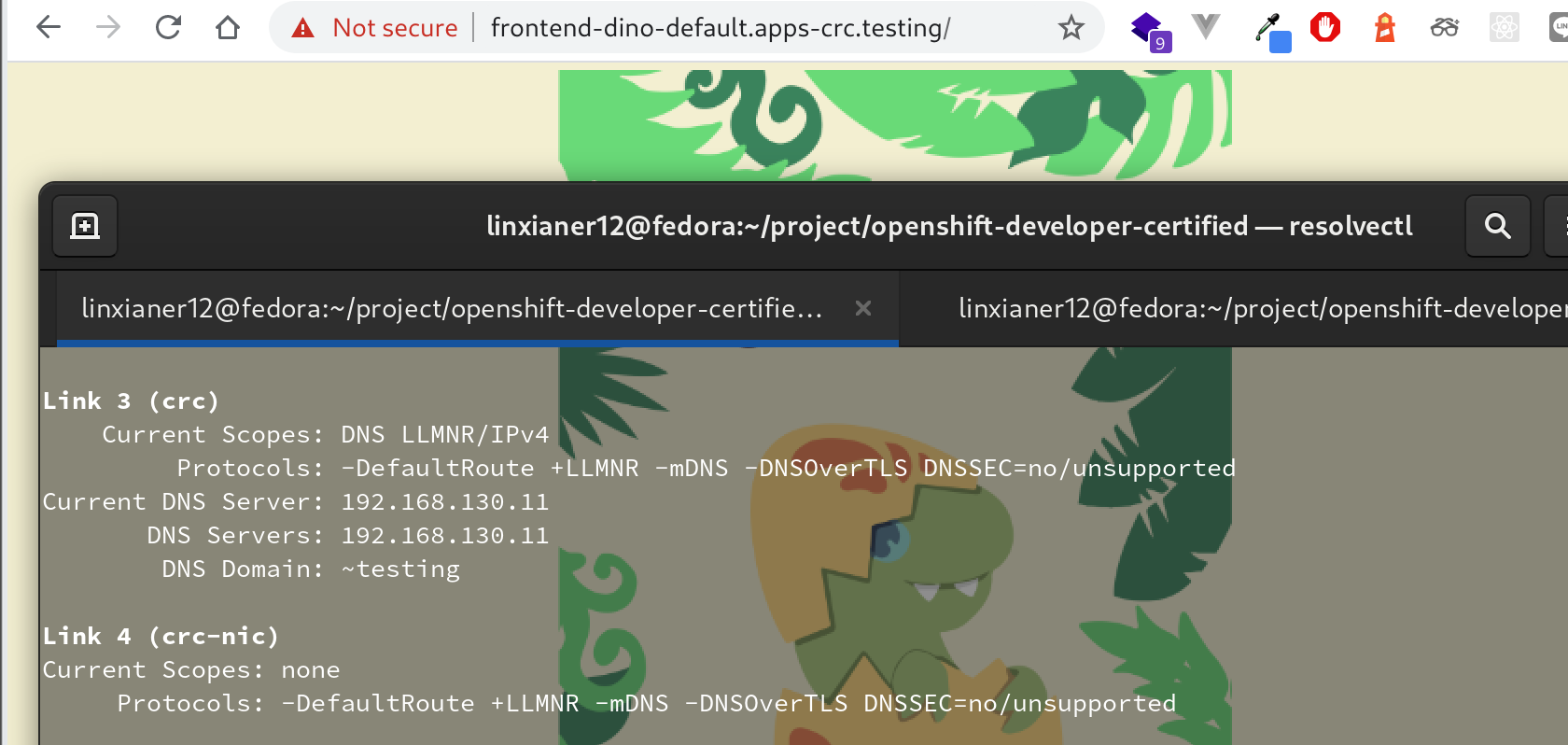
I'm using Fedora 33 with CRC 1.20 should this problem still insist ? If you need any logs to investigate please let me know :100:
 wdrdres3qew5ts21
on 2 Jan 2021
wdrdres3qew5ts21
on 2 Jan 2021
I would first try crc delete && crc cleanup && crc setup, and check if right after that things are working. There is a known issue with 1.20 where the network configuration is lost if you enable a vpn (or I guess plug/unplug an ethrenet cable, or connect to a wifi network, ...)
cfergeau
on 4 Jan 2021
I had try it already because I encounter this problem with my fresh installation Fedora 33 also had try to delete cluster multiple time but still encounter this problem does it have anyway to bebug or found logs of this behavior ?
wdrdres3qew5ts21
on 5 Jan 2021
crc delete && crc cleanup && crc setup --log-level debug && crc start --log-level debug would be a good start.
cfergeau
on 5 Jan 2021
@wdrdres3qew5ts21 Try this as a workaround to the issue, as enable/disable VPN will wipe out the settings.
sudo nmcli connection down crc && nmcli connection up crc
 rhtevan
on 8 Jan 2021
rhtevan
on 8 Jan 2021
I'd recommend virsh -c qemu:///system net-destroy crc; virsh -c qemu:///system net-start crc rather than nmcli interactions.
cfergeau
on 8 Jan 2021
Related issues
 gasgithub
·
6Comments
gasgithub
·
6Comments
 jriverol
·
5Comments
jriverol
·
5Comments
 jkopriva
·
3Comments
jkopriva
·
3Comments
 fabiand
·
10Comments
fabiand
·
10Comments
 arprakas
·
9Comments
arprakas
·
9Comments
Most helpful comment
Manual steps to configure f33 for crc:
If you ran crc previously, start with:
To configure DNS resolution for f33:
/etc/NetworkManager/dispatcher.d/99-crcfile with this content:crcas usual: