Crc: CRC VM not connecting to internet on MAC
I have tried to run CRC 1.10 on my MAC which runs fine but internet connectivity from CRC VM is not working. I am not even able to ping any of the google.com or public IPs 8.8.8.8
I am running on MAC OS Catalina 10.15.4
I think the new CRC bundle has option to run with Hyperkit hypervisor by default and i dont see an option to enable virtualbox
I even tried to run CRC without connecting to my office VPN but issue persists.
 prajendnes
All 25 comments
@prajendnes have a look to https://github.com/code-ready/crc/issues/1211 one also please use the BUG template to file the issue otherwise it will not provide us all the information to understand root case of the issue.
 praveenkumar
on 11 May 2020
praveenkumar
on 11 May 2020
@praveenkumar please find the details below.
General information
- OS: macOS
- Hypervisor: hyperkit
- Did you run
crc setupbefore starting it (Yes/No)? Yes - Running CRC on: Laptop
CRC version
crc version: 1.10.0+9025021
OpenShift version: 4.4.3 (embedded in binary)
CRC status
DEBU Running '/Users/ITRajendPr/.crc/bin/oc get co -ojson --kubeconfig /Users/ITRajendPr/.crc/machines/crc/kubeconfig --context admin --cluster crc'
DEBU About to run SSH command:
df -B1 --output=size,used,target /sysroot | tail -1
DEBU SSH cmd err, output:
CRC VM: Running
OpenShift: Running (v4.4.3)
Disk Usage: 12.41GB of 32.72GB (Inside the CRC VM)
Cache Usage: 12.05GB
Cache Directory: /Users/ITRajendPr/.crc/cache
CRC config
No customisation done
Host Operating System
ProductName: Mac OS X
ProductVersion: 10.15.4
BuildVersion: 19E287
Steps to reproduce
- Starting CRC
- Logging into CRC VM
- Running nc results in connection refused
- Running podman pull results in connection refused
ITRajendPr@Prakashs-MacBook-Pro Downloads % ssh -i ~/.crc/machines/crc/id_rsa core@"$(crc ip)"
Red Hat Enterprise Linux CoreOS 44.81.202004260825-0
Part of OpenShift 4.4, RHCOS is a Kubernetes native operating system
managed by the Machine Config Operator (clusteroperator/machine-config).
WARNING: Direct SSH access to machines is not recommended; instead,
make configuration changes via machineconfig objects:
https://docs.openshift.com/container-platform/4.4/architecture/architecture-rhcos.html
Last login: Mon May 11 10:37:32 2020 from 192.168.64.1
[core@crc-dv9sm-master-0 ~]$ ping google.com
PING google.com (216.58.206.78) 56(84) bytes of data.
^C
--- google.com ping statistics ---
3 packets transmitted, 0 received, 100% packet loss, time 42ms
[core@crc-dv9sm-master-0 ~]$ nc -vz quay.io 443
Ncat: Version 7.70 ( https://nmap.org/ncat )
Ncat: Connection to 34.225.79.222 failed: Connection refused.
Ncat: Trying next address...
Ncat: Connection to 34.200.12.250 failed: Connection refused.
Ncat: Trying next address...
Ncat: Connection to 54.145.51.104 failed: Connection refused.
Ncat: Trying next address...
Ncat: Connection to 34.238.236.79 failed: Connection refused.
Ncat: Trying next address...
Ncat: Connection to 23.20.49.22 failed: Connection refused.
Ncat: Trying next address...
Ncat: Connection refused.
[core@crc-dv9sm-master-0 ~]$ podman pull httpd
Trying to pull registry.access.redhat.com/httpd...
Get https://registry.access.redhat.com/v2/: dial tcp 2.20.170.87:443: connect: connection refused
Trying to pull docker.io/library/httpd...
Get https://registry-1.docker.io/v2/: dial tcp 35.174.73.84:443: connect: connection refused
Error: error pulling image "httpd": unable to pull httpd: 2 errors occurred:
* Error initializing source docker://registry.access.redhat.com/httpd:latest: error pinging docker registry registry.access.redhat.com: Get https://registry.access.redhat.com/v2/: dial tcp 2.20.170.87:443: connect: connection refused
* Error initializing source docker://httpd:latest: error pinging docker registry registry-1.docker.io: Get https://registry-1.docker.io/v2/: dial tcp 35.174.73.84:443: connect: connection refused
Expected
To be able to connect to internet
Actual
Not connecting to internet from CRC VM
prajendnes
on 11 May 2020
@prajendnes Can you try following and then provide the logs in a gist?
$ crc delete
$ crc cleanup
$ crc setup
$ crc start --log-level debug
@praveenkumar I have attached the logs here. thanks
prajendnes
on 12 May 2020
It doesn't look like a DNS issue as on the CRC VM, i can do name resolution successfully. Just that ping or curl to google.com not working. Do i need to explicitly do anything to make internet working on the guest VM on MAC OS ?
prajendnes
on 12 May 2020
It's not just google, it's all outbound connections. Is there anything special on your mac network-wise? enterprise network, proxy, vpn, ... ?
 cfergeau
on 14 May 2020
cfergeau
on 14 May 2020
@cfergeau I really do not have any idea whats stopping. As everyone else i am working from home and i am trying on my company provided MAC. as far as i understand there is no proxy setting to be made. I am connected to my home wifi which has direct internet connectivity. I use secure pulse to connect my MAC to company VPN. I tried CRC with and without connecting to VPN. results are same that outbound connections are blocked.
prajendnes
on 26 May 2020
I tried CRC with and without connecting to VPN. results are same that outbound connections are blocked.
Could you try to disconnect from your company VPN (secure pulse), then crc delete && crc start, and then check again whether the VM can reach quay.io?
cfergeau
on 26 May 2020
@cfergeau As i mentioned before, I have tried this combination earlier. Again, just now i did it once again. I have disconnected VPN.
crc delete
crc setup
crc start -p pull_secret
logged into the CRC VM and following the result

[core@crc-dv9sm-master-0 ~]$ nc -vz quay.io 443
Ncat: Version 7.70 ( https://nmap.org/ncat )
Ncat: Connection to 54.84.167.150 failed: Connection refused.
Ncat: Trying next address...
Ncat: Connection to 52.202.225.67 failed: Connection refused.
Ncat: Trying next address...
Ncat: Connection refused.

[core@crc-dv9sm-master-0 ~]$ podman pull httpd
Trying to pull registry.access.redhat.com/httpd...
  Get https://registry.access.redhat.com/v2/: dial tcp 2.20.241.14:443: connect: connection refused
Trying to pull docker.io/library/httpd...
  Get https://registry-1.docker.io/v2/: dial tcp 107.23.149.57:443: connect: connection refused
Error: error pulling image "httpd": unable to pull httpd: 2 errors occurred:
    * Error initializing source docker://registry.access.redhat.com/httpd:latest: error pinging docker registry registry.access.redhat.com: Get https://registry.access.redhat.com/v2/: dial tcp 2.20.241.14:443: connect: connection refused
    * Error initializing source docker://httpd:latest: error pinging docker registry registry-1.docker.io: Get https://registry-1.docker.io/v2/: dial tcp 107.23.149.57:443: connect: connection refused
If from your host $ nc -vz quay.io 443 succeeds, and not from the guest, this seems to be a VM networking issue, so hyperkit/vmnet issue, which I'm not so sure how to debug :(
cfergeau
on 26 May 2020
@cfergeau yes, exactly. It works from the host but not from guest VM where CRC is running.
prajendnes
on 26 May 2020
I have also confirmed, that on MacOS 10.14.6 , crc 1.8 through 1.11
does not work when Cisco AnyConnect VPN (v4.7.04056) is connected.
Does anyone know of a workaround or patch ?
this is obviously more important now due to the covid crisis
 rscher
on 5 Jun 2020
rscher
on 5 Jun 2020
Same issue.
- Cisco AnyConnect VPN (v4.7.04056)
- macOS Catalina 10.15.5
Cluster starts with AnyConnect disconnected.
Cluster fails to start when it is connected.
 sj4nes
on 9 Jun 2020
sj4nes
on 9 Jun 2020
I am also experiencing the same issue on MacOSX and VPN. I believe the issue lies in if your company does split tunnel or full tunnel. If they full tunnel, like mine. You can not access your local subnet and therefore the openshift cluster that is spun up. See statisics window under menu. It would say split instead of tunnel all

So either they have to put an exclusion rule to allow your vpn client to local LAN access and you may even need to check the preference in Anyconnect to allow local lan access once they do it.

I can't for sure say this is it, but I'm unable to resolve my cluster address when it starts or log into it when on vpn. Off vpn everything is good. @rscher, @sj4nes, @prajendnes if you are able to verify that your company can do split tunnel or even at least while on full tunnel allow local LAN access, it should work.
Since I am just guinea pigging this for my company, they wont do the local access unless it becomes an official development tool. In the mean time, I just get to play around with public projects and not ours.
Cheers!
 taylor-benson
on 7 Jul 2020
taylor-benson
on 7 Jul 2020
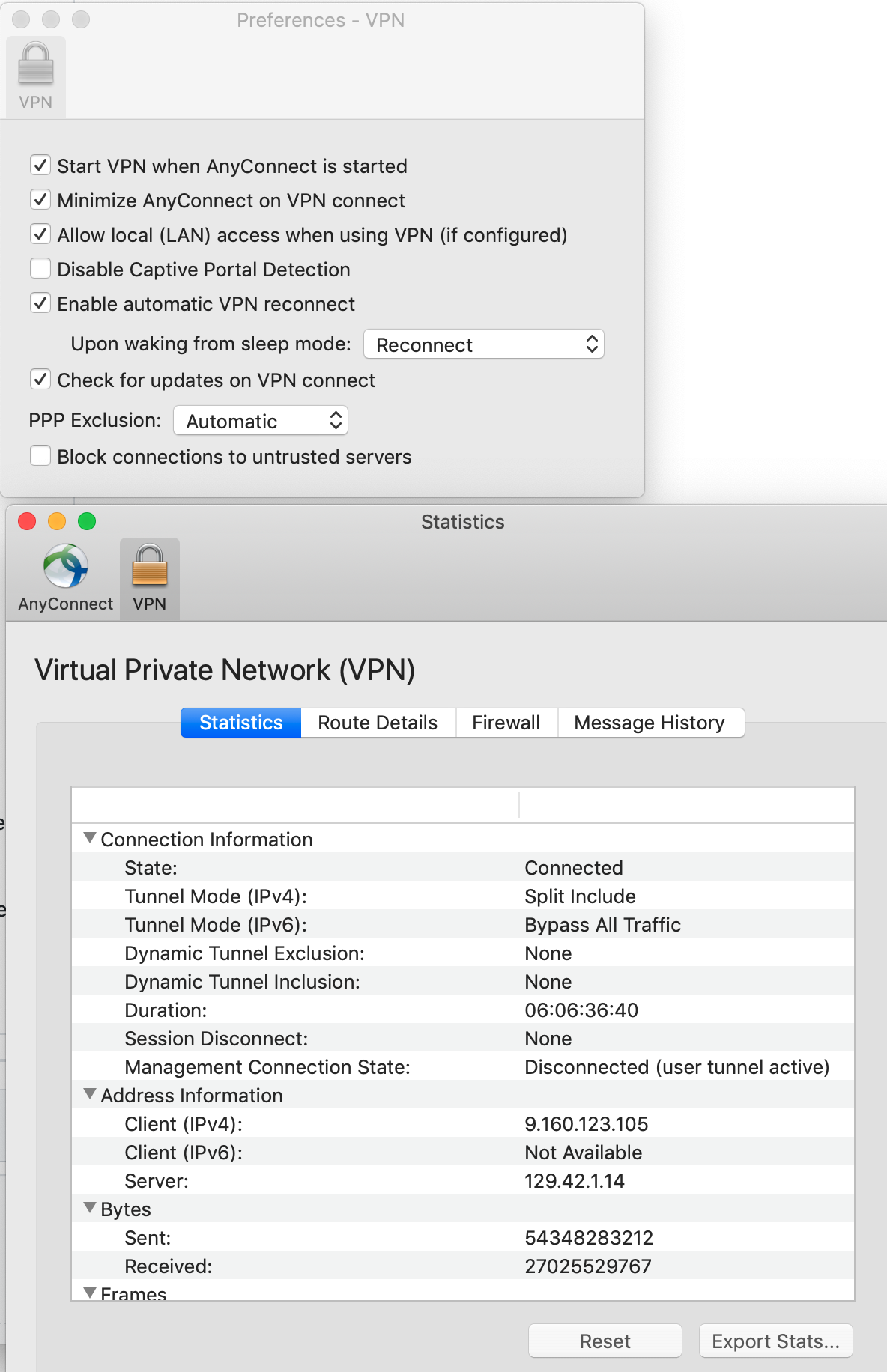
I am also experiencing the same issue on MacOSX and VPN. I believe the issue lies in if your company does split tunnel or full tunnel. If they full tunnel, like mine. You can not access your local subnet and therefore the openshift cluster that is spun up. See statisics window under menu. It would say split instead of tunnel all
So either they have to put an exclusion rule to allow your vpn client to local LAN access and you may even need to check the preference in Anyconnect to allow local lan access once they do it.
I can't for sure say this is it, but I'm unable to resolve my cluster address when it starts or log into it when on vpn. Off vpn everything is good. @rscher, @sj4nes, @prajendnes if you are able to verify that your company can do split tunnel or even at least while on full tunnel allow local LAN access, it should work.
Since I am just guinea pigging this for my company, they wont do the local access unless it becomes an official development tool. In the mean time, I just get to play around with public projects and not ours.
Cheers!
VPN already configured to allow local access and split tunnel mode, CRC cannot start when VPN is connected.
rscher
on 8 Jul 2020
Boo! I was going off assumption that split tunnel was probably required as mine was full tunnel and local LAN access was being blocked. If you start up off VPN after the CRC is started, then you start VPN can you access the console using crc console?
taylor-benson
on 8 Jul 2020
then you start VPN can you access the console using crc console?
This depends on the configuration of the tunnel. When a full tunnel, or route-all is set, this would fail after the VPN is up. This is therefore recorded as a known issue in the release notes :-/
 gbraad
on 14 Jul 2020
gbraad
on 14 Jul 2020
This issue has been automatically marked as stale because it has not had recent activity. It will be closed if no further activity occurs. Thank you for your contributions.
![stale[bot] picture](https://avatars3.githubusercontent.com/in/1724?v=4&s=40) stale[bot]
on 27 Oct 2020
stale[bot]
on 27 Oct 2020
I have exactely the same issue. Did anybody find a solution?
 manuelwallrapp
on 4 Nov 2020
manuelwallrapp
on 4 Nov 2020
Ok I found the solution. I edited /etc/resolve.conf and added the line: nameserver 8.8.8.8
Then it works. Because /etc/resolve.conf on mac is generated, I changed the settings of my Network in the Network Settings -> Advanced -> DNS and added there 8.8.8.8
And then I start the CRC as following: crc start -n 8.8.8.8
Then it works.
manuelwallrapp
on 8 Nov 2020
Hitting same issue: crc vm not connecting to internet
crc version
CodeReady Containers version: 1.18.0+bb304aa
OpenShift version: 4.6.1 (embedded in binary)
 cliebl
on 14 Nov 2020
cliebl
on 14 Nov 2020
Hitting same issue: crc vm not connecting to internet
In Host:
[crcuser@ecs-openshift ~]$ crc version
CodeReady Containers version: 1.19.0+94b0362
OpenShift version: 4.6.3 (embedded in executable)
[crcuser@ecs-openshift ~]$ crc status
CRC VM:          Running
OpenShift:       Running (v4.6.3)
Disk Usage:      16.99GB of 32.72GB (Inside the CRC VM)
Cache Usage:     15.32GB
Cache Directory: /home/crcuser/.crc/cache
[crcuser@ecs-openshift ~]$ ping baidu.com
PING baidu.com (39.156.69.79) 56(84) bytes of data.
64 bytes from 39.156.69.79 (39.156.69.79): icmp_seq=1 ttl=50 time=2.73 ms
^C64 bytes from 39.156.69.79 (39.156.69.79): icmp_seq=2 ttl=50 time=2.77 ms
64 bytes from 39.156.69.79 (39.156.69.79): icmp_seq=3 ttl=50 time=2.71 ms
64 bytes from 39.156.69.79 (39.156.69.79): icmp_seq=4 ttl=50 time=2.79 ms
64 bytes from 39.156.69.79 (39.156.69.79): icmp_seq=5 ttl=50 time=2.78 ms
^C
--- baidu.com ping statistics ---
5 packets transmitted, 5 received, 0% packet loss, time 4004ms
rtt min/avg/max/mdev = 2.716/2.760/2.790/0.055 ms
In VM:
[core@crc-tnpk6-master-0 ~]$ cat /etc/resolv.conf
# Generated by CRC
search crc.testing
nameserver 10.88.0.8
nameserver 192.168.130.1

[core@crc-tnpk6-master-0 ~]$ ping baidu.com -c 4
PING baidu.com (39.156.69.79) 56(84) bytes of data.
^C
--- baidu.com ping statistics ---
4 packets transmitted, 0 received, 100% packet loss, time 90ms
 mrshengzyzy
on 23 Nov 2020
mrshengzyzy
on 23 Nov 2020
never found an actual solution
workaround: disconnect from Cisco AnyConnect VPN before starting crc , then reconnect to VPN once crc VM is running
I haven't tried this solution … https://github.com/code-ready/crc/issues/1233#issuecomment-723557007
as I moved off doing any OpenShift work on Mac and only running on RHEL
rscher
on 23 Nov 2020
CodeReady Containers v1.19.0 introduces a new network mode that allows users to work with a VPN turned on.
Instead of using a traditional NAT, it uses a userland network stack. The virtual machine is now seen by the host operating system as a normal application.
This feature is still in alpha.
Let us know if it works better for you!
Instructions
- Cleanup the previous installation of crc.
Runcrc delete,crc cleanupand remove the folder$HOME/.crc - Remove eventual *.crc.testing records in your hosts file /etc/hosts.
- Activate the vsock network mode.
crc config set network-mode vsock - Prepare the host machine
crc setup - Run the daemon in a separated terminal
crc daemon - Start the virtual machine as usual
crc start
What to test
- Please turn on your VPN software before and after starting CodeReady Containers. We would like to know if CodeReady Containers behave well and if you can login to the OpenShift console (use
crc console). - Deploy a pod that connects to a resource on your VPN network.
Limitations
User-created routes are not reachable from the host. The DNS record is missing and is not inserted yet automatically in the hosts file.
Applications deployed on non-https ports are not reachable from the host. Only the port 443 and 6443 are opened and can be used.
 guillaumerose
on 24 Nov 2020
guillaumerose
on 24 Nov 2020
I tested outbound network connectivity v1.19.0 with limited success on my Mac (Big Sur) and Cisco AnyConnect.
I tested by creating a deployment using the registry.access.redhat.com/ubi8/ubi:8.1 image.
The good (things that now work)
- crc resolves and downloads images from the internet with and without the Cisco AnyConnect VPN running
- containers resolve internet domains and access them
- containers can access IP addresses through the active VPN
- No longer need to add
--nameserver=1.1.1.1oncrc startup
The still broken - containers do not resolve intranet DNS names - using
crc start --nameserver=9.0.130.50appeared to have have no effect on the name resolution.
NOTE: I did NOT test any inbound routes on my crc instance
Strange coincidence, my Mac suddenly repeatedly crashes every 3890 seconds (64 minutes) with the following kernel panic.
panic(cpu 6 caller 0xffffff8013553a13): userspace watchdog timeout: no successful checkins from com.apple.remoted in 180 seconds
service returned not alive with context : unresponsive work processor(s): remoted heartbeat on bridge
service: com.apple.logd, total successful checkins since load (3890 seconds ago): 390, last successful checkin: 0 seconds ago
service: com.apple.WindowServer, total successful checkins since load (3860 seconds ago): 386, last successful checkin: 0 seconds ago
service: com.apple.remoted, total successful checkins since load (3890 seconds ago): 370, last successful checkin: 180 seconds ago
I believe the first crash happened shortly after I upgraded to crc 1.19 from crc 1.17. The crashes could be coincidence and it does not matter if I even start crc, but it is strange that they started shortly after I upgraded crc.
 bellds
on 27 Nov 2020
bellds
on 27 Nov 2020
Related issues
 jkopriva
·
3Comments
jkopriva
·
3Comments
 drpaneas
·
7Comments
drpaneas
·
7Comments
 fabiand
·
10Comments
fabiand
·
10Comments
 rajivnathan
·
6Comments
gbraad
·
6Comments
rajivnathan
·
6Comments
gbraad
·
6Comments
Most helpful comment
I have exactely the same issue. Did anybody find a solution?