Covid19india-react: How to make this app work both in Linux and Windows? [Help Needed]
Hi Devs,
I am new to react. Need advice.
I am a windows user. I couldn't run the website initially. I got 'PORT' is not recognized error.
To fix it I did these:
- Installed dotenv package and created a .env file with PORT=3000.
- Installed cross-env
- Removed PORT=3000 from here "react-scripts start css-watch"
It started working. Can you please advise is it correct or not? And how do we make this work both in Linux as well as Windows?
Thanks
Mani
 manigandan-dorairaj
All 11 comments
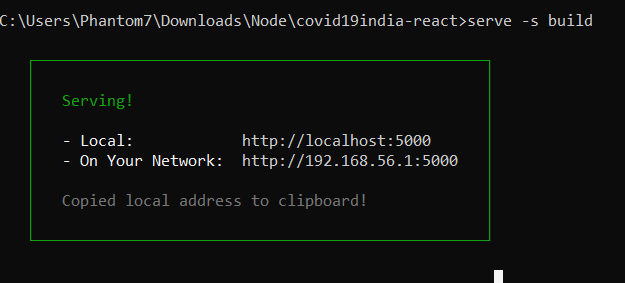
I was also facing the same problem this is how i resolved it. On windows you can simply start by
- cloning the project files then use
npm install -Dto install all the required dependencies - after this you can do
npm run buildto build the project. - run
npm install -g serveto serve the project on browser - at last run
serve -s buildand this will generate localhost address.
 SanjeevYadavcr7
on 26 Mar 2020
SanjeevYadavcr7
on 26 Mar 2020
I tried the same in ubuntu 18.04 LTS
The server is running but the browser responds
404 the requested path cannot be found
Any solution to this?
 rupeshkmr
on 26 Mar 2020
rupeshkmr
on 26 Mar 2020
Thanks, @SanjeevYadavcr7. I am able to run it through this approach but it lost the instant updates (hot reload) feature. Whenever I make any changes I need to rebuild again which takes some time.
manigandan-dorairaj
on 26 Mar 2020
I tried the same in ubuntu 18.04 LTS
The server is running but the browser responds
404 the requested path cannot be foundAny solution to this?
In Linux you can just do this
npm i && npm start
manigandan-dorairaj
on 26 Mar 2020
This error comes up

rupeshkmr
on 26 Mar 2020
Added the installation method for windows in readme.
PR: https://github.com/covid19india/covid19india-react/pull/177
 Rajanpandey
on 26 Mar 2020
Rajanpandey
on 26 Mar 2020
This error comes up
Did you run npm install ?
manigandan-dorairaj
on 26 Mar 2020
yes
rupeshkmr
on 26 Mar 2020
This worked for me.
In package.json under scripts -> start replace existing command to following
SET PORT=3001 && react-scripts start css-watch
But I guess this may not work in Linux.
manigandan-dorairaj
on 26 Mar 2020
The best solution for this is that we can create an .env file in the root of our application and set the PORT environment variable as 3001 there. That way we can run this app in both Linux and windows system. I can share a PR if required.
 Shashwat-Goyal
on 26 Mar 2020
Shashwat-Goyal
on 26 Mar 2020
Closed since future revision of codebase wouldn't require setting the port.
 jeremyphilemon
on 29 Mar 2020
jeremyphilemon
on 29 Mar 2020
Related issues
 DikshantYadav19
·
5Comments
DikshantYadav19
·
5Comments
 tshrwbl
·
5Comments
tshrwbl
·
5Comments
 DashmeetArt
·
5Comments
DashmeetArt
·
5Comments
 mohammedrehan275
·
6Comments
mohammedrehan275
·
6Comments
 abbhhiisseek
·
5Comments
abbhhiisseek
·
5Comments
Most helpful comment
I was also facing the same problem this is how i resolved it. On windows you can simply start by
npm install -Dto install all the required dependenciesnpm run buildto build the project.npm install -g serveto serve the project on browserserve -s buildand this will generate localhost address.