Coverlet: [Update doc only new SDK style supported]error MSB4044: The "Coverlet.MSbuild.Tasks.CoverageResultTask" task was not given a value for the required parameter "InstrumenterState".
Hello GitHubFamily,
I m trying to use publish code coverage for Nunit test. I have created my pipeline from Azure DevOps and utilizing .Net Core (test) task to execute unit test cases and publish code coverage. However, I am getting above mentioned error.
So what all I have done:
A unit test project in VS 2019.
Few sample unit test.
From Manage Nuget, got Nunit, Nunit test adapter and code coverage tool - coverlet.msbuild
Reference screenshot:

Below is the pipeline I am using:

I had below package.config after installing the nuget component. However, as I received an error I carried out certain modifications in the hope to fix the issue. The comment code was by default and the uncommented one is modified one.

I am not using, however, putting YAML for .NET Core (test) if that helps:
steps:
- task: DotNetCoreCLI@2
displayName: 'Test copy'
inputs:
command: test
projects: 'D:CurrentUnitTestAgent_WorkingFolder**CodeCoverageScenarioCodeCoverageScenario.sln'
arguments: '/p:CollectCoverage=true /p:CoverletOutputFormat=cobertura /p:CoverletOutput=$(Build.SourcesDirectory)/TestResults/Coverage/'
condition: succeededOrFailed()
Error Logs:
2020-05-13T03:13:52.2844751Z ##[debug] D:CurrentUnitTestAgent_WorkingFolder_temp (directory)
2020-05-13T03:13:52.2847095Z ##[debug] D:CurrentUnitTestAgent_WorkingFolder_temp.taskkey (file)
2020-05-13T03:13:52.2847572Z ##[debug] D:CurrentUnitTestAgent_WorkingFolder_tool (directory)
2020-05-13T03:13:52.2849611Z ##[debug]20316 results
2020-05-13T03:13:52.2850152Z ##[debug]found 20316 paths
2020-05-13T03:13:52.2850393Z ##[debug]applying include pattern
2020-05-13T03:13:52.4039424Z ##[debug]1 matches
2020-05-13T03:13:52.4039969Z ##[debug]1 final results
2020-05-13T03:13:52.4041899Z ##[debug]which 'C:Program Filesdotnetdotnet.exe'
2020-05-13T03:13:52.4043770Z ##[debug]found: 'C:Program Filesdotnetdotnet.exe'
2020-05-13T03:13:52.4044414Z ##[debug]which 'C:Program Filesdotnetdotnet.exe'
2020-05-13T03:13:52.4044961Z ##[debug]found: 'C:Program Filesdotnetdotnet.exe'
2020-05-13T03:13:52.4045317Z ##[debug]C:Program Filesdotnetdotnet.exe arg: test
2020-05-13T03:13:52.4045718Z ##[debug]C:Program Filesdotnetdotnet.exe arg: D:CurrentUnitTestAgent_WorkingFolder10sCodeCoverageScenarioCodeCoverageScenario.sln
2020-05-13T03:13:52.4046661Z ##[debug]C:Program Filesdotnetdotnet.exe arg: --logger trx --results-directory "D:CurrentUnitTestAgent_WorkingFolder_temp" /p:CollectCoverage=true /p:CoverletOutputFormat=cobertura /p:CoverletOutput=D:CurrentUnitTestAgent_WorkingFolder10s/TestResults/Coverage/
2020-05-13T03:13:52.4050222Z ##[debug]exec tool: C:Program Filesdotnetdotnet.exe
2020-05-13T03:13:52.4050696Z ##[debug]arguments:
2020-05-13T03:13:52.4051132Z ##[debug] test
2020-05-13T03:13:52.4051884Z ##[debug] D:CurrentUnitTestAgent_WorkingFolder10sCodeCoverageScenarioCodeCoverageScenario.sln
2020-05-13T03:13:52.4052521Z ##[debug] --logger
2020-05-13T03:13:52.4052727Z ##[debug] trx
2020-05-13T03:13:52.4053271Z ##[debug] --results-directory
2020-05-13T03:13:52.4054068Z ##[debug] D:CurrentUnitTestAgent_WorkingFolder_temp
2020-05-13T03:13:52.4054331Z ##[debug] /p:CollectCoverage=true
2020-05-13T03:13:52.4054719Z ##[debug] /p:CoverletOutputFormat=cobertura
2020-05-13T03:13:52.4055020Z ##[debug] /p:CoverletOutput=D:CurrentUnitTestAgent_WorkingFolder10s/TestResults/Coverage/
2020-05-13T03:13:52.4055789Z [command]"C:Program Filesdotnetdotnet.exe" test D:CurrentUnitTestAgent_WorkingFolder10sCodeCoverageScenarioCodeCoverageScenario.sln --logger trx --results-directory D:CurrentUnitTestAgent_WorkingFolder_temp /p:CollectCoverage=true /p:CoverletOutputFormat=cobertura /p:CoverletOutput=D:CurrentUnitTestAgent_WorkingFolder10s/TestResults/Coverage/
2020-05-13T03:13:53.4661372Z D:CurrentUnitTestAgent_WorkingFolder10sCodeCoverageScenariopackagescoverlet.msbuild.2.8.1buildcoverlet.msbuild.targets(36,5): error MSB4044: The "Coverlet.MSbuild.Tasks.CoverageResultTask" task was not given a value for the required parameter "InstrumenterState". [D:CurrentUnitTestAgent_WorkingFolder10sCodeCoverageScenarioCodeCoverageScenarioCodeCoverageScenario.csproj]
2020-05-13T03:13:53.5122497Z ##[debug]Exit code 1 received from tool 'C:Program Filesdotnetdotnet.exe'
2020-05-13T03:13:53.5132567Z ##[debug]STDIO streams have closed for tool 'C:Program Filesdotnetdotnet.exe'
2020-05-13T03:13:53.5195070Z ##[error]Error: The process 'C:Program Filesdotnetdotnet.exe' failed with exit code 1
2020-05-13T03:13:53.5210877Z ##[debug]Processed: ##vso[task.issue type=error;]Error: The process 'C:Program Filesdotnetdotnet.exe' failed with exit code 1
2020-05-13T03:13:53.5212306Z ##[debug]BuildConfiguration=undefined
2020-05-13T03:13:53.5213241Z ##[debug]BuildPlatform=undefined
2020-05-13T03:13:53.5213804Z ##[debug]testRunTitle=null
2020-05-13T03:13:53.5214680Z ##[debug]defaultRoot: 'D:CurrentUnitTestAgent_WorkingFolder_temp'
Ask: How shall I resolve the issue - error MSB4044: The "Coverlet.MSbuild.Tasks.CoverageResultTask" task was not given a value for the required parameter "InstrumenterState".
 Ahetejaz
All 26 comments
Does it work on your local(not CI)?
Why are you not using new SDK(and avoid package.config) https://docs.microsoft.com/en-us/dotnet/core/project-sdk/overview?
Usually that error happen when you're running coverlet on a 'non test project', can you try to run only on test csproj for instance 'D:\CurrentUnitTestAgent_WorkingFolder**\CodeCoverageScenario\TestProject\TestProject.csproj' if it works you could add <IsTestProject>false/true</IsTestProject> to all csproj like here https://github.com/coverlet-coverage/coverlet/blob/master/test/coverlet.tests.remoteexecutor/coverlet.tests.remoteexecutor.csproj#L8
 MarcoRossignoli
on 13 May 2020
MarcoRossignoli
on 13 May 2020
Hello Marco,
Thank you for your reply.
Does it work on your local(not CI)?
Are you referring to the build and execution of test cases from Visual Studio? If yes, it does.
Why are you not using new SDK(and avoid package.config)
Well, it is not mandatory to use SDK. I would definitely try this option too. However, would use it for a copy project or a new project. Even if we use package.config probably there shall be something to resolve such issues. There are so many existing net projects where user are still using package.config
I do not remember if it is a console or unit test project. However, I see

from csproj file. Probably that indicates console?
Ahetejaz
on 13 May 2020
Are you referring to the build and execution of test cases from Visual Studio? If yes, it does.
No I mean run test/coverage on console running same command of CI, visual studio workflow is different and not integrated with coverlet.
MarcoRossignoli
on 13 May 2020
Hello Marco,
Thank you for your reply.
I am apologetic and admit I need to explore Unit test way more.
I tried below command from console and it worked.


For test execution from command prompt:

I am pretty sure I am not giving the right information here. I really appreciate that you are looking into it.
Thank you.
Ahetejaz
on 13 May 2020
you should try to run from solution root
dotnet test /p:CollectCoverage=true
This is the command of your CI also if test fails you shouldn't(IIRW) get coverage.
MarcoRossignoli
on 13 May 2020
Hello Marco,
Thank you for your reply and for sharing the command.
I ran the command from the solution root folder.

Also, I would like to mention that I have added all the Nuget packages from Project level. Shall I be doing it from Solution level?
Is it mandatory that all tests should pass to get coverage report?
Thank you.
Ahetejaz
on 13 May 2020
Is it mandatory that all tests should pass to get coverage report?
Mmm IIRW yes(vstest should return error and stop workflow)...but I'm not sure at the moment 😅 btw well see.
Can you try to run that command under csproj test folder only(not sln).
MarcoRossignoli
on 13 May 2020
Hello Marco,
Thank you for your reply.
From csproj test folder.
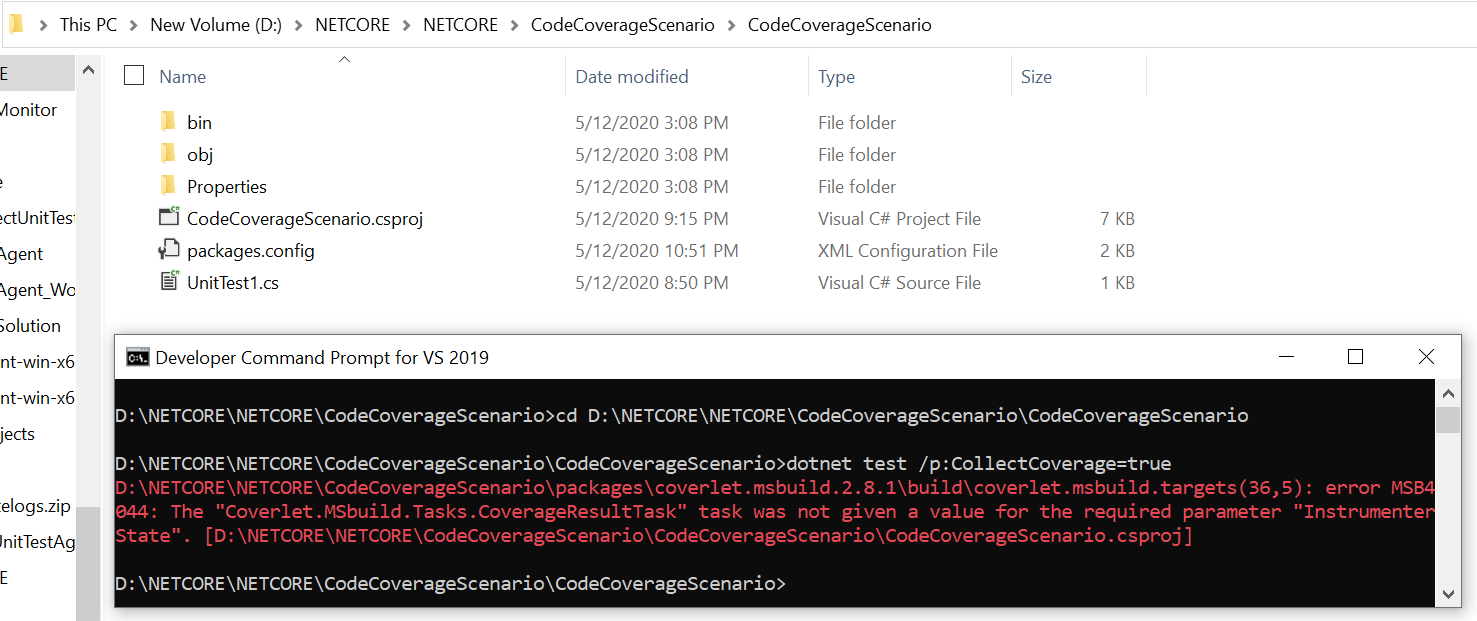
Thank you.
Ahetejaz
on 13 May 2020
show me content of CodeCoverageScenario.csproj and also do you have some tests in project?Take a look at sample(merge one but it's not important the sample, you can check reference and project structure) https://github.com/coverlet-coverage/coverlet/tree/master/Documentation/Examples/MSBuild/MergeWith
Seem that you don't have any ref assembly tested so there is no assembly to instrument(test project is not instrumented by default)
MarcoRossignoli
on 13 May 2020
Hello Marco,
Thank you for your reply.
I am looking into the link shared.
Below is the content of .csproj file:
csproj.txt
Yes, I do have test in the project.
UnitTestFileOfTheProject.txt
Also, in my pipeline I added a VSTest task before .NET Core test task to verify if the test are picked by VSTest task.
2020-05-13T09:36:37.4613378Z Logging Vstest Diagnostics in file: D:CurrentUnitTestAgent_WorkingFolder_tempAttempt--1_uupil5.diag
2020-05-13T09:36:37.8888367Z Test run will use DLL(s) built for framework .NETFramework,Version=v4.0 and platform X86. Following DLL(s) do not match framework/platform settings.
2020-05-13T09:36:37.8889864Z Microsoft.VisualStudio.TestPlatform.MSTestAdapter.PlatformServices.Interface.dll is built for Framework .NETPortable,Version=v4.5,Profile=Profile259 and Platform AnyCPU.
2020-05-13T09:36:37.8890374Z Microsoft.VisualStudio.TestPlatform.MSTestAdapter.PlatformServices.dll is built for Framework .NETFramework,Version=v4.5 and Platform AnyCPU.
2020-05-13T09:36:37.8890791Z Microsoft.VisualStudio.TestPlatform.TestFramework.Extensions.dll is built for Framework .NETFramework,Version=v4.5 and Platform AnyCPU.
2020-05-13T09:36:37.8891201Z Microsoft.VisualStudio.TestPlatform.TestFramework.dll is built for Framework .NETPortable,Version=v4.5,Profile=Profile259 and Platform AnyCPU.
2020-05-13T09:36:37.8891585Z Go to http://go.microsoft.com/fwlink/?LinkID=236877&clcid=0x409 for more details on managing these settings.
2020-05-13T09:36:37.9826625Z A total of 4 test files matched the specified pattern.
2020-05-13T09:36:39.2805692Z NUnit Adapter 3.16.1.0: Test execution started
2020-05-13T09:36:39.3372570Z Running all tests in D:CurrentUnitTestAgent_WorkingFolder10sCodeCoverageScenarioCodeCoverageScenariobinDebugMicrosoft.VisualStudio.TestPlatform.MSTestAdapter.PlatformServices.Interface.dll
2020-05-13T09:36:39.5394045Z NUnit failed to load D:CurrentUnitTestAgent_WorkingFolder10sCodeCoverageScenarioCodeCoverageScenariobinDebugMicrosoft.VisualStudio.TestPlatform.MSTestAdapter.PlatformServices.Interface.dll
2020-05-13T09:36:39.5419512Z Running all tests in D:CurrentUnitTestAgent_WorkingFolder10sCodeCoverageScenarioCodeCoverageScenariobinDebugMicrosoft.VisualStudio.TestPlatform.MSTestAdapter.PlatformServices.dll
2020-05-13T09:36:39.5458432Z NUnit couldn't find any tests in D:CurrentUnitTestAgent_WorkingFolder10sCodeCoverageScenarioCodeCoverageScenariobinDebugMicrosoft.VisualStudio.TestPlatform.MSTestAdapter.PlatformServices.dll
2020-05-13T09:36:39.5478419Z Running all tests in D:CurrentUnitTestAgent_WorkingFolder10sCodeCoverageScenarioCodeCoverageScenariobinDebugMicrosoft.VisualStudio.TestPlatform.TestFramework.Extensions.dll
2020-05-13T09:36:39.5534073Z NUnit couldn't find any tests in D:CurrentUnitTestAgent_WorkingFolder10sCodeCoverageScenarioCodeCoverageScenariobinDebugMicrosoft.VisualStudio.TestPlatform.TestFramework.Extensions.dll
2020-05-13T09:36:39.5571184Z Running all tests in D:CurrentUnitTestAgent_WorkingFolder10sCodeCoverageScenarioCodeCoverageScenariobinDebugMicrosoft.VisualStudio.TestPlatform.TestFramework.dll
2020-05-13T09:36:39.5575164Z NUnit failed to load D:CurrentUnitTestAgent_WorkingFolder10sCodeCoverageScenarioCodeCoverageScenariobinDebugMicrosoft.VisualStudio.TestPlatform.TestFramework.dll
2020-05-13T09:36:39.5588804Z NUnit Adapter 3.16.1.0: Test execution complete
2020-05-13T09:36:39.7118176Z No test is available in D:CurrentUnitTestAgent_WorkingFolder10sCodeCoverageScenarioCodeCoverageScenariobinDebugMicrosoft.VisualStudio.TestPlatform.MSTestAdapter.PlatformServices.Interface.dll D:CurrentUnitTestAgent_WorkingFolder10sCodeCoverageScenarioCodeCoverageScenariobinDebugMicrosoft.VisualStudio.TestPlatform.MSTestAdapter.PlatformServices.dll D:CurrentUnitTestAgent_WorkingFolder10sCodeCoverageScenarioCodeCoverageScenariobinDebugMicrosoft.VisualStudio.TestPlatform.TestFramework.Extensions.dll D:CurrentUnitTestAgent_WorkingFolder10sCodeCoverageScenarioCodeCoverageScenariobinDebugMicrosoft.VisualStudio.TestPlatform.TestFramework.dll. Make sure that test discoverer & executors are registered and platform & framework version settings are appropriate and try again.
2020-05-13T09:36:39.7449982Z Results File: D:CurrentUnitTestAgent_WorkingFolder_tempTestResultsahk_MININT-KQHLQN1_2020-05-13_04_36_39.trx
2020-05-13T09:36:39.7942563Z ##[debug]Exited vstest.console.exe with code 0.
2020-05-13T09:36:39.7943724Z ##[debug]PERF: ExecuteVsTestPhase.InvokeVSTest: took 2960.2411 ms
2020-05-13T09:36:39.7944221Z Vstest.console.exe exited with code 0.
2020-05-13T09:36:39.7944658Z **** Completed test execution *******
2020-05-13T09:36:39.7945771Z ##[debug]Current Phase: MS.VS.TestService.VstestConsoleAdapter.ExecuteVsTestPhase Phase Result: MS.VS.TestService.VstestConsoleAdapter.ExecutionVsTestPhaseResults
2020-05-13T09:36:39.7946929Z ##[debug]PERF WARNING: Running the phase MS.VS.TestService.VstestConsoleAdapter.ExecuteVsTestPhase: took 2961.5553 ms
2020-05-13T09:36:39.7947892Z ##[debug]Current phase: MS.VS.TestService.VstestConsoleAdapter.PublishTestResultPhase
2020-05-13T09:36:39.7978174Z ##[debug]Starting Publish Test Results: TIA: False
2020-05-13T09:36:39.7994270Z ##[debug]Starting PublishTestResult from Result Files
I am looking at this side now. Probably if we could identify the test it might work for both test tasks.
Thank you.
Ahetejaz
on 13 May 2020
Ok but you don't reference any dll so you're not istrumenting nothing try with(always from test project folder)
dotnet test /p:CollectCoverage=true /p:IncludeTestAssembly=true
By design coverlet does not instrument test project
MarcoRossignoli
on 13 May 2020
Hello Marco,
Thank you.
Previously for .NETCore test task, I had below entries in Argument section.
/p:CollectCoverage=true /p:CoverletOutputFormat=cobertura /p:CoverletOutput=$(Build.SourcesDirectory)/TestResults/Coverage/
I have modified it to have:
/p:CollectCoverage=true /p:IncludeTestAssembly=true /p:CoverletOutputFormat=cobertura /p:CoverletOutput=$(Build.SourcesDirectory)/TestResults/Coverage/
When I queued the build again it gave below error:
[debug] /p:CollectCoverage=true
[debug] /p:IncludeTestAssembly=true
[debug] /p:CoverletOutputFormat=cobertura
[debug] /p:CoverletOutput=D:CurrentUnitTestAgent_WorkingFolder10s/TestResults/Coverage/
"C:Program Filesdotnetdotnet.exe" test D:CurrentUnitTestAgent_WorkingFolder10sCodeCoverageScenarioCodeCoverageScenariobinDebugCodeCoverageScenario.dll --logger trx --results-directory D:CurrentUnitTestAgent_WorkingFolder_temp /p:CollectCoverage=true /p:IncludeTestAssembly=true /p:CoverletOutputFormat=cobertura /p:CoverletOutput=D:CurrentUnitTestAgent_WorkingFolder10s/TestResults/Coverage/
Microsoft (R) Test Execution Command Line Tool Version 16.5.0
Copyright (c) Microsoft Corporation. All rights reserved.
The argument /p:CollectCoverage=true is invalid. Please use the /help option to check the list of valid arguments.
[debug]Exit code 1 received from tool 'C:Program Filesdotnetdotnet.exe'
[debug]STDIO streams have closed for tool 'C:Program Filesdotnetdotnet.exe'
[error]Error: The process 'C:Program Filesdotnetdotnet.exe' failed with exit code 1
[debug]Processed: ##vso[task.issue type=error;]Error: The process 'C:Program Filesdotnetdotnet.exe' failed with exit code 1
[debug]BuildConfiguration=undefined
[debug]BuildPlatform=undefined
I could share the access or json of the pipeline if you would like to see the flow.
Thank you.
Ahetejaz
on 13 May 2020
Does it work in your local?
Don't use dll result but csproj folder
dotnet test dir\testproj\testproj.csproj /p:CollectCoverage=true /p:IncludeTestAssembly=true
or
dotnet test dir\solutionDirectory /p:CollectCoverage=true /p:IncludeTestAssembly=true
Hello Marco,
Thank you for your reply.
I have executed the commands from the developer prompt. I am getting the same error message as the release pipeline.

From pipeline:
[debug] D:CurrentUnitTestAgent_WorkingFolder10sCodeCoverageScenarioCodeCoverageScenarioCodeCoverageScenario.csproj
[debug] --logger
[debug] trx
[debug] --results-directory
[debug] D:CurrentUnitTestAgent_WorkingFolder_temp
[debug] /p:CollectCoverage=true
[debug] /p:IncludeTestAssembly=true
[debug] /p:CoverletOutputFormat=cobertura
[debug] /p:CoverletOutput=D:CurrentUnitTestAgent_WorkingFolder10s/TestResults/Coverage/
"C:Program Filesdotnetdotnet.exe" test D:CurrentUnitTestAgent_WorkingFolder10sCodeCoverageScenarioCodeCoverageScenarioCodeCoverageScenario.csproj --logger trx --results-directory D:CurrentUnitTestAgent_WorkingFolder_temp /p:CollectCoverage=true /p:IncludeTestAssembly=true /p:CoverletOutputFormat=cobertura /p:CoverletOutput=D:CurrentUnitTestAgent_WorkingFolder10s/TestResults/Coverage/
D:CurrentUnitTestAgent_WorkingFolder10sCodeCoverageScenariopackagescoverlet.msbuild.2.8.1buildcoverlet.msbuild.targets(36,5): error MSB4044: The "Coverlet.MSbuild.Tasks.CoverageResultTask" task was not given a value for the required parameter "InstrumenterState". [D:CurrentUnitTestAgent_WorkingFolder10sCodeCoverageScenarioCodeCoverageScenarioCodeCoverageScenario.csproj]
[debug]Exit code 1 received from tool 'C:Program Filesdotnetdotnet.exe'
[debug]STDIO streams have closed for tool 'C:Program Filesdotnetdotnet.exe'
[error]Error: The process 'C:Program Filesdotnetdotnet.exe' failed with exit code 1
[debug]Processed: ##vso[task.issue type=error;]Error: The process 'C:Program Filesdotnetdotnet.exe' failed with exit code 1
[debug]BuildConfiguration=undefined
[debug]BuildPlatform=undefined
[debug]testRunTitle=null
[debug]defaultRoot: 'D:CurrentUnitTestAgent_WorkingFolder_temp'
I would like to mention that the nuget package (NUnit, NUnit Adapter and code coverage tool - coverlet.msbuild) are added from the project level. I am not sure if this should be done from the solution level.
Thank you.
Ahetejaz
on 13 May 2020
Can you share your project?Is on github?Can you zip and attach?Coverlet is used mostly on with .NET Core and new SDK style so I need to do some tests to understand if that scenario is supported(.NET Framework with non new SDK style).
MarcoRossignoli
on 13 May 2020
Hello Marco,
Thank you for your reply. Please find the zip file of the project.
Thank you.
Ahetejaz
on 13 May 2020
I'll take a look asap!
MarcoRossignoli
on 13 May 2020
Well, it is not mandatory to use SDK. I would definitely try this option too. However, would use it for a copy project or a new project. Even if we use package.config probably there shall be something to resolve such issues. There are so many existing net projects where user are still using package.config
Did some test and I'm not sure that is supported by coverlet(never had a user with this scenario, I mean non new SDK style project, I landed to project after the start so maybe I'm missing something). We support new SDK style with cli command dotnet test as first scenario(also for .NET Framework app) but I'd like to listen also opinions of other guys @tonerdo @petli that were here before me.
If so we should update the guide adding this requisite.
MarcoRossignoli
on 14 May 2020
I initially built and tested Coverlet with the new SDK style projects. No idea how/if it works on older projects styles. It's not a scenario we intend to support
 tonerdo
on 14 May 2020
tonerdo
on 14 May 2020
@Ahetejaz better if you move to new style SDK, do you need help?
MarcoRossignoli
on 15 May 2020
Docs updated https://github.com/coverlet-coverage/coverlet#quick-start
MarcoRossignoli
on 15 May 2020
Hello Marco,
Thank you for all the help.
Yes, for the new projects (NET Core) with SDK it works fine. Let me try to update my existing test project (.NET Framework) to have a new style SDK. Let me see how the project could be updated to have the new SDK style. I would try to update the project and let you know.
I appreciate all the help.
Thank you.
Ahetejaz
on 15 May 2020
Feel free to close this when solved!
MarcoRossignoli
on 15 May 2020
Thank you @MarcoRossignoli for all the help.
It was very helpful of you to guide me and teach me how the coverlet work.
It was quite a knowledge gaining discussion and I could say I know things better than I had before coming here.
Ahetejaz
on 20 May 2020
Glad to hear, feel free to re-open or file a new issue if needed!
MarcoRossignoli
on 20 May 2020
Hello, install package Microsoft.NET.Test.Sdk solve error MSB4044: The "Coverlet.MSbuild.Tasks.CoverageResultTask" task was not given a value for the required parameter "InstrumenterState".
 DanielPohlmann
on 28 Jun 2020
DanielPohlmann
on 28 Jun 2020
Related issues
 lkurzyniec
·
6Comments
MarcoRossignoli
·
4Comments
lkurzyniec
·
6Comments
MarcoRossignoli
·
4Comments
 felixfbecker
·
6Comments
felixfbecker
·
6Comments
 arpit-nagar
·
4Comments
arpit-nagar
·
4Comments
 ghost
·
5Comments
ghost
·
5Comments
Most helpful comment
Hello, install package Microsoft.NET.Test.Sdk solve error MSB4044: The "Coverlet.MSbuild.Tasks.CoverageResultTask" task was not given a value for the required parameter "InstrumenterState".