Coverlet: For MSBuild integration multiple output formats does not work
My unit test project contains coverlet.msbuild package. When I run dotnet test /p:CollectCoverage=true /p:CoverletOutputFormat=opencover,lcov I received
MSBUILD : error MSB1006: Property is not valid.
Switch: lcov

For switch syntax, type "MSBuild -help"

 lkurzyniec
All 6 comments
It's a know issue with escaping try with dotnet test /p:CollectCoverage=true /p:CoverletOutputFormat=\"opencover,lcov\"
Also FYI https://github.com/tonerdo/coverlet/blob/master/Documentation/MSBuildIntegration.md#note-for-powershell--vsts-users
 MarcoRossignoli
on 3 Dec 2019
MarcoRossignoli
on 3 Dec 2019
We should update documetation
MarcoRossignoli
on 3 Dec 2019
For CMD works fine, but for powershell it won't work.
CMD
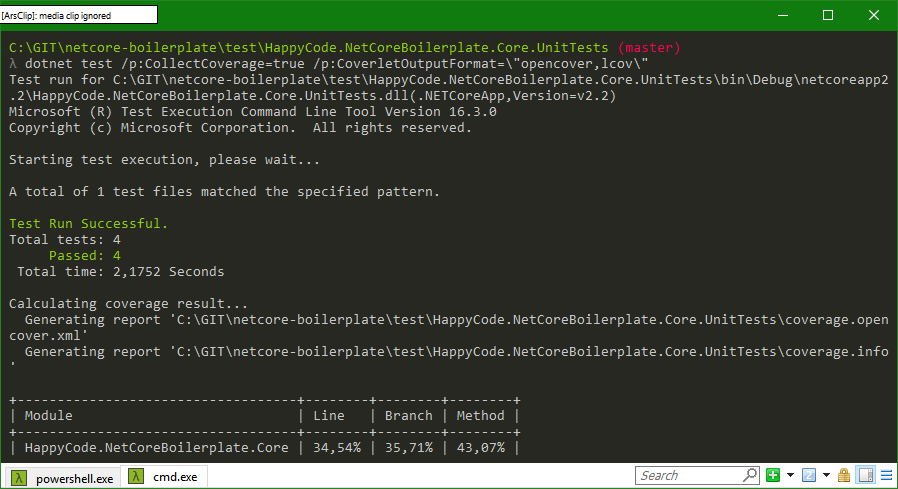
powershell

lkurzyniec
on 3 Dec 2019
Ah ok sorry it was on guide try with PS C:\git\coverlet> dotnet test /p:CollectCoverage=true /p:CoverletOutputFormat="opencover%2clcov" %2c is translated to comma.
MarcoRossignoli
on 3 Dec 2019
Yeap, now it works. You can close the ticket, but please remember to update the documentation.
lkurzyniec
on 3 Dec 2019
Is already present...but yes a bit cryptic and hidden
To exclude or include multiple assemblies when using Powershell scripts or creating a .yaml file for a VSTS build %2c should be used as a separator. Msbuild will translate this symbol to ,
MarcoRossignoli
on 3 Dec 2019
Related issues
 arpit-nagar
·
4Comments
arpit-nagar
·
4Comments
 spboyer
·
3Comments
spboyer
·
3Comments
 civspan
·
6Comments
civspan
·
6Comments
 jamir-araujo
·
4Comments
jamir-araujo
·
4Comments
 hlubovac
·
5Comments
hlubovac
·
5Comments
Most helpful comment
Ah ok sorry it was on guide try with
PS C:\git\coverlet> dotnet test /p:CollectCoverage=true /p:CoverletOutputFormat="opencover%2clcov"%2cis translated to comma.