Corefreq: No temperature report on AMD Opteron
First, this is fantastic software and exactly what I was looking for! Thank you for writing this!
I read through the thread about no temperature report from Ryzen and suspect I have a similar issue.
With an insmod /var/lib/dkms/corefreqk/1.39/4.20.0-arch1-1-ARCH/x86_64/module/corefreqk.ko Experimental=1
Output of corefreq-cli -s is:


I see no thermal data of course.

The output of sensors does show the CPU Temps here:

At your leisure, let me know what I should try. THANK YOU!
 LexJackson
All 57 comments
Hello,
Thanks a lot for trying _CoreFreq_
Those are the very first results of the Opteron architectures I'm seeing
I have to digg into specs to find the thermal registers (and btw voltage id)
I'm also noticing that the base clock estimation is pretty low compared to a factory 100 MHz
I'm also wondering if this architecture is capable with energy counters (current, power), such as the Intel RAPL registers ?
MC and DRAM will also be a subject of work. I don't believe you get something from the memory controller view
Can you list the PCI ids:
lspci - nn
Regards
CyrIng
 cyring
on 10 Jan 2019
cyring
on 10 Jan 2019
Thank you for the rapid reply!
Here the output requested.

Base clock i'm unsure about but the CPU's tend to clock pretty low when idle. Here's an output of cat /proc/cpuinfo | grep MHz. They get pretty sleepy.

LexJackson
on 10 Jan 2019
Also adding, looks like detailed temp per core can be obtained. I'm using Turion Power Control to get this info. (tpc -temp). I believe it's using the cpuid kernel module for that info.

LexJackson
on 12 Jan 2019
Hello,
For your testings, new code is available to read the processor temperature.
Remarks:
- I presume there is only one sensor per package.
- I don't see in specs an offset to apply to the temperature.
The formula has been implemented with(sensor x 5) / 40 - In experimental mode, Thermal Trip (ie throttling) can be tested
cyring
on 13 Jan 2019
Thanks for the work! For some reason I'm not seeing any temp data now.
I loaded corefreq with:
insmod /var/lib/dkms/corefreqk/1.39/4.20.0-arch1-1-ARCH/x86_64/module/corefreqk.ko Experimental=1
systemctl start corefreqd
Here's what I'm seeing (currently running an x265 encode btw)

LexJackson
on 13 Jan 2019
Can you try new code ?
You should also read Bulldozer/Piledriver as the architecture name.
cyring
on 13 Jan 2019
Sorry, I thought I did, did a git clone on the repository and built it. I may have done something wrong. So sorry.
LexJackson
on 13 Jan 2019
In the working directory, just git pull to get last source code then make clean all to rebuild
cyring
on 13 Jan 2019
Will building from this PKGBUILD not pull the latest code?
https://aur.archlinux.org/cgit/aur.git/tree/PKGBUILD?h=corefreq-git
That's how I've been installing it.
LexJackson
on 13 Jan 2019
The PKGBUILD may pull the latest and rebuild withmakepkg -sif; however for our testing session, which implies many small changes, I recommend to clone the source code directly from the github then pull and rebuild whenever I notify a new push.
- Uninstall, remove package dir
- Clone from the GitHub and change to the cloned dir
- Force rebuild
make clean all - Fully restart _CoreFreq_ , especially its driver corefreqk.ko
cyring
on 14 Jan 2019
Using the latest code, please post screenshots of temperature b/c I need to know if the SMU queries are working?
Thks
cyring
on 14 Jan 2019
OK done. Still not seeing temperature data for some reason. Happy to keep testing, please let me know what I can do to help. THANK YOU!


LexJackson
on 14 Jan 2019
If you do confirm that the Experimental mode has been activated prior reading temperature ?
insmod corefreqk.ko Experimental=1
So I need to debug:
Can you edit corefreqk.c and replace these 2 functions with the code bellow
https://github.com/cyring/CoreFreq/blob/9142c6a404d5b128ec64bc77f7727252675862d1/corefreqk.c#L5382
#define Core_AMD_SMU_Thermal(Core,  TctlRegister,           \
                    SMU_IndexRegister,      \
                    SMU_DataRegister)       \
({                                  \
    TCTL_REGISTER TctlSensor = {0};                 \
                                    \
    WRPCI(TctlRegister, SMU_IndexRegister) ;            \
    RDPCI(TctlSensor, SMU_DataRegister);                \
                                    \
    Core->PowerThermal.Sensor = TctlSensor.CurTmp;          \
                                    \
    printk(KERN_INFO "CoreFreq[%d]: PowerThermal.Sensor[%d]\n", \
            Core->Bind, Core->PowerThermal.Sensor) ;    \
})

void Core_AMD_Family_15h_Temp(CORE *Core)
{
    Core_AMD_SMU_Thermal(Core,  SMU_AMD_THM_TCTL_REGISTER_F15H,
                    SMU_AMD_INDEX_REGISTER_F15H,
                    SMU_AMD_DATA_REGISTER_F15H);

    printk(KERN_INFO "CoreFreq[%d]: Experimental[%d] "  \
            "SMU_AMD_THM_TCTL_REGISTER_F15H[%X] "   \
            "SMU_AMD_INDEX_REGISTER_F15H[%X] "  \
            "SMU_AMD_DATA_REGISTER_F15H[%X]\n",
            Core->Bind,
            Proc->Registration.Experimental,
            SMU_AMD_THM_TCTL_REGISTER_F15H,
            SMU_AMD_INDEX_REGISTER_F15H,
            SMU_AMD_DATA_REGISTER_F15H);

    if (Proc->Registration.Experimental) {
    printk(KERN_INFO "CoreFreq[%d]: AdvPower.EDX.TTP[%d]\n",
            Core->Bind,
            Proc->Features.AdvPower.EDX.TTP);

    if (Proc->Features.AdvPower.EDX.TTP == 1) {
        THERMTRIP_STATUS ThermTrip = {0};

        WRPCI(  SMU_AMD_THM_TRIP_REGISTER_F15H,
            SMU_AMD_INDEX_REGISTER_F15H);
        RDPCI(ThermTrip, SMU_AMD_DATA_REGISTER_F15H);

        Core->PowerThermal.Events = ThermTrip.SensorTrip << 0;

        printk(KERN_INFO "CoreFreq[%d]: PowerThermal.Events[%d]\n",
                Core->Bind, Core->PowerThermal.Events);
    }
    }
}
Then please rebuild, load the driver, dmesg and post all lines starting with CoreFreq
cyring
on 15 Jan 2019
Here's the confirmation on the Experimental=1 flag and result.


I am compiling the new code now. Thanks!
LexJackson
on 15 Jan 2019
LexJackson
on 15 Jan 2019
Can you replace and try with the following functions:
- corefreqk.c
void Core_AMD_Family_15h_Temp(CORE *Core)
{
    TCTL_REGISTER TctlSensor = {0};

    RDPCI(TctlSensor, PCI_CONFIG_ADDRESS(0, 0x18, 0x3, 0xa4));
    Core->PowerThermal.Sensor = TctlSensor.CurTmp;

    if (Proc->Features.AdvPower.EDX.TTP == 1) {
        THERMTRIP_STATUS ThermTrip = {0};

        RDPCI(ThermTrip, PCI_CONFIG_ADDRESS(0, 0x18, 0x3, 0xe4));

        Core->PowerThermal.Events = ThermTrip.SensorTrip << 0;
    }
}
- coretypes.h
#define COMPUTE_THERMAL_AMD_15h(Temp, Param, Sensor)            \
    (Temp = (Sensor * 5 / 40) - 49)
Looks like it's showing something.. Not sure what. ;-)

dmesg | grep Core
[ 0.969195] ACPI: Core revision 20181003
[ 9920.687007] CoreFreq(31:-1): Processor [ 6F_02] Architecture [Bulldozer/Piledriver] CPU [32/32]
LexJackson
on 16 Jan 2019
It's showing a negative value, please rollback to the formula bellow.
- coretypes.h
#define COMPUTE_THERMAL_AMD_15h(Temp, Param, Sensor)            \
    (Temp = Sensor * 5 / 40)
You should get ~ 35 C
cyring
on 16 Jan 2019
Looks like that worked! What do I need to tweak to get all CPU's reporting? ;-) Thanks for your help!

LexJackson
on 16 Jan 2019
According to the datasheet, it is a sensor per socket.
To my understanding, no temperature per Core.
But is your proc dual sockets, thus we could read two sensors.
Can you print the topology discovered by _CoreFreq_
corefreq-cli -m
cyring
on 16 Jan 2019
I'm only seeing temp data for one of the 32 CPU's in that case shouldn't at least two temps be displayed since there are 2 CPU's?

LexJackson
on 16 Jan 2019
So far only one sensor is queried (on the service thread; which is driven by the CPU wirh an enlightened number in the UI)
The remaining work consists in improving the AMD topology to make the difference between the two sockets: Node ID, Pkg, Module, Core and so on.
Then, set a CPU affinity of the service thread to the each socket.
Finally collect the PCI sensor from the determined CPUs.
cyring
on 16 Jan 2019
Perfect, thank you very much for your help!
LexJackson
on 16 Jan 2019
Btw do you know the size of the caches?
The L3 looks wrong.
(due to a unit change between Zen and previous architectures)
cyring
on 16 Jan 2019
Looks like:

According to AMD:
Total L1 Cache 48KB
Total L2 Cache 16MB
Total L3 Cache 16MB
LexJackson
on 16 Jan 2019
I have pushed the source code written above.
Remark: Experimental mode not required.
cyring
on 18 Jan 2019
Thanks for working on it!! Looking good so far.

I'm able to see temps pretty well with tpc for now. Oh, and I have 4 CPU's now (as of yesterday)

LexJackson
on 18 Jan 2019
Amazing setup !
64 CPU SMT threads is so far the _CoreFreq_ limit.
I see a zero minimum temp history issue in the corefreq-cli screenshot
What to understand from the Turion Power screenshot : the temperature granularity is at least per Node ?
cyring
on 18 Jan 2019
Can you show the full topology with the 4 processors
cyring
on 18 Jan 2019
Yes with the Turion screenshot I was simply showing that it's possible to see per node temp. How would you like me to show the topology? Happy to do it.
LexJackson
on 18 Jan 2019
Yes with the Turion screenshot I was simply showing that it's possible to see per node temp. How would you like me to show the topology? Happy to do it.
Just copy/past the output corefreq-cli -m with the Markdown code format
cyring
on 18 Jan 2019
LexJackson
on 18 Jan 2019
This last version 1.39.11 will compute the L3 cache size, including the Sub Caches configured by the Probe Filter when enabled.
Please refresh the source code and post the topology back.
Regards,
CyrIng
cyring
on 19 Jan 2019
LexJackson
on 19 Jan 2019
I was expecting to read 16384 KB of L3 cache.
Can you modify the source as bellow at these lines:
https://github.com/cyring/CoreFreq/blob/1554e89f4b77fe80bd7a50a3df51e97c4208fd2e/corefreqk.c#L1194
    case AMD_Family_15h:
      if ((Proc->Features.Std.EAX.ExtModel == 0x0)
       && (Proc->Features.Std.EAX.Model >= 0x0)
       && (Proc->Features.Std.EAX.Model <= 0xf))
      {
        PROBE_FILTER_CTRL PF;
        RDPCI(PF, PCI_AMD_PROBE_FILTER_CTRL);
/*      if (PF.Mode != 0b00) {*/
        /* Add to L3 the Sub Caches in 512 KB unit size.    */
        Core->T.Cache[3].Size = Core->T.Cache[3].Size
        + PF.SubCache0En ? (1 << (1 + (PF.SubCacheSize0 & 0b01))) : 0
        + PF.SubCache1En ? (1 << (1 + (PF.SubCacheSize1 & 0b01))) : 0
        + PF.SubCache2En ? (1 << (1 + (PF.SubCacheSize2 & 0b01))) : 0
        + PF.SubCache3En ? (1 << (1 + (PF.SubCacheSize3 & 0b01))) : 0;
/*      }*/
      }
The purpose above is to mute the condition on PF.Mode
Indeed in AMD family 15h specs, it is explained how a MP system employs part of the L3 cache as sub-cache of size of 1 or 2 MB.
Thus with 4 processors, L3 should equal to:
(4 x 1) + 12 = 16 MB
Then please rebuild and test again
cyring
on 19 Jan 2019
Bump
cyring
on 22 Jan 2019
Thanks for the bump, so sorry, work and life! Looks like I did something wrong, I get build errors on the make clean all.
Is this pasted in correctly?

LexJackson
on 23 Jan 2019
New version pushed.
Please refresh source code then post:
- the topology
corefreq-cli -m - the CPUID dump
corefreq-cli -u
cyring
on 23 Jan 2019
Here yo go! Thanks!
LexJackson
on 24 Jan 2019
Hello,
This version 1.39.15 is focusing on the L3 Cache size.
If your Piledriver processor is detected then any L3 Sub-Cache has to be summed up to L3
cyring
on 26 Jan 2019
Thanks I will rebuild and post results. What would you like to see?
LexJackson
on 26 Jan 2019
The size of the L3 Cache in the Topology, please.
cyring
on 26 Jan 2019
Hello,
Do you have any result of the L3 cache size in Topology ?
Regards,
CyrIng
cyring
on 28 Jan 2019
Hope this helps! Thanks!
LexJackson
on 29 Jan 2019
Thanks for your return.
The Core ID topology looks better, but the L3 cache size remains at 12MB despite the PCI queries of the Sub-Caching data.
The next coding steps will consist in implementing the temperature sensor reading for each cores identified with an ID of # 0 . Thus four sensors (1 per package processor), if available in this architecture ?
CPU Pkg  Apic  Core Thread  Caches      (w)rite-Back (i)nclusive
 #   ID   ID    ID     ID  L1-Inst Way  L1-Data Way      L2  Way      L3  Way
00: BSP     0     0     -1      64  2        16  4      2048 16     12288 14
...
16:   1    32     0     -1      64  2        16  4      2048 16     12288 14
...
32:   2    64     0     -1      64  2        16  4      2048 16     12288 14
...
48:   3    96     0     -1      64  2        16  4      2048 16     12288 14
Hello,
In the last code, you will get the temperature for each Core ID 0 (per Package) and the Voltage ID for any CPU.
I don't find a precise formula how to convert the VID to voltage, in Specs and this AMD FX tuning guide
The same formula of the Zen architecture is copy-past to this function COMPUTE_VOLTAGE_AMD_15h
https://github.com/cyring/CoreFreq/blob/24bbcfe1dce4c580d8637b2bb7ef157154164788/coretypes.h#L284
You will get wrong voltage results but the VID should be correct. Feel free to modify the formula.
In the UI, please returns screenshots of the view "Power & Voltage".
The VID is specified to be per P-State, but you will have to experiment and determine if the VID is per Package, Node, or Core ?
For example, stress individually or group of Cores and observe how the VID differs.
cyring
on 30 Jan 2019
Hello,
Any result from above request ?
Regards
CyrIng
cyring
on 4 Feb 2019
My apologies Cyring I must have misunderstood your request. My fault. I added the line above to coretypes.h as seen here:

I did a "git pull"
Then "make clean all"
The make did not build due to errors in corefreqk.c and .h. Let me know what I need to do next. THANK YOU!
[lex@LexBeast CoreFreq]$ make clean all
rm -f corefreqd corefreq-cli
make -j1 -C /lib/modules/4.20.1-arch1-1-ARCH/build M=/home/lex/pkgbuilds/CoreFreq clean
make[1]: Entering directory '/usr/lib/modules/4.20.1-arch1-1-ARCH/build'
CLEAN /home/lex/pkgbuilds/CoreFreq/.tmp_versions
make[1]: Leaving directory '/usr/lib/modules/4.20.1-arch1-1-ARCH/build'
cc -Wall -pthread -c corefreqd.c
-D FEAT_DBG=1 -o corefreqd.o
cc -Wall -c corefreqm.c -o corefreqm.o
cc -Wall corefreqd.c corefreqm.c
-D FEAT_DBG=1 -o corefreqd -lpthread -lm -lrt
cc -Wall -c corefreq-cli.c -o corefreq-cli.o
cc -Wall -c corefreq-ui.c -o corefreq-ui.o
cc -Wall -c corefreq-cli-rsc.c
-o corefreq-cli-rsc.o
cc -Wall -c corefreq-cli-json.c
-o corefreq-cli-json.o
cc -Wall -c corefreq-cli-extra.c
-o corefreq-cli-extra.o
cc -Wall
corefreq-cli.c corefreq-ui.c corefreq-cli-rsc.c
corefreq-cli-json.c corefreq-cli-extra.c
-o corefreq-cli -lm -lrt
make -j1 -C /lib/modules/4.20.1-arch1-1-ARCH/build M=/home/lex/pkgbuilds/CoreFreq modules
make[1]: Entering directory '/usr/lib/modules/4.20.1-arch1-1-ARCH/build'
CC [M] /home/lex/pkgbuilds/CoreFreq/corefreqk.o
/home/lex/pkgbuilds/CoreFreq/corefreqk.c: In function ‘Map_AMD_Topology’:
/home/lex/pkgbuilds/CoreFreq/corefreqk.c:1191:3: error: unknown type name ‘PROBE_FILTER_CTRL’
PROBE_FILTER_CTRL PF;
^~~~~
In file included from /home/lex/pkgbuilds/CoreFreq/corefreqk.c:34:
/home/lex/pkgbuilds/CoreFreq/corefreqk.c:1192:13: error: ‘PCI_AMD_PROBE_FILTER_CTRL’ undeclared (first use in this function); did you mean ‘UPROBE_FILTER_MMAP’?
RDPCI(PF, PCI_AMD_PROBE_FILTER_CTRL);
^~~~~~~~
/home/lex/pkgbuilds/CoreFreq/corefreqk.h:467:11: note: in definition of macro ‘RDPCI’
: "ir" (_reg)
^
/home/lex/pkgbuilds/CoreFreq/corefreqk.c:1192:13: note: each undeclared identifier is reported only once for each function it appears in
RDPCI(PF, PCI_AMD_PROBE_FILTER_CTRL);
^~~~~~~~
/home/lex/pkgbuilds/CoreFreq/corefreqk.h:467:11: note: in definition of macro ‘RDPCI’
: "ir" (_reg)
^
/home/lex/pkgbuilds/CoreFreq/corefreqk.c:1196:7: error: request for member ‘SubCache0En’ in something not a structure or union
- PF.SubCache0En ? (1 << (1 + (PF.SubCacheSize0 & 0b01))) : 0
^
/home/lex/pkgbuilds/CoreFreq/corefreqk.c:1196:36: error: request for member ‘SubCacheSize0’ in something not a structure or union- PF.SubCache0En ? (1 << (1 + (PF.SubCacheSize0 & 0b01))) : 0
^
/home/lex/pkgbuilds/CoreFreq/corefreqk.c:1197:7: error: request for member ‘SubCache1En’ in something not a structure or union- PF.SubCache1En ? (1 << (1 + (PF.SubCacheSize1 & 0b01))) : 0
^
/home/lex/pkgbuilds/CoreFreq/corefreqk.c:1197:36: error: request for member ‘SubCacheSize1’ in something not a structure or union- PF.SubCache1En ? (1 << (1 + (PF.SubCacheSize1 & 0b01))) : 0
^
/home/lex/pkgbuilds/CoreFreq/corefreqk.c:1198:7: error: request for member ‘SubCache2En’ in something not a structure or union- PF.SubCache2En ? (1 << (1 + (PF.SubCacheSize2 & 0b01))) : 0
^
/home/lex/pkgbuilds/CoreFreq/corefreqk.c:1198:36: error: request for member ‘SubCacheSize2’ in something not a structure or union- PF.SubCache2En ? (1 << (1 + (PF.SubCacheSize2 & 0b01))) : 0
^
/home/lex/pkgbuilds/CoreFreq/corefreqk.c:1199:7: error: request for member ‘SubCache3En’ in something not a structure or union- PF.SubCache3En ? (1 << (1 + (PF.SubCacheSize3 & 0b01))) : 0;
^
/home/lex/pkgbuilds/CoreFreq/corefreqk.c:1199:36: error: request for member ‘SubCacheSize3’ in something not a structure or union- PF.SubCache3En ? (1 << (1 + (PF.SubCacheSize3 & 0b01))) : 0;
^
make[2]: * [scripts/Makefile.build:298: /home/lex/pkgbuilds/CoreFreq/corefreqk.o] Error 1
make[1]: [Makefile:1563: _module_/home/lex/pkgbuilds/CoreFreq] Error 2
make[1]: Leaving directory '/usr/lib/modules/4.20.1-arch1-1-ARCH/build'
make: ** [Makefile:68: all] Error 2
LexJackson
on 4 Feb 2019
I have done successful non-regression builds on several Linux (Arch, Ubuntu, Suse, CentOS)
You have to git clone from scratch again.
cyring
on 4 Feb 2019
No code to edit. Everything has been back-ported; in last version 1.39.18, you should read the temperature and voltage ID for each processor.
cyring
on 4 Feb 2019
Do you still have issues to build the latest version ?
cyring
on 5 Feb 2019
Bump
cyring
on 7 Feb 2019
Latest builds good. Thanks, here's the screen shot. Thanks!
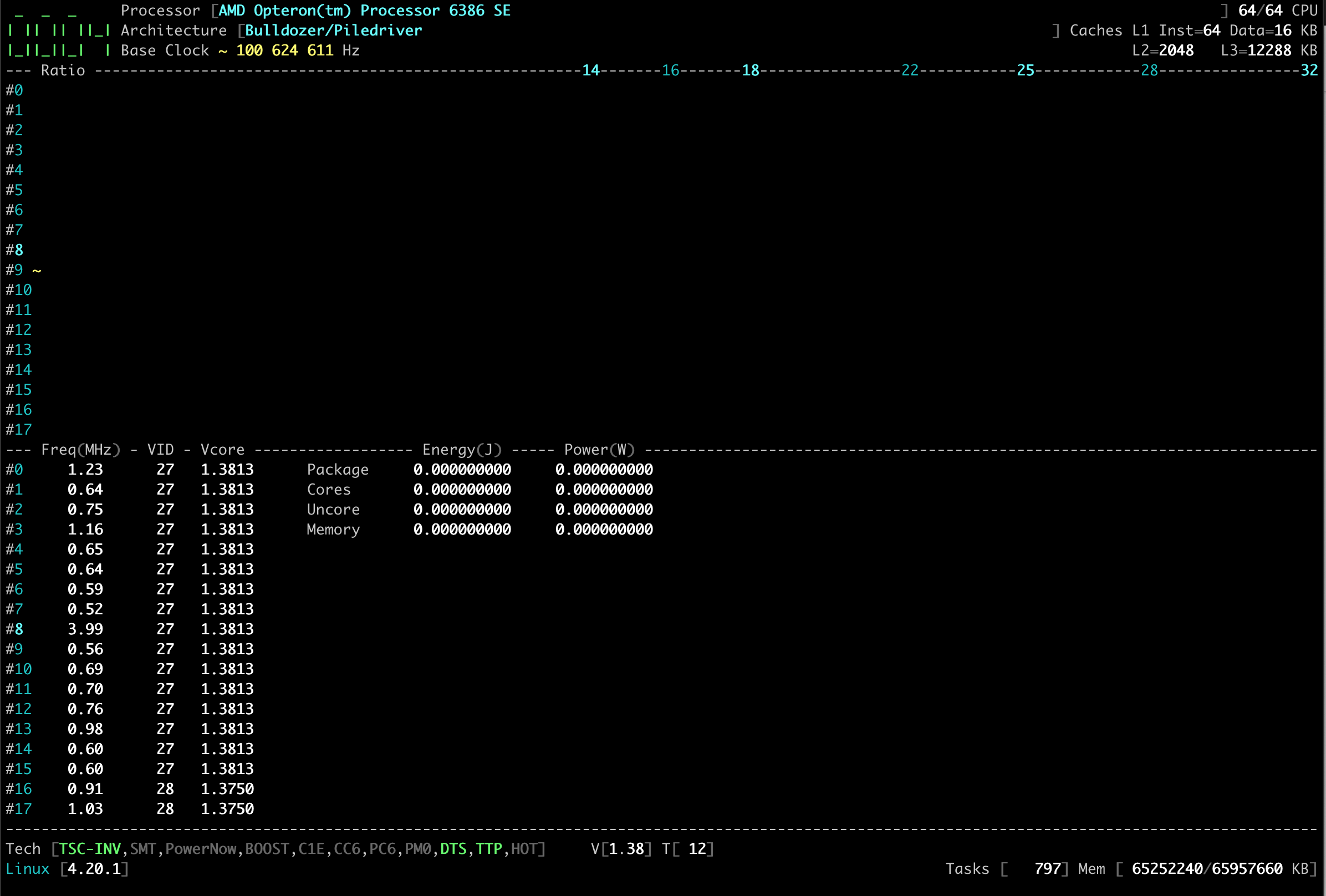
LexJackson
on 8 Feb 2019
- Per package Processor VID may work.
CPU | VID
-------|-------
0 | 27
17 | 28
If you bind load to CPU 17 only, you could read a VID different from the CPU 0 VID
What is the specs voltage Vcore ?
Could you screenshot the BIOS ?About temperature, do you read distinct one per package processor ?
Turbo when it is enabled, it should provide half ratio frequency:
(16 + 1.5) x 200 = 3500 MHz
If you bind load to only one Core, you will read around 3500 MHz
You can you use the integrated tools to trigger the Turbo.
Press [F3] then chooseTurbo Random CPUorTurbo Round Robin
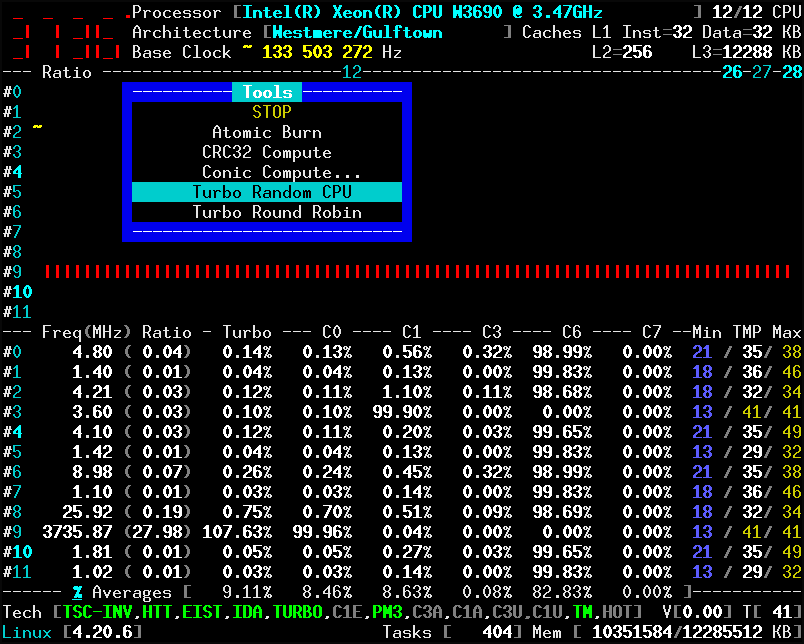
Similar to what I did with Ryzen, the HWCR register provides a 25th bit to disable (1) or enable(0) the Core Performance Boost (CPB).
- My notes from the AMD BKDG
>> Support for CPB is specified by CPUID Fn8000_0007_EDX[CPB].
The CPUID dump (above) has the value 0x000007d9 in EDX register.
Bit at position 25 equals zero thus the Processor is CPB capable.
CPB is enabled if all of the following conditions are true:
• MSRC001_0015[CpbDis]==0 for all cores.
• D18F4x15C[ApmMasterEn]==1.
• D18F4x15C[BoostSrc]==01b.
• D18F4x15C[NumBoostStates]!=0
cyring
on 8 Feb 2019
Hey, version 1.40 brings a new feature to stress a chosen CPU. See issue #97
Based on the topology, you can stress a processor and check how its voltage VID differs from the others.
Please let me know about the testing results b/c I don't know if I'm on the good coding path with Opteron
cyring
on 9 Feb 2019
Hello,
Just bumping my requests above
Thank you
cyring
on 13 Feb 2019
Any results of the voltage ?
cyring
on 20 Feb 2019
Related issues
 vincenzogianfelice
·
17Comments
vincenzogianfelice
·
17Comments
 uzername123
·
11Comments
uzername123
·
11Comments
 EUA
·
8Comments
EUA
·
8Comments
 h1z1
·
30Comments
h1z1
·
30Comments
 RomanHargrave
·
20Comments
RomanHargrave
·
20Comments