Corefreq: Problem TURBO BOOST. TURBO BOOST is ON, but processor not support this
Hi. when I type "./corefreq-cli -s" I see that the turbo boost feature is active ... but the processor doesn't support turbo boost. I have an Intel Core i3-6100 @ 3.70GHZ.
Output command "./corefreq-cli -s | grep -i turbo" is:
|- Turbo Boost                                                          [UNLOCK]
   |- Turbo Activation                                                  [UNLOCK]
|- Turbo Boost                                                 TURBO       < ON>
 vincenzogianfelice
All 17 comments
Hi. Thanks for your report.
Indeed, I have also noticed that some architecture reports the wrong Turbo capability.
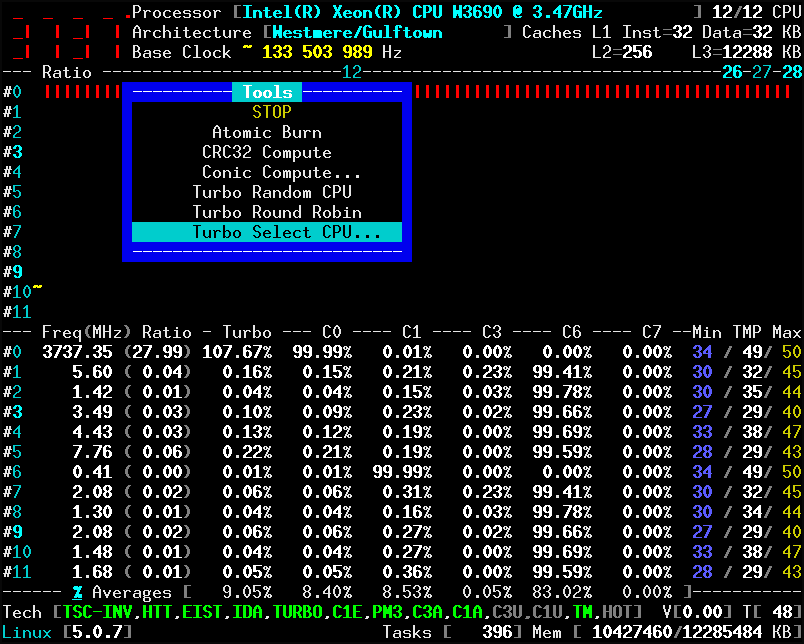
For example, my Xeon W3690 has a locked turbo but in fact it is the opposite.
My workaround will be to override the Turbo capability of your Core i3-6100 based on its CPU name.
- can you print its full brand name, such as:
Intel(R) Xeon(R) CPU W3690 @ 3.47GHz
- can you stress only one Core to show the frequency limit.
- press
[F3]next chooseTurbo Select CPU...then select CPU # 0
 cyring
on 13 Apr 2019
cyring
on 13 Apr 2019
My notes (from the Intel Software Developer’s Manual)
Xeon E5 v3: Haswell-E microarchitecture
CPUID signatures = 06_3F [Haswell_EP]

Above processors support the MSR interfaces listed in Table 2-20, Table 2-29, and Table 2-32

6th generation: Skylake microarchitecture
CPUID signatures = 06_4E [Skylake_UY], 06_5E [Skylake_S], and 06_55 [Skylake_X]

7th generation: Kaby Lake microarchitecture and 8th generation Coffee Lake microarchitecture
CPUID signatures = 06_8E [Kabylake_UY], [Whiskey Lake] and 06_9E [Kabylake]

Future Intel® Core™ processors: Cannon Lake microarchitecture
CPUID signature = 06_66 [Cannon Lake]

Above processors support the MSR interfaces listed in Table 2-20, Table 2-21, Table 2-35, Table 2-39, Table 2-40, and:

Table 2-25: 06_3AH [Ivy Bridge]
    MSR_TURBO_ACTIVATION_RATIO, MSR_CONFIG_TDP_CONTROL, MSR_CONFIG_TDP_LEVEL2, MSR_CONFIG_TDP_LEVEL1, MSR_CONFIG_TDP_NOMINAL

Table 2-29: 06_3CH [Haswell_DT] 06_45H [Haswell_ULT] 06_46H [Haswell_ULX]
    MSR_TURBO_ACTIVATION_RATIO, MSR_CONFIG_TDP_CONTROL, MSR_CONFIG_TDP_LEVEL2, MSR_CONFIG_TDP_LEVEL1, MSR_CONFIG_TDP_NOMINAL
Fix released.
Can you please test and post back the full output of corefreq-cli
cyring
on 14 Apr 2019
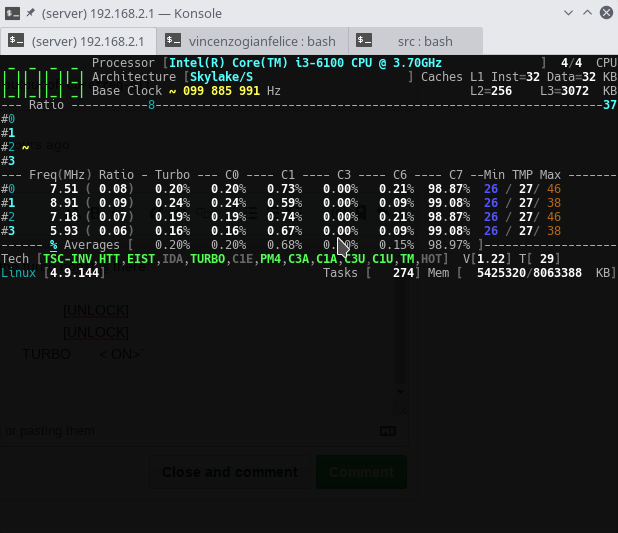
I updated...But 'corefreq-cli' still reports that the turbo boost is there:
|- Turbo Boost                                                          [UNLOCK]
   |- Turbo Activation                                                  [UNLOCK]
|- Turbo Boost                                                 TURBO       < ON>
Here is also the screenshots:
vincenzogianfelice
on 14 Apr 2019
Edit:
Queried with the CPUID instruction, IDA is OFF.
It's a good thing and means that the processor is not Turbo capable.
TURBO state is green and that's indeed an issue. It should not be when IDA is not available at all.
I will fix this.
Can you post the outputs of corefreq-cli -s and corefreq-cli -u
cyring
on 14 Apr 2019
Fix released.
In the UI IDA,TURBO have to be OFF
Same in the Technologies window
cyring
on 14 Apr 2019
Thank you. Now everything works correctly. The data is displayed correctly. For completeness, I post my output:
|- Turbo Boost                                                          [UNLOCK]
   |- Turbo Activation                                                  [UNLOCK]
|- Turbo Boost                                                 TURBO       <OFF>
Here is also the screenshot:

...even if I didn't understand what "UNLOCK" means. What does it mean?
vincenzogianfelice
on 15 Apr 2019
Great news that it works. (a little star for _CoreFreq_ is welcomed)
UNLOCK is a bit status that the associated registers can be altered.
With your processor, Turbo Activation should have no effect.
Verifying will be easier for me if you can post the full output of corefreq-cli -s
cyring
on 15 Apr 2019
Sure, sorry.
corefreq_output.txt
vincenzogianfelice
on 15 Apr 2019
Thanks for this output.
Surprisingly, the Turbo Activation Nominal ratio of [ 37 ] is provided by the register although we know this processor does have any Turbo feature.
cyring
on 15 Apr 2019
Last commit, you will get a fix for the Uncore lock state.
This should look this way (_depending on the current BCLK_):
|- Uncore                                                               [  LOCK]
                 Min    800.00                    [   8 ]
                 Max   3700.00                    [  37 ]
The remaining work is to determine which processors have a Uncore coefficient unlocked or not.
cyring
on 17 Apr 2019
Good job.
Now I'd like to ask you a question. But what changes, as regards temperature control, between this tool and lm-sensors? I read around that lm-sensors can be dangerous ... so how does corefreq see temperatures? Is the operation like that of the lm-sensor tool? And how reliable is this measurement?
Thank you.
vincenzogianfelice
on 17 Apr 2019
Thanks.
I never have an issue with lm-sensors.
_CoreFreq_ is also using low level accesses to read the Processor digital sensors registers.
lm-sensors is however able to give much more information, especially chipsets voltage, fanspeed, etc.
This of-course implies that the user has a good knowledge of her/his hardware.
_CoreFreq_ try to be as accurate as lm-sensors.
The true difficulties come from the lack of specifications supplied by Manufacturers to the open source projects.
cyring
on 17 Apr 2019
I have rollback the Uncore Limit change which will now be applied only for IDA capable processors; starting from the Haswell architectures.
Please let me know if you still get the same result ?
cyring
on 19 Apr 2019
Yes.
I saved the output of 'corefreq-cli -s' and saw the differences. Apparently nothing has changed. I also put a screenshots

vincenzogianfelice
on 19 Apr 2019
Great, Thank you.
I believe we can close this topic.
cyring
on 19 Apr 2019
Related issues
 ich777
·
10Comments
cyring
·
18Comments
ich777
·
10Comments
cyring
·
18Comments
 hakonhall
·
5Comments
hakonhall
·
5Comments
 olejon
·
16Comments
olejon
·
16Comments
 felixbecker2
·
21Comments
felixbecker2
·
21Comments