Core: radvd stops announcing IPv6 prefix after a while
Important notices
Before you add a new report, we ask you kindly to acknowledge the following:
[x] I have read the contributing guide lines at https://github.com/opnsense/core/blob/master/CONTRIBUTING.md
[x] I have searched the existing issues and I'm convinced that mine is new.
Describe the bug
After upgrading from 20.1 to 20.7.2 I am losing IPv6 internet connectivity after ~50-60 hours. This happens because radvd stops announcing the prefix and does not reply to solicit messages any more.
This has nothing to do with chaning IPv6 prefixes in my case, as there is no PPPoE reconnect and no prefix change request from my ISP (my ISP enforces this every 180 days).
Restarting radvd from the web GUI fixes this.
To Reproduce
- Connect to PPPoE network with DHCPv6-PD
- LAN interface with IPv6 tracking on WAN
- IPv6 will be working in the LAN for a while (round about two days)
- After a while IPv6 connectivity is lost. The reason is that the prefix is no longer announced. It looks like radvd is hanging (see logs down below which support this theory).
- Restart radvd from web GUI and have a working IPv6 network again for the next ~50-60 hours
Possibly related: #4282 (this issue mentiones reconnects, which do not apply in my case)
Possibly related forum threads:
https://forum.opnsense.org/index.php?topic=19032.0
https://forum.opnsense.org/index.php?topic=18868.0
https://forum.opnsense.org/index.php?topic=18549.0
Expected behavior
radvd should always announce the IPv6 prefix without hanging after a while :)
Relevant log files
- radvd does not crash. The process remains running and there are no error logs.
- There are no relevant log entries which show any issues with interfaces/networks/reconnects/...
- I have checked the
trussoutput of a defective radvd and it looks very interesting:
Defective truss output on radvd process
truss -p 14675
ppoll(0x64c6da008a0,0x2,0x380a3796c28,0x64c6da00880) = 0 (0x0)
socket(PF_INET,SOCK_DGRAM|SOCK_CLOEXEC,0)        = 8 (0x8)
ioctl(8,SIOCGIFINDEX,0x6f78eb00ac00)             = 0 (0x0)
close(8)                                         = 0 (0x0)
ioctl(6,SIOCGIFFLAGS,0x64c6da007f8)              = 0 (0x0)
ioctl(6,SIOCGIFMTU,0x64c6da007f8)                = 0 (0x0)
__sysctl(0x6f78eb00abd0,0x6,0x0,0x6f78eb00abc8,0x0,0x0) = 0 (0x0)
__sysctl(0x6f78eb00abd0,0x6,0x64c2d333000,0x6f78eb00abc8,0x0,0x0) = 0 (0x0)
__sysctl(0x6f78eb00ab40,0x6,0x0,0x6f78eb00ab38,0x0,0x0) = 0 (0x0)
__sysctl(0x6f78eb00ab40,0x6,0x64c2d333000,0x6f78eb00ab38,0x0,0x0) = 0 (0x0)
setsockopt(6,IPPROTO_IPV6,IPV6_LEAVE_GROUP,0x64c6da00800,20) ERR#49 'Can't assign requested address'
setsockopt(6,IPPROTO_IPV6,IPV6_JOIN_GROUP,0x64c6da00800,20) ERR#12 'Cannot allocate memory'
__sysctl(0x6f78eb0083a0,0x2,0x6f78eb00a8f0,0x6f78eb008398,0x0,0x0) = 0 (0x0)
getpid()                                         = 14675 (0x3953)
sendto(5,"<27>1 2020-09-09T12:24:53.557337"...,116,0,NULL,0) = 116 (0x74)
ppoll(0x64c6da008a0,0x2,0x380a3796c28,0x64c6da00880) = 0 (0x0)
socket(PF_INET,SOCK_DGRAM|SOCK_CLOEXEC,0)        = 8 (0x8)
ioctl(8,SIOCGIFINDEX,0x6f78eb00ac00)             = 0 (0x0)
close(8)                                         = 0 (0x0)
ioctl(6,SIOCGIFFLAGS,0x64c6da007f8)              = 0 (0x0)
ioctl(6,SIOCGIFMTU,0x64c6da007f8)                = 0 (0x0)
__sysctl(0x6f78eb00abd0,0x6,0x0,0x6f78eb00abc8,0x0,0x0) = 0 (0x0)
__sysctl(0x6f78eb00abd0,0x6,0x64c2d333000,0x6f78eb00abc8,0x0,0x0) = 0 (0x0)
__sysctl(0x6f78eb00ab40,0x6,0x0,0x6f78eb00ab38,0x0,0x0) = 0 (0x0)
__sysctl(0x6f78eb00ab40,0x6,0x64c2d333000,0x6f78eb00ab38,0x0,0x0) = 0 (0x0)
setsockopt(6,IPPROTO_IPV6,IPV6_LEAVE_GROUP,0x64c6da00800,20) ERR#49 'Can't assign requested address'
setsockopt(6,IPPROTO_IPV6,IPV6_JOIN_GROUP,0x64c6da00800,20) ERR#12 'Cannot allocate memory'
__sysctl(0x6f78eb0083a0,0x2,0x6f78eb00a8f0,0x6f78eb008398,0x0,0x0) = 0 (0x0)
getpid()                                         = 14675 (0x3953)
sendto(5,"<27>1 2020-09-09T12:25:01.135191"...,110,0,NULL,0) = 110 (0x6e)
ppoll(0x64c6da008a0,0x2,0x380a3796c28,0x64c6da00880) = 0 (0x0)
socket(PF_INET,SOCK_DGRAM|SOCK_CLOEXEC,0)        = 8 (0x8)
ioctl(8,SIOCGIFINDEX,0x6f78eb00ac00)             = 0 (0x0)
close(8)                                         = 0 (0x0)
ioctl(6,SIOCGIFFLAGS,0x64c6da007f8)              = 0 (0x0)
ioctl(6,SIOCGIFMTU,0x64c6da007f8)                = 0 (0x0)
__sysctl(0x6f78eb00abd0,0x6,0x0,0x6f78eb00abc8,0x0,0x0) = 0 (0x0)
__sysctl(0x6f78eb00abd0,0x6,0x64c2d333000,0x6f78eb00abc8,0x0,0x0) = 0 (0x0)
__sysctl(0x6f78eb00ab40,0x6,0x0,0x6f78eb00ab38,0x0,0x0) = 0 (0x0)
__sysctl(0x6f78eb00ab40,0x6,0x64c2d333000,0x6f78eb00ab38,0x0,0x0) = 0 (0x0)
setsockopt(6,IPPROTO_IPV6,IPV6_LEAVE_GROUP,0x64c6da00800,20) ERR#49 'Can't assign requested address'
setsockopt(6,IPPROTO_IPV6,IPV6_JOIN_GROUP,0x64c6da00800,20) ERR#12 'Cannot allocate memory'
__sysctl(0x6f78eb0083a0,0x2,0x6f78eb00a8f0,0x6f78eb008398,0x0,0x0) = 0 (0x0)
getpid()                                         = 14675 (0x3953)
sendto(5,"<27>1 2020-09-09T12:25:08.924928"...,117,0,NULL,0) = 117 (0x75)
truss output of working radvd (still advertising routes)
ioctl(6,SIOCGIFFLAGS,0x64c6da007f8)              = 0 (0x0)
ioctl(6,SIOCGIFMTU,0x64c6da007f8)                = 0 (0x0)
__sysctl(0x6f78eb00abd0,0x6,0x0,0x6f78eb00abc8,0x0,0x0) = 0 (0x0)
__sysctl(0x6f78eb00abd0,0x6,0x64c2d333000,0x6f78eb00abc8,0x0,0x0) = 0 (0x0)
__sysctl(0x6f78eb00ab40,0x6,0x0,0x6f78eb00ab38,0x0,0x0) = 0 (0x0)
__sysctl(0x6f78eb00ab40,0x6,0x64c2d333000,0x6f78eb00ab38,0x0,0x0) = 0 (0x0)
setsockopt(6,IPPROTO_IPV6,IPV6_LEAVE_GROUP,0x64c6da00800,20) = 0 (0x0)
setsockopt(6,IPPROTO_IPV6,IPV6_JOIN_GROUP,0x64c6da00800,20) = 0 (0x0)
sendmsg(6,{{ AF_INET6 [ff02::1]:58 },28,[{"\M^F\0\0\0@\0\0\M-4\0\0\0\0\0\0"...,120}],1,{{level=IPPROTO_IPV6,type=IPV6_PKTINFO,data={0xfe,0x80,0x00,0x00,0x00,0x00,0x00,0x00,0x02,0x0d,0xb9,0xff,0xfe,0x4a,0x7c,0x02,0x13,0x00,0x00,0x00}}},40,0},0) = 120 (0x78)
ppoll(0x64c6da008a0,0x2,0x380a3796c28,0x64c6da00880) = 1 (0x1)
recvmsg(6,{{ AF_INET6 [fe80::20d:b9ff:fe4a:7c02]:0 },28,[{"\M^F\0\M^KI@\0\0\M-4\0\0\0\0\0\0"...,1500}],1,{{level=IPPROTO_IPV6,type=IPV6_PKTINFO,data={0xff,0x02,0x00,0x00,0x00,0x00,0x00,0x00,0x00,0x00,0x00,0x00,0x00,0x00,0x00,0x01,0x13,0x00,0x00,0x00}},{level=IPPROTO_IPV6,type=IPV6_HOPLIMIT,data={0xff,0x00,0x00,0x00}}},64,0},0) = 120 (0x78)
__sysctl(0x6f78eb00ac20,0x6,0x0,0x6f78eb00ac18,0x0,0x0) = 0 (0x0)
__sysctl(0x6f78eb00ac20,0x6,0x64c2d333000,0x6f78eb00ac18,0x0,0x0) = 0 (0x0)
__sysctl(0x6f78eb00abe0,0x6,0x0,0x6f78eb00abd8,0x0,0x0) = 0 (0x0)
__sysctl(0x6f78eb00abe0,0x6,0x64c2d333000,0x6f78eb00abd8,0x0,0x0) = 0 (0x0)
ppoll(0x64c6da008a0,0x2,0x380a3796c28,0x64c6da00880) = 0 (0x0)
socket(PF_INET,SOCK_DGRAM|SOCK_CLOEXEC,0)        = 8 (0x8)
ioctl(8,SIOCGIFINDEX,0x6f78eb00ac00)             = 0 (0x0)
close(8)                                         = 0 (0x0)
ioctl(6,SIOCGIFFLAGS,0x64c6da007f8)              = 0 (0x0)
ioctl(6,SIOCGIFMTU,0x64c6da007f8)                = 0 (0x0)
__sysctl(0x6f78eb00abd0,0x6,0x0,0x6f78eb00abc8,0x0,0x0) = 0 (0x0)
__sysctl(0x6f78eb00abd0,0x6,0x64c2d333000,0x6f78eb00abc8,0x0,0x0) = 0 (0x0)
__sysctl(0x6f78eb00ab40,0x6,0x0,0x6f78eb00ab38,0x0,0x0) = 0 (0x0)
__sysctl(0x6f78eb00ab40,0x6,0x64c2d333000,0x6f78eb00ab38,0x0,0x0) = 0 (0x0)
setsockopt(6,IPPROTO_IPV6,IPV6_LEAVE_GROUP,0x64c6da00800,20) ERR#49 'Can't assign requested address'
setsockopt(6,IPPROTO_IPV6,IPV6_JOIN_GROUP,0x64c6da00800,20) = 0 (0x0)
sendmsg(6,{{ AF_INET6 [ff02::1]:58 },28,[{"\M^F\0\0\0@\0\0\M-4\0\0\0\0\0\0"...,120}],1,{{level=IPPROTO_IPV6,type=IPV6_PKTINFO,data={0xfe,0x80,0x00,0x00,0x00,0x00,0x00,0x00,0x02,0x0d,0xb9,0xff,0xfe,0x4a,0x7c,0x02,0x03,0x00,0x00,0x00}}},40,0},0) = 120 (0x78)
ppoll(0x64c6da008a0,0x2,0x380a3796c28,0x64c6da00880) = 1 (0x1)
recvmsg(6,{{ AF_INET6 [fe80::20d:b9ff:fe4a:7c02]:0 },28,[{"\M^F\0\M^K\M-i@\0\0\M-4\0\0\0\0"...,1500}],1,{{level=IPPROTO_IPV6,type=IPV6_PKTINFO,data={0xff,0x02,0x00,0x00,0x00,0x00,0x00,0x00,0x00,0x00,0x00,0x00,0x00,0x00,0x00,0x01,0x03,0x00,0x00,0x00}},{level=IPPROTO_IPV6,type=IPV6_HOPLIMIT,data={0xff,0x00,0x00,0x00}}},64,0},0) = 120 (0x78)
__sysctl(0x6f78eb00ac20,0x6,0x0,0x6f78eb00ac18,0x0,0x0) = 0 (0x0)
__sysctl(0x6f78eb00ac20,0x6,0x64c2d333000,0x6f78eb00ac18,0x0,0x0) = 0 (0x0)
__sysctl(0x6f78eb00abe0,0x6,0x0,0x6f78eb00abd8,0x0,0x0) = 0 (0x0)
__sysctl(0x6f78eb00abe0,0x6,0x64c2d333000,0x6f78eb00abd8,0x0,0x0) = 0 (0x0)
I am not a BSD guy but the following lines in the output of the broken radvd instance look very suspicious:
setsockopt(6,IPPROTO_IPV6,IPV6_LEAVE_GROUP,0x64c6da00800,20) ERR#49 'Can't assign requested address'
setsockopt(6,IPPROTO_IPV6,IPV6_JOIN_GROUP,0x64c6da00800,20) ERR#12 'Cannot allocate memory'
The Can't assign requested address is also present in the working radvd truss output from time to time. The Cannot allocate memory' sounds very fishy though. Maybe it's an issue with setting up the multicast group?
Environment
Software version used and hardware type if relevant.
OPNsense 20.7.2-amd64, openssl
APU2C4
Network Intel® I210-AT
PPPoE-connected fiber modem (DHCPv6-PD)
I did not experience the issue in OPNsense 20.1.
 klada
klada
All 213 comments
Thank you for the details. Just for more data points... the following fixes the issue temporarily?
# pluginctl -s radvd restart
Cheers,
Franco
 fichtner
on 9 Sep 2020
fichtner
on 9 Sep 2020
I'm also seeing this issue. The next time it pops up, I'll run that command and report back.
 lattera
on 9 Sep 2020
lattera
on 9 Sep 2020
Also PPPoE? It looks a bit like the adapter is gone and a new one with the same name exists but radvd doesn’t know and still references the old one which obviously doesn’t work.
fichtner
on 9 Sep 2020
Sorry, nope. My WAN is a normal ethernet connection (Verizon FiOS).
lattera
on 9 Sep 2020
I'm using TunnelBroker to get IPv6 support. Relevant screenshots attached.


lattera
on 9 Sep 2020
@fichtner
Thank you for the details. Just for more data points... the following fixes the issue temporarily?
# pluginctl -s radvd restart
Exactly. As soon as I run this command IPv6 is working again. Before running this command radvd does not send any RAs and does not react to solicit requests. For some reason today it just took ~1 day before radvd started to hang.
As soon as the process is restarted through the command provided above it's working again (temporarily).
Edit: I don't see any events in ppps.log since the last reboot (5 days ago). I guess this means that the PPPoE link remains unchanged (it should in my case).
klada
on 10 Sep 2020
There seems to be an issue with list management code in the kernel regarding multicast. Radvd reload behaviour didn't change as far as I can see and you guys are right that the interfaces do not change as well. Initially we added the join/leave to cope with updates in ravdv 2.x which worked well on 11.x but 12.x seems to be allergic to too many iterations. I don't see any readily available commit to cherry-pick so this will take a while to find the cause.
Cheers,
Franco
fichtner
on 11 Sep 2020
I wonder if a custom cronjob to restart radvd periodically would be sufficient as a workaround.
lattera
on 11 Sep 2020
I wonder if a custom cronjob to restart radvd periodically would be sufficient as a workaround.
It should be. I have a CRON job in place right now as losing internet connectivity every other day is not an option (it's required for emergency calls over here). I don't know if you guys want to ship such an uber-ugly hack in the default distribution though.
Does anybody know which upstream issue we are talking about? I guess it's an issue within HardenedBSD kernel's, or am I wrong here? I could not find a bug tracker from them which is kinda weird. Does anybody have a link to the upstream issue?
klada
on 11 Sep 2020
The issue likely comes from HardenedBSD's upstream, FreeBSD. HardenedBSD has only few changes to kernel networking code--changes that wouldn't cause this behavior (like enabling IP ID randomization by default.)
lattera
on 11 Sep 2020
I wonder if a custom cronjob to restart radvd periodically would be sufficient as a workaround.
I have a similar issue where radvd is not responding to solicitations directly, but doesn't seem to fail at sending unsolicited advs. So the situation is a host solicits and gets nothing back, finally once the unsolicited interval triggers, the host can then establish it's ipv6 address and connect. That creates a delay others reported in how soon a host can establish it's connection.
The other symptom is on a cold boot, there is no ipv6 connectivity until re-saving both the wan interface settings followed by re-saving lan interface settings (this happened recently when I noticed nagios was failing an ipv6 ping for 90 minutes). This all seems to be related. What I haven't tested is after cold start whether restarting radvd also solves the issue.

 greggitter
on 11 Sep 2020
greggitter
on 11 Sep 2020
I experienced this issue under 20.1, too after uptime of 30 days.
Here's another thread that seems to be related:
https://forum.opnsense.org/index.php?topic=18663.0
I hope this gets fixed soon. It's really annoying.
 imp1sh
on 22 Sep 2020
imp1sh
on 22 Sep 2020
Asserting the same issue in 20.1 is speculation without the appropriate data points to support this.
While it’s annoying, please refrain from telling how annoying this is for the sake of keeping this technical and on point.
Cheers,
Franco
fichtner
on 22 Sep 2020
The data points are:
- OPNSense 20.1.9_1-amd64
- radvd suddenly stops sending router advertisements (in my case after 30 days of uptime)
- radvd keeps running
- stateless IPv6 for all clients fail, default gateway vanishes
- restarting radvd fixes it
Actually I downgraded to 20.1 because of that bug in 20.7. As far as I can tell it takes a lot more time for this problem to show up in 20.1 but the symptoms are exactly the same.
If you need anything else, just ask me, glad to help.
imp1sh
on 22 Sep 2020
Hm, upon user requests we moved from radvd version 1 to version 2 with 20.1.6. Could it be that 20.1 - 20.1.5 were not showing this issue?
Given this is true the kernel bug always existed but moving from 11.2 to 12.1 operating system version made this worse. Quite a bit of coincidence. I'm not sure if this is the same issue or two separate issues that look the same.
fichtner
on 22 Sep 2020
On 20.1.9 (two instances, APU2, Config: Unmanaged or Stateless), I can't confirm the bug. Even after a long uptime (> 30 days) everything is fine.
 robgnu
on 24 Sep 2020
robgnu
on 24 Sep 2020
@robgnu yes this definitively involves some sort of dynamic interface creation. I wrote a POC yesterday that wouldn't trigger the bug on hardware interfaces, but here it seems that GIF and PPPoE can interfere.
fichtner
on 24 Sep 2020
For everyone affected please try this version based on a debug patch that realigns the interface index with every invoke in case it changed...
# pkg add -f https://pkg.opnsense.org/FreeBSD:12:amd64/20.7/misc/radvd-2.18_2.txz
It also has an additional debug line should the interface not be available at all during connectivity issues / reconfigure.
Cheers,
Franco
fichtner
on 24 Sep 2020
Installed.. it's a very intermittent bug, I've not seen it for a while then yesterday it appeared again whilst I was setting up a new FreeBSD HyperV instance... bloody odd.
 marjohn56
on 24 Sep 2020
marjohn56
on 24 Sep 2020
I mean by that that the new instance was not getting an address!
marjohn56
on 24 Sep 2020
The problem @marjohn56 describes is similar to what I had (which I described above) but only on a cold boot...a reboot was never a problem with not getting an ipv6 connection for hosts. I noticed it after we had two power outages where I was offline for about an hour each time. I don't have a separate test system unfortunately...but will test when I can. Installed the patch...thanks.
greggitter
on 24 Sep 2020
Thanks @fichtner for providing this version. I've occasionally run into the same issue as described here, but I haven't found a way to replicate it. I've installed your patched version and maybe it will yield some new information. 👍
 9numbernine9
on 24 Sep 2020
9numbernine9
on 24 Sep 2020
@fichtner - I think to debug this a little more we need to be able to get debug logs. Man says it needs to run foreground and have the level and the logfile specified. I think we should create a specific patch for this, thoughts?
marjohn56
on 25 Sep 2020
I have also seen this issue.
 m-schaeffler
on 25 Sep 2020
m-schaeffler
on 25 Sep 2020
Can everyone seeing this please tell us about their setup. This isn’t a common thing and we barely know the commonalities between affected setups.
fichtner
on 25 Sep 2020
KPN FTTH vlan 6 PPPoe WAN connection.
Request prefix delegation over ipv4 connectivity.
On the LAN side track interface with chosen prefix ID.
When restarting Radvd deamon everthing is working again.
When nothing is done and radvd sends an router advertisement then the client is picking up the gateway.
It looks like radvd is not responding to router solicitations from clients.
Installed radvd-2.18_2 but nothing shows up in the log.
 Staticznld
on 25 Sep 2020
Staticznld
on 25 Sep 2020
PC Engine APU4 OPNsense 20.1.9_1-amd64
- LAGG (LACP) over igb2 and igb3 to my Switch
- 5 different VLAN 802.1Q over this LAGG to the switch, having multiple different local nets
- pppoe0 on igb0 connecting to my provider via VDSL Modem, request PD via IPv4
- getting a static /48 prefix from upstream
- downtream interfaces some are on managed, some on unmanaged and one router adv is completely disabled
- IPv6 addresses statically assigned. I used to have them on Track WAN but there were issues
- what else do you want to know?
imp1sh
on 25 Sep 2020
Qotom - Intel(R) Core(TM) i5-5300U CPU @ 2.30GHz (4 cores) OPNsense 20.7.2-amd64
WAN PPPoE: Static V6/48 : Static V4 /29
LAN: 3 VLAN's - V6 Static, Managed.
marjohn56
on 25 Sep 2020
Installed radvd-2.18_2 but nothing shows up in the log.
There won't be anything in the logs unless we create a patch to make it do so.
marjohn56
on 25 Sep 2020
OK, this is simple, didn't realise it was already logging. Logs are in the Routes: Log File.
I've edited the dhcpd.inc file at line 539 and set the log level to 2, it can up to 5.
mwexec('/usr/local/sbin/radvd -p /var/run/radvd.pid -C /var/etc/radvd.conf -m syslog -d2');
This gives me this in the log file when I stop and start v6 on my PC.
2020-09-25T11:13:54 | radvd[63515] | polling for 492.091 second(s), next iface is igb1_vlan101
2020-09-25T11:13:54 | radvd[63515] | processed RA on igb1_vlan101
2020-09-25T11:13:54 | radvd[63515] | polling for 492.091 second(s), next iface is igb1_vlan101
2020-09-25T11:13:54 | radvd[63515] | timer_handler called for igb1_vlan101
2020-09-25T11:13:51 | radvd[63515] | polling for 3.005 second(s), next iface is igb1_vlan101
2020-09-25T11:13:51 | radvd[63515] | processed RA on igb1_vlan102
2020-09-25T11:13:51 | radvd[63515] | polling for 3.005 second(s), next iface is igb1_vlan101
2020-09-25T11:13:51 | radvd[63515] | timer_handler called for igb1_vlan102
2020-09-25T11:12:28 | radvd[63515] | polling for 82.733 second(s), next iface is igb1_vlan102
2020-09-25T11:10:55 | radvd[63515] | polling for 175.948 second(s), next iface is igb1_vlan102
2020-09-25T11:10:55 | radvd[63515] | igb1_vlan101 processed an RS
marjohn56
on 25 Sep 2020
The routes log file is flooded with the error "can't join ipv6-allrouters on IGB*".
Staticznld
on 25 Sep 2020
@Staticznld do you have the test package installed? In particular the messages before "can't join ipv6-allrouters on IGB*" starts are the ones that are interesting
fichtner
on 25 Sep 2020
Hmm - I searched for that error and it took me here. https://forum.netgate.com/topic/142363/ipv6-broken-radvd-can-t-join-ipv6-allrouters-on-interface/30
marjohn56
on 25 Sep 2020
When starting Radvd from terminal as mentioned: "/usr/local/sbin/radvd -p /var/run/radvd.pid -C /var/etc/radvd.conf -m syslog -d2"
processed RA on igb1
igb1 processed an RS
And currently no errors, i will leave it for a moment to see if the errors are comming back.
@marjohn56 Yes i have the test package installed
I restarted a client and the client had no ipv6 connectivity, in the log is see no RS messages, when an RA is sent connectivity is back.
2020-09-25T13:24:15 radvd[83326] polling for 230.78 second(s), next iface is igb2
2020-09-25T13:24:15 radvd[83326] processed RA on igb1
2020-09-25T13:24:15 radvd[83326] polling for 230.781 second(s), next iface is igb2
2020-09-25T13:24:15 radvd[83326] timer_handler called for igb1
2020-09-25T13:22:34 radvd[83326] polling for 101.187 second(s), next iface is igb1
Staticznld
on 25 Sep 2020
Actually I edited the dhcpd.inc file and stopped and started radvd from the lobby, it's a bit more permanent that way. Think I'll add an option to the interfaces settings so I can change the log level, see if that works.
marjohn56
on 25 Sep 2020
KVM virtualized OPNsense. Underlying system is Arch with Kernel 5.8.7.
OPNsense 20.7.2-amd64
FreeBSD 12.1-RELEASE-p8-HBSD
OpenSSL 1.1.1g 21 Apr 2020
I do use VLANs in my home network. However my OPNsense does not know about them. I've created a bridge for each VLAN my hostsystem and the virtual interfaces from my OPNsense are attached to the respective bridges. Type of them is virtio.
I ran into this bug after updating to 20.7. Restarting radvd solves this issues for 2-3 days. I'm only using it in unmanaged mode. I've got a static prefix from my ISP so no interface tracking etc. Using only global unicast.
I've already traced a bit. The solicitation is reaching the OPNsense interface but no advertisement is sent out. ~Unsolicited advertisements are sent out according to my configuration.~
Edit: Unsolicitated advertisements also stop
 vlcty
on 25 Sep 2020
vlcty
on 25 Sep 2020
I am about to issue a PR which will allow you to set a log level for radvd.
marjohn56
on 25 Sep 2020
PR #4376 - Use it if you wish. You will have an option in interfaces settings to set the level between 0 & 5. Restart RADVD afterwards; if you are using track interface without manual override then kill the daemon and resave the LAN interface, that should restart it.
marjohn56
on 25 Sep 2020
Don't forget to use the radvd that @fichtner posted earlier in this thread too.
marjohn56
on 25 Sep 2020
@marjohn56 Thanks! Maybe a stupid question but how to install your PR?
Staticznld
on 25 Sep 2020
You need to be on 20.7.3 for the patch to work. It won't apply to 20.7.2
opnsense-patch f2dc854
marjohn56
on 25 Sep 2020
Thanks, installed the patch en logging seems to work!
When something suspiciousis logged il come to back to post a reply.
After the patch i have seen only once:
2020-09-25T15:36:51 radvd[6299] igb1 processed an RS
2020-09-25T15:36:51 radvd[6299] sending RA to fe80::1109:8159:cd85:d0e6 on igb1 (fe80::4262:31ff:fe02:cb18), 5 options (using 120/1210 bytes)
2020-09-25T15:36:51 radvd[6299] checking ipv6 forwarding not supported
2020-09-25T15:36:51 radvd[6299] igb1 is ready
2020-09-25T15:36:51 radvd[6299] igb1 address: fe80::4262:31ff:fe02:cb18
2020-09-25T15:36:51 radvd[6299] igb1 address: 2a02:ZZZZ:ZZZZ:aaaa:4262:31ff:fe02:cb18
2020-09-25T15:36:51 radvd[6299] igb1 linklocal address: fe80::4262:31ff:fe02:cb18
2020-09-25T15:36:51 radvd[6299] checking ipv6 forwarding of interface not supported
2020-09-25T15:36:51 radvd[6299] prefix length for igb1 is 64
2020-09-25T15:36:51 radvd[6299] link layer token length for igb1 is 48
2020-09-25T15:36:51 radvd[6299] mtu for igb1 is 1500
2020-09-25T15:36:51 radvd[6299] igb1 supports multicast or is point-to-point
2020-09-25T15:36:51 radvd[6299] igb1 is running
2020-09-25T15:36:51 radvd[6299] igb1 is up
2020-09-25T15:36:51 radvd[6299] ioctl(SIOCGIFFLAGS) succeeded on igb1
2020-09-25T15:36:51 radvd[6299] igb1 received RS from: fe80::1109:8159:cd85:d0e6
2020-09-25T15:36:51 radvd[6299] igb1 received a packet
2020-09-25T15:36:51 radvd[6299] igb1 recvmsg len=16
After a reboot of a Windows 10 client i dont see any RS in the log
Staticznld
on 25 Sep 2020
Good.. need to update my live system, cannot do that till later without risking an earful. Lots of devices on that one so it should fill the logs pretty quickly.
marjohn56
on 25 Sep 2020
p.s. I don't reboot the windows client, I just go and disable IPv6 in the adaptors settings, save it, then re-enable and save it, that's enough to trigger an RS.
marjohn56
on 25 Sep 2020
This issue has been fixed with 20.7_3 or need to apply the patch ?
Edit : installed new radvd seem better thanks
On the route log every minutes :
radvd[80464] | sendmsg: Network is down
All route are by default.
 zzyonn
on 26 Sep 2020
zzyonn
on 26 Sep 2020
@zzyonn please kindly follow the comments here
fichtner
on 26 Sep 2020
Running the Radvd-2.18_2 test package for 5 days now, also set the debug level to 5 to see as much as possible.
Sometimes I see an RS in the log which is immediately replied with an RA.
But far more often I have to wait till to the timer is running out and an RA is send anyways.
I still haven’t seen the error Can’t join ipv6-allrouters with 2.18_2 .
Going to let it run for a while and keep you guys informed when something happens..
Staticznld
on 30 Sep 2020
I have a similar issue but restarting radvd doesn't bring it back (but saving the lan settings and applying does)
Installing the patch, will report back.
 loxK
on 1 Oct 2020
loxK
on 1 Oct 2020
I've been running 2.18_2 for a bit. Like @Staticznld I haven't seen any errors, but I do see the issue where a device gets an IPv4 address right away, but doesn't get an IPv6 until later. Examples logs of that just happening:
dhcpd.log
Oct  1 08:11:51 firewall dhcpd[47599]: Wrote 0 deleted host decls to leases file.
Oct  1 08:11:51 firewall dhcpd[47599]: Wrote 0 new dynamic host decls to leases file.
Oct  1 08:11:51 firewall dhcpd[47599]: Wrote 4 leases to leases file.
Oct  1 08:11:51 firewall dhcpd[47599]: DHCPRELEASE of 10.10.9.100 from 8c:86:1e:e8:e8:e8 (iPhone) via igb2 (found)
Oct  1 08:11:51 firewall dhcpd[47599]: DHCPDISCOVER from 8c:86:1e:e8:e8:e8 via igb2
Oct  1 08:11:51 firewall dhcpd[36400]: Release message from fe80::10ed:989:3991:fdb8 port 546, transaction ID 0xA1F48A00
Oct  1 08:11:51 firewall dhcpd[36400]: Client 00:01:00:01:25:36:29:89:8c:86:1e:e8:e8:e8 releases address 2600:3780:4890:59a0::3447:2172
Oct  1 08:11:51 firewall dhcpd[36400]: Sending Reply to fe80::10ed:989:3991:fdb8 port 546
Oct  1 08:11:51 firewall dhcpd[36400]: Solicit message from fe80::10ed:989:3991:fdb8 port 546, transaction ID 0xDCAE5F00
Oct  1 08:11:51 firewall dhcpd[36400]: Advertise NA: address 2600:3780:4890:59a0::3447:2172 to client with duid 00:01:00:01:25:36:29:89:8c:86:1e:e8:e8:e8 iaid = 0 valid for 7200 seconds
Oct  1 08:11:51 firewall dhcpd[36400]: Sending Advertise to fe80::10ed:989:3991:fdb8 port 546
Oct  1 08:11:52 firewall dhcpd[47599]: DHCPOFFER on 10.10.9.100 to 8c:86:1e:e8:e8:e8 (iPhone) via igb2
Oct  1 08:11:52 firewall dhcpd[36400]: Request message from fe80::10ed:989:3991:fdb8 port 546, transaction ID 0x692B9400
Oct  1 08:11:52 firewall dhcpd[36400]: Reply NA: address 2600:3780:4890:59a0::3447:2172 to client with duid 00:01:00:01:25:36:29:89:8c:86:1e:e8:e8:e8 iaid = 0 valid for 7200 seconds
Oct  1 08:11:52 firewall dhcpd[36400]: Sending Reply to fe80::10ed:989:3991:fdb8 port 546
Oct  1 08:11:53 firewall dhcpd[47599]: DHCPREQUEST for 10.10.9.100 (10.10.8.1) from 8c:86:1e:e8:e8:e8 (iPhone) via igb2
Oct  1 08:11:53 firewall dhcpd[47599]: DHCPACK on 10.10.9.100 to 8c:86:1e:e8:e8:e8 (iPhone) via igb2
Oct  1 08:13:41 firewall dhcpd[47599]: reuse_lease: lease age 108 (secs) under 25% threshold, reply with unaltered, existing lease for 10.10.9.100
Oct  1 08:13:41 firewall dhcpd[47599]: DHCPDISCOVER from 8c:86:1e:e8:e8:e8 (iPhone) via igb2
Oct  1 08:13:41 firewall dhcpd[47599]: DHCPOFFER on 10.10.9.100 to 8c:86:1e:e8:e8:e8 (iPhone) via igb2
Oct  1 08:13:43 firewall dhcpd[47599]: reuse_lease: lease age 110 (secs) under 25% threshold, reply with unaltered, existing lease for 10.10.9.100
Oct  1 08:13:43 firewall dhcpd[47599]: DHCPREQUEST for 10.10.9.100 (10.10.8.1) from 8c:86:1e:e8:e8:e8 (iPhone) via igb2
Oct  1 08:13:43 firewall dhcpd[47599]: DHCPACK on 10.10.9.100 to 8c:86:1e:e8:e8:e8 (iPhone) via igb2
                    ...time passes (no other log entries during this time gap)...
Oct  1 09:11:23 firewall dhcpd[36400]: Solicit message from fe80::10ed:989:3991:fdb8 port 546, transaction ID 0x21D52000
Oct  1 09:11:23 firewall dhcpd[36400]: Advertise NA: address 2600:3780:4890:59a0::3447:2172 to client with duid 00:01:00:01:25:36:29:89:8c:86:1e:e8:e8:e8 iaid = 0 valid for 7200 seconds
Oct  1 09:11:23 firewall dhcpd[36400]: Sending Advertise to fe80::10ed:989:3991:fdb8 port 546
Oct  1 09:11:24 firewall dhcpd[36400]: Solicit message from fe80::10ed:989:3991:fdb8 port 546, transaction ID 0x21D52000
Oct  1 09:11:24 firewall dhcpd[36400]: Advertise NA: address 2600:3780:4890:59a0::3447:2172 to client with duid 00:01:00:01:25:36:29:89:8c:86:1e:e8:e8:e8 iaid = 0 valid for 7200 seconds
Oct  1 09:11:24 firewall dhcpd[36400]: Sending Advertise to fe80::10ed:989:3991:fdb8 port 546
Oct  1 09:11:24 firewall dhcpd[36400]: Request message from fe80::10ed:989:3991:fdb8 port 546, transaction ID 0x7C0AF900
Oct  1 09:11:24 firewall dhcpd[36400]: Reply NA: address 2600:3780:4890:59a0::3447:2172 to client with duid 00:01:00:01:25:36:29:89:8c:86:1e:e8:e8:e8 iaid = 0 valid for 7200 seconds
Oct  1 09:11:24 firewall dhcpd[36400]: Sending Reply to fe80::10ed:989:3991:fdb8 port 546
routing.log
Oct  1 08:38:20 firewall radvd[52802]: timer_handler called for igb2
Oct  1 08:38:20 firewall radvd[52802]: mtu for igb2 is 1500
Oct  1 08:38:20 firewall radvd[52802]: link layer token length for igb2 is 48
Oct  1 08:38:20 firewall radvd[52802]: prefix length for igb2 is 64
Oct  1 08:38:20 firewall radvd[52802]: polling for 509.108 second(s), next iface is igb2
Oct  1 08:38:20 firewall radvd[52802]: igb2 received RA from: fe80::4262:99ff:feaa:bbcc (myself)
Oct  1 08:38:20 firewall radvd[52802]: processed RA on igb2
Oct  1 08:38:20 firewall radvd[52802]: polling for 509.107 second(s), next iface is igb2
Oct  1 08:41:48 firewall radvd[52802]: polling for 301.905 second(s), next iface is igb2
Oct  1 08:42:01 firewall radvd[52802]: polling for 288.707 second(s), next iface is igb2
Oct  1 08:46:09 firewall radvd[52802]: polling for 40.353 second(s), next iface is igb2
Oct  1 08:46:50 firewall radvd[52802]: timer_handler called for igb2
Oct  1 08:46:50 firewall radvd[52802]: mtu for igb2 is 1500
Oct  1 08:46:50 firewall radvd[52802]: link layer token length for igb2 is 48
Oct  1 08:46:50 firewall radvd[52802]: prefix length for igb2 is 64
Oct  1 08:46:50 firewall radvd[52802]: polling for 583.453 second(s), next iface is igb2
Oct  1 08:46:50 firewall radvd[52802]: igb2 received RA from: fe80::4262:99ff:feaa:bbcc (myself)
Oct  1 08:46:50 firewall radvd[52802]: processed RA on igb2
Oct  1 08:46:50 firewall radvd[52802]: polling for 583.452 second(s), next iface is igb2
Oct  1 08:51:43 firewall radvd[52802]: polling for 290.361 second(s), next iface is igb2
Oct  1 08:55:40 firewall radvd[52802]: polling for 53.147 second(s), next iface is igb2
Oct  1 08:56:33 firewall radvd[52802]: timer_handler called for igb2
Oct  1 08:56:33 firewall radvd[52802]: mtu for igb2 is 1500
Oct  1 08:56:33 firewall radvd[52802]: link layer token length for igb2 is 48
Oct  1 08:56:33 firewall radvd[52802]: prefix length for igb2 is 64
Oct  1 08:56:33 firewall radvd[52802]: polling for 498.339 second(s), next iface is igb2
Oct  1 08:56:33 firewall radvd[52802]: igb2 received RA from: fe80::4262:99ff:feaa:bbcc (myself)
Oct  1 08:56:33 firewall radvd[52802]: processed RA on igb2
Oct  1 08:56:33 firewall radvd[52802]: polling for 498.339 second(s), next iface is igb2
Oct  1 09:00:42 firewall radvd[52802]: polling for 249.717 second(s), next iface is igb2
Oct  1 09:01:28 firewall radvd[52802]: polling for 202.958 second(s), next iface is igb2
Oct  1 09:04:51 firewall radvd[52802]: timer_handler called for igb2
Oct  1 09:04:51 firewall radvd[52802]: mtu for igb2 is 1500
Oct  1 09:04:51 firewall radvd[52802]: link layer token length for igb2 is 48
Oct  1 09:04:51 firewall radvd[52802]: prefix length for igb2 is 64
Oct  1 09:04:51 firewall radvd[52802]: polling for 391.15 second(s), next iface is igb2
Oct  1 09:04:51 firewall radvd[52802]: igb2 received RA from: fe80::4262:99ff:feaa:bbcc (myself)
Oct  1 09:04:51 firewall radvd[52802]: processed RA on igb2
Oct  1 09:04:51 firewall radvd[52802]: polling for 391.15 second(s), next iface is igb2
Oct  1 09:06:02 firewall radvd[52802]: polling for 320.921 second(s), next iface is igb2
Oct  1 09:09:05 firewall radvd[52802]: polling for 137.784 second(s), next iface is igb2
Oct  1 09:11:07 firewall radvd[52802]: polling for 15.191 second(s), next iface is igb2
                    ...and this is when it finally gets an IPv6 address...
Oct  1 09:11:23 firewall radvd[52802]: timer_handler called for igb2
Oct  1 09:11:23 firewall radvd[52802]: mtu for igb2 is 1500
Oct  1 09:11:23 firewall radvd[52802]: link layer token length for igb2 is 48
Oct  1 09:11:23 firewall radvd[52802]: prefix length for igb2 is 64
Oct  1 09:11:23 firewall radvd[52802]: polling for 471.252 second(s), next iface is igb2
Oct  1 09:11:23 firewall radvd[52802]: igb2 received RA from: fe80::4262:99ff:feaa:bbcc (myself)
Oct  1 09:11:23 firewall radvd[52802]: processed RA on igb2
Oct  1 09:11:23 firewall radvd[52802]: polling for 471.252 second(s), next iface is igb2
 eddyg
on 1 Oct 2020
eddyg
on 1 Oct 2020
Can everyone seeing this please tell us about their setup. This isn’t a common thing and we barely know the commonalities between affected setups.
Hi,
i have OPNSense 20.7.3-amd64 running on an IPU672 (https://www.ipu-system.de/produkte/ipu672.html).
My ISP is Deutsche Glasfaser which gives IPv4 via CGN (DHCP) and IPv6 with DHCP an /56 prefix delegation.
I experience this issue since 20.7.
 martinvogt-tinc
on 1 Oct 2020
martinvogt-tinc
on 1 Oct 2020
I have:
OPNsense 20.7.3-amd64
FreeBSD 12.1-RELEASE-p10-HBSD
OpenSSL 1.1.1g 21 Apr 2020
running on a Protectli Intel(R) Celeron(R) CPU J3160 4 port micro computer
My ISP is BT (UK) which gives IPv4 via PPPoE and IPv6 via DHCP (obtained over v4). I'm seeing the issue roughly every day and a half. I have seen this issue ever since I enabled IPv6 a week or two ago.
 thelioncape
on 2 Oct 2020
thelioncape
on 2 Oct 2020
So errors are plenty and with our test package the error message is gone but the error is not? We may still be looking at multiple issues just to manage expectations...
fichtner
on 2 Oct 2020
@fichtner
Yes, the error “can’t join all routers” is after 8 days not visible in the log.
But when a client sends an RS, Radvd not always reacts with an RS.
Running your test package and have set the debug level to 5.
Staticznld
on 3 Oct 2020
Can everyone seeing this please tell us about their setup. This isn’t a common thing and we barely know the commonalities between affected setups.
OPNsense 20.7.3-amd64FreeBSD 12.1-RELEASE-p10-HBSDOpenSSL 1.1.1g 21 Apr 2020
Zotac Zbox CI640
ISP Deutsche Telekom
IPv4 via PPPoE and IPv6 (obtained over v4), Prefix /56
I have the issue every 1-2 Days.
 Benqer0
on 3 Oct 2020
Benqer0
on 3 Oct 2020
OPNsense 20.7.3-amd64FreeBSD 12.1-RELEASE-p10-HBSDOpenSSL 1.1.1g 21 Apr 2020
Protectli Vault with 4 ports
JM-Data as legacy IP ISP
IPv6 via HE.net tunnel
This issue appeared here after 11 days uptime.
 ajuch
on 5 Oct 2020
ajuch
on 5 Oct 2020
OPNsense 20.7.3-amd64 FreeBSD 12.1-RELEASE-p10-HBSD OpenSSL 1.1.1g 21 Apr 2020
APU2C4
ISP Deutsche Telekom, IPv4 via PPPoE and IPv6 (obtained over v4), Prefix /56
Multiple VLANs
I had this issue multiple times per day and created a cronjob to restart radvd every hour. But yesterday this was not enough. IPv6 "broke" multiple times per hour. I post this just for documentation. Now I'm gonna install the test-package.
robgnu
on 6 Oct 2020
Is there already a new status here?
For me IPv6 is not usable in this way.
Is there really a patch only available from 21.1?
Benqer0
on 10 Oct 2020
Please try the test package as per instructions above. Nobody said this is for 21.1.
fichtner
on 10 Oct 2020
I have installed the test package.
Nevertheless I lose the gateway after a few minutes on all devices.
Which log exactly is needed?
Benqer0
on 10 Oct 2020
Are you sure it is the same issue? I am still struggling with the multitude of reports that make this bug appear never, quickly or only after a number of days. It’s impossible to get a clear baseline.
fichtner
on 10 Oct 2020
Also only very few gave feedback (negative or positive) after installing the pkg
 mimugmail
on 10 Oct 2020
mimugmail
on 10 Oct 2020
I'll give the test package a try soon. ${LIFE} has been keeping me busy. :)
lattera
on 10 Oct 2020
Installed. I'll kill my cronjob and report back in a few days.
lattera
on 10 Oct 2020
From what I'm reading, there could be as many as three different issues here.
1) radvd is not answering solicitations
2) pppoe specific - radvd hangs/crashes (I do not have this problem, I do not have pppoe).
3) at cold boot (power off/power on) there is no ipv6 available until the LAN and/or WAN interfaces are both re-saved (without changes). Whatever that action of "saving" does seems to trigger radvd advertisements to commence (or commence properly...not sure).
I experience 1 and 3. Just now testing the first scenario above, disabling wifi on an ipad, waiting and re-enabling, it takes over 30 seconds to get an ipv6 address assigned (stateless no dhcpv6). This is documented here. To reduce the impact from 1, I reduced the time interval to 100/200 from whatever the default was...prior it was a longer wait (depending of course at what point we were at in the interval itself).
My hardware is "HP 620T Plus/AMD GX-420CA/8GB/250GB SSD, HP NC365T 4-PORT". My ISP, Spectrum, uses native IPv6 (dynamic IP) and I get a /56. These issues were not present prior to 20.7. Hope that helps.
greggitter
on 10 Oct 2020
I'll give the test package a try soon. ${LIFE} has been keeping me busy. :)
Seems you take your hair style more serious than OPNsense ;)
mimugmail
on 10 Oct 2020
Also only very few gave feedback (negative or positive) after installing the pkg
It's extremely intermittent.
marjohn56
on 11 Oct 2020
- at cold boot (power off/power on) there is no ipv6 available until the LAN and/or WAN interfaces are both re-saved (without changes). Whatever that action of "saving" does seems to trigger radvd advertisements to commence (or commence properly...not sure).
After cold boot, can you check that you do have v6 addresses assigned to the LAN interfaces? Can you also check radvd.cof to make sure that also is configured correctly.
marjohn56
on 11 Oct 2020
I have installed the test package.
Nevertheless I lose the gateway after a few minutes on all devices.Which log exactly is needed?
Read the full thread, as you'll need both the radvd posted @fichtner and the logging patch by yours truly.
marjohn56
on 11 Oct 2020
@marjohn56
- at cold boot (power off/power on) there is no ipv6 available until the LAN and/or WAN interfaces are both re-saved (without changes). Whatever that action of "saving" does seems to trigger radvd advertisements to commence (or commence properly...not sure).
After cold boot, can you check that you do have v6 addresses assigned to the LAN interfaces? Can you also check radvd.cof to make sure that also is configured correctly.
Just tried a power off/on (although the last time we had power outages and were down for more than an hour...controlled shutdowns with UPS...so not a pull-the-plug situation). Now everything came up fine, I enabled full logging on radvd (thanks for that!). I had applied the radvd patch, so not sure now if that was the solution or there is a time constraint with being offline. I guess for now we can assume that issue is resolved...hard to fix if we can't recreate.
radvd.conf looks correct (I think).
 interface igb0 {
         AdvSendAdvert on;
         MinRtrAdvInterval 100;
         MaxRtrAdvInterval 200;
         AdvLinkMTU 1500;
         AdvDefaultPreference medium;
         prefix 2607:fcc8:xxxx:xxxx::/64 {
                 DeprecatePrefix on;
                 AdvOnLink on;
                 AdvAutonomous on;
         };
         RDNSS fe80::5bf:c753:1b99:e37a fe80::8ac3:cdee:7f72:c32c {
         };
         DNSSL home {
         };
 };
Hmm...not finding the radvd log file. Thx.
greggitter
on 11 Oct 2020
Are you sure it is the same issue? I am still struggling with the multitude of reports that make this bug appear never, quickly or only after a number of days. It’s impossible to get a clear baseline.
I do not know if my problem is exactly the problem here.
It can be also:
https://github.com/opnsense/core/issues/4282
In fact I have the same configuration on a Vodafone connection without PPPoE and it works fine there.
Enclosed the log:
routing (1).log
system.log
Do you need more Logs?
Benqer0
on 12 Oct 2020
After 20 days of running and not always reacting to RS, today (sorry i was little to late) the cant join all routers came up in the log.
2020-10-13T22:24:08 radvd[6299] igb1 next scheduled RA in 440.761 second(s)
2020-10-13T22:24:08 radvd[6299] send_ra_forall failed on interface igb1
2020-10-13T22:24:08 radvd[6299] not sending RA for igb1, interface is not ready
2020-10-13T22:24:08 radvd[6299] can't join ipv6-allrouters on igb1
2020-10-13T22:24:08 radvd[6299] igb1 address: fe80::4262:31ff:fe02:cb18
2020-10-13T22:24:08 radvd[6299] igb1 address: 2a02:XXXX::4262:31ff:fe02:cb18
2020-10-13T22:24:08 radvd[6299] igb1 linklocal address: fe80::4262:31ff:fe02:cb18
2020-10-13T22:24:08 radvd[6299] checking ipv6 forwarding of interface not supported
2020-10-13T22:24:08 radvd[6299] prefix length for igb1 is 64
2020-10-13T22:24:08 radvd[6299] link layer token length for igb1 is 48
2020-10-13T22:24:08 radvd[6299] mtu for igb1 is 1500
2020-10-13T22:24:08 radvd[6299] igb1 supports multicast or is point-to-point
2020-10-13T22:24:08 radvd[6299] igb1 is running
2020-10-13T22:24:08 radvd[6299] igb1 is up
2020-10-13T22:24:08 radvd[6299] ioctl(SIOCGIFFLAGS) succeeded on igb1
2020-10-13T22:24:08 radvd[6299] timer_handler called for igb1
2020-10-13T22:23:29 radvd[6299] polling for 38.476 second(s), next iface is igb1
2020-10-13T22:23:29 radvd[6299] igb2 next scheduled RA in 321.339 second(s)
2020-10-13T22:23:29 radvd[6299] send_ra_forall failed on interface igb2
2020-10-13T22:23:29 radvd[6299] not sending RA for igb2, interface is not ready
2020-10-13T22:23:29 radvd[6299] can't join ipv6-allrouters on igb2
2020-10-13T22:23:29 radvd[6299] igb2 address: fe80::4262:31ff:fe02:cb19
2020-10-13T22:23:29 radvd[6299] igb2 address: 2a02:XXXX::4262:31ff:fe02:cb19
2020-10-13T22:23:29 radvd[6299] igb2 linklocal address: fe80::4262:31ff:fe02:cb19
2020-10-13T22:23:29 radvd[6299] checking ipv6 forwarding of interface not supported
2020-10-13T22:23:29 radvd[6299] prefix length for igb2 is 64
2020-10-13T22:23:29 radvd[6299] link layer token length for igb2 is 48
2020-10-13T22:23:29 radvd[6299] mtu for igb2 is 1500
2020-10-13T22:23:29 radvd[6299] igb2 supports multicast or is point-to-point
2020-10-13T22:23:29 radvd[6299] igb2 is running
2020-10-13T22:23:29 radvd[6299] igb2 is up
        2:23:29 router radvd[6299]: ioctl(SIOCGIFFLAGS) succeeded on igb2
Restarting Radvd and my Windows 10 client gets an IPV6 address.
Staticznld
on 14 Oct 2020
Hmm...not finding the radvd log file. Thx.
System routes, or send it to a logserver like I do. 19 days since last reboot and have not seen the issue again.
marjohn56
on 14 Oct 2020
Seems like the test package is stable for me.
lattera
on 17 Oct 2020
@lattera - Tend to agree... Cannot say for certain I have had an issue since I installed @fichtner's pkg, I definitely had an issue before.
marjohn56
on 17 Oct 2020
Hmm...not finding the radvd log file. Thx.
System routes, or send it to a logserver like I do. 19 days since last reboot and have not seen the issue again.
@marjohn56
Ah thanks, I was looking via command line. I'm constantly getting these messages now which doesn't seem right (?).
2020-10-16T04:26:33 | radvd[99171] | ioctl(SIOCGIFFLAGS) succeeded on igb0
2020-10-16T04:26:33 | radvd[99171] | timer_handler called for igb0
2020-10-16T04:26:30 | radvd[99171] | polling for 3.36 second(s), next iface is igb0
2020-10-16T04:26:30 | radvd[99171] | igb1 received icmpv6 RS/RA packet on an unknown interface with index 2
2020-10-16T04:26:30 | radvd[99171] | igb1 received a packet
2020-10-16T04:26:30 | radvd[99171] | igb1 recvmsg len=16
2020-10-16T04:26:27 | radvd[99171] | polling for 6.371 second(s), next iface is igb0
2020-10-16T04:26:27 | radvd[99171] | igb1 received icmpv6 RS/RA packet on an unknown interface with index 2
2020-10-16T04:26:27 | radvd[99171] | igb1 received a packet
2020-10-16T04:26:27 | radvd[99171] | igb1 recvmsg len=16
2020-10-16T04:26:20 | radvd[99171] | polling for 12.413 second(s), next iface is igb0
2020-10-16T04:26:20 | radvd[99171] | igb1 received icmpv6 RS/RA packet on an unknown interface with index 2
2020-10-16T04:26:20 | radvd[99171] | igb1 received a packet
igb0 is my LAN, igb1 is internet. Any ideas what this means or how to diagnose? Thanks.
EDIT: Or is this just my ISP sending out advertisements?
greggitter
on 17 Oct 2020
@greggitter - what log level do you have set for radvd?
marjohn56
on 17 Oct 2020
@marjohn56 - I had level 5 set when those messages were displaying, there are no messages now that it's back to level 0. Thx.
greggitter
on 17 Oct 2020
Yup, I see messages from pppoe when set to level 5, so it's the upstream router sending messages. I'm using level 3.
marjohn56
on 17 Oct 2020
Ah good....thanks. I'll switch to level 3. Cheers.
greggitter
on 17 Oct 2020
Ok, I will push the patch with a bit more debug information attached into version 20.7.4 and then we take it from there...
fichtner
on 19 Oct 2020
Looks like I spoke too soon: back to now RAs. I can take a look at log files tomorrow.
lattera
on 20 Oct 2020
One thing to note: I did notice that my WAN (set to DHCP, I'm on Verizon FiOS) is renewing its IP every hour (renewal time is set to 3600 seconds.) Could this be a contributing factor?
lattera
on 20 Oct 2020
Ok, slight change of plans. We take the patch as is for 20.7.4 and provide a new debug package later. I think we either hit the kernel limit later with the patch or eventually hit another issue was described by others in this thread.
It could very well be that we can't completely solve this from user space / radvd package alone.
fichtner
on 21 Oct 2020
I just recently recognized the same problem - see the already linked forum discussion.
May I ask why we use the radvd from ports at all instead of rtadvd from base?
Kind regards,
Patrick
 pmhausen
on 22 Oct 2020
pmhausen
on 22 Oct 2020
I've a patch ready to use rtadvd if anyone wants to try it. It's only for testing purposes as basically it uses the existing config and pid files, just calls rtadvd instead of radvd. I have it working fine on my live system which has two vlans using radvd/dhcpd6 and it appears to work. The debugging output is either none, very little or very verbose!
marjohn56
on 23 Oct 2020
@marjohn56 I would like to try your test patch. My RS are still not always answered.
Found #4429 is an upgrade to 20.7.4 necessary ?
Staticznld
on 24 Oct 2020
Hold for a while.. I've found a strange issue I'm baffled with, so I need to ask @fichtner about it. You will need to update though for testing purposes. If we get this sorted before 21.1.1 then it might be back ported to 20.7.x.
marjohn56
on 24 Oct 2020
i have the same issue, 20.7.3 currently (will update soon) Vodafone/Unitymedia ISP - Cable Modem (TC4400) --> OPNsense. As soon as i restart radvd my windows machine immediatly has ipv6 back up. IPv6 will work for about 7-10 days after reboot. Will try to gather data.
 Optic00
on 25 Oct 2020
Optic00
on 25 Oct 2020
I have definitely been hitting this from time to time. I have dual-stack via Spectrum. WAN interface set for DHCPv6, all other interfaces (I have quite a few VLANs for home LAN, IoT, and homelab) are set to track WAN interface. Whenever I see that any of my devices are missing their IPv6 address, I jump on the router's UI and click the restart button for radvd - instantly I have IPv6 addresses on all my devices. I'm adding a cron job to restart radvd because it's gotten kind of annoying. I'm also just now installing the 2.18_2 update via the production release channel.
 puithove
on 25 Oct 2020
puithove
on 25 Oct 2020
So... late for the party... i'm searching for a solution for this problem since days for my new opnsense installation.
Exactly the issues described here, but for me the problem appears after about 30 seconds after the start of radvd.
A restart does solve it. Also the unsolicited RAs are no problem (so clients get a connection if they do not timeout before the next unsolicited RA). Also checked with tcpdump and truss. tcpdump shows the Router Solicitations and truss not... but it changes rapidly.
Sometimes 2 RS go missing, the 3rd goes through and a RA is send back. In one moment a clients gets an solicited RA immediately, but if you immediately disconnect and connect again no solicited RA is received. 5 seconds later another client gets a solicited RA, which then does begin to not work. And sometimes nothing happens 'til the next unsolicited RA. So very confusing issue.
I also got the
setsockopt(6,IPPROTO_IPV6,IPV6_LEAVE_GROUP,0x64c6da00800,20) ERR#49 'Can't assign requested address'
in truss. After restarting radvd it works for about 30-60 seconds fine. Cron is thus not really a solution for me.
I have PPPoE WAN (on vlan 7) and 5 "internal" vlans, some of which are ipv6 only (that's were it gets really bad.
Request prefix delegation over ipv4 connectivity.
On the LAN side track interface with chosen prefix ID.
/56 prefix from provider.
OPNsense 20.7.4-amd64
Hardware: https://www.thomas-krenn.com/en/products/low-energy-systems/les-compact-4l.html
Reinstalled 3 times on different ssds with no effect. Also had originally a LAGG on 3 ethernet ports but removed it to check if that's causing the problem (it's not badumm tss).
I'm really jealous that it works days for you all and for me it is only 30 secs :D.
Edit:
Installed the pkg from above but no change:
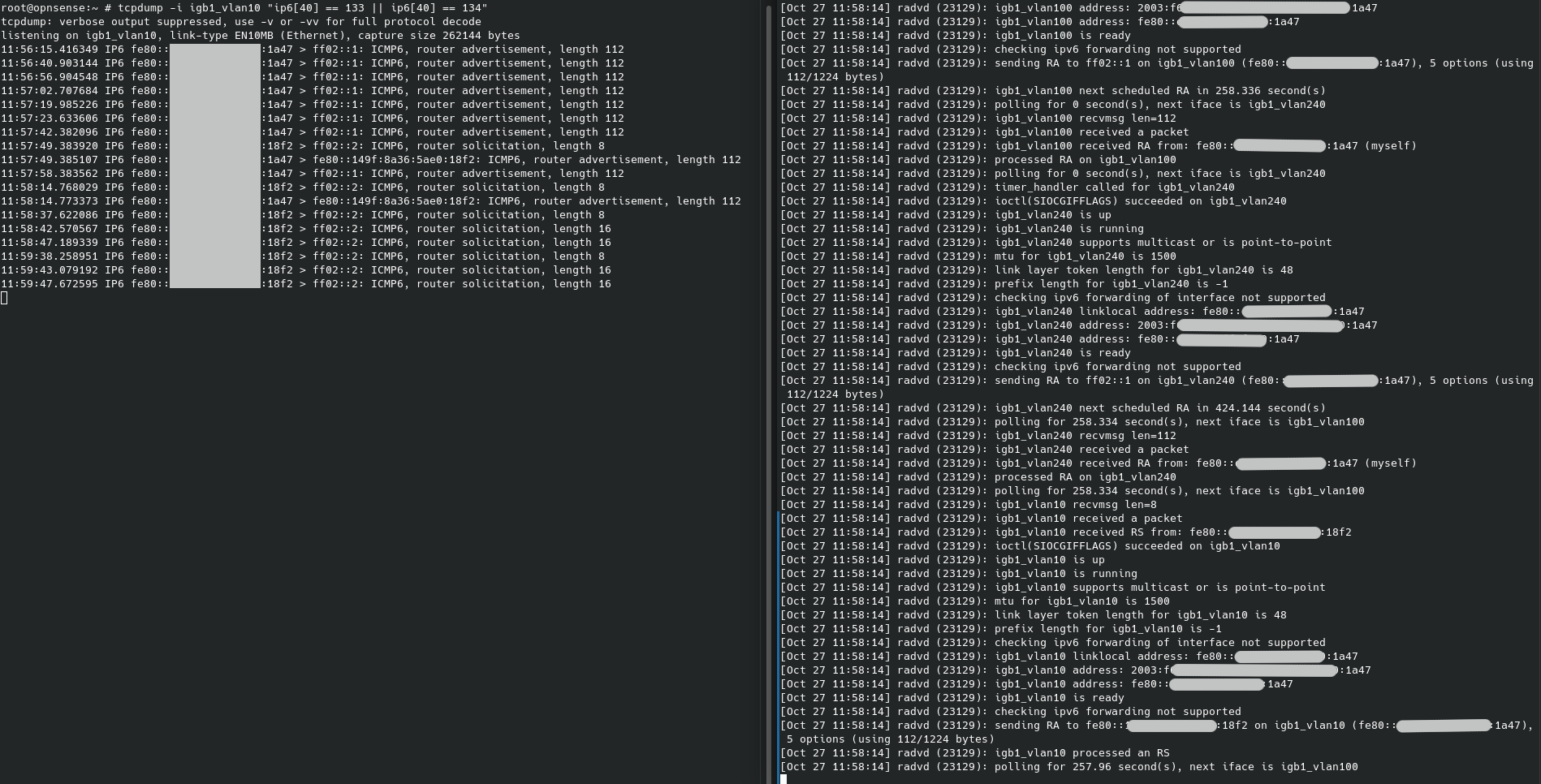
As you can see at around 11:58.14 is the last log entry from radvd, but there are Rs on 11:59.
The second picture is how tcpdump receives the RS, but truss shows no recvmsg attached to the radvd process.

 muellphi
on 27 Oct 2020
muellphi
on 27 Oct 2020
After last rebooting my router on October 23 (unplanned power outage!), radvd has started acting up again. I'm running radvdump on another host and currently no router advertisements are being received.
Sometime since that last reboot, radvd has been spamming this message every 5-20 seconds:
root@opnsense:/var/log # grep radvd routing.log | tail
Nov  3 14:27:56 opnsense radvd[91286]: can't join ipv6-allrouters on bridge0
Nov  3 14:28:10 opnsense radvd[91286]: can't join ipv6-allrouters on bridge0
Nov  3 14:28:27 opnsense radvd[91286]: can't join ipv6-allrouters on bridge0
Nov  3 14:28:34 opnsense radvd[91286]: can't join ipv6-allrouters on bridge0
Nov  3 14:28:42 opnsense radvd[91286]: can't join ipv6-allrouters on bridge0
Nov  3 14:28:49 opnsense radvd[91286]: can't join ipv6-allrouters on bridge0
Nov  3 14:29:05 opnsense radvd[91286]: can't join ipv6-allrouters on bridge0
Nov  3 14:29:20 opnsense radvd[91286]: can't join ipv6-allrouters on bridge0
Nov  3 14:29:30 opnsense radvd[91286]: can't join ipv6-allrouters on bridge0
As I write this, radvd has stopped spamming the message but radvd has also stopped working altogether at roughly the same time - coincidence or not? I tried to run dtrace on the existing radvd process but I'm running into unrelated problems making dtrace work.
Restarting radvd has resolved the problem for now, and the log spam is no longer present.
9numbernine9
on 3 Nov 2020
I'm getting the same messages as @9numbernine9 described.
 ywolynsky
on 6 Nov 2020
ywolynsky
on 6 Nov 2020
radvd misbehaved again last night. It seems like my can't join ipv6-allrouters log message that I mentioned in this comment might just be a red herring - it _didn't_ happen this time and router advertisements stopped.
BTW, if anyone is looking for a simple Bash one-liner to monitor when router advertisements stop being received, you can try this:
while read -t 300; do :; done <> <(radvdump); echo "Router Advertisements Stopped"
This will run radvdump (which runs continuously) and keeps reading its output, _but_ the read will timeout after 300 seconds. Feel free to replace the echo statement with something better, e.g. sending a ping to healthchecks.io or similar. 😄
9numbernine9
on 8 Nov 2020
I'm seeing the same even with the patch however, in my case I have to save the WAN settings before I'll get IPv6 connectivity back. Can anyone point me to the relevant log files? I'll search through the ones I know of as time permits today.
 maxfield-allison
on 12 Nov 2020
maxfield-allison
on 12 Nov 2020
@marjohn56 I've read all the commits and posts here on GitHub and wondering if you need any help testing something in regards to rtadvd. I'd like to help test on 20.7.
 Madj42
on 14 Nov 2020
Madj42
on 14 Nov 2020
Any chance we might be able to get a test package for radvd 2.19? I'd like to test this out as well. http://www.litech.org/radvd/
Madj42
on 14 Nov 2020
I'm on 2.18 (OPNsense 20.7.4-amd64) and would be happy to test 2.19 aswell I suffer form the same problem:
https://forum.opnsense.org/index.php?topic=19976.msg92446#msg92446
 mahescho
on 14 Nov 2020
mahescho
on 14 Nov 2020
I've been running rtadvd using the #4432 patch ID 124cdf6 for the last three weeks, no issues. It's up to you whether you want to try it.
marjohn56
on 14 Nov 2020
How to get and install it ?
mahescho
on 14 Nov 2020
run opnsense-patch 124cdf6
maxfield-allison
on 14 Nov 2020
I guess I wasn't aware this was already put in as a pull request. I
applied this and it worked right away. No crashes yet and I'm incredibly
happy as my devices that were failing started working again.
On Sat, Nov 14, 2020, 8:34 AM Maxfield Allison notifications@github.com
wrote:
run opnsense-patch 124cdf6
—
You are receiving this because you commented.
Reply to this email directly, view it on GitHub
https://github.com/opnsense/core/issues/4338#issuecomment-727215881, or
unsubscribe
https://github.com/notifications/unsubscribe-auth/AE34CSIZLPSAU2IG7TS74LLSP2IQFANCNFSM4RCFTDTA
.
Madj42
on 14 Nov 2020
It was pulled together pretty quickly, @fichtner has taken it to run with. Pretty sure there will be lots of things he'll want to change, but it appears to work fine on my system. Just need to be warned that this a WIP is by no means guaranteed!
marjohn56
on 14 Nov 2020
No problem and understood. One thing I also wanted to point out is that I saw OpenBSD moved away from rtadvd and built there own daemon called rad. Not sure if there was a reason but wanted to mention that in case there was a good reason and nobody saw that. Thank you both for the hard work on this. If you need any more testing, I'd be happy to help in this regard.
Madj42
on 14 Nov 2020
Thanks @marjohn56 @fichtner @maxfield-allison - I've applied the patch as well. So far so good - I'll run it for a few weeks and report back! I don't think I've managed to run radvd for longer than a week without needing to restart it, so anything longer than that is a definite improvement. 😄
9numbernine9
on 14 Nov 2020
I have issued a new commit as for some odd reason my local Opnsense repo was screwed up which left me unable to merge cleanly. So with a nice new clean fork of the core and I've done a new PR #4461 for anyone who wants to try it. Glad it's working for those that have tried it, but the same rule apples, no guarantees!
marjohn56
on 14 Nov 2020
So for those who did the previous release, what would you recommend we do to get the new release? Or should we not worry about it since it's not a huge change?
Edit: figured it out. Ran the patch tool with the previous commit to reverse it and then again with the new commit Id. Still working great. Thanks.
Madj42
on 14 Nov 2020
Oh wow. I really had that problem about 10 secs after radvd start (see above for details). It was constant and rendered IPv6 useless. Just used the mentioned patch and it worked flawlessly. I hop this will replace radvd in the main version.
muellphi
on 15 Nov 2020
Thanks @marjohn56 also working well here! Really appreciate your efforts! Cheers.
greggitter
on 15 Nov 2020
I switched back. Crashes for me completely after about a day.
mahescho
on 15 Nov 2020
Weird. I haven't had any issues myself yet. Able to provide some details or logs so it can be looked at?
Madj42
on 15 Nov 2020
@Madj42
No problem and understood. One thing I also wanted to point out is that I saw OpenBSD moved away from rtadvd and built there own daemon called rad. Not sure if there was a reason but wanted to mention that in case there was a good reason and nobody saw that. Thank you both for the hard work on this. If you need any more testing, I'd be happy to help in this regard.
radvd as well as rtadvd both run with root privileges. As far as I have come to know the OpenBSD folks over the years they replace everything that does not drop privileges and/or use their MAC framework with their own code sooner or later.
So that's not a statement about the quality of either daemon, IMHO. Just that they don't follow OpenBSD's policy.
Kind regards,
Patrick
pmhausen
on 15 Nov 2020
I've been running patched to PR #4461 for a little while now, and so far so good. It's been running long enough that I generally would have seen the issue by now.
puithove
on 23 Nov 2020
Same here. Uptime is now 31 days since my first patch with no issues.
marjohn56
on 23 Nov 2020
I can confirm this very annoying bug. My IP television is a Freebox POP running solely on IPv6. So from time to time I loose my TV stream while watching. This is a Android system and looking at settings, IPv6 is gone. Restarting radv on OPNsense firewall gives back IPv6 immediately. I am surprised that such an important problem is not fixed in OPNsense. Will apply the patch right now.
 ffries
on 23 Nov 2020
ffries
on 23 Nov 2020
Yeah this should be looked into.
rtadvd #4461 seems to fix it so far, i just have to look into long term stability.
 MartB
on 23 Nov 2020
MartB
on 23 Nov 2020
opnsense-patch 9a4a908 #4461
This patch broke my system. First, my firewall web interface, which was available on a vlan is not accessible anylonger. Secondly, IPv6 is not announced on my VLANs. How do I revert to stock version and remove the patch? I can still access the firewall with SSH and ipv4 is working. No IPv6.
ffries
on 23 Nov 2020
I have applied the patch on a 20.7.5 system and i can't see the service reload button for radvd in the webinterface any longer.
martinvogt-tinc
on 23 Nov 2020
How do I use https://docs.opnsense.org/manual/opnsense_tools.html to revert?
ffries
on 23 Nov 2020
Just use the same command and patch id to reverse the patch
marjohn56
on 23 Nov 2020
I have applied the patch on a 20.7.5 system and i can't see the service reload button for radvd in the webinterface any longer.
thats normal, it should change to rtadvd radvd should be gone.
MartB
on 23 Nov 2020
opnsense-patch -r 9a4a908 ?
ffries
on 23 Nov 2020
no need for -r
marjohn56
on 23 Nov 2020
I've not checked the patch against 20.7.5, I will do later tonight.
marjohn56
on 23 Nov 2020
So what command should I use? I need to know to know the command before I switch to a seperate vlan and connect to the firewall. Sorry.
ffries
on 23 Nov 2020
opnsense-patch 9a4a908
marjohn56
on 23 Nov 2020
Thanks. It worked. Will test the next patch. The previous patch obviously did not support VLANs.
ffries
on 23 Nov 2020
I've not checked the patch against 20.7.5, I will do later tonight.
I just updated to .5 with the patch already installed and it seems to be working fine. I did have to start the service but once started all was well. I'll test after a reboot later this evening.
maxfield-allison
on 23 Nov 2020
After apllying the patch an a manual restart of rtadvd via ssh i have seen one difference to the unpatched system. i don't know if it is necessary but i will explain it:
windows ipconfig before the patch:
...
IPv6-Adresse. . . . . . . . . . . : 2a00:6020:XXXX:28b4::117d
IPv6-Adresse. . . . . . . . . . . : 2a00:6020:XXXX:28b4:2d08:ec88:7ca1:69f3
Temporäre IPv6-Adresse. . . . . . : 2a00:6020:XXXX:28b4:8c5c:495:431b:48c
...
windows ipconfig after the patch:
...
IPv6-Adresse. . . . . . . . . . . : 2a00:6020:XXXX:28b4:2d08:ec88:7ca1:69f3
Temporäre IPv6-Adresse. . . . . . : 2a00:6020:XXXX:28b4:8c5c:495:431b:48c
...
as you can see the ::117d is gone. you might ask yourself why i am reporting this. but i'm very sure that i haven't had this short addresses from the very beginning of this setup. and now after the patch they are gone again. but i can't definetly say that they were there since this problem exists.
i just know this short addresses from network where dhcp6 is enabled. but i don't have dhcp6 configured on this vlan because i'm running it in track interface mode. so this interface is not available für dhcp6 configuration.
martinvogt-tinc
on 23 Nov 2020
I've not checked the patch against 20.7.5, I will do later tonight.
I just updated to .5 with the patch already installed and it seems to be working fine. I did have to start the service but once started all was well. I'll test after a reboot later this evening.
That's pretty odd, Just completed a clean install of 20.7 and bounced to 20.75, and you're right, rtadvd only starts manually. I'll look into it later. Comments about it not working with VLANs are false, I've got it running on my primary system with three VLANs and it's working fine on that one. Again, might be a 20.7.5 thing, I'll check that later too.
marjohn56
on 23 Nov 2020
Will test again a new patch now against 20.75. Thanks.
ffries
on 23 Nov 2020
I'm running only VLAN's on internal net for what its worth. most likely other issues being misconstrued as related but aren't
maxfield-allison
on 23 Nov 2020
Same here, after apply on .5 all seems working perfectly (working good since 6 days with .4 before)
zzyonn
on 23 Nov 2020
The web interface on IPv4 is only accessible on an admin VLAN and I could not accept it. I don't know any more details since I reverted the patch. Thanks!
ffries
on 23 Nov 2020
Well it does start up on a reboot, I checked to see if it was running and it was, although the services icon said it wasn't. A refresh of the web page about 15 seconds later and it then showed it as running, so seems to be a gui issue I need to look at. Other than that I can confirm its working fine on 20.7.5. If a user was having issues with v6 before using this patch and a restart of radvd or a reboot still left you without v6 then it's unlikely that radvd is the source of that issue.
marjohn56
on 23 Nov 2020
as you can see the ::117d is gone. you might ask yourself why i am reporting this. but i'm very sure that i haven't had this short addresses from the very beginning of this setup. and now after the patch they are gone again. but i can't definetly say that they were there since this problem exists.
Addresses will change depending on how windows is being used, it will ask for new addresses and drop them as it sees fit. Even if you have a static allocation set for a specific windows device it will still ask for others. The only way to stop that is to disable privacy mode in windows, in which case it will use just the one address.
with radvd and rtadvd you will get an address on windows ( SLAAC ), you'll then get another from dhcp6c if you have advertisements set to assisted. Setting it to managed will result in only dhcpv6 assigned addresses and nothing from radvd or rtadvd, but then any android devices will not work, as they use SLAAC only.
i just know this short addresses from network where dhcp6 is enabled. but i don't have dhcp6 configured on this vlan because i'm running it in track interface mode. so this interface is not available für dhcp6 configuration.
If it's running in track interface then it will be using IPv6.
marjohn56
on 23 Nov 2020
I can add confirmation on multiple VLANs - I have 10 for personal and homelab use. I get a /56 from my ISP and have Track Interface set. This all works with the patch.
puithove
on 24 Nov 2020
How do I restart radvd from command line: service radvd restart ?
service radvd onerestart
does not work
ffries
on 26 Nov 2020
Check the first reply
vlcty
on 26 Nov 2020
Gave the latest version a try. It survived about 2 hours. How to debug this? At the moment I'm back on radvd as it survives a few weeks and not hours :-)
mahescho
on 26 Nov 2020
Hello! Just thought I'd chime in and mention that I've been running the 124cdf6 patch for two weeks as of today, and it has been working flawlessly. Zero instances of missing/dropped router advertisements since that time. Thanks again for all your efforts!
9numbernine9
on 28 Nov 2020
Hello. I'm running the patch (124cdf6) for a few days now without any problems! Seems fine to me.
robgnu
on 4 Dec 2020
So this was working great for me until I updated to 20.7.6. After the update radvd was back and running. I reapplied the patch and now things appear to be working well again, but I haven't waited that long. I see there is a PR that references this issue but there's not much activity there. Is there anything anyone in the community can do other than keep testing the patch?
 kevenwyld
on 9 Dec 2020
kevenwyld
on 9 Dec 2020
I just upgrade from 20.1.9 where everything is great to 20.7.6 where ipv6 connectivity is broken. I had to apply opnsense-patch 9a4a908 just to get it working. I am wondering after 6 releases, is problem still on the developers radar?
 agh1701
on 14 Dec 2020
agh1701
on 14 Dec 2020
The pull request you guys are applying the patch from is definitely still on the radar. My assumption based on past experience is that it will be rolled into the next major release. There are other ipv6 related pulls that may need adjustment when the decision is made to include rtadvd and testing can take time when you have a project with this many moving parts.
maxfield-allison
on 14 Dec 2020
Thank you for your quick reply and hard work. I know you do not do the release notes however at this time shouldn't it be noted in the release notes that this patch may be needed for ipv6 connectivity.
agh1701
on 14 Dec 2020
After updating to 20.7.6 ipv6 looked OK, but again prefixes are not announced. Going to wait for patch day tomorrow. Rtadvd runs for at least 6 days without any problems.
Staticznld
on 15 Dec 2020
Anybody tried this on 20.7.7?
agh1701
on 18 Dec 2020
Anybody tried this on 20.7.7?
radvd is still broken, but the rtadvd patch still works.
 jess-sch
on 18 Dec 2020
jess-sch
on 18 Dec 2020
@marjohn56 Found that after the 20.7 update I'm getting exited on signal 11 (core dumped) and a [HBSD SEGVGUARD] [rtadvd (1232)] Suspension expired. error. This is on an HA/PFsync setup on the primary baremetal node. Secondary KVM node shows no issues.
maxfield-allison
on 22 Dec 2020
I've not had any issues with the latest update, at least not with RTADVD.
marjohn56
on 23 Dec 2020
I destroyed my HA config and it's operating just fine now.
maxfield-allison
on 23 Dec 2020
Is 9a4a908 the latest version? How to find the latest version?
For me rtadvd does not work at all. No router advertisements got sent.
mahescho
on 23 Dec 2020
It is the latest.
agh1701
on 23 Dec 2020
@mahescho - After you have applied the patch, do you see rtadvd in the services widget? Also, a reboot after applying the patch can help.
marjohn56
on 24 Dec 2020
@marjohn56 - Yes, it's in the widget. At first stopped. When I start it I see the process with "ps" on the shell but no router advertisments get sent. How can a (Windows style ...) reboot help more than killing and starting rtadvd? I've stated rtadvd with -D and -f to see more but found nothing of value.
mahescho
on 24 Dec 2020
You need to do none of that, Debug settings are available om Interfaces->Settings, I meant a reboot after installing the patch, just for cleanliness. I need more info than 'it doesn't work', it does work or many of us would not be using it. Can you give more info, e.g. are you seeing GUA addresses on the WAN and LAN, are you using Manual Configuration on the tracking interface(s)? Have you looked at the rtadvd.conf file to see what the configuration is? If you post said file here it here it may help us work out why it appears not to be working for you.
marjohn56
on 25 Dec 2020
I need to add a comment here... The reason rtadvd probably appears to do nothing after patching and manually starting it is that there is a two part process, there is also the daemon controller, it signals the daemon with the interfaces to use and an instruction to re-read the config file, sorry I forgot to mention that bit and it probably explains why it doesn't always appear to work. So, best to apply the patch and REBOOT!!! If anything changes, i.e. LAN address changes etc then the controller will signal the daemon to reload the config. However, the controller only does its thing either at start-up or something causes the rtadvd configure process to be called.
marjohn56
on 25 Dec 2020
After I had ran into the same issue(s) with radvd on 20.7.7_1-amd64, we got a friendly
pointer to your patch over here
It is now almost 24 hours after I had applied it cleanly to 20.7.7_1-amd64, and rtadvd is still happily sending its RAs. Whereas radvd always got "wedged" after running some 20 hours, and started spewing warning messages into the Routers log.
So far so good, thank you, and I'll continue to keep any eye on it over the coming hours & days.
 hb9cwp
on 25 Dec 2020
hb9cwp
on 25 Dec 2020
I've 3 internet connections one completely static with an other router in front of it and two with static IPs static using PPPoE. A GUA is set nowhere. But the PPPoE interfaces all other interfaces (LAN, DMZ, several VLANs) are manually configured with static addresses. /var/etc/rtadvd.conf exists and the content looks OK to me:
default:\
    :raflags#0:rltime#3600:\
    :pinfoflags#64:vltime#360000:pltime#360000:mtu#1500:\

# Automatically generated, do not edit
# Generated for DHCPv6 server lan
lagg0:\
    :mininterval#200:\
    :maxinterval#600:\
    :mtu#1500:\
    :raflags#64:\
    :addrs#1:\
    :addr1="AAAA:BBBB:CCCC:DDDD:2::":prefixlen#64\
    :pinfoflags#192:\
    :rdnss="AAAA:BBBB:CCCC:DDDD:2::200,AAAA:BBBB:CCCC:DDDD:2::201":\
    :dnssl="domain.loc domainxxxxxx.com":
# Generated for DHCPv6 server opt10
lagg0_vlan202:\
    :mininterval#200:\
    :maxinterval#600:\
    :mtu#1500:\
    :raflags#128:\
    :addrs#1:\
    :addr1="EEEE:FFFF:AAAA:a810::":prefixlen#64\
    :pinfoflags#192:\
    :rdnss="AAAA:BBBB:CCCC:DDDD:2::200,AAAA:BBBB:CCCC:DDDD:2::201":\
    :dnssl="domain.loc":
# Generated for DHCPv6 server opt11
lagg0_vlan203:\
    :mininterval#200:\
    :maxinterval#600:\
    :mtu#1500:\
    :raflags#192:\
    :addrs#1:\
    :addr1="2003:a:f01:3903::":prefixlen#64\
    :pinfoflags#192:\
    :rdnss="AAAA:BBBB:CCCC:DDDD:2::200,AAAA:BBBB:CCCC:DDDD:2::201":\
    :dnssl="domain.loc":
# Generated for DHCPv6 server opt13
lagg0_vlan204:\
    :mininterval#200:\
    :maxinterval#600:\
    :mtu#1500:\
    :addrs#1:\
    :addr1="CCCC:DDDD:EEEE:3904::":prefixlen#64\
    :pinfoflags#192:\
    :rdnss="AAAA:BBBB:CCCC:DDDD:2::200,AAAA:BBBB:CCCC:DDDD:2::201":\
    :dnssl="domain.loc":
After the first reboot I've seen 4 router advertisements. Than it stoppend.
I use remote syslog. I've set the log level to 2. No logs get sent to the remote syslog server. In "System: Settings: Logging / targets" rtadvd is missing in "applications". How to make remote syslog working?
mahescho
on 26 Dec 2020
What is the setting for Router Advertisements in Settings->Router Advertisements? This is one of my VLANs.
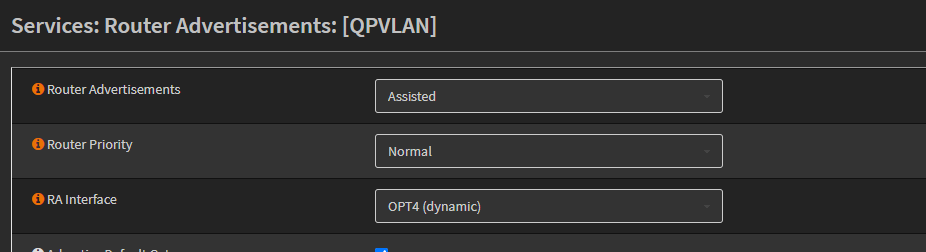
marjohn56
on 26 Dec 2020
My LAN and all other look like this:
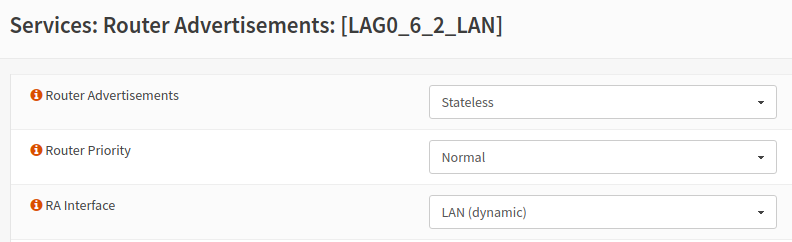
mahescho
on 26 Dec 2020
can you change from stateless to either managed or assisted, assisted if you want to use dhcpv6 also.
marjohn56
on 26 Dec 2020
I do not use DHCP at all on the firewall so I think this does not make any sense. Or am I wrong?
I use remote syslog. I've set the log level to 2. No logs get sent to the remote syslog server. In "System: Settings: Logging / targets" rtadvd is missing in "applications". How to make remote syslog working?
mahescho
on 26 Dec 2020
Set it to Managed or Unmanaged if you are not using dhcpv6, my preference would be Managed, both work, just tested them on a virgin 20.7 installation. Logging is very low even at level 2, rtadvd doesn't tell you very much at all. Log entries appear in the system log.
I do not understand why it's missing from your services list on the lobby page, If you install the patch and reboot then it's there, I've reversed the patch and then reapplied the patch and tested on both my live and test systems. After reboot it may show not running, but leave it for twenty seconds or so and then refresh the page it will show running. When stopping and restarting rtadvd it may appear to have frozen the page, it hasn't though, it is sending out signals to all clients that the route is down, with a lot of clients this can take quite a while, twenty seconds or more on my primary VLAN which has a lot of clients.
marjohn56
on 26 Dec 2020
misunderstood me ... the lobby is fine. it's missing here (currently I'm back to radvd as you can see, when I switch to rtadvd neither rtadvd nor radvd is listed in remote syslog settings):
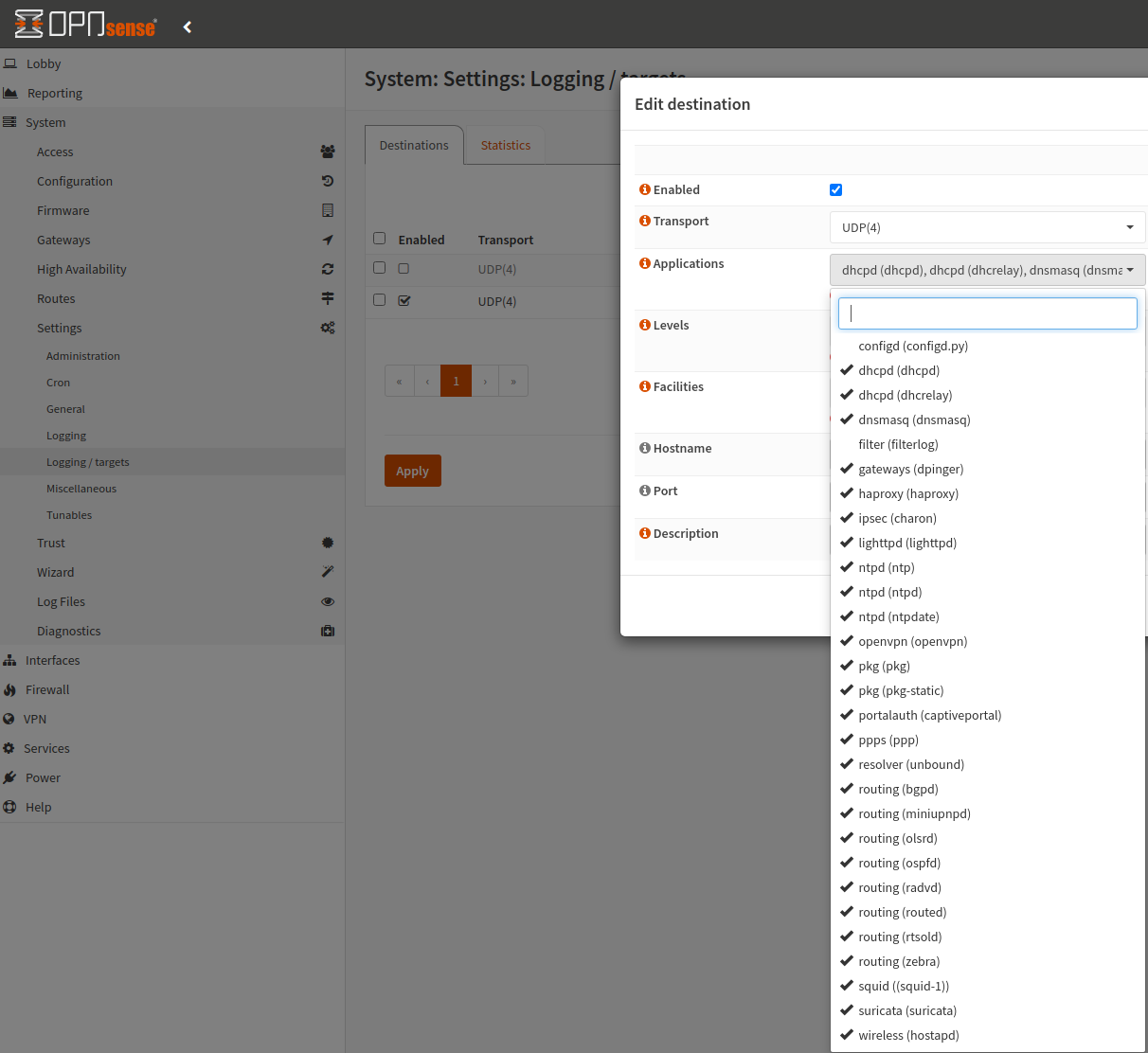
I will give it a try tomorrow morning, at the moment I can't reboot without interrupting streaming :-)
mahescho
on 26 Dec 2020
Ok.. everybody, updated with a new commit 8155f3a. So reverse the original commit ( if applied ) 9a4a908 before applying this new one,
This commit removes the killing of rtadvd which sometimes causes a race issue with its controller. There is in fact no need to kill rtadvd at all, it launches but does nothing until its controller signals it with interface options and a config re-read. This should prevent the strangeness where just saving an interface was killing the daemon. I've deleted the commit details for the logging additions as this commit also includes them too.
I am seeing a coredump on rtadvd around 30 seconds after an update from its controller. I have replaced rtadvd with the version from FreeBSD 12.0 and the core dump no longer happens
marjohn56
on 27 Dec 2020
Thank you for the patch because I was wondering why my IPv6 connectivity kept on randomly breaking. It is more stable now, however I've been having issues with getting DHCPv6 to work with rtadvd whereas it worked with previous daemon. I was looking in the auto configuration generated by the patch and noticed some odd values in the raflags field:
igb0_vlan10:\
        :mininterval#1350:\
        :maxinterval#1800:\
        :mtu#1500:\
        :raflags#192:\
        :addrs#1:\
        :addr1="aaaa:bbbb:cccc:dddd::":prefixlen#64\
        :pinfoflags#192:\
        :rdnss="aaaa:bbbb:cccc:dddd::1":\
        :dnssl="localdomain":
igb1_vlan55:\
        :mininterval#1350:\
        :maxinterval#1800:\
        :mtu#1500:\
        :raflags#384:\
        :addrs#1:\
        :addr1="aaaa:bbbb:cccc:eeee::":prefixlen#64\
        :pinfoflags#192:\
        :rdnss="aaaa:bbbb:cccc:eeee::1":\
        :dnssl="localdomain":
igb1_vlan50:\
        :mininterval#1350:\
        :maxinterval#1800:\
        :mtu#1500:\
        :raflags#576:\
        :addrs#1:\
        :addr1="aaaa:bbbb:cccc:ffff::":prefixlen#64\
        :pinfoflags#128:\
        :rdnss="aaaa:bbbb:cccc:ffff::1":\
        :dnssl="localdomain":
I couldn't think why the values for raflags would be different when I have set it to the same 'RA mode', i.e. Assisted. It then occurred to me that 192+192 = 384 and 384+192 = 576 ! I think raflags needs to be reset to 0 before adding on the flag values.
 mrkevlh
on 27 Dec 2020
mrkevlh
on 27 Dec 2020
I'll go look..
marjohn56
on 27 Dec 2020
try d690f93 instead. Remember to reverse the old patch first.
marjohn56
on 27 Dec 2020
Thanks. Config file now looks correct. The same RA flag value for each interface 👍
mrkevlh
on 27 Dec 2020
Yes, don't know why I missed the zero on those, I'd set it for the other set of flags,,
marjohn56
on 27 Dec 2020
Regardless which option I use (statless, managed, assisted) and despite the only option wich makes sense for me is "statless" I get about 4 advertisements and then rtadvd stops advertising. I reverted back to radvd.
mahescho
on 28 Dec 2020
No idea why it doesn't work for you.
marjohn56
on 28 Dec 2020
For those who wish to see some useful info try this command from the shell.
rtadvctl -v show
It gives all the useful info, including the last time an RA was sent.
marjohn56
on 29 Dec 2020
Here's a new radvd with improved patching that would hopefully not create the issue of eventually stopping to send router advertisements on FreeBSD 12:
# pkg add -f https://pkg.opnsense.org/FreeBSD:12:amd64/20.7/misc/radvd-2.19.txz
I'm used to RTADVD now.😉 I'll run it up on my test device and see what happens.
marjohn56
on 29 Dec 2020
Here's a new radvd with improved patching that would hopefully not create the issue of eventually stopping to send router advertisements on FreeBSD 12:
# pkg add -f https://pkg.opnsense.org/FreeBSD:12:amd64/20.7/misc/radvd-2.19.txz
I'm assuming it would be best to reverse the RTADVD patch before adding this pkg.
maxfield-allison
on 29 Dec 2020
radvd isn’t started when the patch is applied. Easiest way for a clean system is:
# opnsense-revert opnsense
I'll give this a go as well - running into the same issue. 9a4a908 fixed this actually.
 Wireheadbe
on 29 Dec 2020
Wireheadbe
on 29 Dec 2020
@fichtner I reverted and installed the package you mentioned. All appears to be working for about an hour now. I'll report back in a day or two. Thank you.
Madj42
on 30 Dec 2020
twenty hours on live system... so far so good... However the logs have flashed up a new issue, I'm seeing RA's from my IoT vlan appearing on my primary vlan. Checked all my rules, they look good. I'll reload rtadvd and see if that was the same.
marjohn56
on 30 Dec 2020
Problem solved, nothing to do with Opnsense, Sky boxes were causing it.
marjohn56
on 30 Dec 2020
twenty hours on live system... so far so good...
Same here - hasn't returned yet.
Wireheadbe
on 30 Dec 2020
I've been having similar issues to everyone here.
Never tried rtadvd. Recently discovered this thread. Never had the time/realized fully how to get it to work. I also didn't wnat to mess with the system [too] much. I've installed the radvd patch. Mine randomly stops working after 3 days of uptime, even though the DHCPv6 leases stay active with Comcast.
I'll give you an update in a few days.
 Aidan16
on 31 Dec 2020
Aidan16
on 31 Dec 2020
Here's a new radvd with improved patching that would hopefully not create the issue of eventually stopping to send router advertisements on FreeBSD 12:
# pkg add -f https://pkg.opnsense.org/FreeBSD:12:amd64/20.7/misc/radvd-2.19.txz
With this update I'm seeing slightly better uptime but ultimately my interfaces lose their lease for some reason. I'll roll over to the rtadvd patch and see if the behavior persists with that and do a deeper dive if so.
maxfield-allison
on 1 Jan 2021
For some reason with rtadvd I'm not seeing nearly as many issues with my interfaces. I loaded the patch, confirmed all settings and saved all interfaces then reloaded services and everything is running smoothly again. I'll update if it stays good for the next few days.
maxfield-allison
on 1 Jan 2021
For some reason with rtadvd I'm not seeing nearly as many issues with my interfaces. I loaded the patch, confirmed all settings and saved all interfaces then reloaded services and everything is running smoothly again. I'll update if it stays good for the next few days.
How do you load the patch?
Aidan16
on 2 Jan 2021
If you've applied @Franco's radvd update and you are still having issues can you post what the issues are, i.e. is it still doing the same thing as the original radvd or is there something new?
If you are still having issues with radvd then of course try the rtadvd patch by going to the shell and entering
opnsense-patch d690f93
but please let @fichtner know that you are still having issues.
marjohn56
on 2 Jan 2021
To add my comment here, my live system now has been running radvd for three days or so, and it's still responding to RS's etc. There is an issue I'm seeing in the logs
our AdvValidLifetime on igb1_vlan102 for fdc9:bf4:80a7:a20c:: doesn't agree with fe80::4262:31ff:fe00:c1b0
I see this for every client, @fichtner any ideas why this might be?
marjohn56
on 2 Jan 2021
I still wonder what the plans for future development are. I personally don't see the need to import a third party product that according to their own website does not have full BSD support:
Linux is supported. Your mileage may vary on BSD.
While there is a perfectly capable solution in the base system since day 1 of IPv6 integration.
pmhausen
on 2 Jan 2021
While there is a perfectly capable solution in the base system since day 1 of IPv6 integration.
This is a flawed assumption: radvd was working fine until FreeBSD 12 for many years. Now some people report issues and replacing the daemon with a less-feature savvy alternative that might fit better could look like a no-brainer, but we are effectively only switching sides and just have to wait for other people to report issues with rtadvd.
What do we do then? Switch back? Fix it? How do we explain to those not affected by this bubble of issues we made a switch and deleted some edge case features because they are no longer supported? Why not fix it now in radvd, alleged FreeBSD 12 kernel issues aside?
If FreeBSD ports has radvd should not it not work fine for the code that is added there? Who is responsible, the maintainer? The community? Who's not doing what's necessary?
Also what we have seen the last couple of years: there are far too little people capable of contributing to C daemons, maybe even far less interested in figuring them out. That won't change with rtadvd underneath.
Cheers,
Franco
fichtner
on 2 Jan 2021
What about the assumption that
- rtadvd works as documented
- rtadvd was in FreeBSD since KAME IPv6 was first integrated
is wrong?
And, should there ever be a problem with rtadvd you can raise an issue with upstream, because it is - I am repeating myself - an official part of FreeBSD.
radvd is a third party project that explicitly comes with Linux support only.
pmhausen
on 2 Jan 2021
As an aside, I've updated the PR #4461 rtadvd patch with #1515e8c.
marjohn56
on 2 Jan 2021
I tend to agree with @fichtner that it would be preferable to keep radvd, as he said, it served well for many years without an issue, Although the patch for rtadvd works and is stable it's not a finished article, There are features in radvd that do not have an equivalent within rtadvd, though no-one using rtadvd has yet missed them; on the flip-side rtadvd can be left running and updates to interfaces and config are just signalled to it by its control program - which is useful. Something I'm about to look at is will a change in the interface address ( such as what would happen on a dhcp6c lease change ) be reflected by a a deprecation and re-advertise of the new lease just by a config change.
marjohn56
on 2 Jan 2021
- rtadvd works as documented
Isn't that the same case for radvd? For anything that is not bug-bound beyond the documented purposes?
- rtadvd was in FreeBSD since KAME IPv6 was first integrated
We are weighing whether or not a long running service works as expected (as per the previous question). Wikipedia says radvd is 25 years old and still maintained. That is roughly the same time frame, isn't it?
In these regards I see no proof that rtadvd is better than radvd other than rtadvd is probably a better fit for FreeBSD, but that is more a BSD thing than bad for Linux in general. So FreeBSD needs to put functional code in the port to make it work but that doesn't mean it doesn't work fine elsewhere?
Every other year we feel our expectations broken by non-functional states in FreeBSD-centric software/implementations. If we switch to rtadvd we have to know it is actually a lot better, but personally I have no data other than this non-representative thread.
Cheers,
Franco
fichtner
on 2 Jan 2021
For me on US Spectrum cable, radvd 2.18 would crash immediately. Only have 1 interface.
rtadvd Patch 9a4a908 – 10+ days no problems
radvd 2.19 – 5+ days no problems
Could the problem simply be radvd 2.18?
Thanks @marjohn56 and @fichtner
agh1701
on 4 Jan 2021
@agh1701 changes from 2.18 to 2.19 are minimal upstream, but we changed the FreeBSD patching to avoid an alleged issue with FreeBSD 12...
fichtner
on 4 Jan 2021
radvd-2.19 has been rocksolid here
Wireheadbe
on 4 Jan 2021
9+ days solid radvd 2.19
agh1701
on 9 Jan 2021
I also can confirm: 5+ days and no issues anymore with radvd.
robgnu
on 9 Jan 2021
Thanks for the feedback! So we will be shipping the updated radvd in 20.7.8 and 21.1-RC1 and if that at least improves the situation also provide a patch to FreeBSD ports.
Cheers,
Franco
fichtner
on 10 Jan 2021
When is 20.7.8?
agh1701
on 11 Jan 2021
Same here with 2.19, work perfectly ;)
It fixed another problem to me, with 2.18 when I changed any parameter it was like restarting the radvd (even if I changed the theme for example)
So thanks ;)
zzyonn
on 11 Jan 2021
When is 20.7.8?
Likely next week.
fichtner
on 11 Jan 2021
Running Radvd 2.19 for 5 hours, so far so good!
Everything seems to be fine so far but there are some errors reported in the log file
Staticznld
on 11 Jan 2021
So to understand.. to good people in this thread reporting 2.19 behaves well.
Does radvd-2.19 alone make the difference? This almost sounds too good to be true. (Though I really hope it is true)
Looking at https://github.com/radvd-project/radvd/compare/v2.18...v2.19 there’re only three slightly relevant changes, namely commit 9644266, dec4402 and 0d891e8, the issues they address hardly manifest as stochastically as what we’ve seen. 9644266 maybe, but still..🤔
Finger crossed🤞
Also what’s the alleged FreeBSD12 issue?
Thanks a lot!
 ivwang
on 13 Jan 2021
ivwang
on 13 Jan 2021
@ivwang the relevant parts are FreeBSD specific, see https://github.com/opnsense/ports/commit/a5ace74ef2273eeb7 and https://github.com/opnsense/ports/commit/54152320fa817
I don't think any changes of upstream are at play here. Note the absence of setsockopt(sock, IPPROTO_IPV6, IPV6_LEAVE_GROUP, &mreq, sizeof(mreq)); in version 2.19 and how people say now it works on FreeBSD 12 even though the code worked with it fine on FreeBSD 11.
fichtner
on 13 Jan 2021
By the way, the patch has been working flawlessly. IPv6 has been working for around 8-11 days now. With the old radvd, it only worked for 3 days and then stopped announcing and working like clockwork.
Thanks!
Aidan16
on 14 Jan 2021
just an update: Radvd has been behaving since I swapped back via the patch. About a week of uptime.
maxfield-allison
on 14 Jan 2021
Great to hear, looks like raided-2.19 does improve it for almost everyone.. getting my hope up for the next release :)
ivwang
on 16 Jan 2021
I upgraded from 20.1 to 20.7.7. After about 1 or 2 days my problems with radvd popped up again. I decided to manually install radvd 2.19 via the above pkg -f command.
Now my IPv6 connectivity is completely broken, even my upstream isn't getting an IPv6 address any more... thus no router advertisements are being sent. I don't know what's happening actually, I see that a /48 prefix is being assigned to me but even from the firewall itself I cannot ping6 into the internet even though I'm having a default route assigned.
This I found in syslog:
Jan 17 11:45:52 uprouter1 opnsense[67855]: /usr/local/etc/rc.newwanipv6: The command '/usr/local/sbin/radvd -p /var/run/radvd.pid -C /var/etc/radvd.conf -m syslog' returned exit code '255', the output was ''
This is my radvd.conf:
# Automatically generated, do not edit
# Generated for DHCPv6 server opt5
interface lagg0_vlan51 {
        AdvSendAdvert on;
        MinRtrAdvInterval 10;
        MaxRtrAdvInterval 30;
        AdvLinkMTU 1500;
        AdvDefaultPreference medium;
        AdvManagedFlag on;
        AdvOtherConfigFlag on;
        prefix 2001:1234:1234:6000::/64 {
                DeprecatePrefix on;
                AdvOnLink on;
                AdvAutonomous off;
        };
        RDNSS 2001:1234:1234:5000::12 2a00:fe0:3f:3::6 {
        };
        DNSSL mydom.ain {
        };
};
# Generated for DHCPv6 server opt1
interface lagg0_vlan5 {
        AdvSendAdvert on;
        MinRtrAdvInterval 200;
        MaxRtrAdvInterval 600;
        AdvLinkMTU 1492;
        AdvDefaultPreference medium;
        AdvManagedFlag on;
        AdvOtherConfigFlag on;
        prefix 2001:1234:1234:1b::/64 {
                DeprecatePrefix on;
                AdvOnLink on;
                AdvAutonomous off;
        };
        RDNSS 2001:1234:1234:5000::12 2a00:fe0:3f:3::6 {
        };
        DNSSL mydom.ain {
        };
};
# Generated for DHCPv6 server opt2
interface lagg0_vlan13 {
        AdvSendAdvert on;
        MinRtrAdvInterval 10;
        MaxRtrAdvInterval 30;
        AdvLinkMTU 1500;
        AdvDefaultPreference medium;
        AdvManagedFlag on;
        AdvOtherConfigFlag on;
        prefix 2001:1234:1234:5000::/64 {
                DeprecatePrefix on;
                AdvOnLink on;
                AdvAutonomous off;
        };
        RDNSS 2001:1234:1234:5000::12 2a00:fe0:3f:3::6 {
        };
        DNSSL mydom.ain {
        };
};
# Generated for DHCPv6 server opt4
interface lagg0_vlan10 {
        AdvSendAdvert on;
        MinRtrAdvInterval 200;
        MaxRtrAdvInterval 600;
        AdvLinkMTU 1500;
        AdvDefaultPreference medium;
        prefix 2001:1234:1234:1001::/64 {
                DeprecatePrefix on;
                AdvOnLink on;
                AdvAutonomous on;
        };
        RDNSS 2001:1234:1234:5000::12 2a00:fe0:3f:3::6 {
        };
        DNSSL mydom.ain {
        };
};
Even after I downgraded radvd version corresponding to the 20.7 release it stays broken.
I downgraded to 20.1 and everything is working fine at least so far.
imp1sh
on 17 Jan 2021
Please don’t hijack this thread. As I said you have a different issue and you need to provide proper amount of details (see bug report template).
On 17. Jan 2021, at 23:23, pmisch notifications@github.com wrote:
I upgraded from 20.1 to 20.7.7. After about 1 or 2 days my problems with radvd popped up again. I decided to manuall install radvd 2.19 via the above pkg -f command.
Now my IPv6 connectivity is completely broken, even my upstream isn't getting an IPv6 address any more... thus no router advertisements are being sent. I don't know what's happening, but I think I will be downgrading to 20.1 once again.
This I found in syslog:Jan 17 11:45:52 uprouter1 opnsense[67855]: /usr/local/etc/rc.newwanipv6: The command '/usr/local/sbin/radvd -p /var/run/radvd.pid -C /var/etc/radvd.conf -m syslog' returned exit code '255', the output was ''
This is my radvd.conf:Automatically generated, do not edit
Generated for DHCPv6 server opt5
interface lagg0_vlan51 {
AdvSendAdvert on;
MinRtrAdvInterval 10;
MaxRtrAdvInterval 30;
AdvLinkMTU 1500;
AdvDefaultPreference medium;
AdvManagedFlag on;
AdvOtherConfigFlag on;
prefix 2001:1234:1234:6000::/64 {
DeprecatePrefix on;
AdvOnLink on;
AdvAutonomous off;
};
RDNSS 2001:1234:1234:5000::12 2a00:fe0:3f:3::6 {
};
DNSSL mydom.ain {
};
};Generated for DHCPv6 server opt1
interface lagg0_vlan5 {
AdvSendAdvert on;
MinRtrAdvInterval 200;
MaxRtrAdvInterval 600;
AdvLinkMTU 1492;
AdvDefaultPreference medium;
AdvManagedFlag on;
AdvOtherConfigFlag on;
prefix 2001:1234:1234:1b::/64 {
DeprecatePrefix on;
AdvOnLink on;
AdvAutonomous off;
};
RDNSS 2001:1234:1234:5000::12 2a00:fe0:3f:3::6 {
};
DNSSL mydom.ain {
};
};Generated for DHCPv6 server opt2
interface lagg0_vlan13 {
AdvSendAdvert on;
MinRtrAdvInterval 10;
MaxRtrAdvInterval 30;
AdvLinkMTU 1500;
AdvDefaultPreference medium;
AdvManagedFlag on;
AdvOtherConfigFlag on;
prefix 2001:1234:1234:5000::/64 {
DeprecatePrefix on;
AdvOnLink on;
AdvAutonomous off;
};
RDNSS 2001:1234:1234:5000::12 2a00:fe0:3f:3::6 {
};
DNSSL mydom.ain {
};
};Generated for DHCPv6 server opt4
interface lagg0_vlan10 {
AdvSendAdvert on;
MinRtrAdvInterval 200;
MaxRtrAdvInterval 600;
AdvLinkMTU 1500;
AdvDefaultPreference medium;
prefix 2001:1234:1234:1001::/64 {
DeprecatePrefix on;
AdvOnLink on;
AdvAutonomous on;
};
RDNSS 2001:1234:1234:5000::12 2a00:fe0:3f:3::6 {
};
DNSSL mydom.ain {
};
};
Even after I downgraded the radvd version back to the one corresponding the the 20.7 release it stays completely broken.
I downgraded to 20.1 and everything is working fine at least so far.—
You are receiving this because you were mentioned.
Reply to this email directly, view it on GitHub, or unsubscribe.
fichtner
on 18 Jan 2021
20.7.8 addressed this issue. If you have issues with IPv6 please open tickets with enough relevant info.
Thanks,
Franco
fichtner
on 20 Jan 2021
Related issues
 gauthig
·
3Comments
gauthig
·
3Comments
 defiantmonkey
·
8Comments
defiantmonkey
·
8Comments
 darkain
·
4Comments
darkain
·
4Comments
 linuxmail
·
4Comments
linuxmail
·
4Comments
 StrikerTwo
·
8Comments
StrikerTwo
·
8Comments
Most helpful comment
I am about to issue a PR which will allow you to set a log level for radvd.