Core: Unbound DNSBL - Add option to use local-zone with refuse instead of redirecting everything to localhost via local-data
Important notices
Before you add a new report, we ask you kindly to acknowledge the following:
[x] I have read the contributing guide lines at https://github.com/opnsense/core/blob/master/CONTRIBUTING.md
[x] I have searched the existing issues and I'm convinced that mine is new.
Is your feature request related to a problem? Please describe.
Hi, new to OPNsense (and BSD in general), so forgive me if I sound dumb (though I probably am dumb given I'm new to a lot of this).
I mainly got OPNsense installed for a replacement of my local DNS server (plan to do more with it in the future), in particular I wanted to make use of the blocking feature in Unbound.
After testing it out, I noticed that when the dnsbl.conf file is generated everything is redirected to localhost. At a base level this works fine for blocking requests, but I also want to be able to go into the logs and see what was blocked. Currently it will just show that the request succeeded.
Describe the solution you'd like
I achieved this locally by modifying line 140 of https://github.com/opnsense/core/blob/master/src/opnsense/scripts/unbound/download_blacklists.py on my install so that it now looks like this:
unbound_outf.write("local-zone: \"%s\" refuse\n" % entry)
which lets me simply search the logs for the word "refuse" to see what is actually being blocked.
As I am quite new at doing this kind of stuff, this may not even be a good way of doing this, but it would be nice if a change could be made so that tracking blocked requests through the logs/statistics is possible on future releases.
Edit: After further discussion, I realized that others may have existing configs working with local-data entries, so instead of a hard change, a toggle/option to use local-zone with refuse instead of local-data redirect (probably through the web UI) would be a better solution.
Describe alternatives you've considered
I don't know of any alternative solutions so far.
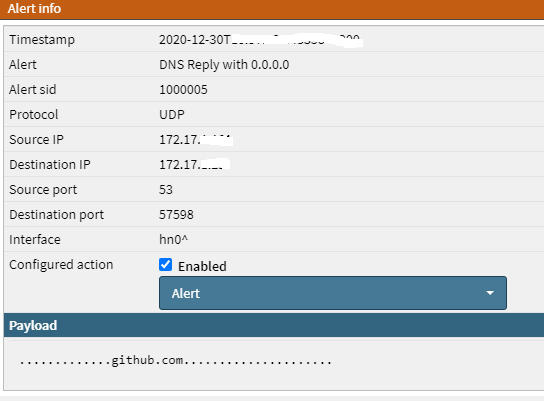
EDIT: as discussed below, a current workaround for those who wish to stick to the web UI or have existing configs working with the local-data entries is to use the suricata alerts (Intrusion Detection service) and enable/disable the alert as needed.
Additional context
Version: OPNsense 20.7.7_1-amd64
 defiantmonkey
All 8 comments
Edited the initial comment, I'm guessing this was marked incomplete because I didn't follow that exact template?
defiantmonkey
on 29 Dec 2020
@defiantmonkey
sorry, and what if the client have backup (second) dns server configured?
 kulikov-a
on 30 Dec 2020
kulikov-a
on 30 Dec 2020
@kulikov-a
I feel that's out of scope since that would be more a configuration issue on the client side than anything else. To explain a little more, if you're setting dns servers on a client and your backup dns servers don't block the same things as your primary dns server, that should be something that whoever is setting up the dns servers on a client should worry about.
To me it doesn't make sense that a DNS server should have to try and compensate for other servers the client may or may not be using.
If this is a mistaken view please explain why as I am not that knowledgable in regards of DNS.
If it turns out that's something that OPNsense should be worrying about, then another solution I can propose is a toggle for the blocking mode (local-data redirect to localhost being default, toggle on to local-zone refuse). This might be a better solution actually so that administrators can configure it based on their own needs.
EDIT: The end goal is to have some sort of way to track what's being blocked, whether it's through the stats or the logs, so if there's an easier/better solution for that then please share.
defiantmonkey
on 30 Dec 2020
@defiantmonkey
I do not think this configuration type is wrong: it is normal practice to have a redundant server, even with less functionality. and most importantly, the proposed change will kill the already working dnsbl configurations with the described redundant servers configs.
This might be a better solution actually so that administrators can configure it based on their own needs.
I would have liked the option with a switch or some other way of customizing records too. but I'm not sure if the devs will like this)
The end goal is to have some sort of way to track what's being blocked
i think about suricata rule for this. not tested yet. will update info
kulikov-a
on 30 Dec 2020
might work. quickly checked by making a suricata rule, adding the github to the blacklist and ping:
kulikov-a
on 30 Dec 2020
Thanks for the explanation, makes more sense now, I cerainly didn't think about others who have already configured things around the current local-data when exploring this.
The alert idea is certainly adequate, and is a more persistent workaround than what I've done, but in my case would not be desirable as I don't want to be alerted every time something is blocked, this would trigger many alerts that I would rather just ignore (ie: during general web browsing).
Probably a little more context I could have added in the beginning, the reason I want the ability to tell if a request was actually blocked or went through is mostly in the case of connecting new devices to a network or installing new software so that I can see which connections I actually want/have to allow vs which connections I don't want/need.
I suppose in my particular case I can get away with configuring a cronjob through the terminal to update that line in the script every time the file is updated (or some other similar method), though having a more officialy supported method of configuration would be nice.
Out of curiosity, do you know why the devs wouldn't be open to the idea of allowing either a toggle between refuse/redirect or some more configurable setting for the DNSBL?
defiantmonkey
on 30 Dec 2020
why the devs wouldn't be open to the idea of allowing either a toggle between refuse/redirect or some more configurable setting for the DNSBL?
I am not suggesting that they will not be open to idea. I just do not know.
For me, any changes should not kill existing configurations, and any complications in configuration should be seriously justified and verified.
I want the ability to tell if a request was actually blocked or went through is mostly in the case of connecting new devices to a network or installing new software so that I can see which connections I actually want/have to allow vs which connections I don't want/need
sorry, imho "suricata alert workaround " should still work, no? you can use (enable) this suricata alert on demand and just collate unbound dns request logs with suricata alerts to understand what was happening. and disable alert when not needed.
in any case - good luck with the FR. some way of tracking DNSBL hits would be very helpful.
kulikov-a
on 31 Dec 2020
I am not suggesting that they will not be open to idea. I just do not know.
Ah okay, sorry for misunderstanding.
For me, any changes should not kill existing configurations, and any complications in configuration should be seriously justified and verified.
I agree, I also believe that should be the case all the time
sorry, imho "suricata alert workaround " should still work, no? you can use (enable) this suricata alert on demand and just collate unbound dns request logs with suricata alerts to understand what was happening. and disable alert when not needed.
Yeah that's definitely also a solution, although the only OPNsense service I'm using so far is Unbound (I plan to do more with OPNsense in the future, this was just a more immediate need for me), so I'd rather not have to configure other services just to have that one feature for one service. The sircata alert workaround definitely works for others who want to stick to the web interface though (or those who have other existing configs relying on local-data redirect).
I will change the request to be an option rather than a hard change.
defiantmonkey
on 31 Dec 2020
Related issues
 namezero111111
·
5Comments
namezero111111
·
5Comments
 icedream
·
4Comments
icedream
·
4Comments
 linuxmail
·
4Comments
linuxmail
·
4Comments
 sooslaca
·
5Comments
sooslaca
·
5Comments
 paride
·
4Comments
paride
·
4Comments
Most helpful comment
@kulikov-a
I feel that's out of scope since that would be more a configuration issue on the client side than anything else. To explain a little more, if you're setting dns servers on a client and your backup dns servers don't block the same things as your primary dns server, that should be something that whoever is setting up the dns servers on a client should worry about.
To me it doesn't make sense that a DNS server should have to try and compensate for other servers the client may or may not be using.
If this is a mistaken view please explain why as I am not that knowledgable in regards of DNS.
If it turns out that's something that OPNsense should be worrying about, then another solution I can propose is a toggle for the blocking mode (local-data redirect to localhost being default, toggle on to local-zone refuse). This might be a better solution actually so that administrators can configure it based on their own needs.
EDIT: The end goal is to have some sort of way to track what's being blocked, whether it's through the stats or the logs, so if there's an easier/better solution for that then please share.