Core: Can't get image or video for rpi_camera on RPI 3B
The problem
Cannot get rpi_camera to work. I have verified that the camera is working on my RPI 3B when running Raspberry OS, and have tried fresh install of Home Assistant. Have tried running v0.112, 0.113 and 0.114, but no luck.
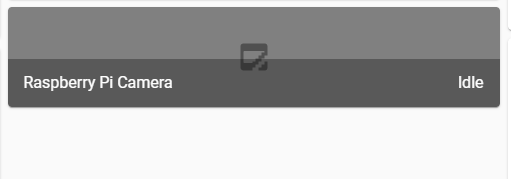
The entity is created, but no image or video.
Should raspistill be available in terminal? It is referenced in the guide, but command is not available in terminal, even when running the "SSH & Web Terminal"-addon with protective mode disabled.
Environment
- Home Assistant Core release with the issue: 0.114.0
- Last working Home Assistant Core release (if known): None
- Operating environment (OS/Container/Supervised/Core): OS (hassos_rpi3-4.12.img.gz)
- Integration causing this issue: rpi_camera
- Link to integration documentation on our website: https://www.home-assistant.io/integrations/rpi_camera/
Problem-relevant configuration.yaml
Below is the complete config for my RPI 3B
# Configure a default setup of Home Assistant (frontend, api, etc)
default_config:

logger:
  default: info
  logs:
    homeassistant.components.rpi_camera: debug

# Text to speech
tts:
  - platform: google_translate

# HTTPS
http:
  ssl_certificate: /ssl/fullchain.pem
  ssl_key: /ssl/privkey.pem

# Camera
rpi_camera:

# Include
group: !include groups.yaml
automation: !include automations.yaml
script: !include scripts.yaml
scene: !include scenes.yaml
Traceback/Error logs
No errors reported in any logs relevant to rpi_camera, even when running debug for the component.
N/A
Additional information
Screenshot:
 ctvedt
All 10 comments
rpi_camera documentation
rpi_camera source
(message by IssueLinks)
![probot-home-assistant[bot] picture](https://avatars2.githubusercontent.com/in/36093?v=4&s=40) probot-home-assistant[bot]
on 13 Aug 2020
probot-home-assistant[bot]
on 13 Aug 2020
Verified that the problem exist for Raspberry Pi 4 Model B (2 GB) as well. No errors in log, but also no image or video. Camera works fine when running Raspberry Pi OS.
Image used for RPI 4B: https://github.com/home-assistant/operating-system/releases/download/4.12/hassos_rpi4-4.12.img.gz
ctvedt
on 15 Aug 2020
Related issue: https://github.com/home-assistant/supervisor/issues/184
ctvedt
on 15 Aug 2020
Verified that the problem also exist for Raspberry Pi 4 Model B (4 GB) as well. (pi camera V2) Also No errors in log, neither image or video.
tried editing config without succes.
 zenoVerboom
on 10 Sep 2020
zenoVerboom
on 10 Sep 2020
Clean install not working on Pi 4 Model B (2 GB), just says camera idle. No errors in logs. This is on the Docker Version 0.114.4
 F5Brewery
on 17 Sep 2020
F5Brewery
on 17 Sep 2020
There seem to be two problems.
First to get the hardware working for a Raspberry Pi with the Home Assistant image. After I changed some boot settings for my raspberry pi, the led on the camera started to work (https://github.com/home-assistant/supervisor/issues/1474.
The second is what you allready mentioned, raspistill is nowhere to be found in the installation set. I have also searched for it with the SSH & Web Terminal"-addon.
 jheling
on 21 Sep 2020
jheling
on 21 Sep 2020
There seem to be two problems.
First to get the hardware working for a Raspberry Pi with the Home Assistant image. After I changed some boot settings for my raspberry pi, the led on the camera started to work (https://github.com/home-assistant/supervisor/issues/1474.
The second is what you allready mentioned, raspistill is nowhere to be found in the installation set. I have also searched for it with the SSH & Web Terminal"-addon.
Could you explain more precisely how did you fix it?
 marcinbauer85
on 26 Oct 2020
marcinbauer85
on 26 Oct 2020
I don't have a solution yet. I'm still looking how to get raspistill on the Raspberry Pi.
jheling
on 26 Oct 2020
I have gotten the camera to work on a 3B+ after much trial and error, and have attempted to document the process at https://gist.github.com/enegaard/a57af286205914bd912270c89650fb1b#file-hassos-rpi-camera-howto-md
This is not an issue with core - the raspistill program is installed in /usr/local/bin in the core (homeassistant) container. It's more an issue with the HASSOS operating-system that does not install the start_x.elf and fixup_x.dat firmware files by default - if it did, getting the camera to work would be MUCH easiser.
 enegaard
on 2 Nov 2020
enegaard
on 2 Nov 2020
I have opened a new operating-system issue to request the inclusion of the alternate firmware files in future HASSOS builds (https://github.com/home-assistant/operating-system/issues/947).
enegaard
on 2 Nov 2020
Related issues
 i-am-shodan
·
3Comments
i-am-shodan
·
3Comments
 sogeniusio
·
3Comments
sogeniusio
·
3Comments
 kirichkov
·
3Comments
kirichkov
·
3Comments
 neonandu
·
3Comments
neonandu
·
3Comments
 sh0rez
·
3Comments
sh0rez
·
3Comments