Core: Error, when using strictTemplates in Angular 9.
Enabling the new strictTemplates flag in Angular 9's compiler options generates the following build error:
This likely means that the library (@ngx-translate/core) which declares TranslateModule has not been processed correctly by ngcc, or is not compatible with Angular Ivy. Check if a newer version of the library is available, and update if so. Also consider checking with the library's authors to
see if the library is expected to be compatible with Ivy.
 andzejsw
All 13 comments
I'm having the exact same problem after moving to Angular 9. Has anyone had a chance to look into this?
 sergiotome
on 1 Apr 2020
sergiotome
on 1 Apr 2020
Same problem here. Ngx-translate is no longer compatible with Angular?
 dcolakchile
on 7 Apr 2020
dcolakchile
on 7 Apr 2020
Same problem here. It can't solve it yet. Some have any solution?
 Cfvillarroel
on 9 Apr 2020
Cfvillarroel
on 9 Apr 2020
Hi guys, this fixed the problem for me:
npm cache verify
Remove the node modules
rm -rf node_modules
And npm install again and it works properly.
Cfvillarroel
on 9 Apr 2020
@Cfvillarroel Thanks, fixed mine also.
 dinirichard
on 15 Apr 2020
dinirichard
on 15 Apr 2020
Same error @Cfvillarroel solution didn't fix mine
ERROR in node_modules/@ngx-translate/http-loader/lib/http-loader.d.ts:4:22 - error NG6002:
Appears in the NgModule.imports of AppModule, but could not be resolved to an NgModule class.

This likely means that the library (@ngx-translate/http-loader) which declares
TranslateHttpLoader has not been processed correctly by ngcc, or is not compatible with Angular
Ivy. Check if a newer version of the library is available, and update if so. Also consider checking
with the library's authors to see if the library is expected to be compatible with Ivy.
 MrRaymondVO
on 17 Apr 2020
MrRaymondVO
on 17 Apr 2020
@Cfvillarroel fvillarroel Works for me! Thanks!
Hi guys, this fixed the problem for me:
npm cache verifyRemove the node modules
rm -rf node_modulesAnd npm install again and it works properly.
 S1nPur1ty
on 18 Apr 2020
S1nPur1ty
on 18 Apr 2020
I'm facing same issue as @MrRaymondVO. Fix don't work. Used latest versions of Angular 9 and ngx-translate.
 mdudek
on 20 Apr 2020
mdudek
on 20 Apr 2020
@Cfvillarroel Thanks,
guys, this fixed the problem for me:
npm cache verify
 peposhh
on 24 Apr 2020
peposhh
on 24 Apr 2020
@mdudek I was able to fixit this way in the app module
TranslateModule.forRoot({
      loader: {
        provide: TranslateLoader,
        useFactory: (http: HttpClient) => {
          return new TranslateHttpLoader(http, "./assets/i18n/", ".json");
        },
        deps: [HttpClient],
      },
    }),
MrRaymondVO
on 26 Apr 2020
I have same issue. The fix don't work.
 mazenkt
on 28 Apr 2020
mazenkt
on 28 Apr 2020
@mdudek I was able to fixit this way in the app module
TranslateModule.forRoot({ loader: { provide: TranslateLoader, useFactory: (http: HttpClient) => { return new TranslateHttpLoader(http, "./assets/i18n/", ".json"); }, deps: [HttpClient], }, }),
@MrRaymondVO Thanks a lot, it worked! Can you explain a bit?
 atj393
on 6 May 2020
atj393
on 6 May 2020
@atj393 basically this is what I did
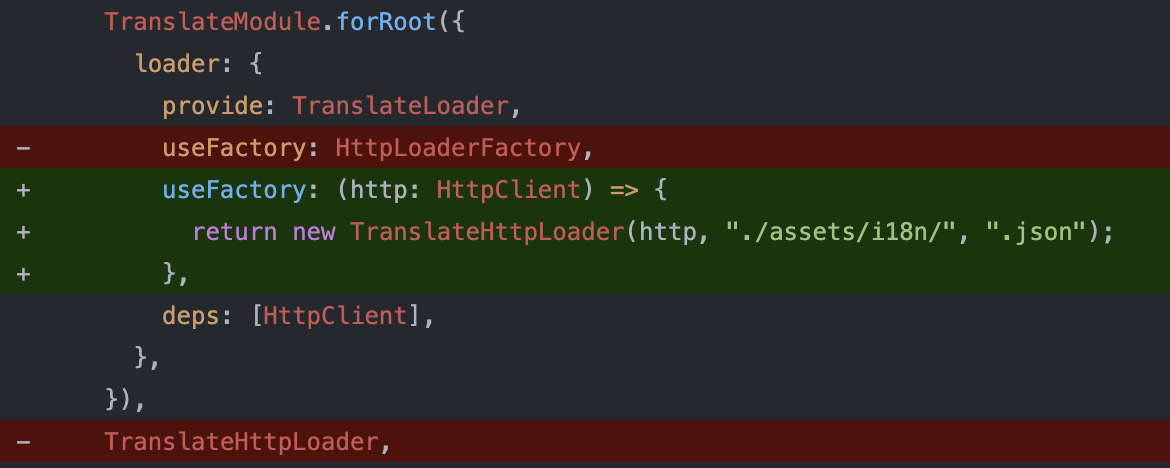
MrRaymondVO
on 7 May 2020
Related issues
 jlberrocal
·
24Comments
jlberrocal
·
24Comments
 jbarber2016
·
26Comments
jbarber2016
·
26Comments
 chaouiy
·
172Comments
chaouiy
·
172Comments
 gamazeps
·
36Comments
gamazeps
·
36Comments
 frederikschubert
·
52Comments
frederikschubert
·
52Comments
Most helpful comment
Hi guys, this fixed the problem for me:
npm cache verify
Remove the node modules
rm -rf node_modules
And npm install again and it works properly.