Core: Angular 6 library with ngx-translate
When I create a library using angular 6 cli by using ng generate library, I want to use ngx-translate inside of the library.
Current behavior
ng build libraryname doesn't export and http loader cannot find the i18n location I specified.
Expected behavior
How do you think that we should fix this?
Minimal reproduction of the problem with instructions
Environment
ngx-translate version: 10.0.2
Angular version: 6.1.4


Browser:
N/A

For Tooling issues:
- Node version: 10.8.0
- Platform: Windows

Others:
 jbarber2016
All 26 comments
Could you please specify more information, such as your libraryname's imports and exports?
If you're using translate loader, take a look at https://github.com/ngx-translate/core#configuration.
 ease
on 28 Aug 2018
ease
on 28 Aug 2018
@ease Maybe if there's an example of using ngx-translate inside an Angular 6 library project (not an app project), that'd help? If no such thing exists, I'll try to create a minimal version of what I'm doing and the issues I'm facing. They're similar, at least, to what @jbarber2016 is getting.
 jameslafferty
on 29 Aug 2018
jameslafferty
on 29 Aug 2018
@jameslafferty Do you have the exact same problem jbarber2016 has? If so, please provide that minimal version and I'll do my best to figure out what's the problem.
Based on the information we have at this moment, there could be multiple reasons why it doesn't work. Waiting for more info.
ease
on 30 Aug 2018
Not sure if it's precisely the same thing, but I'll try and get a minimal version of what I'm seeing together this evening (PDT). Thanks for the quick reply!
jameslafferty
on 30 Aug 2018
After putting in a bit of effort, I wasn't able to fully get to my exact issue (our setup has a fair amount of complication). I was, however, also unable to locate a custom loader or missing translation handler provided in my library project to be called when a library component was called in the consuming app. That's really the critical use case for us, and, I suspect, for @jbarber2016 as well.
The repo with the example is here: https://github.com/jameslafferty/ngx-translate-example-project
jameslafferty
on 30 Aug 2018
My issue is a limitation in Angular CLI and libraries. There is an issue created over at the Angular CLI github, and seems they have hacks to fix.
jbarber2016
on 30 Aug 2018
I was just trying to make ngx-translate work with Angular 6 libraries, using one i18n folder per library.
The architecture I'm trying to replicate is described here.
- I did not manage to use a specific loader for each lib using forChild and isolate: true in the library module configuration. In the end, it was always the root test application loader that was used. I worked around that by overriding the TranslateService.currentLoader property in the library root component, but that might have some side-effects I'm not seeing yet.
- Even when using the workaround above, the loader can't locate the i18n folder in the library assets. I found out that, again, it just looks in the root app assets folder. As @jbarber2016 mentioned, it might be a CLI issue, since the CLI doesn't package the library assets folder, if my understanding is right?
 TheBrao
on 30 Aug 2018
TheBrao
on 30 Aug 2018
@TheBrao Yes, that's right. I have an assets/i18n folder with json files for different languages in my library and if you look at this issue here you will see many people talking about hacks. I didnt want to use gulp solution because I'm using the CLI to build.
jbarber2016
on 30 Aug 2018
@jbarber2016 Is my reproduction relevant to your issue at all? Or is it totally besides the point. If it's not _apropos_ to this, I'll happily remove it from here and raise a separate issue. :)
jameslafferty
on 30 Aug 2018
I think it's appropriate.
jbarber2016
on 31 Aug 2018
@jameslafferty please provide working version of your repository for 'ng serve' command. Currently, I'm seeing the following - http://prntscr.com/kq7sgr, probably because you've put /dist destination in tsconfig.
@jbarber2016 After putting efforts on finding the best solution for you case, unfortunately (based on the current possibilities) I think you should manually copy your assets folder to the /dist/your-lib-project-name and pack your library afte doing it. Upon completion, you should be able to have your translations available and visible to your app's imports.
Also, if nothing happens this way, try with defining and exporting your localizations as .ts files with simple object that contains your translation, so it's:
export const engLocaleKeys = {
  "my-translation": "Hello world!"
}
Your public_api.ts:
export * from './lib/localization/index';
It should look like:
http://prntscr.com/kq7zd0
Inside of app.component.ts of your main app, or anywhere else where you tell your app the location of translations you use, do the following:
import { engLocaleKeys } from 'your-lib-name-inside-of-package.json';
It should work with objects instead of .json without single problem.
ease
on 3 Sep 2018
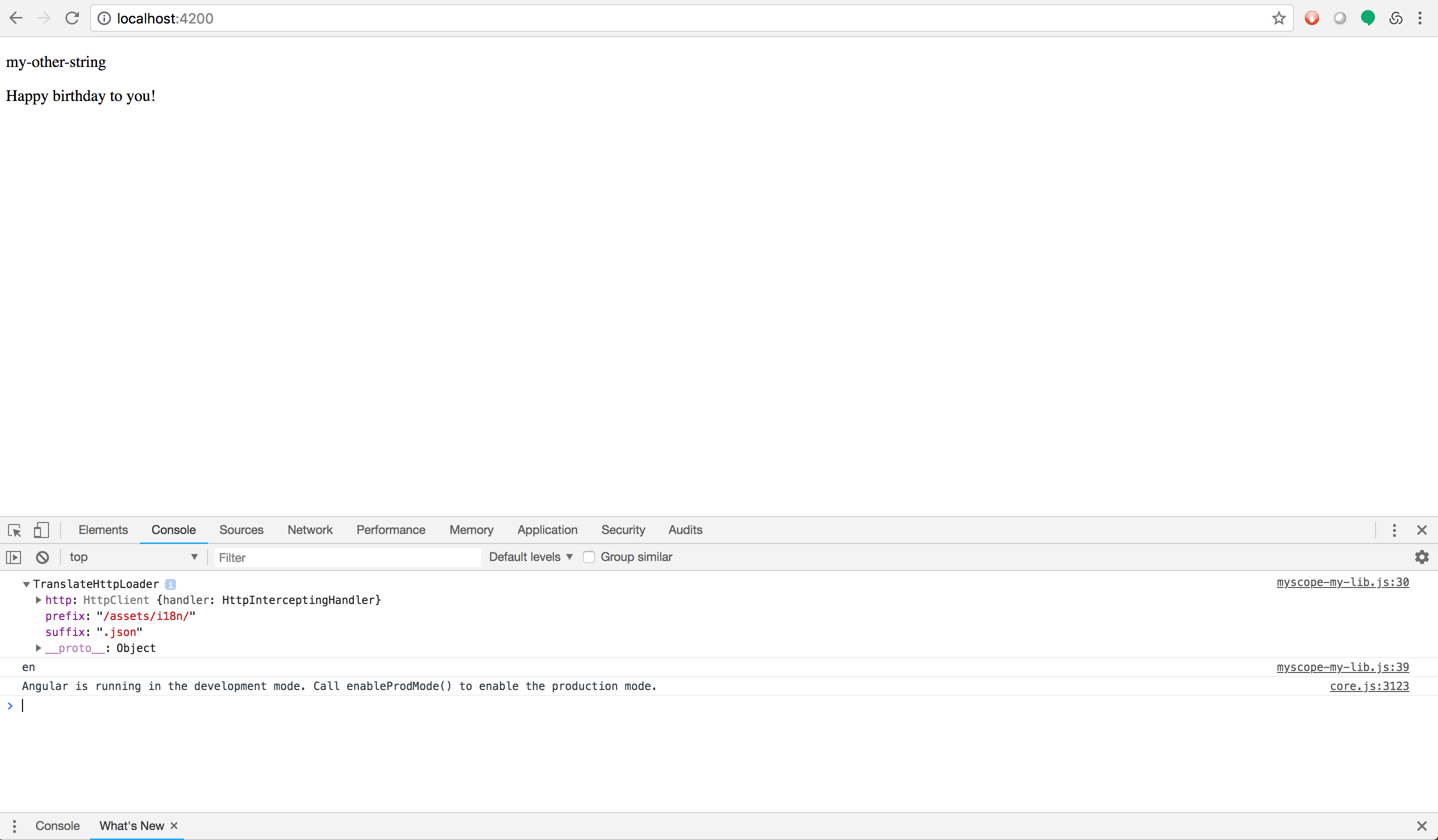
@ease Since @myscope/my-lib is a library, you need to do ng build @myscope/my-lib before running ng serve.
jameslafferty
on 5 Sep 2018
@jameslafferty I've spent couple of hours investigating your problem.
Your GitHub example freaked me out. Please be careful while providing examples of your code.
There's one small, but really important difference, typo:
Your translation key inside of my-demo app is named: 'my-string' - see here
But your translation key inside of my-lib is different: 'my-other-string' - see here so it was the starting point to investigate this issue, because provided translation does not exist.
And guess what, it worked out of the box - http://prntscr.com/krha3w
Just change _my-string_ to _my-other-string_ inside of en.json to match the key provided in your template, or vice versa.
@jbarber2016
The way I load translations for main app and library as well is to have library-related translations as an object inside of my library and having them exported, just like mentioned above - https://prnt.sc/kq7zd0. After that, inside of app.component.ts of my main application, I do import library-related translations and also translations located in my main app and use translateService.setTranslation method.
If you still need help, please provide GitHub repository so we can run your app.
ease
on 6 Sep 2018
@ease That's actually intentional. The issue is that my child missing translation handler and child loader aren't getting called. Yep, if the main app translations are there, it does work. Sorry that the example was a bit ambiguous.
jameslafferty
on 7 Sep 2018
(It's certainly possible, btw, that I'm misunderstanding how the forChild function is supposed to work.)
jameslafferty
on 7 Sep 2018
@jameslafferty please provide working version of your repository for 'ng serve' command. Currently, I'm seeing the following - http://prntscr.com/kq7sgr, probably because you've put /dist destination in tsconfig.
@jbarber2016 After putting efforts on finding the best solution for you case, unfortunately (based on the current possibilities) I think you should manually copy your assets folder to the /dist/your-lib-project-name and pack your library afte doing it. Upon completion, you should be able to have your translations available and visible to your app's imports.Also, if nothing happens this way, try with defining and exporting your localizations as .ts files with simple object that contains your translation, so it's:
export const engLocaleKeys = {
  "my-translation": "Hello world!"
}
Your public_api.ts:
export * from './lib/localization/index';It should look like:
http://prntscr.com/kq7zd0
Inside of app.component.ts of your main app, or anywhere else where you tell your app the location of translations you use, do the following:
import { engLocaleKeys } from 'your-lib-name-inside-of-package.json';It should work with objects instead of .json without single problem.
@ease Can you give a detailed description of this implementation method, I am a newcomer to angular, so I can't understand what you mean, thank you very much.
 ZCatherine
on 25 Oct 2018
ZCatherine
on 25 Oct 2018
@ZCatherine What's the certain problem you have? Aforementioned explanation seems enough detailed, but if you need additional help, please provide some information that would be helpful for us to provide you better explanation.
ease
on 25 Oct 2018
@ease I am building a Angular 6 application with several libraries .
when I build my application, the assets in library will be thrown away.
I don't want to copy the assets folder because different teams are responsible for different libraries,so I want to use the second method you proposed,but I am a newcomer to angular and I don't know if I should modify the loader how to modify the following sections.
Thank you.

ZCatherine
on 25 Oct 2018
Since the loader currently only supports .json files, you are not able to use the second option - https://prnt.sc/kq7zd0.
I suggest you to use either translate.setTranslation or manually copying assets folders where your JSONs are.
I haven't tried loading the translations with TranslateHttpLoader, but I guess you should be able to load .json even from a custom folder under your library's folder.
I'm writing all of this assuming you're having problem with exporting and using the translation from Angular library.
Please provide as much as possible information, if you still have a problem.
ease
on 25 Oct 2018
Hi, I try to integrate a library with the module ngx-translate and associated json files, within a project also with ngx-translate and its associated json files. However i can't see the translations. This is my code in app.module.ts in library:
export class Loader implements TranslateLoader {
  private translations = new Subject();
  $translations = this.translations.asObservable();
  getTranslation(lang: string) {
    return this.$translations;
  }
}

export class Awol implements MissingTranslationHandler {
  handle(params: MissingTranslationHandlerParams) {
    return '... and many more';
  }
}

export function HttpLoaderFactory(http: HttpClient) {
  return new TranslateHttpLoader(http, '../assets/login-lib/i18n/', '.json');
}

@NgModule({
  imports: [
    TranslateModule.forChild({
      loader: {
        provide: TranslateLoader,
        useFactory: HttpLoaderFactory,
        deps: [HttpClient]
      },
      missingTranslationHandler: {
        provide: MissingTranslationHandler,
        useClass: Awol
      }
    }),
  ...  ],
  declarations: [
   ...  ],
  exports: [
    ...,
    TranslateModule
  ],
  entryComponents: [
   ...
   ]
})
export class LoginLibModule { }
and this is my code in app.module in project:
@NgModule({
  declarations: [
    AppComponent,
  ],
  imports: [
    .....,
   TranslateModule.forRoot({
      loader: {
        provide: TranslateLoader,
        useFactory: HttpLoaderFactory,
        deps: [HttpClient]
      }
    })
  ],
  providers: [],
  bootstrap: [AppComponent]
})
export class AppModule {
  constructor(translate: TranslateService) {
    translate.setDefaultLang('en');
    translate.use('en');
  }
}

export function HttpLoaderFactory(http: HttpClient) {
  return new TranslateHttpLoader(http);
}
 ruizenrmar
on 6 Nov 2018
ruizenrmar
on 6 Nov 2018
@ruizenrmar Exactly, that is the use case.
I think it is a good design that the translations of the libraries live in the library. Otherwise, the main app will contain translations from code that is not present in that library. Does that make sense to you @ease ?
 sergiojoker11
on 22 Nov 2018
sergiojoker11
on 22 Nov 2018
You're right @sergiojoker11, but please have in mind that maybe something is set wrong in @ruizenrmar's example, as we don't have the whole repository of his example.
@ruizenrmar, could you please provide GitHub link of your repository, so I can pull the code and do the test locally? What about your public_api.ts files in your library? Did you expose your localization files in it? Something that I was pointing at in comments above?
ease
on 22 Nov 2018
Any news on this issue? I'm building a library for Angular and still have problems to make it work with the translations
 Dunos
on 19 Apr 2019
Dunos
on 19 Apr 2019
I think it's worth pointing out that factories like return new TranslateHttpLoader(http, '../assets/login-lib/i18n/', '.json'); in library modules runs in runtime.
Therefore the path relates to dist folder after building client app that consumes this library.
Even if you manage to deploy your assets with custom builder like @linnenschmidt/build-ng-packagr:build, the client app still needs to copy assets into it's own assets during the build.
How? Using angular.json's assets array and having a glob that grabs them from node_modules folder your library lives in? Might work for production build but not for development.
That's the issue I am facing.
 GeorgeKnap
on 22 Oct 2019
GeorgeKnap
on 22 Oct 2019
I'm facing the same issue. I'm looking for a way to use translation json inside my lib.
 BenDevelopment
on 10 Mar 2020
BenDevelopment
on 10 Mar 2020
@ocombe can we have some solution for this. This is a critical requirement for a lot of applications. Kindly help with a solution.
 mohammedzamakhan
on 30 Jul 2020
mohammedzamakhan
on 30 Jul 2020
Related issues
 digaus
·
24Comments
digaus
·
24Comments
 peterpeterparker
·
46Comments
peterpeterparker
·
46Comments
 gjuchault
·
25Comments
gjuchault
·
25Comments
 doxiaodong
·
26Comments
doxiaodong
·
26Comments
 estradamarkie
·
27Comments
estradamarkie
·
27Comments
Most helpful comment
I'm facing the same issue. I'm looking for a way to use translation json inside my lib.