Describe the bug
Not able to create a new working alias - old ones are working good
19.1.6
NOT UPDATED/NOT REBOOTED because feeling curious if currently working alias also begin to fail. - Possible to debug a little more first?
First thought it is related to alias on floating rules. But is not limited to that. Don't think so but mention the old issue where I also had problems: #3321
To Reproduce
Steps to reproduce the behavior:
- Go to Firewall/Alias
- Create a new alias, type host(s) with name h_t_itops_repo (had a longer before), IP xx.xx.xx.12
(tried that to with an Alias type network and xx.xx.xx.12/32) - (A) Used the alias on Floating Rule (incoming to ip)
- PASS
- IPv4
- TCP
- Source Any
- Destination: ALIAS h_t_itops_repo
- Destination Port: HTTP HTTPS
- (B) Used the alias on Interface (outgoing from ip)
- PASS
- IPv4
- TCP/IP
- Source: ALIAS h_t_itops_repo
- Destination: any
- Destination Port: HTTP HTTPS
Expected behavior
Traffic should be passed in both rules, but isn't. As soon as i change the rules to use the ip instead of the alias, traffic is passed through.
Screenshots
Floating rule
not working

Working

Interface rule
not Working

Working

Relevant log files
not working
pass inet proto tcp from {any} to $h_t_itops_repo port $pg_HTTP_HTTPS keep state label "USER_RULE: 1122REPORULE" # f53a6faaf0b327cddd53ad2d684ef22a
pass in quick on vmx2_vlan602 inet proto {tcp udp} from $h_t_itops_repo to {any} port $pg_HTTP_HTTPS keep state label "USER_RULE: 1122REPORULE" # 7b7e21c152105d90c470d54457d64c9c
working
 grep 1122 /tmp/rules.debug
pass inet proto tcp from {any} to {10.40.2.58} port $pg_HTTP_HTTPS keep state label "USER_RULE: 1122REPORULE" # c9eb0325669251250be0c4031f1ae357
pass in quick on vmx2_vlan602 inet proto {tcp udp} from {10.40.2.58} to {any} port $pg_HTTP_HTTPS keep state label "USER_RULE: 1122REPORULE" # cff36fecc774b83a007504ee24fb9707
Additional context
Add any other context about the problem here.
Environment
(2x) VMWARE Virtual Guest in HA
OPNsense 19.1.6-amd64
FreeBSD 11.2-RELEASE-p9-HBSD
OpenSSL 1.0.2r 26 Feb 2019
 katamadone
All 11 comments
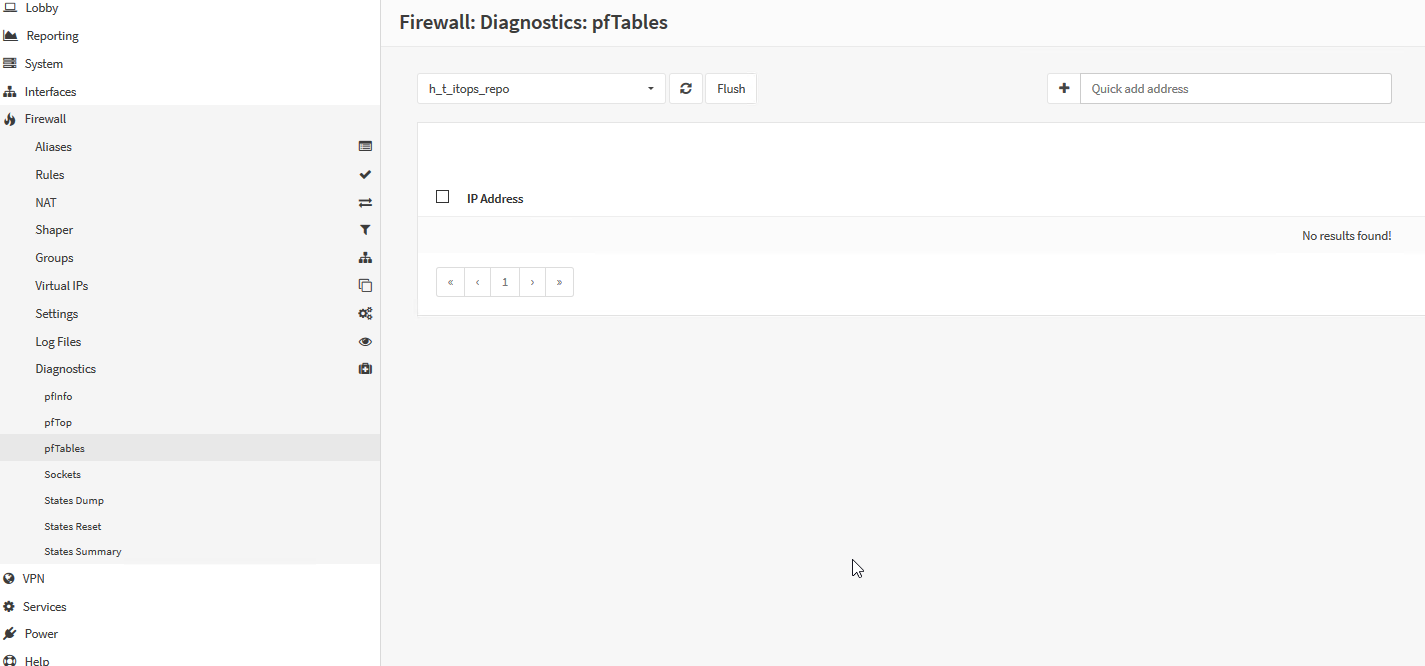
just found something - Firewall Diagnostics pfTables
the entry for h_t_itops_repo is empty
katamadone
on 16 May 2019
did you hit apply (in the alias form)? if not, please inspect the logs for anything out of the ordinary.
 AdSchellevis
on 16 May 2019
AdSchellevis
on 16 May 2019
yes
katamadone
on 16 May 2019
just created an additional one and hit apply - but no usage in a rule, only to test adding an Alias - same problem: emtpy in pfTables
katamadone
on 16 May 2019
(same on primary and secondary)
katamadone
on 16 May 2019
There was a relevant alias fix in 19.1.7.
 fichtner
on 16 May 2019
fichtner
on 16 May 2019
sure? - thought I looked over the release notes? - let me try
katamadone
on 16 May 2019
https://github.com/opnsense/core/commit/ea2f217cf3213cc12a94155d3b5a5d5f9ea8bc43 in which case this would be a duplicate of https://github.com/opnsense/core/issues/3399
AdSchellevis
on 16 May 2019
ok.. updated slave to 19.1.7 and pftable shows now the entry correctly. And sure the rules are working.
I'm sorry that I overlooked that fix. Is there any way to donate you both a 🍺 ?
katamadone
on 16 May 2019
No worries, all good. Thanks for the quick feedback :)
fichtner
on 16 May 2019
would love to
katamadone
on 16 May 2019
Related issues
 icedream
·
4Comments
icedream
·
4Comments
 StevenNexus
·
6Comments
StevenNexus
·
6Comments
 BPtLNfxZWo
·
3Comments
BPtLNfxZWo
·
3Comments
 mimugmail
·
6Comments
mimugmail
·
6Comments
 paride
·
4Comments
paride
·
4Comments