Core: Unable to use port ranges in traffic shaper
When trying to create firewall shaper rules. The UI will not allow entering of port ranges for _dst-port_ or _src-port_ fields. Please see example marked up screen capture.

 StevenNexus
All 6 comments
I'm seeing this same behavior, was trying to set up a rule to prioritize mosh traffic, which uses a range of UDP ports.
 2bithacker
on 28 Jan 2019
2bithacker
on 28 Jan 2019
I think this worked by accident a long time ago, our port validator seems to be missing support for ranges. I'll put it on my list.
 AdSchellevis
on 28 Jan 2019
AdSchellevis
on 28 Jan 2019
https://github.com/opnsense/core/commit/0f6b29f5bbe15e7bf3b2e276f36e4921626d2e1e should do the trick
AdSchellevis
on 28 Jan 2019
Do I test this patch by running the dev branch or can I test this patch using production 18.7.10_3-amd64?
StevenNexus
on 29 Jan 2019
I think it fits 18.7 too, we'er very busy with 19.1 at the moment, so you have to test for yourself to be sure.
AdSchellevis
on 30 Jan 2019
Is there no way to use an alias for these fields? That, comma separated, or by using tab as shown here?
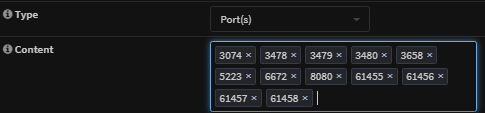
The image shows a list of non-contiguous ports that I'm trying to use in two separate traffic shaper rules, and I just updated to 20.1.3 from 19.7.8 in hopes of fixing this. In _both_ releases, I can only enter one range. It will accept one port at a time, or a single range, but not a combination. I tried the same in Src-port just to test and it's the same result.
I even tried manually downloading
PortField.php
and
TrafficShaper.xml
and updating them in their respective folders via ssh, but the issue persists.
Is there something I'm missing? Has anyone else been able to use aliases or more than one range per rule?
 beemac88
on 3 Apr 2020
beemac88
on 3 Apr 2020
Related issues
 icedream
·
4Comments
icedream
·
4Comments
 TransLunarInjection
·
7Comments
TransLunarInjection
·
7Comments
 Stephanowicz
·
6Comments
Stephanowicz
·
6Comments
 darkain
·
4Comments
darkain
·
4Comments
 maurice-w
·
4Comments
maurice-w
·
4Comments