Core: Unbound DNS DHCP registration can stop working intermittently
I have found that the registration of dhcp-hostnames in Unbound DNS does not always work as expected. Looking at the scripts involved (/usr/local/opnsense/scripts/dns/unbound_dhcpd.py and /usr/local/opnsense/site-python/watchers/dhcpd.py) I think I have found two potential issues:
1.) From time to time dhcpd moves dhcpd.leases to dhcpd.leases~ and writes a new and usually smaller dhcpd.leases file (easiest example is restart of dhcpd). In this case it looks like the watcher stays on the now stale dhcpd.leases~ and will only re-open the live one when that file gets deleted by the next rotation. So the mechanism stops working and then "repairs" itself again at a later time.
2.) The content of /var/unbound/dhcpleases.conf and what is actually registered in the Unbound instance can grow appart. For example if a host changes its name a new entry will be written into dhcpleases.conf but Unbound will not be notified vi unbound-control because the address is already in known_addresses. The same could probably also happen if a lease gets reused by another host because it looks like there is no cleanup in the known_addresses list.
Restarting Unbound DNS fixes both issues
Tested in 19.1.7
 clystron
All 22 comments
I have now confirmed point 1 by logging the size of the watched file as returned by os.fstat. The filesize increases when new leases are added until dhcpd writes a new leases file. After that it stays at the size of the backup-file (dhcpd.leases~) and does not increase anymore. Find attached a small patch for /usr/local/opnsense/site-python/watchers/dhcpd.py that compares the sizes returned by os.fstat for the open filehandle and os.stat for the watched filename and reopens the file if they are different. I am not very well versed in python so there may be better solutions or there may be stuff missing but this makes the watcher reopen the wanted file after dhcpd has rotated it.
clystron
on 14 May 2019
This Issue is flagged "incomplete" - can someone explain what other information is needed. I'm happy to add what's missing.
 bergfink
on 21 May 2019
bergfink
on 21 May 2019
Would be nice to have a fix for this once and for all!
Some of the related threads about this issue:
https://github.com/opnsense/core/issues/435 (closed
https://github.com/opnsense/core/issues/1320 (closed)
https://github.com/opnsense/core/issues/3478 (Open)
https://forum.opnsense.org/index.php?topic=5318.msg21596#msg21596 (open)
(Sad to see several has been closed when the issue has not been solved)
Still doesn't work in newest version 19.1.8!
See attachment for an example of the problem.
 MrM40
on 1 Jun 2019
MrM40
on 1 Jun 2019
@MrM40 are you planning to work on "it"? (note the labels on the issue, it all starts with a clear issue description and people willing to work on solving things)
 AdSchellevis
on 1 Jun 2019
AdSchellevis
on 1 Jun 2019
Did I not describe the issue(s) I have investigated in enough detail? If there is stuff missing I can provide more information but there has been no reaction so far. I have also appended a patch to detect the rotation of dhcpd.leases and react to it, that should show that I am willing to do more than just report an issue.
clystron
on 1 Jun 2019
@clystron my response is about the list of "related" issues and exclamation mark of @MrM40, plain and simple. The incomplete tag on the issue means that the bug or feature request wasn't created using our templates.
I'll take a look at the watcher script, thanks.
Please remember, we're with a small group of people, how more structured the input is, the larger the chances of getting improvements through (a PR with the same patch and explanation might have been handled faster in this particular case for example).
AdSchellevis
on 2 Jun 2019
@clystron https://github.com/opnsense/core/commit/40bd0c5dc8212d5584daf741b27372afb72be533 should fix the issue, since I don't know how to force a rotate in dhcpd, I've tested the library function with the manual steps below (assuming dhcpd does something similar).
rm /var/dhcpd/var/db/dhcpd.leases~
mv /var/dhcpd/var/db/dhcpd.leases /var/dhcpd/var/db/dhcpd.leases~
cp /var/dhcpd/var/db/dhcpd.leases~ /var/dhcpd/var/db/dhcpd.leases
To install on a fresh 19.1.8:
opnsense-patch 40bd0c5
Feel free to reopen if this doesn't fix the rotate issue.
AdSchellevis
on 2 Jun 2019
Your're quick :-) Look forward to try it out
MrM40
on 2 Jun 2019
Thanks for clarifying why this was marked incomplete and for checking out the patch, I'll stick to the templates for future issues. Investigating an issue in unknown code/unfamiliar languages is usually easier (for me) than providing a usuable fix, thats why I first tried to describe what I found. I know that "feature x does not work sometimes" is not a very helpfull report, thats why I only opened the issue after having identified what could be the cause.
dhcpd usually rotates the file when it gets restarted, I can also run your patch on my test-setup next week.
clystron
on 2 Jun 2019
It seems new hosts are now correctly parsed from DHCP to Unbound DNS :-)
But if the host gets a new IP from the DHCP, Ubound DNS doesn't seem to get informed:

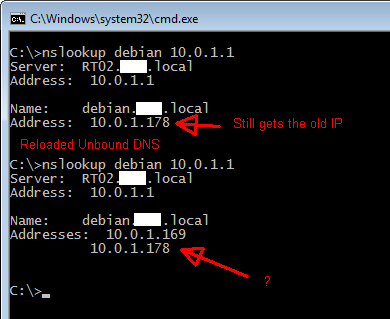
Cannot tell if its correct that also the "old" IP's should still be in the DNS. Both are in the DHCP table, of course one will be newer than the other.
MrM40
on 2 Jun 2019
If both leases are still valid I would totally expect them both to be there, if one is expired it should be removed from /var/unbound/dhcpleases.conf eventually. Because unbound only gets notified for new leases this will require a restart of unbound.
clystron
on 3 Jun 2019
Issue still persist in version OPNsense 19.7.3-amd64.
You still have to restart the Unbound DNS service ti get the newest DHCP assigned host/IP parsed to DNS.
Attaching documentation (but it's basically the same as before and has been since beginning of time).
UnboundDNS_DHCP_error.pdf
MrM40
on 1 Sep 2019
FYI Dnsmaq DNS seem to work fine in this regard (don't know if that help)
MrM40
on 1 Sep 2019
I am still seeing the same behavior in OPNsense 20.1-amd64
DNS is resolving older DHCP leased addresses, but new ones do not resolve until a reboot of unbound.
 dragonian
on 16 Feb 2020
dragonian
on 16 Feb 2020
Me too! This is a rather vital part of any IT infrastructure, and it's a same we still have to struggle with this.
MrM40
on 16 Feb 2020
I also can confirm that behaviour, have to restart unbound to force reading the new leases.
 hkirschk
on 24 Feb 2020
hkirschk
on 24 Feb 2020
I'm observing the same behavior too. Can we get this fixed please!?
 miminno
on 4 Mar 2020
miminno
on 4 Mar 2020
Just ran into this problem with the latest OPNSense (20.7.8-amd64). I added a new linux client to my network, which is set to DHCP. I have register DHCP leases enabled on OPNSense.
I could not resolve the new client name on another machine (trying to ping etc.). Was banging my head against a wall trying to figure this out.... assuming it was a problem with the Linux client.
After much googling, I found this bug, and after restarting the Unbound service, the name resolution started working again.
This bug still seems to be pretty active. Would be great to get this fixed to prevent future headaches.
 YTN0
on 21 Jan 2021
YTN0
on 21 Jan 2021
I think we need to fix it ourselves, been begging to get this fixed for years :-(
it seem this issue both exist in Dnsmasq and Unbound DNS, so it's likely the problem has to be solved on the DHCP server, somehow it doesn't get the DNS servers updated in some situations (in some it works). Does anyone know how the DNS servers are supposed to be updated by the DHCP server? Will the DHCP just update some file and then the DNS server must be reloaded/restarted every time?
MrM40
on 21 Jan 2021
@MrM40 Unbound and Dnsmasq are different in that regard, for Unbound it's quite interactive and parses the leases on changes, next registers these changes in the dns component without a restart using https://github.com/opnsense/core/blob/master/src/opnsense/scripts/dns/unbound_dhcpd.py. I haven't seen issues with it for a long time, quite some people use this without issues, which is probably why it doesn't help to beg (a proper report which can be reliably replicated on a someone else's setup usually has more chance of gaining attention)
AdSchellevis
on 21 Jan 2021
Also, as per https://github.com/opnsense/core/blob/master/CONTRIBUTING.md pinging stale tickets is discouraged for the same reasons @AdSchellevis mentioned.
 fichtner
on 21 Jan 2021
fichtner
on 21 Jan 2021
But since both DNS services seem to be affected, I would think the issue is related to the DHCP server. What code parse the updates to the DNS servers (unbound / Dnsmasq)?
MrM40
on 21 Jan 2021
Related issues
 TransLunarInjection
·
7Comments
TransLunarInjection
·
7Comments
 icedream
·
4Comments
icedream
·
4Comments
 Kimotu
·
4Comments
Kimotu
·
4Comments
 mimugmail
·
6Comments
mimugmail
·
6Comments
 StevenNexus
·
6Comments
StevenNexus
·
6Comments
Most helpful comment
@clystron https://github.com/opnsense/core/commit/40bd0c5dc8212d5584daf741b27372afb72be533 should fix the issue, since I don't know how to force a rotate in dhcpd, I've tested the library function with the manual steps below (assuming dhcpd does something similar).
To install on a fresh 19.1.8:
Feel free to reopen if this doesn't fix the rotate issue.