Core: Static route to route-based IPsec gateway does not get configured after reboot
Important notices
Before you add a new report, we ask you kindly to acknowledge the following:
[X] I have read the contributing guide lines at https://github.com/opnsense/core/blob/master/CONTRIBUTING.md
[X] I have searched the existing issues and I'm convinced that mine is new.
Describe the bug
We have setup route-based IPsec with the necessary gateway. We added a static route for our remote LAN that points to the IPsec gateway. After reboot the static route does not get applied anymore (still visible in Configuration but not in Status). Similar issue #2388.
To Reproduce
Steps to reproduce the behavior:
- Setup a route-based IPsec (see https://wiki.opnsense.org/manual/how-tos/ipsec-s2s-route-azure.html)
- Then reboot
- Static route is still configured but not applied
Expected behavior
Route being set
Screenshots


Relevant log files
Cannot find anything in the logs
Environment
OPNsense 19.1.4-amd64
Intel(R) Xeon(R) CPU D-1518 @ 2.20GHz (8 cores)
Network Intel® I210-AT
 alexanderharm
All 76 comments
So 9046727 should work for tunnels on static IPs... but it needs more work unfortunately. You can try it and let us know:
# opnsense-patch 9046727
Cheers,
Franco
 fichtner
on 25 Apr 2019
fichtner
on 25 Apr 2019
@fichtner Works for us in 19.1.4
Thanks for the quick fix.
alexanderharm
on 28 Apr 2019
Thanks, I'll bring this workaround into 19.1.7 and will work on a better solution for 19.7.
fichtner
on 29 Apr 2019
Apparently, this issue is a burden to 19.7.4_1 in continuity. This is rather unfortunate as it makes more flexible VTI difficult and not as reliable as hoped.
Please be aware this may hinder deployment aims and seems to contradict the OPNsense own advertisement "to run dynamic routing protocols over the tunnel to create more redundant, or software-defined networks."
 TP75
on 26 Sep 2019
TP75
on 26 Sep 2019
Only to clarify, dynamic routing is NOT affected by this issue, as these routes are learned dynamically by FRR and not configured via OPN itself, so the "advertisement" is still true :)
 mimugmail
on 26 Sep 2019
mimugmail
on 26 Sep 2019
Only to clarify, dynamic routing is NOT affected by this issue, as these routes are learned dynamically by FRR and not configured via OPN itself, so the "advertisement" is still true :)
IMHO this may be technically correct but is quite misleading. Obviously, there is a lack of reliability to VTI and one cannot hope to ge a "more redundant" network.
Dynamic routing works (after some efforts and configuration) but apparently a VTI route fails after any reboot. The tunnel is up but routing and traffic is failing.
TP75
on 26 Sep 2019
P.S.: my lab survived the reboot, no iusse with route-based ipsec and reboot.
mimugmail
on 26 Sep 2019
P.S.: my lab survived the reboot, no iusse with route-based ipsec and reboot.
My findings are different. In a three peer scenario both VTI channels fail repeatedly after reboot. As a workaround we use a two hop IPsec standard tunnel, re-apply the route configuration, and only then the VTI comes up again.
TP75
on 26 Sep 2019
Screenshots please, for you it's clear what a "three peer scenario" and a "two hop IPsec standard tunnel" means. I'd recommend you open a new issue with as much information as possible and screenshot of P1 and P2, error logs from system log and ipsec.log.
mimugmail
on 26 Sep 2019
Screenshots please, for you it's clear what a "three peer scenario" and a "two hop IPsec standard tunnel" means. I'd recommend you open a new issue with as much information as possible and screenshot of P1 and P2, error logs from system log and ipsec.log.
Point taken. However, the core issue seems to be the same and IPSec.logs are quite exhaustive.
TP75
on 26 Sep 2019
I‘m waiting for users to help solve this by providing more test cases, not to hear how frustrating it is. The ticket is open and the issue is obvious. 😊
fichtner
on 26 Sep 2019
How can I support? I have the same problem.
My system OPNsense 19.7.4_1-amd64, OpenSSL.
I am use a VPN to Azure with static route. I have to press the "Apply"-Button (System -> Routes) after every reboot.
 dklimpel
on 1 Oct 2019
dklimpel
on 1 Oct 2019
I am use a VPN to Azure with static route. I have to press the "Apply"-Button (System -> Routes) after every reboot.
Same here in the a.m. scenario but without Azure. OPNsense 19.7.4_1-amd64, LibreSSL
VTI route between two self administrated boxes. A third box allows the access to the down VTI after the daily reboot to 're-apply' the route config.
Do you need more details?
TP75
on 9 Oct 2019
system.log while/after reboot from both machines
mimugmail
on 10 Oct 2019
My system.log after reboot from my opnsense
dklimpel
on 10 Oct 2019
Hi again.
Please note there would be some opportunity for excitement for me if the devs would give some hints (see below).
Status
Scenario
There are three boxes involved. A fourth is stand-by and irrelevant until further notice.
OPNsense Docs » Virtual Private Networking » Setup a routed IPSec Tunnel
Boxes A-B should connect via VTI and static routes in a stable fassion. Unfortunately, this only works between reboots and cannot survive without regular manual interference apparently.
Pre-conditions:
Box C connects to boxes A and B each by means of VPN as two seperate VPN tunnels A-C and B-C i.e. C-B in a stable fassion.
Setup of VTI A-B acc. to a.m. docs should be accomplished and tested.
Scenario pic:
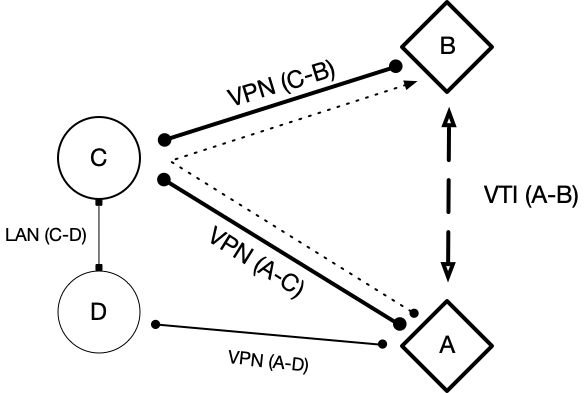
The VTI A-B depends on static routes on either sides A + B each and the setup works nicely after setup.
Unfortunately, after reboot of either A or B the tunnel A-B reappears but without static routes on the box where the reboot happened. The two LAN A + B cannot connect.
Workaround: Re-apply the static route set on box B remotely.
Client in LAN A remotely makes access to B by a two-hop VPN A-C and VPN C-B connection.
Simply 're-apply' the static route(s) set in the GUI under 'System: Routes: Configuration' on box B remotely.
Enjoy the VLAN between LAN A + B without further ado after static route on box B was re-applied.
Repeat after next reboot on a daily procedure.
Example applies to any combination of reboots and the a.m. workaround procedure has to be applied to any and all boxes which were rebooted and/or booted.
This comprises the scenario.
OPNsense
It's now 19.7.5 and hotfix 5 and I slept through hotfixes 1-4 apparently.
- OPNsense 19.7.5_5-amd64
- FreeBSD 11.2-RELEASE-p14-HBSD
- LibreSSL 2.9.2
Unfortunately, the same issue as before.
😏
Triage
One may recall static routes are lost after reboot.
A simple 're-apply' to the routes set in the GUI under 'System: Routes: Configuration' makes everthing fine, so we have a workaround if we can reach the box somehow without VTI connect.
A look into the routes by netstat -nr and by cat /etc/rc.conf reveals you do not put the static routes in the default safe place to survive a reboot, apparently. So one may deduce some of your reboot scripts or similar thingie from /usr/local/etc/rc.d and beyond forgets to re-apply the routes set in the GUI under 'System: Routes: Configuration', I presume.
There would be some opportunities for me if the devs (maybe @mimugmail ?) would give some hints to:
a) Build my own configd action
Build my own configd action for some cron script to re-apply routes (from prior GUI setup) after the daily re-boot (which is controlled by cron) in a fancy manner.
https://forum.opnsense.org/index.php?topic=2263.msg8504#msg8504
You can build your own configd actions to do so, development documentation is available here https://docs.opnsense.org/development/examples/helloworld.html?highlight=configd
@@ : What would be the script to re-apply routes please?
The opnsense-path to the script and some basic hints like options would be helpful. In return of such kind offer I would say thanks by making publicly available a little script acc. to a.m. definition.
b) Look into the logs and identify the script to be improved
Educated look into the logs for the script which forgets to re-apply the routes set in the GUI apparently. Allows me to better identify the script(s) to be improved by the devs.
@@ : What would be the script names or other indicators in the logs to look for please?
I would reply with excerpts from the logs with snippets around the reboot timestamp and around the tags and/or other entries from the a.m. scripts.
Sources
Ref the docs
- https://docs.opnsense.org/manual/routes.html
- https://docs.opnsense.org/development/examples/helloworld.html?highlight=configd
- https://www.freebsd.org/doc/handbook/network-routing.html
- https://www.freebsd.org/cgi/man.cgi?query=rc.conf&sektion=5
- https://www.freebsd.org/cgi/man.cgi?query=rc&sektion=8
Task
Accomplishing both (a) and (b) would be desirable, I propose.
Would start my efforts after receiving some help. Any advice welcome.
Deal?
😄
TP75
on 29 Oct 2019
Well, ideally we just need a "netstat -r" and "ifconfig" for after reboot broken and after the reload fix.
You can run a syshook for start to reapply routes, documentation is here:
https://docs.opnsense.org/development/backend/autorun.html
And reloading the routes should be as simple as calling:
# /usr/local/etc/rc.routing_configure
Cheers,
Franco
fichtner
on 29 Oct 2019
Great advice.
This would be even better than a cron script. Many thanks to @fichtner
I will use 'start' and will establish my own script in between all the given ones? Just using caution and to be on the correct side.
$ ls -1 /usr/local/etc/rc.syshook.d/start
10-newwanip
20-freebsd
90-carp
90-cron
95-beep
Further questions would be:
There is no
/usr/local/etc/rc.syshook-local.dor similar available? Could this idea become a reasonable feature?How to protect my hooks against overwrite or clean-up of the
/usr/local/etc/rc.syshook-local.dpath after an update of OPNsense software?
In the meantime I will make my trials and may return later.
Happy hacking. :+1:
TP75
on 29 Oct 2019
CC @alexanderharm
Does this solution meet your requirement?
TP75
on 29 Oct 2019
Status
[Solved] Mission accomplished.
Trial
Summary
This was a simple one.
Quick and dirty: Establish a system hook by new file /usr/local/etc/rc.syshook.d/start/88-re-apply-routes as:
#!/bin/sh

# Re-apply static routes e.g., to enjoy VTI without further ado
/usr/local/etc/rc.routing_configure
However, not an easy one if you (are a lazy guy like me and) do not thoroughly read the developer documentation which was kindly provided online by the OPNsene project. Please take your time and IMHO was worth the effort.
One should read the complete example, proposedly.
🛡 Prerequisites
Please be aware one has to to have manual access to the boxes involved (either directly for same site trials or by remote help by somebody at the other site for the real scenario). Furthermore, you need the correct setup for both the login shell and the ssh access for the remote admin user account involved. This includes but may not be limited to box B and certainly matters for a remote B in the test procedure as described below.
Please consider the above pre-conditions prerequisites in ref to the below quote.
Pre-conditions:
Box C connects to boxes A and B each by means of VPN as two seperate VPN tunnels A-C and B-C i.e. C-B in a stable fassion.
Setup of VTI A-B acc. to a.m. docs should be accomplished and tested.
Scenario pic:
Your scenario may differ.
👩💻 Coding
Establishing a new hook acc. to a.m. advice:
We will be using the command-line (CLI) of the box and please always recall you can destroy any and everything on the box at this level. The kind reader may note the '$' in below procedure instead of the a.m. '#' which comes from using a login for a 'sudoer' user of group 'wheel' as a safety net on the box locally.
Login to the box via the console locally or remotely by ssh secured connection.
$ sudo vi /usr/local/etc/rc.syshook.d/start/88-re-apply-routes

We trust you have received the usual lecture from the local System
Administrator. It usually boils down to these three things:

    #1) Respect the privacy of others.
    #2) Think before you type.
    #3) With great power comes great responsibility.
Note to oneself: Always recall this text and add something like "... and the OPNsense developers" after "the local System Administrator" in the above. This standard text being the usual one-time warning on first use to all sudoers on a Un*x system.
NB - The above text was copied from a _fresh test box_ as tests should not take place on a productive box and this may be a matter of security, I presume.
The content of the new file /usr/local/etc/rc.syshook.d/start/88-re-apply-routes should be:
#!/bin/sh

# Re-apply static routes e.g., to enjoy VTI without further ado
/usr/local/etc/rc.routing_configure
The newly established script needs the appropriate access rights i.e. execution to all users to become a hook.
$ sudo chmod a+x /usr/local/etc/rc.syshook.d/start/88-re-apply-routes
This comprises the coding effort.
🚀 Testing
Reboot
Afterwards one may test this setup by forcing a reboot from the CLI if one is safe on the "nobody gets hurt by this intervention" consideration.
$ sudo shutdown -r now

Shutdown NOW!
shutdown: [pid 51176]
$
*** FINAL System shutdown message from [email protected] ***

System going down IMMEDIATELY


System shutdown time has arrived
One should be able to access the GUI of box B by preferred internet browser on client A without hassle after some minutes.
--> Yes.
Hard reset and Power off
Finally, one may test this setup by 'Power Off' from the GUI if one is safe on the "somebody has manual access to the box for a restart / fresh boot after power-on" consideration.
Drops away into darkness<
Power on and booting<
Client in LAN A should have access to the GUI of box B again without hassle after some minutes.
--> Yes.
This comprises the testing effort.
Conclusion
Thanks to help from the developers, certainly @fichtner , the issue was solved.
:+1:
Tasks remaining
Sorry for the long post, get some Pommes frites / French fries or pomme frite i.e. potato wedges. 😏
To do list:
- Install this hook to any and all boxes involved in a.m. scenario.
- Consider to make some feature request to OPNsense on GitHub.
- Consider making a commit to the a.m. docs of OPNsense where applicable.
Hope this helps.
:smiley:
TP75
on 29 Oct 2019
Now that we have the solution, we would need to understand the problem exactly in order to evaluate if the fix is the right one or simply a workaround. I would still like to see "ifconfig" and "netstat -r" output after a broken reboot and after running the rc.routing_configure please. :)
fichtner
on 30 Oct 2019
Wow. You ask me to destroy the workaround and to get in troubles again?
Yeah -deal. This was my commitment. Will be back (although not being Arni nor from Austria).
TP75
on 30 Oct 2019
Basically, I'm only trying to get to the bottom to be able to solve it permanently, but there's certainly no rush with it if a workaround exists and is well-documented like you've done here. Thanks so far!
fichtner
on 30 Oct 2019
Note to self: suspecting that src/etc/rc.syshook.d/start/10-newwanip plays a role here and we should fix up the whole routing table after WAN connections are up and running. The specific dynamics at play are unclear for now unfortunately.
fichtner
on 30 Oct 2019
CC @alexanderharm
My above example may look more complicated and beyond the original issue. However, the workaraound should apply to the core issue nicely.
Describe the bug
We have setup route-based IPsec with the necessary gateway. We added a static route for our remote LAN that points to the IPsec gateway. After reboot the static route does not get applied anymore (still visible in Configuration but not in Status). Similar issue #2388.Describe the bug
We have setup route-based IPsec with the necessary gateway. We added a static route for our remote LAN that points to the IPsec gateway. After reboot the static route does not get applied anymore (still visible in Configuration but not in Status). Similar issue #2388.To Reproduce
Steps to reproduce the behavior:
Setup a route-based IPsec (see https://wiki.opnsense.org/manual/how-tos/ipsec-s2s-route-azure.html)
Then reboot
Static route is still configured but not applied
Expected behavior
Route being set
The workaround allows for static route(s) being set sustainably in general.
TP75
on 30 Oct 2019
report 2019-10-30a from @TP75
Report
For the full report including the protocols see the file in the attach:
report_2019-10-30a_TP75.md.zip
_NB
Honestly? GitHub supports TXT and others but not MD as a file postfix? Funny._
Issue
[Static route to route-based IPsec gateway does not get configured after reboot
3414](https://github.com/opnsense/core/issues/3414)
Scenario: VTI between box A and box B with redundant extra VPN as safety net.
The system hook file: /usr/local/etc/rc.syshook.d/start/88-re-apply-routes
Trial
Testing the a.m. issue with workaround by new system hook file.
box B after reboot without the workaround (script commented out)
box B after reboot with active workaround
Please note box B has two WAN gateway interfaces as newest invention. However, this should
not influence this test, I presume.
NOTE: The outer IP of box A was redacted as
No data for box A given intentionally as this gets no reboot and does not count, I presume.
Addendum
One simply makes a '#' symbol i.e. comment for 'sh' syntax in the a.m. system hook script to disable the workaround temporarily.
#!/bin/sh

# Re-apply static routes e.g., to enjoy VTI without further ado
# /usr/local/etc/rc.routing_configure
NOTE: The a.m. report document is in Markdown format. A plain text editor could open this like a TXT and shows the tags embedded to the text of the MD file. Naturally, one has to decompress the ZIP archive file for the text view first if the text editor in use may not capable of this feature. Long story short: A MD file is just a TXT file with tags and may be copied into a '.txt' file or into email text or similiar without further ado.
_DE NOTE / Hinweis: Die o.g. Berichtsdatei mit Protokoll enthält Textauszeichnungen in Markdown also .md, was in einem Texteditor sichtbar wird._
One may consult the GitHub guide Mastering Markdown and the Wikipedia (EN) or Wikipedia (DE) or any language available which suites you more.
Hope this helps.
😃
@fichtner Please don't hesitate to ask for more...
🚀
TP75
on 30 Oct 2019
@TP75 we were discussing that maybe you have your IPsec interface assigned with an IP address from the GUI which is causing these issues?
fichtner
on 1 Nov 2019
@fichtner Thank you for addressing me again. I will try to provide some insights.
Let's have a look:
- box A has an automaticaly assigned interface
ipsec3000 00:00named aVPN_GWi as ipv4 none, ipv6 none - box B has an automaticaly assigned interface
ipsec1000 00:00named bVPN_GWi as ipv4 none, ipv6 none
All below interfaces were assigned by GUI:
- aWAN1 of box A is DHCP ipv4, no ipv6
- bWAN1 of box B is DHCP ipv4, no ipv6
- aWAN1 of box A has use cases IPsec VPN with C and IPsec VTI to B and some other
- bWAN1 of box B has use cases IPsec VPN with C and IPsec VTI to A
- box B has just one poor sole static route which is 192.168.72.0/22 i.e. the LAN A netaddress over bVPN_GWi pointing to 172.16.10.2 the VTI A host address.
- box B VTI is IPsec V2 ipv4 on bWAN1 with DDNS from box A
- box A VTI is IPsec V2 ipv4 on aWAN1 with DDNS from box B
- box A has several static routes and one static route which is 192.168.80.0/22 i.e. the LAN B netaddress over aVPN_GWi pointing to 172.16.10.1 the VTI B host address.
Hope this helps.
😄
TP75
on 1 Nov 2019
@TP75 ok, just to be clear. the assigned VTI interfaces do have an IPv4 configuration (manual IP assignment) under the interface settings?
fichtner
on 1 Nov 2019
Some misunderstanding? Something missing?
box A has an automaticaly assigned interface
ipsec3000 00:00named aVPN_GWi as ipv4 none, ipv6 nonebox B has an automaticaly assigned interface
ipsec1000 00:00named bVPN_GWi as ipv4 none, ipv6 none
@fichtner The VTI interface was automaticaly assigned on both boxes. Each VTI interface got a new name i.e. 'Description' assigned by GUI but no manual IP assignment.
The VTI host address for each A & B was manually set by GUI 'VPN: IPsec: Tunnel Settings - Phase 2 - Local Address' as should be appropriate, I presume.
TP75
on 1 Nov 2019
@fichtner Moin Moin
All boxes now at versions
- OPNsense 19.7.6-amd64
- FreeBSD 11.2-RELEASE-p14-HBSD
- LibreSSL 2.9.2
No hassles. VTI came back after nightly reboot. No new trial yet.
😄
Thanks to all the devs involved for the efforts and the new version.
:+1:
TP75
on 1 Nov 2019
@fichtner Moin
Performed basic trial by reboot of box B with and without workaround. Nothing changed and open issue to 19.7.6 remaining, unfortunately.
Please don't hesitate to ask for more...
🚀
TP75
on 2 Nov 2019
@TP75 do you have any chance to change the WAN type to static?
I only tested with static WAN IPs ...
Maybe DHCP setup takes too long and strongswan can't add routes without an interface IP?
mimugmail
on 4 Nov 2019
@mimugmail Thank you.
@TP75 do you have any chance to change the WAN type to static?
I only tested with static WAN IPs ...
No chance and the DDNS is in use for a reason.
😐
I could agree with your technical presumptions but would like to leave this to the OPNsense developers. In the meantime the workaround is working nicely for our scenario.
:+1:
Please don't hesitate to discuss trials reasonable to my a.m. scenario or other aspects of this issue in general.
😄
TP75
on 4 Nov 2019
Update:
@mimugmail Thank you.
@TP75 do you have any chance to change the WAN type to static?
I only tested with static WAN IPs ...the DDNS is in use for a reason.
There may a time slot in a fortnight were we could do some trials and to change the WAN type to static as was proposed by you.
CC @mimugmail @fichtner
Please provide sufficent details for the proposed tests in due time. I will see what I can deduce from that and will seek to do some trials after.
Would this be reasonable to you?
😄
TP75
on 7 Nov 2019
@fichtner Moin Moin
All boxes now at versions
- OPNsense 19.7.7-amd64
- FreeBSD 11.2-RELEASE-p16-HBSD
- LibreSSL 3.0.2
Usual hassle that box B was lost after A and C were updated. Please be aware that IPsec and VTI get lost after an update and only IPsec gets recovery by manual restart from the GUI recycle symbol.
😏
VTI A-B came back after nightly reboot of B before update of B box. No new trial yet.
👍
Please find a log in the attach.
Box A log (redacted) - report_2019-11-22a_box-B-log.txt
NOTE: human error - the file is named box-B-log but shows the box A log (Alpha box)
The box B got the a.m. update in the morning while the log was active. VTI A-B came back after the update luckily.
👍
Again: Please provide sufficent details for the proposed tests in due time. I will see what I can deduce from that and will seek to do some trials after.
🚀
Would this be reasonable to you?
😄
Happy hacking.
🌻
TP75
on 22 Nov 2019
@fichtner Stay safe and happy hacking.
See you next year and we may reconvene after 2020-01-06, I presume.
TP75
on 15 Dec 2019
All boxes now at versions
- OPNsense 19.7.9_1-amd64
- FreeBSD 11.2-RELEASE-p16-HBSD
- LibreSSL 3.0.2
Fortunately, not that much former hassle and box B continued after A and C were updated.
VTI A-B came back after nightly reboot of B before update of B box. No new trial yet.
👍
Please be aware that IPsec and VTI can get lost after an traffic issue apparently and cannot always recover by manual restart from the GUI recycle symbol.
😏
Happy new year.
🚀
Happy hacking.
🌻
TP75
on 11 Jan 2020
Moin Moin,
All three boxes were upgraded:
- OPNsense 20.1-amd64
- FreeBSD 11.2-RELEASE-p16-HBSD
- LibreSSL 3.0.2
Unfortunately, the the VTI issue continues and static routes get lost or fail to apply after reboot.
😢
Happy hacking.
🌻
TP75
on 11 Feb 2020
Here I am with same bug (see #4021 )
I have 2 OPNSense:
1) main server, OPNSense 19.7.10, static fixed WAN IP
2) remote agency server, OPNSense 20.1.3, dynamic Wan IP via DHCP
What kind of test I can do for helping with this bug ?
I can reboot server n°2 for test purpose, collecting logs or dump
 lastuptodate
on 7 Apr 2020
lastuptodate
on 7 Apr 2020
Little hack from TP75 is also fine for me (/usr/local/etc/rc.syshook.d/start/88-re-apply-routes)
If I analyse boot order:
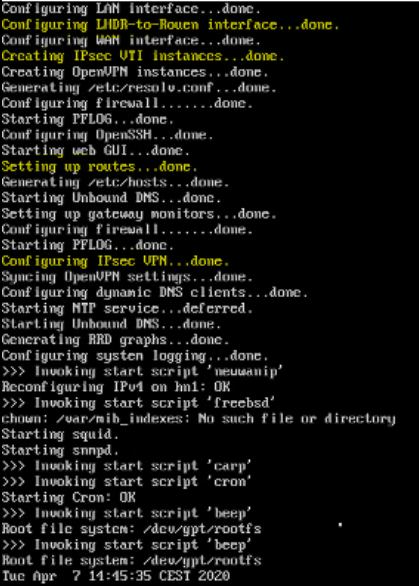
Creating IPsec VTI instances is called from function ipsec_configure_vti inside /usr/local/etc/inc/plugins.inc.d/ipsec.inc
This part take a while (30sec), I think this part only create network interface ipsecxxxx
After, system route are applied (Setting up routes...done). Maybe IPsec interface is not really up or do not have a network address yet ?! I think route via ipsecxxxx can't apply at this step
The last part (Configuring IPsec VPN) is called from function ipsec_configure_do inside the same file. I think this time, VPN is really UP but in our case, not routed.
After applied /usr/local/etc/rc.routing_configure, VPN is UP and routed
I'm not an expert, it's just some guesses
lastuptodate
on 7 Apr 2020
@lastuptodate see previous:
Well, ideally we just need a "netstat -r" and "ifconfig" for after reboot broken and after the reload fix.
fichtner
on 13 Apr 2020
@fichtner : Good morning :-)
Just after reboot, here is ifconfig and netstart -r result:
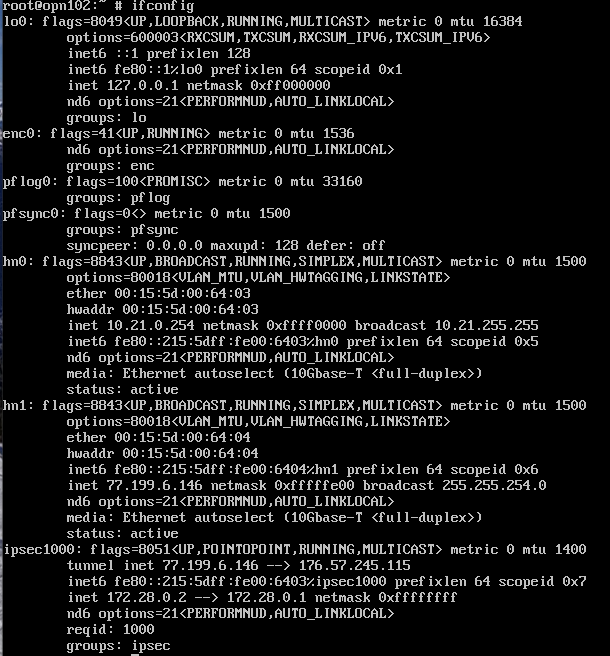
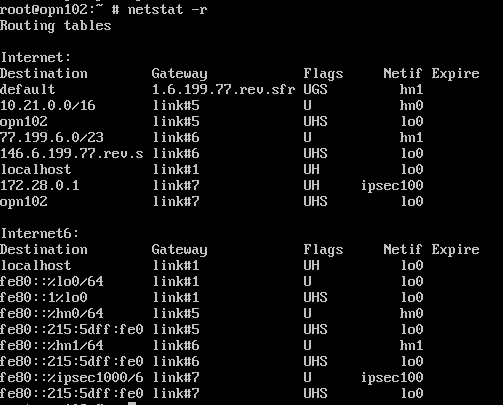
Just after thus screenshot, I manually launch rc.routing_configure. Below the screenshot.
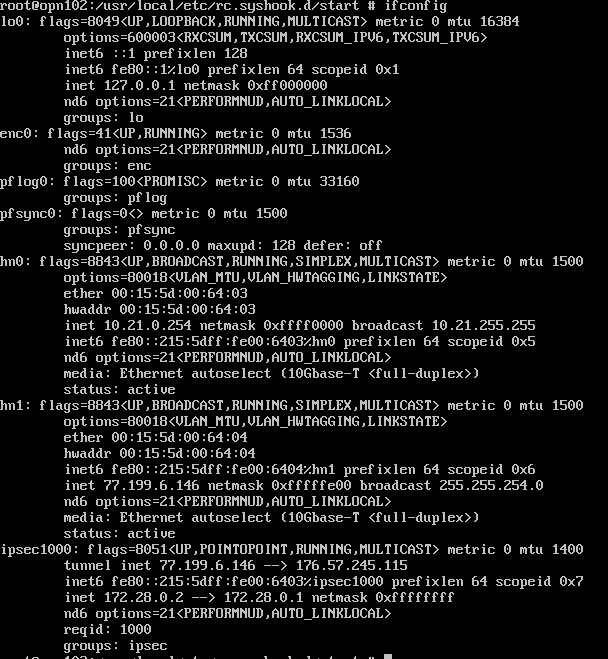
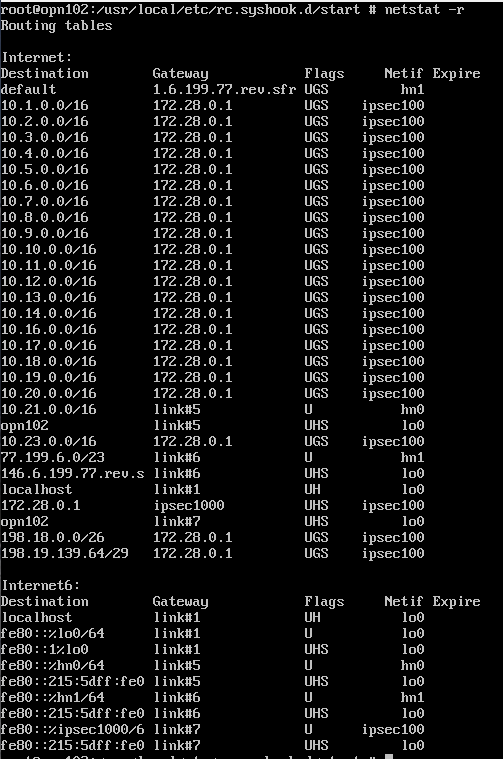
Best regards
lastuptodate
on 14 Apr 2020
@lastuptodate what does your gateway definition look like (in System->Gateways->Single for this gateway) and the interface settings for ipsec1000 (should be empty, only enabled)?
 AdSchellevis
on 14 Apr 2020
AdSchellevis
on 14 Apr 2020
Hi AdSchellevis !
Here is my GW definition:

I've only adjusted MSS on ipsec1000 interface:
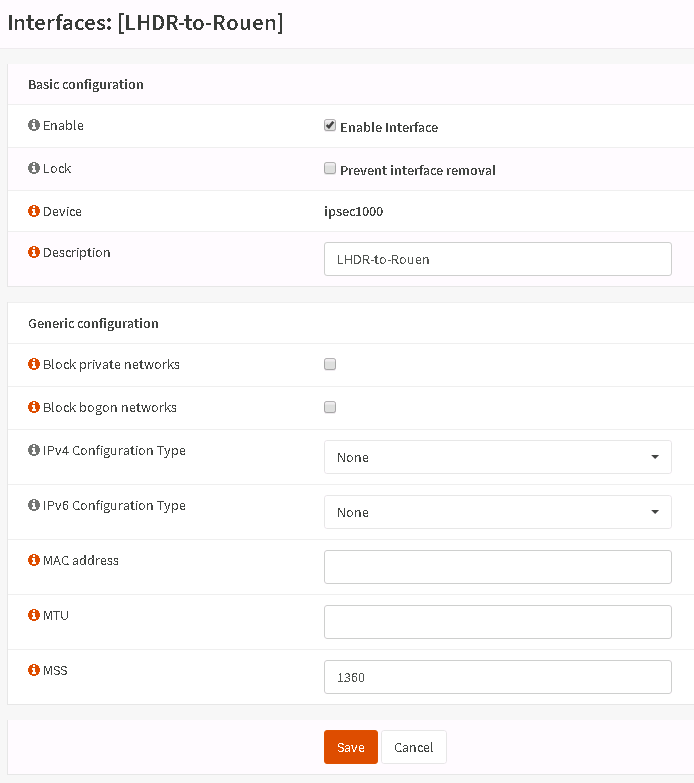
lastuptodate
on 14 Apr 2020
@lastuptodate can you share a screenshot of the details as well (for the gateway)?
AdSchellevis
on 14 Apr 2020
Of course :-)
Here is detailed GW information:
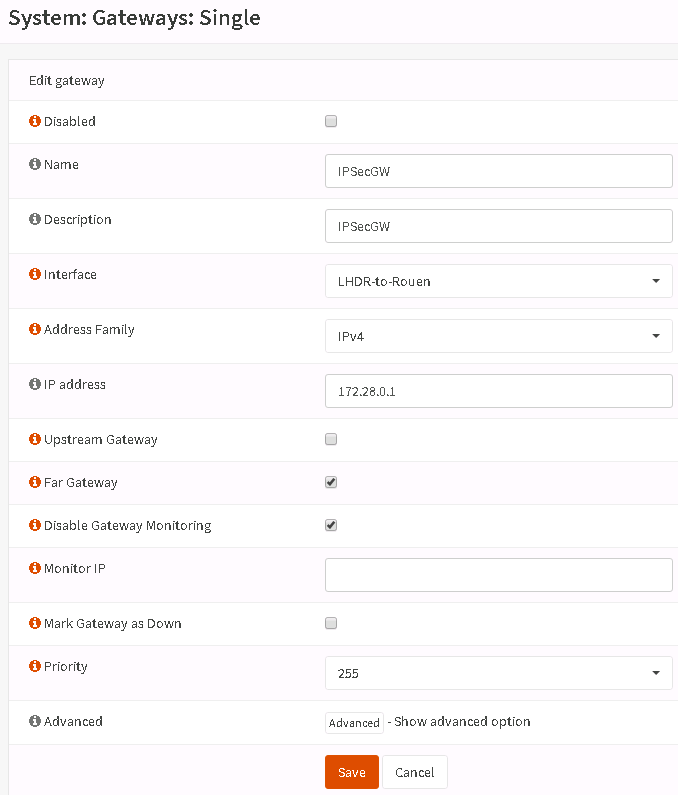
lastuptodate
on 14 Apr 2020
@lastuptodate our settings look quite similar at a first glance, but I haven't configured a MSS, can you try if that makes a difference after boot?
AdSchellevis
on 14 Apr 2020
I have just tried without MSS value on ipsec interface and same problem, i need to re-apply route.
I'm pretty sure that there is something with ipsec inializing and route applying too early.
Also, "IPsec VTI instances" is very long, about 30s, don't know if it is normal or not
lastuptodate
on 14 Apr 2020
the ipsec daemon itself shouldn't play a huge role in this, as the tunnel interface is a separate device. It is a bit odd that configuring takes longer on your end. If I'm not mistaken my end booted instantly.
AdSchellevis
on 14 Apr 2020
After 3 consecutive test, I can say that "IPsec VTI instances" step is during exactly 30sec, not less, not more
lastuptodate
on 14 Apr 2020
My test setup boots instantly, quick question, you're not using domain names in IPsec are you? Resolve issues might point into a direction.
AdSchellevis
on 14 Apr 2020
Yes !
My phase 1 IKEv2 is using a fqdn (vpn.mycompany.fr) in "Remote Gateway".
My DNS system is configured with:
- Prefer to use ipv4 even if ipv6 is available
- only one internal DNS server (needed for Squid Kerberos Auth)
- "Do not use the local DNS service as a nameserver" is UNCHECK (I will explain below)
=> so my resolv.conf is
- nameserver 127.0.0.1
- nameserver IP_Of_My_Internal_DNS_Server
My internal DNS is unaible to resolv vpn fqdn (this is desired)
So I have an unbound DNS enable with DNS overrides for this vpn fqdn
This unbound DNS is working fine from my tests
lastuptodate
on 14 Apr 2020
ok, that's very likely your issue. ifconfig will try to resolve the address, but if unbound isn't configured yet, it can't do so (yet).
The problem with this kind of setup is that it assumes it can handle dns changes, which in reality it can not. To be honest, I don't think we can properly fix this, whatever you do, the setup will always act inconsistently in some scenario's.
AdSchellevis
on 14 Apr 2020
You've got it :-) (I'm feel idiot now) Thank you for your time !
If I replace Remote Gateway fqdn with IP address. All is working fine :-)
- IPsec VTI instances step is very fast (less than 1sec)
- no need to re-apply route
Just 3 thinks about this:
- I can replace Remote Gateway fqdn with IP because I'm using Mutual PSK. Other people using Mutual RSA probably won't be able...
- I have to play with unbound because /etc/hosts is overrided after reboot. That is annoying :-/
- I can't test yet with VPN remote party (in production and used for another things) but I will not be able to replace fqdn with IP because WAN is not using fixed IP address. I'm using duckdns...
Thank you so much !
lastuptodate
on 14 Apr 2020
Hi, I believe an issue may still exist here, even with IP address specified in the remote gateway address.
A few times I have had to "reinstate" routing down the tunnel, by disabling the static routes and then re-enabling them. This tends to happen after loss of the tunnel. In the case of the most recent example (last night) a loss of the internet connection. The tunnel itself re-establishes fine, just the routing issue.
Happy to share log files, configuration etc. if you can tell me which you would require?
Version is OPNsense 20.1.7-amd64 running as a VM within FreeNAS-11.3-U3.1 (both latest)
 firswaycomputers
on 27 May 2020
firswaycomputers
on 27 May 2020
Same issue with version 20.7.2, opnsense at both ends
one with fixed IP but NATted behind Bordergatway (opnsense too),
the other one with dynamic IP and NAT behind FritzBox
After reboots, tcoms f....* "zwangstrennung" etc. the configured static route(s) are not present.
Here is my workaround:
Set routes at startup with Systemhook, for example _/usr/local/etc/rc.syshook.d/start/88-re-apply-routes_:
_#!/bin/sh
/usr/local/etc/rc.routing_configure_
Additionally I have every 15min a _cronjob_ with action defined for example in _/usr/local/opnsense/service/conf/actions.d/actions_re-apply-routes.conf_:
_[reconfigure]
command:/usr/local/etc/rc.routing_configure
parameters:
type:script
description:Periodic reapplying routes
message:reapplying routes_
As one can see, I just call original OpnSense script: _/usr/local/etc/rc.routing_configure_
OpnSense is great and I'm looking forward, this will be fixed some day. Unfortunately I'm not able to support with coding, but maybe this workaround helps someone in meantime.
 mc-hack
on 24 Sep 2020
mc-hack
on 24 Sep 2020
Hi, I believe an issue may still exist here, even with IP address specified in the remote gateway address.
A few times I have had to "reinstate" routing down the tunnel, by disabling the static routes and then re-enabling them. This tends to happen after loss of the tunnel. In the case of the most recent example (last night) a loss of the internet connection. The tunnel itself re-establishes fine, just the routing issue.
Happy to share log files, configuration etc. if you can tell me which you would require?
Version is OPNsense 20.1.7-amd64 running as a VM within FreeNAS-11.3-U3.1 (both latest)
I'm experiencing the exact same issue. When my WAN connection breaks, the routed tunnel comes back up, but the routes are not. Hitting apply in the Route Configuration reinstalls them back and everything works instantaneously.
 joni1993
on 18 Oct 2020
joni1993
on 18 Oct 2020
Same issue observed in 20.7.7
 r3pl1x
on 19 Dec 2020
r3pl1x
on 19 Dec 2020
I had the same problem.
I have a "workaround" for me.
Opnsense has triggerd the connection with the access data to the modem (Dial-In).
I have changed it, that the modem dials in independently without Opnsense.
The internet connection is already up when Opnsense reboots. Opnsense can set the static routes.
dklimpel
on 22 Dec 2020
We are adding 4992c11 to make sure the boot comes up correctly, but then further investigation is needed into what part of routing configure is normally missed and how VTI is to be tied into it.
fichtner
on 13 Jan 2021
@fichtner I'd like to test this bugfix with a 20.7.7_1 installation. Is applying patch 4992c11 sufficient? Or were there other commits since 20.7.7 which might be required to solve the missing routes?
 8191
on 13 Jan 2021
8191
on 13 Jan 2021
No overlapping changes in the file, as easy as opnsense-patch 4992c11
fichtner
on 13 Jan 2021
@fichtner I just tested a bit with the patch active and after a reboot the routes are now successfully applied (at least at two tries). But unfortunately after a WAN interface down/up even, the routes are still missing. This is now a slightly different situation. Is there a different issue already for that one?
I think an issue might be, that when the WAN IP does not change, that routes are not re-applied:
https://github.com/opnsense/core/blob/6529ef77efaefb9723d2b20c1c8b1ba839687625/src/etc/rc.newwanip#L151-L165
8191
on 13 Jan 2021
@8191 I'm aware the issue shifts to WAN reload now. Since I don't know what changes it's difficult to tell. You can try to delete the cache file and call rc.newwanip directly to force all the reloads. Although that only gives a 50% chance that it will work since system_routing_configure(false, **$interface**); may not call all the necessary steps here to fix a separate interface/VTI.
fichtner
on 13 Jan 2021
Hi all.
What i have to do in order to apply the patch?
 peironem
on 13 Jan 2021
peironem
on 13 Jan 2021
Ok, no problem, just done.
I'll try it this evening to see if works fine.
peironem
on 13 Jan 2021
@8191 Did the fix solved the problem for you?
@fichtner, with clean GRE problem is not solved.
Just applied the patch 4992c11.
I can see under root@opnsense:/usr/local/etc/rc.syshook.d/start following files
root@opnsense:/usr/local/etc/rc.syshook.d/start # ls
10-newwanip             20-freebsd              90-cron
10-newwanip.orig        90-carp                 95-beep
10-newwanip content is patched
root@opnsense:/usr/local/etc/rc.syshook.d/start # cat 10-newwanip
#!/bin/sh

REROUTE=

for IPV4 in $(find /tmp -type f -name "newwanip_*"); do
        INTERFACE=$(cat "${IPV4}")
        rm "${IPV4}"

        echo -n "Reconfiguring IPv4 on ${INTERFACE}: "
        configctl interface newip ${INTERFACE}

        REROUTE=yes
done

for IPV6 in $(find /tmp -type f -name "newwanipv6_*"); do
        INTERFACE=$(cat "${IPV6}")
        rm "${IPV6}"

        echo -n "Reconfiguring IPv6 on ${INTERFACE}: "
        configctl interface newipv6 ${INTERFACE}

        REROUTE=yes
done

if [ -n "${REROUTE}" ]; then
        # Following #3414 there is a missing link between VTI and
        # routing configuration reload so at least for reboot make
        # sure that it is properly executed even if no VTI exists

        echo -n "Reconfiguring routes: "
        configctl interface routes configure
fi
After sys reboot i can't see my GRE vti routes up, notice that they're up on GUI

root@opnsense:~ # route show 192.168.1.0/24
route: route has not been found
root@opnsense:~ # route show 172.16.10.0/24
route: route has not been found
I still have to manually disable and re-enable routes from GUI to have them to work.
Regards,
Pm.
peironem
on 15 Jan 2021
@peironem Does a click on "Apply" (without any changes) in the GUI add the routes?
I tested only one or two reboots and routes where applied without manual interaction.
8191
on 15 Jan 2021
@8191 Yeah, you are right.
After a reboot i have the following routing table
root@opnsense:~ # netstat -r
Routing tables

Internet:
Destination        Gateway            Flags     Netif Expire
default            172.28.115.105     UGS        igb0
10.10.10.1         link#9             UH         gre0
opnsense           link#9             UHS         lo0
localhost          link#5             UH          lo0
172.28.115.104/29  link#1             U          igb0
opnsense           link#1             UHS         lo0
192.168.0.0/24     link#2             U          igb1
opnsense           link#2             UHS         lo0
If i do nothing but clicking on Apply button on System > Routes > Configuration via GUI, routes actually raise up again.
root@opnsense:~ # netstat -r
Routing tables

Internet:
Destination        Gateway            Flags     Netif Expire
default            172.28.115.105     UGS        igb0
10.10.10.1         link#9             UH         gre0
opnsense           link#9             UHS         lo0
localhost          link#5             UH          lo0
172.16.10.0/24     10.10.10.1         UGS        gre0
172.28.115.104/29  link#1             U          igb0
opnsense           link#1             UHS         lo0
192.168.0.0/24     link#2             U          igb1
opnsense           link#2             UHS         lo0
192.168.1.0/24     10.10.10.1         UGS        gre0
Any ideas?
peironem
on 18 Jan 2021
It's the same issue but your boot does not trigger reload in 10-newwanip, maybe because of static WAN config?
fichtner
on 18 Jan 2021
It's the same issue but your boot does not trigger reload in 10-newwanip, maybe because of static WAN config?
@fichtner Yeah, sure, my WAN is configured as static IPv4 interface facing on MPLS network with an isp given IP.
Do you have any fix or workaround for that?
peironem
on 18 Jan 2021
@peironem not yet, but your setup is simple enough to find out why I hope... So the odd thing is we configure interfaces including GRE here:
https://github.com/opnsense/core/blob/1a646e087d842164a1240f420768aab03a2e4b4d/src/etc/rc.bootup#L98
And then later run the code that should put the routes in place:
But at the end of the boot sequence the routes are not there, which means:
- The initial configuration does not work (1), or
- Something messes with the routing table after routes were set correctly. (2)
You say applying the routes from System > Routes > Configuration works. Does running /usr/local/etc/rc.routing_configure have the same effect? Trying to rule out (1) here...
Cheers,
Franco
fichtner
on 18 Jan 2021
@fichtner Wouldn't it be better to focus on a solution with IPsec tunnel establishment than with WAN interface startup?
8191
on 18 Jan 2021
fichtner
on 18 Jan 2021
@fichtner just tried.
I can confirm that running rc.routing_configure under /usr/local/etc/ has the same effect as using apply button via GUI
peironem
on 18 Jan 2021
Related issues
mimugmail
·
6Comments
 StevenNexus
·
6Comments
StevenNexus
·
6Comments
 linuxmail
·
4Comments
linuxmail
·
4Comments
 lordraiden
·
7Comments
lordraiden
·
7Comments
 xpac1985
·
5Comments
xpac1985
·
5Comments
Most helpful comment
Well, ideally we just need a "netstat -r" and "ifconfig" for after reboot broken and after the reload fix.
You can run a syshook for start to reapply routes, documentation is here:
https://docs.opnsense.org/development/backend/autorun.html
And reloading the routes should be as simple as calling:
Cheers,
Franco